1. Introduktion
Welcome to the user manual for your new ZZB ZB10 10.1-inch Android 14 Tablet PC. This guide provides essential information for setting up, operating, maintaining, and troubleshooting your device. Please read this manual thoroughly to ensure optimal performance and longevity of your tablet.

Figur 1: Forside view of the ZZB ZB10 Tablet.
2. Hvad er der i æsken
Upon opening your ZZB ZB10 Tablet PC package, please verify that all the following items are included:
- ZZB ZB10 10.1-inch Android 14 Tablet PC
- Type-C kabel
- Brugervejledning (dette dokument)

Figure 2: The ZZB ZB10 Tablet and its packaging.
3. Produktet er slutview
Familiarize yourself with the physical components of your ZZB ZB10 Tablet.
3.1 Fysiske komponenter
- Vise: 10.1-inch IPS screen.
- Forreste kamera: Placeret over skærmen.
- Bagkamera: Placeret på bagpanelet.
- Power knap: Typically on the side or top edge.
- Lydstyrkeknapper: Juster lydniveauer.
- USB Type-C-port: Til opladning og dataoverførsel.
- MicroSD -kortplads: Til udvidelig lagerplads.

Figur 3: Bagside view of the ZZB ZB10 Tablet, highlighting the camera and model information.
4. Opsætning
4.1 Opladning af tabletten
Before first use, fully charge your tablet. Connect the provided Type-C cable to the tablet's charging port and the other end to a compatible USB power adapter (not included) or a computer's USB port. The battery indicator on the screen will show charging status.
4.2 Tænd/sluk
- For at tænde: Tryk og hold tænd/sluk-knappen nede, indtil skærmen lyser.
- For at slukke: Tryk på tænd/sluk-knappen, og hold den nede, indtil der vises en menu, og vælg derefter 'Sluk'.
- For at genstarte: Tryk på tænd/sluk-knappen, og hold den nede, indtil der vises en menu, og vælg derefter 'Genstart'.
4.3 Indledende opsætning
Når tabletten tændes første gang, vil den guide dig gennem den indledende opsætningsproces. Dette omfatter typisk:
- Valg af sprog.
- Opretter forbindelse til et Wi-Fi-netværk.
- Setting up your Google account (or skipping for later).
- Reviewog accepterer vilkår og betingelser.
5. Betjeningsvejledning
5.1 Grundlæggende navigation
The ZZB ZB10 Tablet runs on Android 14, offering an intuitive touch interface.
- Tryk på: Vælg et element, eller åbn en app.
- Stryg: Naviger gennem skærme eller rul gennem indhold.
- Knib-for-at-zoome: Forstør eller formindsk indholdet på skærmen.
- Langt tryk: Få adgang til kontekstmenuer eller flyt ikoner.
5.2 Tilslutning til Wi-Fi
- Gå til Indstillinger > Netværk og internet > Wi-Fi.
- Slå Wi-Fi til/fra On.
- Vælg det ønskede netværk fra listen.
- Indtast adgangskoden, hvis du bliver bedt om det, og tryk derefter på Forbinde.
5.3 Bluetooth -parring
- Gå til Indstillinger > Tilsluttede enheder > Bluetooth.
- Slå Bluetooth til/fra On.
- Sørg for, at den enhed, du vil parre, er i parringstilstand.
- Select the device from the 'Available devices' list and follow on-screen prompts.
5.4 Kamerabrug
Tabletten har et 2MP frontkamera og et 8MP bagkamera.
- Åbn Kamera app.
- Tryk på udløserknappen for at tage et billede.
- Skift mellem for- og bagkamera ved hjælp af kameraikonet.
- Vælg videotilstand for at optage videoer.

Figure 4: Using the tablet's camera for photos or video calls.
5.5 Lagerstyring
The tablet comes with 32GB of internal storage and supports up to 1TB expandable storage via a MicroSD card.
- To insert a MicroSD card, locate the card slot on the side of the tablet.
- Gently insert the MicroSD card until it clicks into place.
- You can manage storage in Indstillinger > Opbevaring.

Figure 5: The tablet supports extended storage up to 1TB.
5.6 Læsetilstand
The tablet features a reading mode designed to reduce eye strain by adjusting screen colors and brightness. This mode can typically be activated from the quick settings panel (swipe down from the top of the screen) or within the display settings.
6. Vedligeholdelse
6.1 Rengøring
Use a soft, lint-free cloth to clean the screen and body of the tablet. Avoid using harsh chemicals or abrasive materials, which can damage the device.
6.2 Pleje af batterier
- Undgå at udsætte tabletten for ekstreme temperaturer.
- Lad ikke batteriet aflades helt ofte.
- Brug kun det medfølgende Type-C-kabel til opladning.
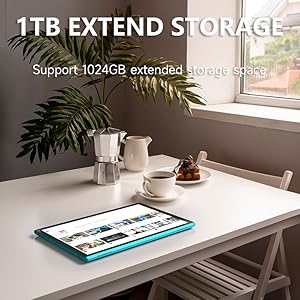
Figure 6: The tablet features a 6000mAh battery for extended use.
6.3 Softwareopdateringer
Tjek regelmæssigt for systemopdateringer for at sikre, at din tablet har de nyeste funktioner og sikkerhedsrettelser. Gå til Indstillinger > System > Systemopdatering.
7. Fejlfinding
Hvis du støder på problemer med din tablet, kan du bruge følgende almindelige løsninger:
| Problem | Mulig løsning |
|---|---|
| Tabletten tænder ikke | Ensure the battery is charged. Connect to a power source for at least 30 minutes. |
| Skærmen reagerer ikke | Restart the tablet by holding the power button for 10-15 seconds. |
| Problemer med Wi-Fi-forbindelse | Restart your Wi-Fi router. Forget the network in tablet settings and reconnect. |
| Apps går ned eller fryser | Clear the app's cache (Settings > Apps > [App Name] > Storage > Clear cache). If the problem persists, uninstall and reinstall the app. |
| Langsom ydeevne | Luk unødvendige baggrundsapps. Ryd cache og midlertidige files. Consider a factory reset if issues persist (backup data first). |
8. Specifikationer
Key technical specifications for the ZZB ZB10 Tablet PC:
- Model: ZB10
- Operativsystem: Android 14
- Vise: 10.1-inch IPS, 1280 x 800 pixels
- VÆDDER: 6GB (including 4GB virtual memory)
- Intern opbevaring: 32 GB ROM
- Udvidelig lagerplads: Op til 1 TB via MicroSD-kort
- Bagkamera: 8 MP
- Forreste kamera: 2 MP
- Trådløs forbindelse: Wi-Fi 802.11ac, Bluetooth
- Batteri: 6000mAh, up to 12 hours average life
- Dimensioner: 12 x 7 x 0.3 tommer
- Vægt: 1 pund
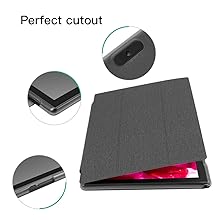
Figure 7: The tablet's 10.1-inch IPS display.
9. Garanti og support
For warranty information and customer support, please refer to the documentation provided with your purchase or visit the official ZZB webwebsted. Gem din købsbevis til garantikrav.


