Indledning
Welcome to the user manual for your new Dyzeryk 4GB MP3 Player, Model JS-01. This guide provides comprehensive instructions on how to set up, operate, maintain, and troubleshoot your device. Please read this manual carefully to ensure optimal performance and longevity of your MP3 player.
Produkt overview
The Dyzeryk JS-01 is a portable and compact MP3 player designed for high-fidelity lossless sound playback. It features 4GB of internal memory and supports expandable storage up to 64GB via a TF card slot. Its simple design makes it easy to carry and operate.

Figur 1: Front view of the Dyzeryk JS-01 MP3 Player, showcasing its sleek black design and central control buttons.

Figur 2: Detailed diagram of the Dyzeryk JS-01 MP3 Player, highlighting the functions of each button and port. This includes the power button, TF card slot, volume controls, track navigation, and play/pause button.
Figur 3: The Dyzeryk JS-01 MP3 Player with its compact dimensions, measuring approximately 3.3 inches in length and 0.9 inches in width, emphasizing its portability.
Opsætning
- Indledende opkrævning: Before first use, fully charge the MP3 player. Refer to the "Charging" section for detailed instructions.
- Indsæt TF-kort (valgfrit): If you wish to expand storage, gently insert a TF (microSD) card (up to 64GB) into the TF card slot until it clicks into place. Ensure the card is inserted in the correct orientation.
- Transfer Music: Connect the MP3 player to your computer using a USB cable. The device will appear as a removable disk. Drag and drop your MP3, WMA, or WAV audio files ind i afspillerens lagerplads.
- Tilslut høretelefoner: Plug the included earphones into the 3.5mm audio jack on the player.
Betjeningsvejledning
Tænd/sluk
- For at tænde, skub ON/OFF skifte til ON position.
- For at slukke skal du skubbe ON/OFF skifte til SLUKKET position.
Musikafspilning
- Afspil/pause: Tryk på den centrale ►▮▮ knappen for at afspille eller sætte det aktuelle nummer på pause.
- Lydstyrkekontrol:
- Tryk på + knappen for at øge lydstyrken.
- Tryk på - knappen for at reducere lydstyrken.
- Forrige/næste nummer:
- Tryk på ◀◀ knappen for at gå til det forrige spor.
- Tryk på ►► knappen for at gå til det næste nummer.
- Switch Playback Modes:
- Sequential Playback: The green light flashes.
- Random Play Mode: Tryk længe på + button to switch to random play mode. The red light flashes.
- Single Loop Mode: Tryk længe på - button to switch to single loop mode. The green and red lights alternately flash.
- Skift mappe: Long press the central ►▮▮ button to switch between music folders.
Opladning
The Dyzeryk MP3 player is equipped with a 180mAh battery. Please charge the device when it is turned on. When the battery is low, the player will stop playing and shut down automatically.
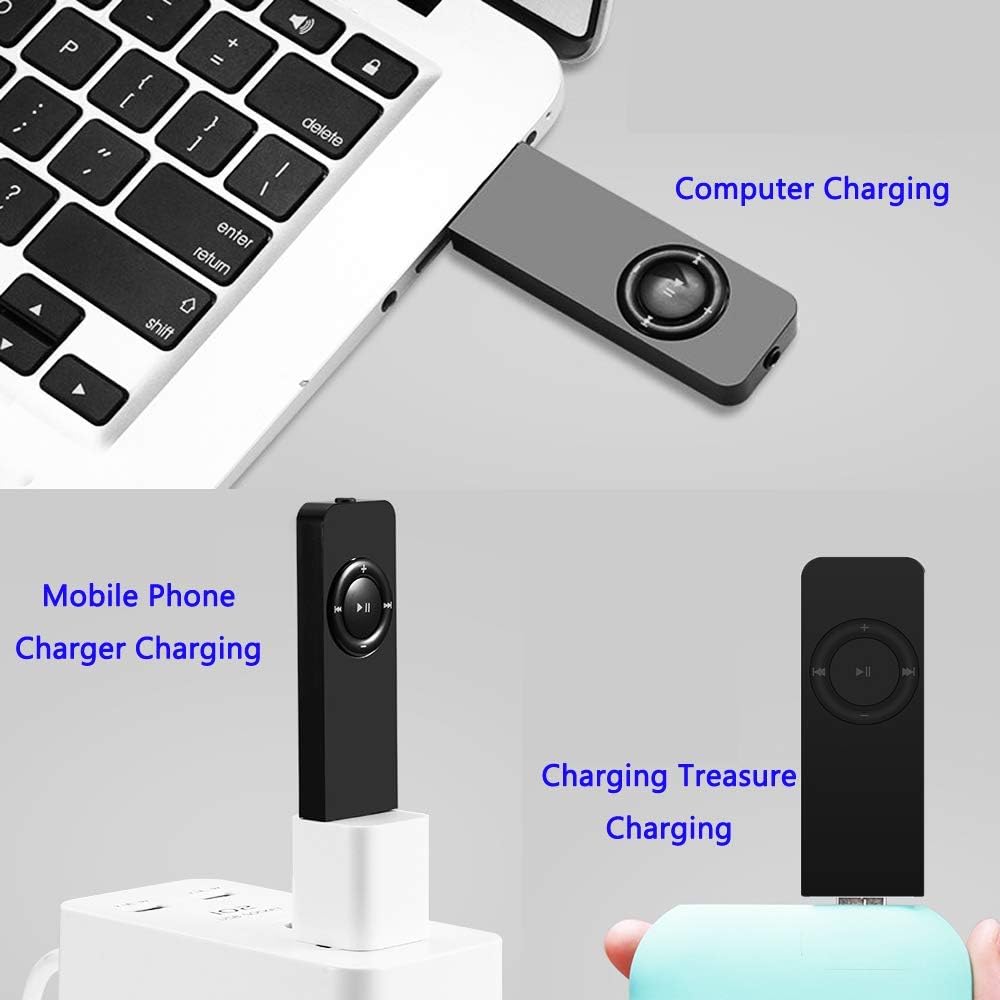
- Connect the MP3 player to a USB power source (e.g., computer USB port, mobile phone charger, or power bank) using a compatible USB cable.
- Upon entering the charging state, the red light will flash.
- Once charging is complete, the red light will remain steadily on.

Figur 4: Various methods for charging the Dyzeryk JS-01 MP3 Player, including connection to a computer, a mobile phone charger, and a portable power bank.
Opretholdelse
- Hold enheden tør. Undgå udsættelse for fugt eller væsker.
- Rengør enheden med en blød, tør klud. Brug ikke skrappe kemikalier eller slibende rengøringsmidler.
- Undgå at tabe eller udsætte enheden for kraftige stød.
- Opbevar afspilleren et køligt og tørt sted, når den ikke er i brug.
Fejlfinding
| Problem | Mulig årsag | Løsning |
|---|---|---|
| Afspilleren tænder ikke. | Batteriet er afladet. | Charge the device fully. Ensure the ON/OFF switch is in the ON position. |
| Player stops playing and shuts down. | Lavt batteri. | Oplad enheden med det samme. |
| Ingen lyd fra høretelefoner. | Earphones not properly connected; Volume too low; Corrupted audio file. | Ensure earphones are fully plugged in. Increase volume. Try a different audio file. |
| Kan ikke overføre files til spilleren. | Incorrect USB connection; Driver issue; Player not recognized by computer. | Ensure the USB cable is securely connected. Try a different USB port or cable. Restart your computer and the player. |
| Audio playback is choppy or distorted. | Ødelagt lyd file; Low battery; Interference. | Prøv at afspille en anden lydfil file. Charge the device. Avoid strong electromagnetic interference. |
Specifikationer
| Feature | Detalje |
|---|---|
| Model | JS-01 |
| Dimensioner (L x B x H) | 3.3 x 0.9 x 0.4 tommer (ca.) |
| Vægt | 33.2 g (0.634 ounce) |
| Intern hukommelse | 4 GB |
| Udvidbar hukommelse | Understøtter TF-kort op til 64 GB |
| Batterikapacitet | 180mAh |
| Understøttede musikformater | MP3, WMA, WAV |
| Forbindelse | Hi-Speed USB 2.0 (for data transfer and charging) |
| Batterilevetid | Approximately 10 Hours (playback time, actual results may vary) |
Garanti og support
For information regarding warranty coverage, technical support, or service inquiries for your Dyzeryk MP3 Player (Model JS-01), please refer to the warranty card included with your product packaging or visit the official Dyzeryk website. This manual does not contain specific warranty terms or direct support contact information.


