1. Introduktion
The Behringer Four LFO is a versatile 4-channel Low Frequency Oscillator Eurorack module designed for modular synthesis systems. It provides a wide range of modulation possibilities with user-assignable waveforms and various operational modes, making it an essential tool for creating dynamic and evolving soundscapes.
Nøglefunktioner omfatter:
- 14HP 4-channel LFO Module with 4 Creative Modes
- User-assignable Waveforms
- Reset/Sync Modes
- Zoom-tilstand
- CV (Control Voltage) capabilities
2. Vigtige sikkerhedsinstruktioner
Always follow basic safety precautions when using electrical products to reduce the risk of fire, electric shock, and injury to persons.
- Læs disse instruktioner.
- Gem disse instruktioner.
- Overhold alle advarsler.
- Følg alle instruktioner.
- Brug ikke dette apparat i nærheden af vand.
- Rengør kun med en tør klud.
- Bloker ikke nogen ventilationsåbninger. Installer i overensstemmelse med producentens anvisninger.
- Må ikke installeres i nærheden af varmekilder såsom radiatorer, varmeapparater, komfurer eller andre apparater (inklusive ampløftere), der producerer varme.
- Undgå at omgå sikkerhedsformålet med det polariserede stik eller stik med jordforbindelse. Et polariseret stik har to knive, hvor den ene er bredere end den anden. Et stik med jordforbindelse har to knive og et tredje jordstik. Det brede blad eller det tredje ben er tilvejebragt for din sikkerhed. Hvis det medfølgende stik ikke passer i din stikkontakt, skal du kontakte en elektriker for at få udskiftet den forældede stikkontakt.
- Beskyt netledningen mod at blive trådt på eller klemt, især ved stik, stikkontakter og det punkt, hvor de kommer ud af apparatet.
- Brug kun tilbehør/tilbehør specificeret af producenten.
- Brug kun den vogn, stativ, stativ, beslag eller bord, der er specificeret af producenten eller solgt sammen med apparatet. Når en vogn bruges, skal du være forsigtig, når du flytter kombinationen af vognen/apparatet for at undgå skader ved at vælte.
- Træk stikket ud af dette apparat under tordenvejr, eller når det ikke skal bruges i længere perioder.
- Overlad al service til kvalificeret servicepersonale. Service er påkrævet, når apparatet er blevet beskadiget på nogen måde, såsom strømforsyningsledning eller stik er beskadiget, væske er blevet spildt, eller genstande er faldet ind i apparatet, apparatet har været udsat for regn eller fugt, ikke fungerer normalt , eller er blevet droppet.
2.1 FCC Compliance Information
Dette udstyr er blevet testet og fundet i overensstemmelse med grænserne for en klasse B digital enhed i henhold til del 15 af FCC-reglerne. Disse grænser er designet til at give rimelig beskyttelse mod skadelig interferens i en boliginstallation. Dette udstyr genererer, bruger og kan udstråle radiofrekvensenergi og kan, hvis det ikke installeres og bruges i overensstemmelse med instruktionerne, forårsage skadelig interferens i radiokommunikation. Der er dog ingen garanti for, at der ikke vil forekomme interferens i en bestemt installation.

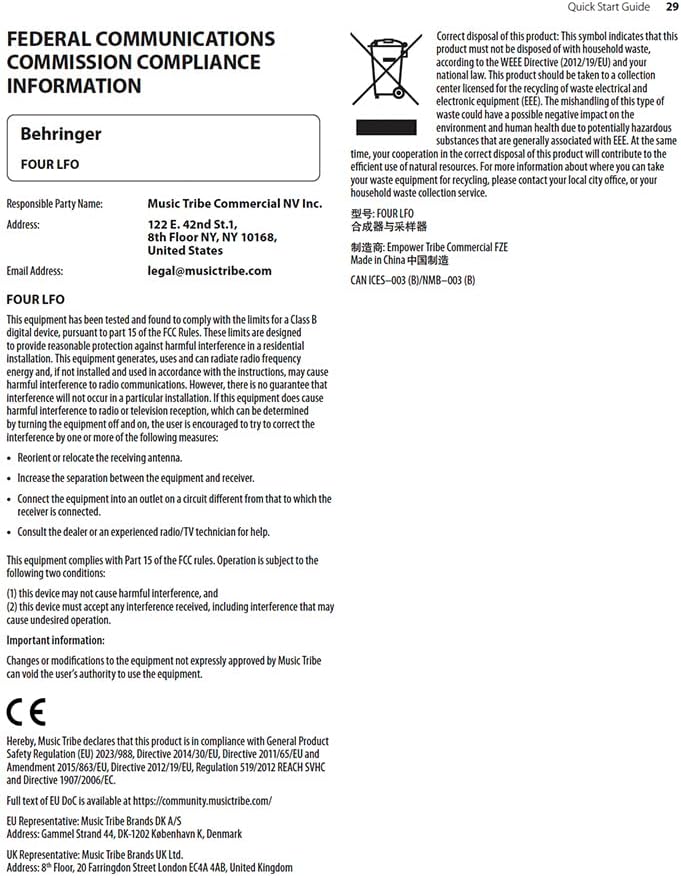
Figure 2.1: FCC Compliance and WEEE Directive Information. This image details the Federal Communications Commission compliance statement and the WEEE (Waste Electrical and Electronic Equipment) directive symbol, indicating proper disposal of the product.
Hvis dette udstyr forårsager skadelig interferens på radio- eller tv-modtagelse, hvilket kan fastslås ved at slukke og tænde for udstyret, opfordres brugeren til at forsøge at korrigere interferensen ved hjælp af en eller flere af følgende foranstaltninger:
- Drej eller flyt modtagerantennen.
- Øg afstanden mellem udstyret og modtageren.
- Tilslut udstyret til en stikkontakt på et andet kredsløb end det, som modtageren er tilsluttet.
- Kontakt forhandleren eller en erfaren radio/tv-tekniker for at få hjælp.
Dette udstyr overholder del 15 af FCC-reglerne. Driften er underlagt følgende to betingelser:
- Denne enhed må ikke forårsage skadelig interferens, og
- Denne enhed skal acceptere enhver modtaget interferens, inklusive interferens, der kan forårsage uønsket drift.
Vigtig information: Changes or modifications to the equipment not expressly approved by Music Tribe can void the user's authority to use the equipment.
3. Opsætning og installation
The Behringer Four LFO is a Eurorack module and requires a compatible Eurorack case with a power supply. Ensure your Eurorack case provides sufficient power for the module.
3.1 Fysisk installation
- Sluk: Before installing, ensure your Eurorack case's power supply is completely turned off.
- Connect Ribbon Cable: Connect the included ribbon cable to the module's power header. Ensure the red stripe on the ribbon cable aligns with the -12V pin on both the module and your Eurorack power bus board. Incorrect connection can damage the module.
- Monteringsmodul: Carefully align the module with the rail nuts in your Eurorack case. Use the provided screws to secure the module firmly to the rails. Do not overtighten.
- Tænd: Once securely mounted and connected, you can power on your Eurorack case.
3.2 Forbindelse
The Four LFO module features various jacks for integration into your modular system:
- RESET/SYNC Jacks: These inputs allow external signals to reset or synchronize the LFOs.
- SINE Jacks: Output for the sine waveform of each LFO.
- ASSIGN Jacks: Assignable outputs for various waveforms or modes, depending on the module's settings.
- SQUARE Jacks: Output for the square waveform of each LFO.

Figure 3.1: Front panel of the Behringer Four LFO module, showing all controls and jacks.
4. Betjening
The Four LFO module offers four independent LFO channels, each with dedicated controls and outputs. Understanding the different modes and controls is key to unlocking its full potential.
4.1 kontroller overview
Figur 4.1: Nærbillede view of the Behringer Four LFO's control section, highlighting the sliders and switches.
- Hz Slider: Controls the frequency of the LFOs. The range can be adjusted from very slow (0.01 Hz) to audio rates (100 Hz).
- Φ (Phase) Slider: Adjusts the phase relationship between the LFOs, particularly relevant in certain modes.
- DIV (Divide) Slider: Sets the division factor for LFO frequencies in divide modes.
- MODE-omskifter: Selects the operational mode of the LFOs.
- GRATIS knap: Toggles between free-running and synchronized operation.
- ASSIGN Switch: Configures the function of the ASSIGN outputs.
4.2 Driftstilstande
The MODE switch allows you to select between four distinct operational modes, each offering unique modulation capabilities:
- FREQ (Frequency) Mode: In this mode, each of the four LFOs operates independently, and their frequencies are controlled by the Hz slider. This is ideal for general-purpose modulation where individual control over each LFO's speed is desired.
- QUAD Mode: This mode links the four LFOs, allowing for complex polyrhythmic or synchronized modulation. The exact behavior depends on the phase and divide settings.
- FRQ-PH-DIV (Frequency-Phase-Divide) Mode: This mode offers advanced control where the frequency, phase, and division of the LFOs are interconnected, enabling intricate rhythmic and evolving patterns.
- PHASE Mode: Focuses on phase relationships between the LFOs. The Φ slider becomes central to shaping the modulation.
- DIVIDE Mode: In this mode, the frequencies of LFOs 2, 3, and 4 are divisions of the frequency of LFO 1, as set by the DIV slider. This is excellent for creating harmonically related or synchronized LFO patterns.
4.3 Synkronisering og nulstilling
The Four LFO module can be synchronized to external clock signals or reset manually:
- RESET/SYNC Inputs: Patch a gate or trigger signal into these jacks to reset or synchronize the corresponding LFO. This is crucial for keeping LFOs in time with sequencers or drum machines.
- GRATIS knap: Pressing the FREE button toggles between free-running LFO operation and synchronized operation. When synchronized, the LFOs will restart or sync to an incoming signal.
5. Vedligeholdelse
Proper care and maintenance will ensure the longevity and optimal performance of your Behringer Four LFO module.
- Rensning: Use a soft, dry cloth to clean the module's surface. Do not use abrasive cleaners, solvents, or waxes, as these can damage the finish and controls.
- Miljø: Keep the module in a dry environment, away from direct sunlight, extreme temperatures, and excessive dust.
- Forbindelser: Periodically check all patch cable connections for secure fit. Avoid excessive force when inserting or removing cables.
- Opbevaring: If storing the module for an extended period, ensure it is disconnected from power and stored in a protective case or anti-static bag.
6. Fejlfinding
If you encounter issues with your Behringer Four LFO module, refer to the following common problems and solutions:
| Problem | Mulig årsag | Løsning |
|---|---|---|
| No LFO output | Module not powered; incorrect power cable connection; output jack not connected. | Ensure Eurorack case is powered on. Verify ribbon cable orientation (red stripe to -12V). Connect a patch cable from a SINE, ASSIGN, or SQUARE output to an audio or CV input. |
| LFOs not synchronizing | Incorrect RESET/SYNC input; FREE button engaged (free-running mode). | Ensure a proper gate or trigger signal is patched to the RESET/SYNC input. Press the FREE button to disengage free-running mode and enable synchronization. |
| Unexpected LFO behavior | Incorrect MODE selection; conflicting CV input. | Check the MODE switch setting and ensure it matches your desired operation. Disconnect any CV inputs to isolate the issue. |
| Module not recognized by software (if applicable) | USB connection issue; driver not installed. | Ensure USB cable is securely connected. Install necessary drivers if required by your operating system or software (e.g., VCV Rack). |
If the problem persists after attempting these solutions, please contact Behringer customer support or refer to the official Behringer webwebsted for yderligere hjælp.
7. Specifikationer
| Feature | Detalje |
|---|---|
| Modelnavn | FIRE LFO |
| Mærke | Behringer |
| Varens vægt | 9.6 ounce (ca. 272 gram) |
| Produktdimensioner | 6.95 x 4.1 x 3.05 tommer (ca. 17.65 x 10.41 x 7.75 cm) |
| Strømkilde | DC power supply (Eurorack standard) |
| Connector Type | USB Type B (for potential future firmware updates or specific software integration) |
| Understøttet software | VCV Rack or Modular (implies compatibility with virtual modular environments) |
| Farve | Sort |
| Fabrikant | Behringer |
| ASIN | B0C5TQQFSP |
| UPC | 787790557753 |
8. Garanti og support
For detailed warranty information and technical support, please visit the official Behringer website or contact Music Tribe Commercial NV Inc., the manufacturer's representative.
- Officiel Webwebsted: music.tribe.com
- E-mail support: legal@musictribe.com
- Fabrikant: Music Tribe Commercial NV Inc.
- Adresse: 122 E 42nd St.1, 8th Floor, NY NY 10168, United States
Gem venligst din købsbevis i tilfælde af garantikrav.


