1. Introduktion
Thank you for choosing the BuTure VC70 Cordless Vacuum Cleaner. This manual provides important information on the safe operation, maintenance, and troubleshooting of your new appliance. Please read this manual thoroughly before first use and keep it for future reference.
2. Sikkerhedsinstruktioner
Følg altid grundlæggende sikkerhedsforanstaltninger, når du bruger elektriske apparater, for at mindske risikoen for brand, elektrisk stød eller personskade.
- Må ikke bruges udendørs eller på våde overflader.
- Må ikke bruges som legetøj. Omhyggelig opmærksomhed er nødvendig, når den bruges af eller i nærheden af børn.
- Brug kun som beskrevet i denne manual. Brug kun producentens anbefalede tilbehør.
- Må ikke bruges med beskadiget ledning eller stik. Hvis apparatet ikke fungerer, som det skal, er blevet tabt, beskadiget, efterladt udendørs eller tabt i vand, skal det returneres til et servicecenter.
- Undlad at trække eller bære i snoren, bruge snoren som håndtag, lukke en dør på snoren eller trække snoren rundt om skarpe kanter eller hjørner. Kør ikke apparatet over ledningen. Hold ledningen væk fra opvarmede overflader.
- Tag ikke stikket ud ved at trække i ledningen. For at tage stikket ud skal du tage fat i stikket, ikke i ledningen.
- Håndter ikke stikket eller apparatet med våde hænder.
- Stik ikke genstande ind i åbninger. Må ikke bruges med blokerede åbninger; holdes fri for støv, fnug, hår og alt, hvad der kan reducere luftstrømmen.
- Hold hår, løstsiddende tøj, fingre og alle dele af kroppen væk fra åbninger og bevægelige dele.
- Tag ikke noget op, der brænder eller ryger, såsom cigaretter, tændstikker eller varm aske.
- Må ikke bruges til at opsamle brændbare eller brændbare væsker, såsom benzin, eller brug i områder, hvor de kan være til stede.
- Saml ikke giftigt materiale op, såsom klorblegemiddel, ammoniak eller afløbsrens.
- Må ikke bruges uden støvpose og/eller filtre på plads.
- Sluk for alle knapper, før du trækker stikket ud.
- Vær ekstra forsigtig ved rengøring på trapper.
- Må ikke bruges til at opsamle hårde eller skarpe genstande såsom glas, søm, skruer, mønter osv.
3. Pakkens indhold
Carefully unpack your BuTure VC70 and check that all items are present and in good condition. If any items are missing or damaged, please contact customer support.

Figur 3.1: All components of the BuTure VC70 cordless vacuum cleaner, including the main unit, extension wand, floor brush, crevice tool, 2-in-1 brush, wall mount, charger, and spare filter.
- Main Vacuum Body (with dustbin and motor)
- Forlængerstav
- Motoriseret gulvbørste
- Sprækkeværktøj
- 2-i-1 børsteværktøj
- Vægmonteringsbeslag
- Strømadapter/oplader
- Reservefilter
- Brugervejledning (dette dokument)
4. Produktet er slutview
Familiarize yourself with the main parts of your BuTure VC70 vacuum cleaner.

Figur 4.1: The BuTure VC70 cordless vacuum cleaner shown as a stick vacuum, and in handheld configurations with different attachments, along with the wall mount and filters.
- Hovedenhed: Indeholder motor, støvbeholder og kontrolpanel.
- Forlængerstav: Forbinder hovedenheden til gulvbørsten til oprejst rengøring.
- Motoriseret gulvbørste: Features an integrated brush with soft and hard bristles for effective cleaning on various floor types.
- Skraldespand: Gennemsigtig beholder til opsamling af støv og snavs.
- Filtreringssystem: Multi-layer system designed to capture fine dust and allergens.
- LED-berøringsskærm: Displays battery level, current mode, and maintenance reminders.
5. Opsætning og montering
Follow these steps to assemble your vacuum cleaner for first use.
5.1 Indledende opladning
Oplad batteriet helt før første brug. Batteriet kan tages ud for nem opladning.
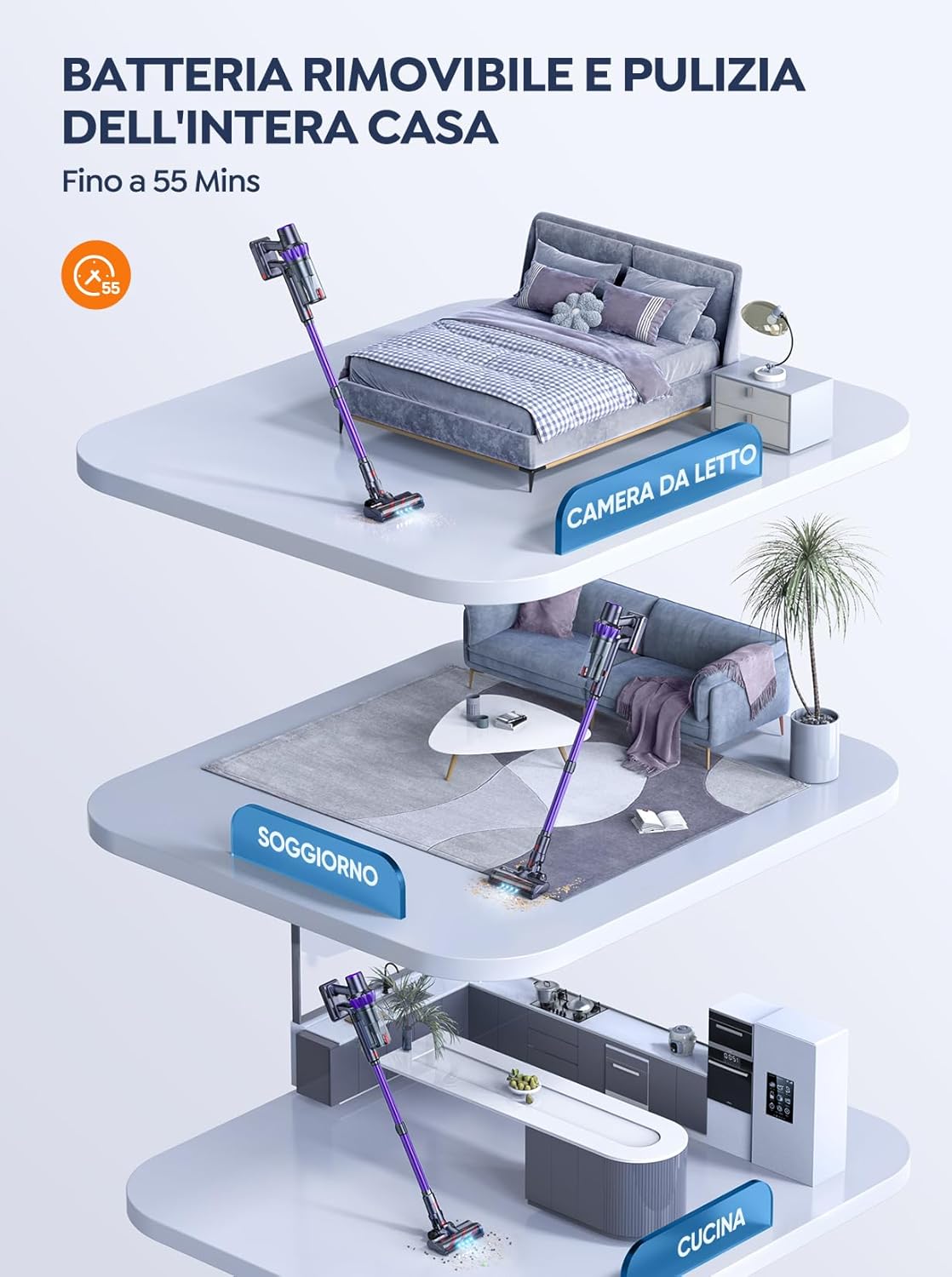
Figur 5.1: The removable battery allows for flexible charging options and extended cleaning time across multiple rooms.
- Connect the power adapter to the charging port on the main unit or directly to the battery if removed.
- Sæt adapteren i en stikkontakt.
- LED-skærmen viser opladningsstatus. En fuld opladning tager typisk 4-5 timer.
5.2 Samling af støvsugeren
- Fastgør forlængerstangen: Insert the top end of the extension wand into the main vacuum body until it clicks into place.
- Fastgør gulvbørsten: Insert the bottom end of the extension wand into the motorized floor brush until it clicks into place.
- Attach Accessories (for handheld use): For handheld cleaning, you can directly attach the crevice tool or 2-in-1 brush tool to the main vacuum body.
6. Betjening af støvsugeren
Learn how to effectively use your BuTure VC70 for various cleaning tasks.
6.1 Tænd/sluk og valg af tilstand

Figur 6.1: The intelligent LED touch screen provides real-time information on battery status and selected cleaning mode.
- For at tænde: Press the power button on the main unit. The vacuum will start in the default mode.
- Sådan skifter du tilstande: Use the mode selection button on the LED touch screen to cycle through available suction modes (e.g., Eco, Standard, Max, Auto).
- For at slukke: Tryk på tænd/sluk-knappen igen.
6.2 Intelligent Automatic Suction Mode
The BuTure VC70 features an intelligent automatic suction mode that adjusts power based on floor type.
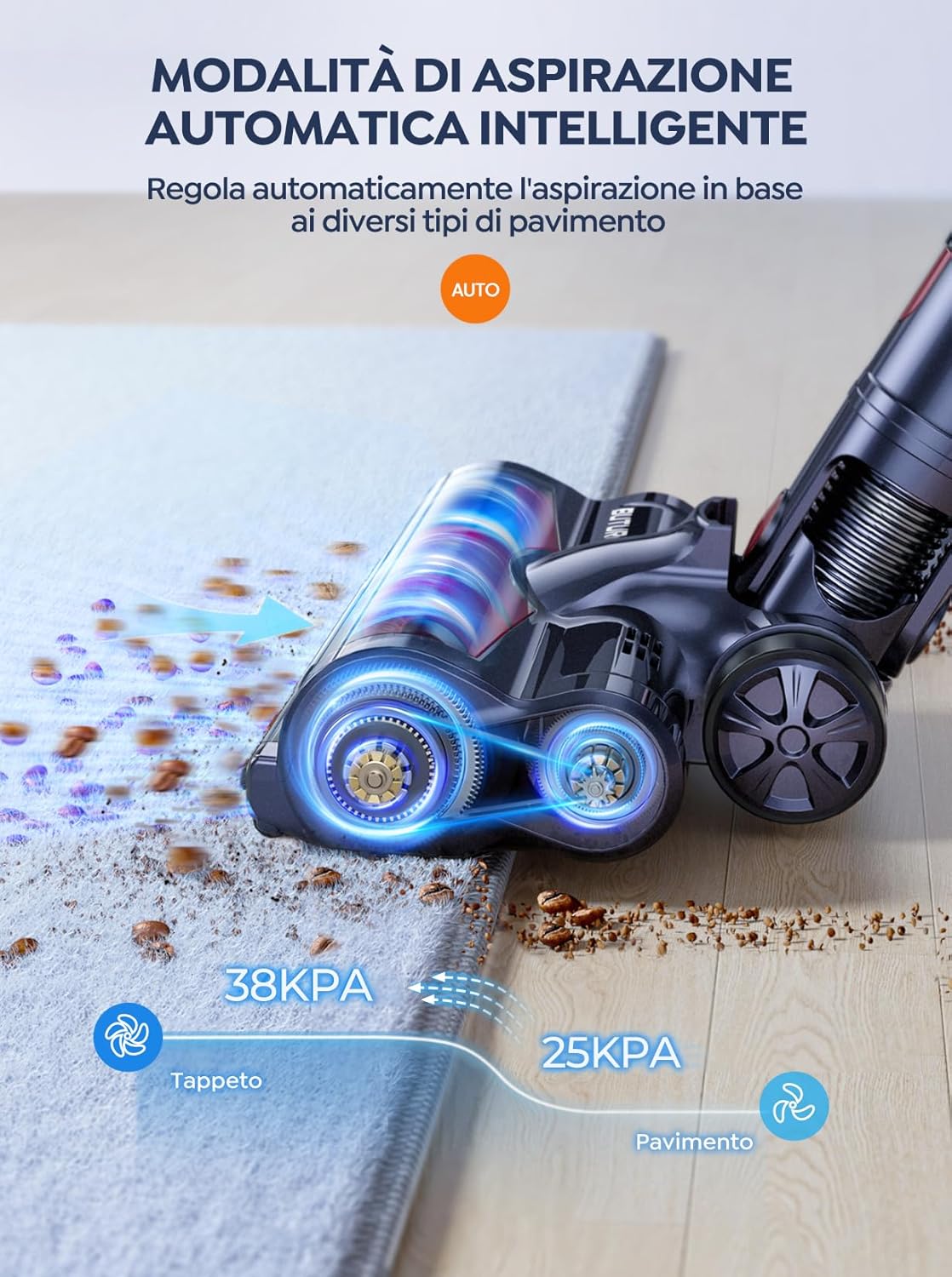
Figur 6.2: The vacuum automatically adjusts suction power, providing 38KPA for carpets and 25KPA for hard floors in Auto mode.
In Auto mode, the vacuum detects the floor type and automatically increases suction for carpets (up to 38KPA) and reduces it for hard floors (25KPA), optimizing cleaning efficiency and battery life.
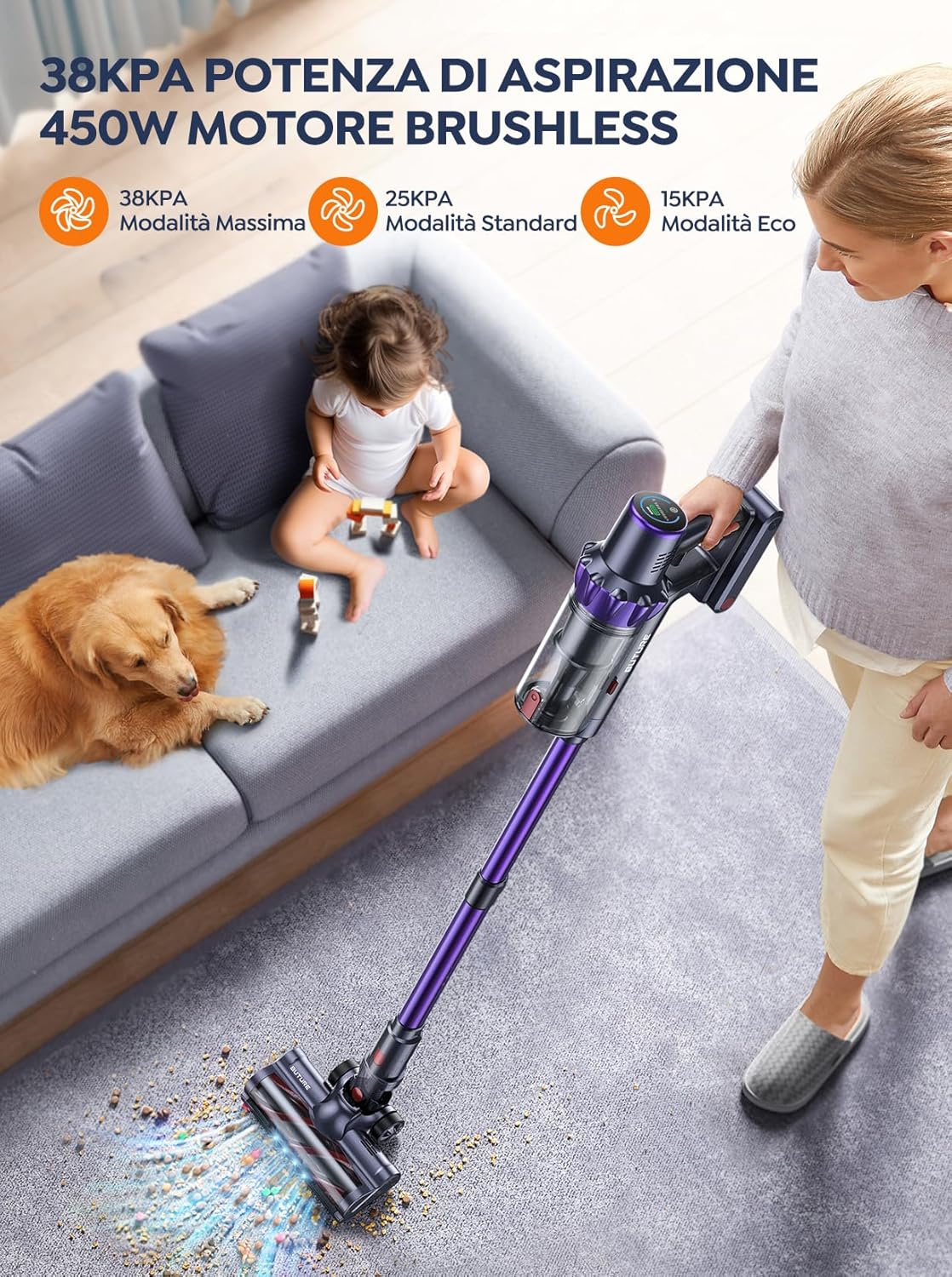
Figur 6.3: The 450W brushless motor delivers powerful suction, with modes including 38KPA Max, 25KPA Standard, and 15KPA Eco.
6.3 Brug af vedhæftede filer
- Sprækkeværktøj: Ideel til smalle sprækker, hjørner og kanter.
- 2-i-1 penselværktøj: Use the brush for delicate surfaces like upholstery or curtains, and the nozzle for general dusting.
- Motoriseret gulvbørste: Designed for efficient cleaning of both hard floors and carpets. Its integrated bristles effectively pick up various debris.

Figur 6.4: The motorized floor brush features a combination of soft and hard bristles to effectively clean different types of debris from various floor surfaces.
7. Vedligeholdelse
Regelmæssig vedligeholdelse sikrer optimal ydeevne og forlænger din støvsugers levetid.
7.1 Tømning af skraldespanden
Tøm støvbeholderen efter hver brug, eller når MAX-påfyldningslinjen er nået.
- Tryk på udløserknappen til støvbeholderen for at afmontere den fra hovedenheden.
- Open the dustbin lid and empty contents into a trash can.
- Close the lid and reattach the dustbin to the main unit.
7.2 Rengøring af filtre
The BuTure VC70 features an advanced multi-layer filtration system. Clean filters regularly to maintain suction power.

Figur 7.1: The advanced multi-layer filtration system captures 99.99% of dust and dirt, ensuring cleaner exhaust air.
- Remove the dustbin and locate the filters inside.
- Gently tap the filters to remove loose dust.
- Rinse the filters under cold running water. Ensure they are completely dry before reinserting (allow 24-48 hours for air drying).
- Replace filters every 3-6 months depending on usage.
7.3 Rengøring af børstevalsen
Kontrollér børsterullen med jævne mellemrum for sammenfiltrede hår eller snavs.
- Sluk for støvsugeren, og afmonter den motoriserede gulvbørste.
- Locate the brush roll access latch/button and open it.
- Remove the brush roll. Use scissors or a cleaning tool to cut and remove any tangled hair or fibers.
- Sæt børsterullen i igen, og fastgør adgangslåsen.
8. Fejlfinding
Hvis du støder på problemer med din støvsuger, kan du se følgende tabel for almindelige problemer og løsninger.
| Problem | Mulig årsag | Løsning |
|---|---|---|
| Vakuum tænder ikke | Batteriet er ikke opladet Batteri ikke korrekt installeret | Oplad batteriet helt Sørg for, at batteriet klikker sikkert på plads |
| Lav sugeevne | Skraldespanden er fuld Filtrene er tilstoppede Børsterullen er filtret sammen Slange/dyse er blokeret | Tøm skraldespanden Rengør eller udskift filtre Rengør børsterullen Kontroller og fjern blokeringer |
| Børsterullen roterer ikke | Børsterullen er filtret sammen Problem med børstehjulets motor | Rengør børsterullen Kontakt kundesupport, hvis problemet fortsætter |
| Vacuum stops suddenly | Overophedningsbeskyttelse aktiveret Lavt batteri | Turn off and allow to cool for 30 minutes Oplad batteriet |
9. Specifikationer
Technical specifications for the BuTure VC70 Cordless Vacuum Cleaner.
| Feature | Specifikation |
|---|---|
| Modelnummer | VC70 |
| Mærke | BuTure |
| Nominel effekt | 450 watt |
| Voltage | 100-240 volt |
| Skraldespandskapacitet | 1.5 liter |
| Støjniveau | 68 dB |
| Varens vægt | 1.81 kilogram (ca. 4 lbs) |
| Batteritype | Lithium-ion |
| Farve | Violet |
10. Garanti og support
BuTure products are manufactured to the highest quality standards. For warranty information or technical support, please refer to the warranty card included with your purchase or visit the official BuTure website. Please have your model number (VC70) and purchase details ready when contacting support.


