1. Introduktion
This manual provides detailed instructions for the installation, operation, and maintenance of your Jennov Security Camera, model IJ1-P23WJ35-3-FAS. This device is designed to provide reliable surveillance for indoor environments, offering features such as high-definition video, night vision, and motion detection. Please read this manual thoroughly before using the product to ensure proper functionality and safety.
2. Produktet er slutview
The Jennov Security Camera is a compact, dome-shaped device designed for discreet monitoring. It integrates seamlessly into standard light bulb sockets for easy power and installation.
Nøglefunktioner:
- High-Definition video: Optager klare fodtage med 1080p opløsning.
- Nattesyn: Equipped with infrared LEDs for visibility up to 30 meters in low-light conditions.
- Bevægelsesdetektion: Sends notifications upon detecting movement within its field of view.
- Tovejs lyd: Giver mulighed for kommunikation via kameraet.
- Trådløs forbindelse: Operates via Wi-Fi for remote access.
- Fleksibel opbevaring: Supports Micro SD card (up to 128GB) and cloud storage options.
- Smart Home Integration: Compatible with Amazon Alexa and Android devices.
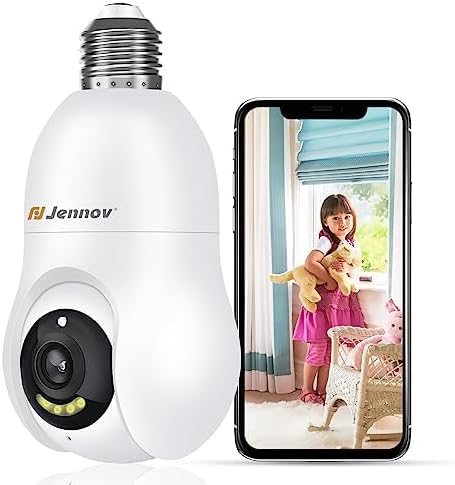
Figure 2.1: The Jennov Security Camera shown alongside a smartphone displaying live footage of a child.
3. Opsætning
3.1 Pakkens indhold
Bekræft, at din pakke indeholder følgende varer:
- 1 x Jennov Security Camera (Model: IJ1-P23WJ35-3-FAS)
- 1 x Brugermanual (dette dokument)
3.2 Installation
The Jennov Security Camera is designed for easy installation into a standard light bulb socket.
- Sluk: Ensure the power to the light socket is turned off at the circuit breaker before installation.
- Skru ind: Carefully screw the camera into a standard E27/E26 light bulb socket. Ensure it is securely fastened but do not overtighten.
- Tænd: Restore power to the light socket. The camera will power on and initiate its startup sequence.

Figure 3.1: The camera is designed for quick installation by screwing it into an ordinary bulb base.
3.3 App-download og -forbindelse
To operate the camera, you will need to download the companion mobile application.
- Download app: Søg efter the official Jennov security camera app in your device's app store (e.g., Google Play Store for Android, Apple App Store for iOS).
- Opret konto: Åbn appen, og følg instruktionerne på skærmen for at oprette en ny brugerkonto eller logge ind, hvis du allerede har en.
- Tilføj enhed: Select the option to 'Add Device' or 'Add Camera' within the app.
- Opret forbindelse til Wi-Fi: Follow the app's prompts to connect the camera to your 2.4GHz Wi-Fi network. Ensure your Wi-Fi password is correct.
- Parring: The app will guide you through the pairing process, which may involve scanning a QR code displayed on your phone with the camera, or listening for an audible prompt.
- Konfiguration: Når du har oprettet forbindelse, kan du navngive dit kamera og justere de oprindelige indstillinger.
4. Betjeningsvejledning
4.1 Live View og videokvalitet
Access the live feed of your camera through the mobile application. The camera provides 1080p Full HD resolution for clear monitoring.

Figure 4.1: Visual comparison demonstrating the enhanced clarity of 2K Ultra HD resolution provided by the Jennov camera compared to standard 1080p.
4.2 Motion Detection and Auto-Tracking
The camera features intelligent motion detection and auto-tracking capabilities.
- Aktivér bevægelsesdetektion: In the app settings, activate motion detection and customize sensitivity levels.
- Modtag advarsler: When motion is detected, you will receive push notifications on your smartphone.
- Automatisk sporing: The camera can automatically track detected movement within its field of view, ensuring the subject remains in frame.
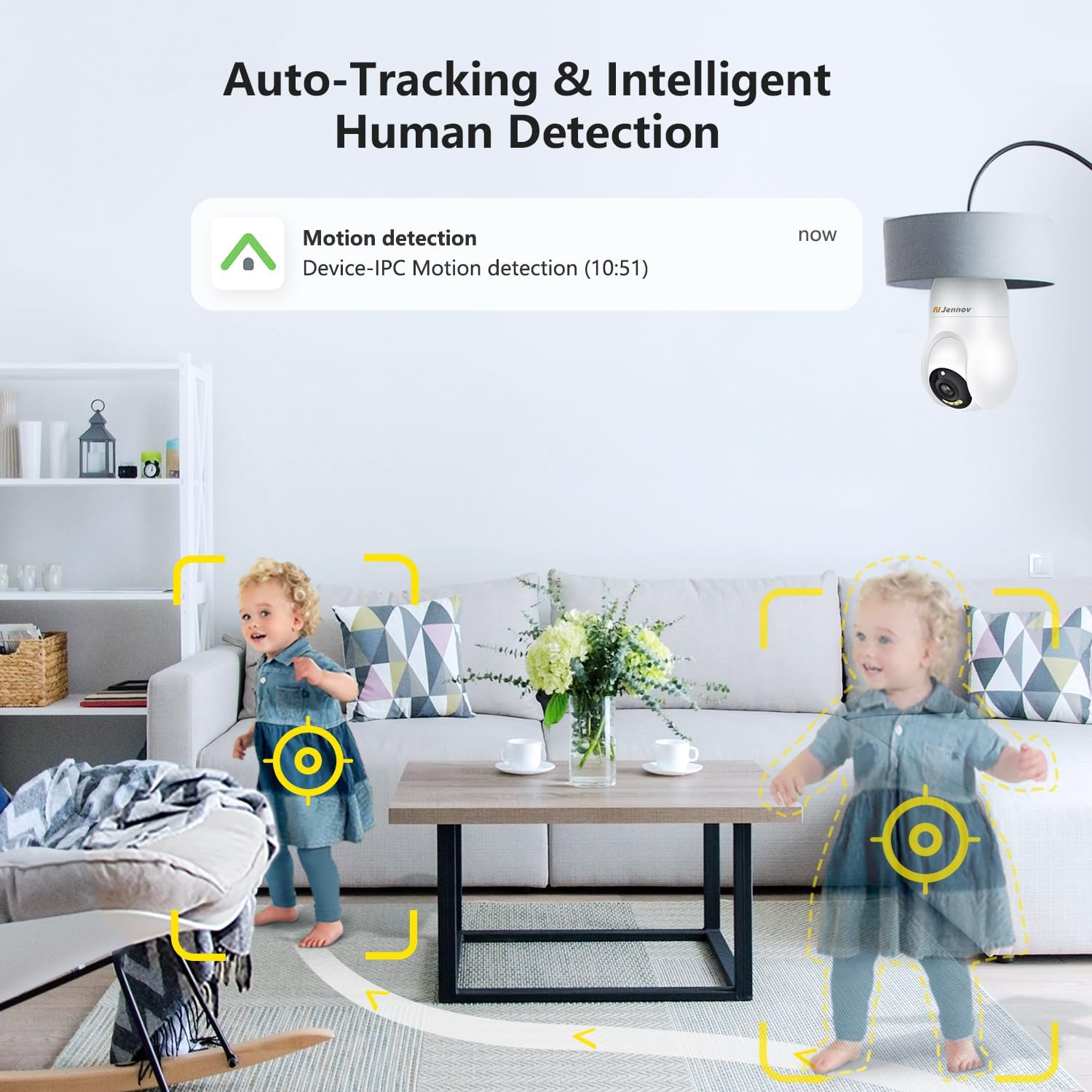
Figure 4.2: The camera's auto-tracking and intelligent human detection feature, showing a motion detection alert.
4.3 Nattesyn
The camera is equipped with infrared LEDs to provide clear vision in low-light or no-light conditions.
- Automatisk aktivering: Night vision typically activates automatically when ambient light levels drop.
- Rækkevidde: Effective night vision range is up to 30 feet (approximately 9 meters).
- Nattesyn i stjernelysfarver: In certain low-light conditions, the camera may provide enhanced color night vision.

Figure 4.3: A visual comparison illustrating the clarity and color retention of Starlight Color Night Vision compared to traditional night vision.
4.4 Tovejslyd
Utilize the camera's built-in microphone and speaker for two-way communication.
- Tale: Tryk på mikrofonikonet i live-udsendelsen view appens brugerflade til at tale gennem kameraet.
- Lytte: Kameraets mikrofon optager lyd fra omgivelserne, som kan høres via appen.

Figure 4.4: Demonstration of the two-way audio feature, showing a child speaking through the camera and a parent responding via smartphone.
4.5 Videolagring
The camera supports two primary methods for video storage:
- Micro SD-kort: Insert a Micro SD card (up to 128GB, not included) into the designated slot on the camera for local storage of recordings.
- Cloud Storage: The camera offers optional cloud storage services, which may require a subscription. Refer to the app for details on available plans.

Figure 4.5: The camera supports both cloud storage and local storage via a Micro SD card (up to 128GB).
4.6 Smart Home-integration
The Jennov Security Camera is compatible with certain smart home platforms.
- Amazon Alexa: Link your camera to Amazon Alexa through the Alexa app to view live feeds on compatible Echo Show devices or use voice commands.
- Android-enheder: The camera app is compatible with Android smartphones and tablets.

Figure 4.6: The camera's compatibility with Amazon Alexa, allowing users to view camera feeds on smart displays.
5. Vedligeholdelse
5.1 Rengøring af kameraet
To ensure optimal performance, keep the camera lens and body clean.
- Sluk: Disconnect the camera from its power source before cleaning.
- Linse: Gently wipe the camera lens with a soft, lint-free cloth. For stubborn smudges, use a lens cleaning solution designed for optics.
- Legeme: Wipe the camera body with a dry or slightly damp klæde. Undgå at bruge skrappe kemikalier eller slibende materialer.
5.2 firmwareopdateringer
Periodically check the mobile application for available firmware updates. Updates can improve performance, add new features, and enhance security.
- Tjek for opdateringer: Navigate to the camera settings within the app to check for and install any available firmware updates.
- Stabil forbindelse: Ensure the camera has a stable Wi-Fi connection and sufficient power during the update process. Do not interrupt the update.
6. Fejlfinding
If you encounter issues with your Jennov Security Camera, refer to the following common problems and solutions:
- Kameraet tænder ikke:
- Ensure the light socket has power and the camera is securely screwed in.
- Test the socket with a working light bulb to confirm power supply.
- Kan ikke oprette forbindelse til Wi-Fi:
- Bekræft, at dit Wi-Fi-netværk er 2.4 GHz. Kameraet understøtter ikke 5 GHz-netværk.
- Sørg for, at Wi-Fi-adgangskoden er indtastet korrekt i appen.
- Flyt kameraet tættere på din Wi-Fi-router for at forbedre signalstyrken.
- Genstart din router og kameraet.
- Ingen bevægelsesdetektionsalarmer:
- Check if motion detection is enabled in the app settings.
- Juster bevægelsesdetektionens følsomhed.
- Sørg for, at app-notifikationer er aktiveret på din smartphone.
- Dårlig videokvalitet:
- Tjek din Wi-Fi-signalstyrke; et svagt signal kan påvirke kvaliteten af videostreaming.
- Rengør kameralinsen for støv eller pletter.
- Ensure adequate lighting for optimal daytime video.
- Tovejslyd virker ikke:
- Ensure microphone and speaker permissions are granted to the app on your smartphone.
- Check the volume settings on both your phone and within the camera app.
7. Specifikationer
| Modelnummer | IJ1-P23WJ35-3-FAS |
| Monteringstype | Light socket (Screw In) |
| Videooptagelsesopløsning | 1080p |
| Trådløs kommunikation | Wi-Fi (kun 2.4 GHz) |
| Formfaktor | Kuppel |
| Materiale | Plast |
| Voltage | 220 volt (AC) |
| Wattage | 3 watt |
| Dimensioner (L x B x H) | 7.62 x 7.62 x 17.02 cm |
| Varens vægt | 177 g |
| Særlige funktioner | Nattesyn, bevægelsesdetektion, tovejslyd |
| Opbevaringsmuligheder | Micro SD card (Max 128GB), Cloud Storage |
| Indendørs/Udendørs brug | Indendørs |
| Kompatible enheder | Bærbar computer, smartphone, tablet |
| Controller type | Amazon Alexa, Android |
8. Garantioplysninger
The Jennov Security Camera (Model: IJ1-P23WJ35-3-FAS) comes with a 1 års begrænset garanti fra købsdatoen. Denne garanti dækker fabrikationsfejl og funktionsfejl ved normal brug. Den dækker ikke skader forårsaget af misbrug, ulykker, uautoriserede ændringer eller forkert installation.
Please retain your proof of purchase for warranty claims. For detailed warranty terms and conditions, refer to the official Jennov webwebsted eller kontakt kundesupport.
9. Kundesupport
For further assistance, technical support, or inquiries regarding your Jennov Security Camera, please refer to the following resources:
- Online support: Visit the official Jennov website for FAQs, troubleshooting guides, and product information.
- Kontakt email: Refer to the product packaging or the Jennov website for customer service contact email.
When contacting support, please have your product model number (IJ1-P23WJ35-3-FAS) and purchase information readily available.


