Produkt overview
The Steinberg 100 Series Basin Mixer Faucet (Model 1001010S) is a high-quality single-lever faucet designed for basin installation. It features a modern matte black finish and is constructed from durable brass. This faucet is designed for standing installation and includes a fixed spout, a ceramic cartridge, and flexible G 3/8" connection hoses. It is compatible with instantaneous water heaters from 21 kW.

Image: The Steinberg 100 Series Basin Mixer Faucet in matte black, showcasing its sleek design and single-lever operation.
Pakkens indhold
Sørg for, at alle komponenter er til stede, inden installationen påbegyndes:
- 1 x Steinberg 100 Series Basin Mixer Faucet (Model 1001010S)
- 2 x Flexible connection hoses (G 3/8")
- Mounting hardware (nuts, washers, seals)
- Installationsvejledning
Opsætning og installation
Professional installation is recommended. Before installation, ensure the water supply is turned off. This faucet requires a single tap hole for mounting.
Nødvendige værktøjer (ikke inkluderet):
- Justerbar skruenøgle
- Skruetrækker
- Tætningsbånd (PTFE-tape)
- Bucket and cloth for spills
Installationstrin:
- Forbered B'etasin: Ensure the mounting surface is clean and dry. The basin should have a single tap hole with a diameter suitable for the faucet's base.
- Tilslut slanger: Screw the flexible G 3/8" connection hoses into the base of the faucet. Hand-tighten first, then use a wrench for a snug fit, being careful not to overtighten.
- Monter vandhanen: Insert the faucet's threaded rod and hoses through the tap hole in the basin. From underneath the basin, slide the rubber washer, metal washer, and then the mounting nut onto the threaded rod.
- Fastgør vandhanen: Align the faucet correctly on the basin and tighten the mounting nut securely with a wrench.
- Tilslutning til vandforsyning: Connect the flexible hoses to the hot and cold water supply lines. Use sealant tape on the threads of the supply lines for a watertight seal. Ensure the hot and cold connections are correct (typically red for hot, blue for cold).
- Tjek for lækager: Slowly turn on the main water supply. Check all connections for leaks. If leaks are present, tighten the connections slightly.
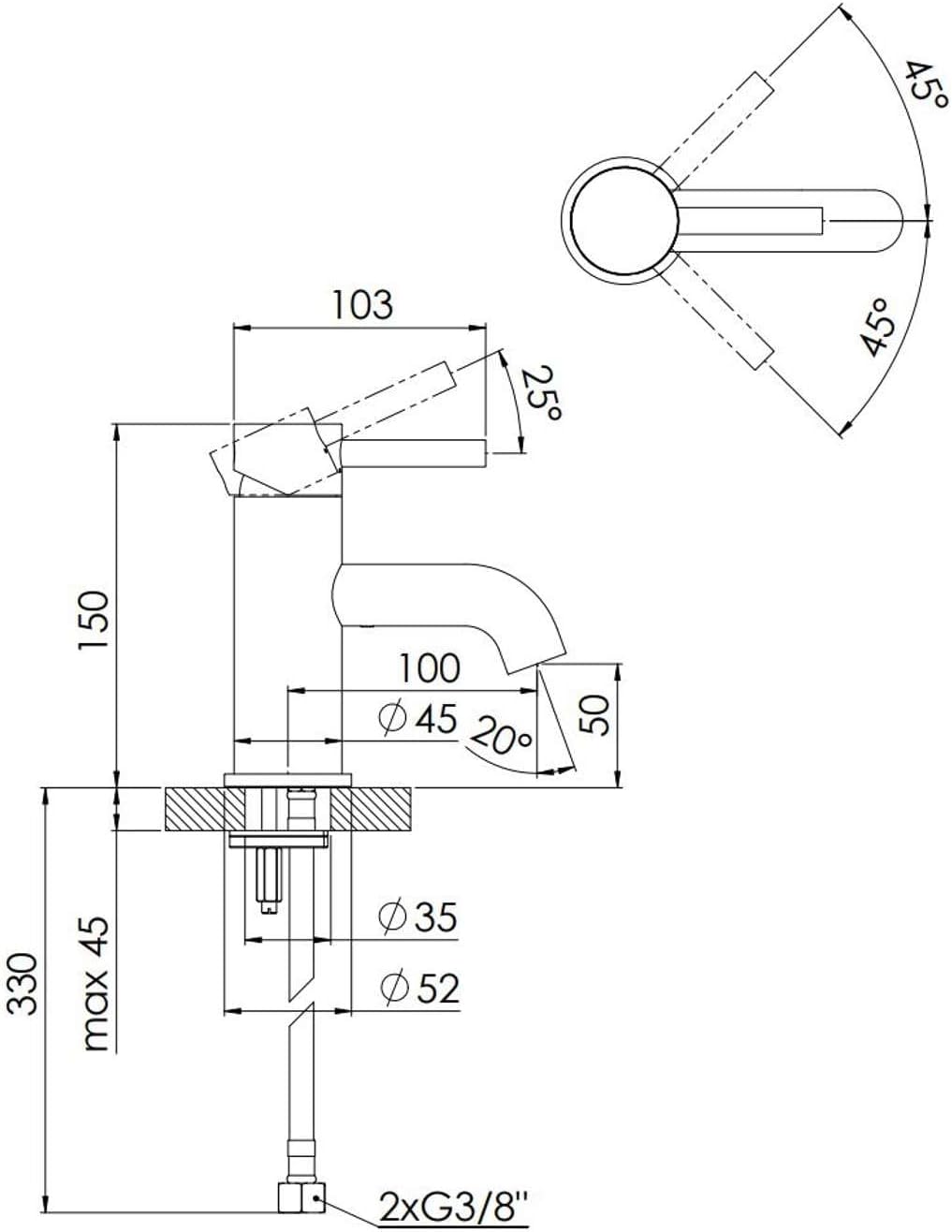
Image: Technical drawing illustrating the dimensions and installation requirements of the Steinberg 100 Series Basin Mixer Faucet, including spout length and overall height.
Betjeningsvejledning
The Steinberg 100 Series Basin Mixer Faucet features a single lever for controlling both water flow and temperature.
- Vandflow: Lift the lever upwards to increase water flow. Push it downwards to decrease flow and turn off the water.
- Temperaturkontrol: Move the lever to the left for hot water and to the right for cold water. The ceramic cartridge ensures smooth and precise temperature adjustment.
The integrated aerator ensures a soft, splash-free water stream and helps conserve water.
Vedligeholdelse og pleje
To ensure the longevity and appearance of your Steinberg faucet, follow these care instructions:
- Rensning: Clean the faucet regularly with a soft cloth and mild soap or a non-abrasive cleaner specifically designed for bathroom fixtures. Avoid using abrasive sponges, scouring pads, or harsh chemical cleaners, as these can damage the matte black finish.
- Tørring: After cleaning, always dry the faucet thoroughly with a soft, dry cloth to prevent water spots and mineral buildup.
- Vedligeholdelse af belufter: If water flow becomes weak or uneven, the aerator may be clogged with mineral deposits. Unscrew the aerator from the spout, clean it under running water, and remove any debris. Reinstall the aerator securely.
- Keramisk patron: The ceramic cartridge is designed for long-lasting, drip-free performance. If you experience persistent dripping or difficulty in adjusting temperature, it may indicate a need for cartridge replacement. This should be performed by a qualified professional.
Fejlfinding
| Problem | Mulig årsag | Løsning |
|---|---|---|
| Lav vandgennemstrømning | Tilstoppet perlator; delvist lukkede afspærringsventiler; knækket tilførselsslange. | Clean or replace aerator; fully open shut-off valves; straighten supply hose. |
| Lækage ved basen | Loose mounting nut; damaged seal. | Tighten mounting nut; inspect and replace seals if damaged. |
| Dripping from Spout | Slidt keramisk patron. | Contact a qualified plumber for cartridge replacement. |
| Problemer med vandtemperaturen | Incorrect hot/cold connections; issue with water heater. | Verify hose connections; check water heater functionality. |
If the problem persists after attempting these solutions, please contact Steinberg customer support or a qualified plumber.
Specifikationer
| Feature | Detalje |
|---|---|
| Modelnummer | 1001010S |
| Mærke | Steinberg |
| Farve | Matt sort |
| Materiale | Messing |
| Stil | Etgrebs mixer |
| Installationsmetode | Single Hole (Standing) |
| Samlet højde | 150 mm |
| Spout Reach (Projection) | 100 mm |
| Komfort zone | 50 mm |
| Patrontype | Keramisk |
| Connection Hoses | 2x Flexible G 3/8" |
| Flow Rate (at 3 bar) | 6 l/min |
| Kompatibilitet | Suitable for instantaneous water heaters from 21 kW |
| Produktdimensioner | 7.5 x 18.5 x 29.5 cm |
Garantioplysninger
Steinberg products are manufactured to high quality standards. For specific warranty terms and conditions, please refer to the warranty card included with your product or visit the official Steinberg website. Typically, warranty covers manufacturing defects under normal use and service.
Gem venligst din købsbevis i tilfælde af garantikrav.
Kundesupport
For technical assistance, spare parts, or any questions regarding your Steinberg 100 Series Basin Mixer Faucet, please contact Steinberg customer support.
Webwebsted: www.steinberg-armaturen.de
When contacting support, please have your model number (1001010S) and purchase date ready.


