Indledning
The Bushnell Wingman Mini is a compact GPS Bluetooth speaker designed for golf enthusiasts. It provides audible GPS distances, premium audio quality for music, and the ability to handle calls. Its integrated BITE magnetic cart mount allows for convenient attachment to a golf cart or bag. The device is built with a waterproof IPX7 construction, ensuring durability in various outdoor conditions.
Hvad er der i æsken
- 1x Wingman Mini Black/Silver GPS Speaker
- 1x Carabiner Clip
- 1x USB-C-kabel
- 1x Wearable4U Black EarBuds with Charging E-Bank Case
- 1 x vægoplader
- 1x billader

Image: The complete bundle including the Wingman Mini speaker, earbuds, USB-C cable, wall charger, and car charger.
Produkt overview

Billede: Forside view of the Bushnell Wingman Mini GPS Bluetooth Speaker, showcasing its hexagonal design and central 'B' logo.

Billede: Flere views of the Wingman Mini, highlighting the control buttons for volume, power, and GPS functions, as well as the carabiner clip and USB-C port.

Image: The Wingman Mini speaker in use alongside a smartphone displaying the Bushnell Golf app, showing GPS distances and settings.

Billede: Nærbillede view of the USB-C charging port on the side of the Bushnell Wingman Mini speaker.
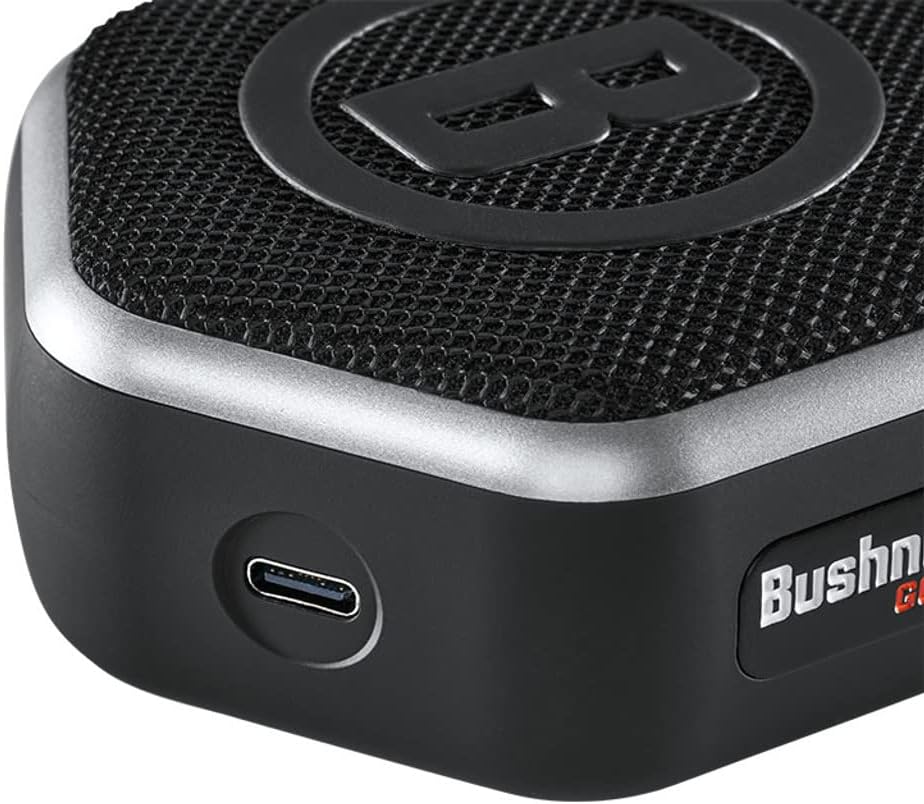
Image: The Wearable4U Ultimate Earbuds with their charging case, highlighting features like Bluetooth 5.0 and 1500 mAh power bank.
Opsætning
1. Opladning af enheden
Before first use, fully charge the Wingman Mini using the provided USB-C cable and either the wall or car charger. The charging port is located on the side of the speaker. A full charge provides approximately 11 hours of battery life.
2. Bluetooth-parring
- Power on the Wingman Mini by pressing and holding the power button.
- Sørg for, at Bluetooth er aktiveret på din smartphone.
- Søg efter available Bluetooth devices and select "Bushnell Wingman Mini" to pair.
- Once paired, the speaker will confirm the connection.
3. Bushnell Golf App Installation
For full GPS functionality and custom sound bites, download the Bushnell Golf app from your smartphone's app store (Google Play or Apple App Store). Follow the in-app instructions to set up your profile and access golf course data.
Betjeningsvejledning
1. Audible GPS Distances
With the Bushnell Golf app running and the Wingman Mini connected, press the 'B' button on the speaker to receive audible distances to the front, center, and back of the green. The speaker comes preloaded with over 38,000 golf courses worldwide.
2. Musikafspilning
Once paired via Bluetooth, you can stream music from your smartphone or other Bluetooth-enabled devices. Use the volume controls on the speaker or your connected device to adjust audio levels.
3. Håndfri opkald
The built-in microphone allows you to take and make calls directly through the Wingman Mini when connected to your smartphone. Press the play/pause button to answer or end a call.
4. TWS Speaker Pairing (True Wireless Stereo)
If you have two Wingman Mini speakers, you can pair them together for a True Wireless Stereo experience. Refer to the Bushnell Golf app or the full product manual for detailed instructions on TWS pairing.
5. Attaching to Golf Cart/Bag
Utilize the integrated BITE magnetic cart mount to securely attach the speaker to a golf cart bar. Alternatively, use the provided carabiner clip to attach it to your golf bag.
Opretholdelse
- Rensning: Tør højttaleren af med en blød, damp klæde. Undgå at bruge skrappe kemikalier eller slibende rengøringsmidler.
- Opbevaring: Opbevar enheden på et køligt, tørt sted, når det ikke er i brug.
- Vandtæthed: The Wingman Mini features IPX7 waterproof construction, meaning it can withstand immersion in up to 1 meter of water for 30 minutes. Ensure the charging port cover is securely closed before exposure to water.
- Batteripleje: For at forlænge batteriets levetid bør du undgå at aflade batteriet helt ofte. Oplad enheden regelmæssigt.
Fejlfinding
| Problem | Løsning |
|---|---|
| Ingen strøm/Enheden tænder ikke | Ensure the device is fully charged. Connect to a power source using the provided USB-C cable and charger. |
| Kan ikke parres via Bluetooth |
|
| No audible GPS distances |
|
| Dårlig lydkvalitet |
|
Specifikationer
- Modelnavn: Wingman Mini Black/Silver
- Varemodelnummer: w1
- Varens vægt: 6 ounce
- Produktdimensioner: 4 x 3.23 x 1.57 tommer
- Batteritype: 1 lithium-ion batteri (medfølger)
- Batterilevetid: Cirka 11 timer
- Forbindelse teknologi: Bluetooth
- Særlige funktioner: Audible GPS Distances, Built-in Microphone, Mini, TWS Speaker Pairing Technology, Waterproof (IPX7)
- Monteringstype: Bite Mount
- Korttype: Golf Course (preloaded with over 38,000 courses)
- Stemmekommando: Mikrofon
Garanti og support
The Bushnell Wingman Mini comes with a 2 års producentgaranti. For warranty claims, technical support, or further assistance, please contact Wearable4U customer service or refer to the official Bushnell Golf webwebsted for supportressourcer.
Fabrikant: Bærbar4U


