Ctronics 4K 5G Wi-Fi udendørs sikkerhedskamera brugermanual
Model: CTSC-5S
1. Produktet er slutview
The Ctronics 4K 5G Wi-Fi Outdoor Security Camera (Model: CTSC-5S) is an advanced surveillance solution designed for comprehensive outdoor monitoring. Featuring an 8-megapixel sensor, it delivers stunning 4K (3840x2160) ultra-high-definition video, ensuring clear and detailed footage. This camera supports both 2.4GHz and 5GHz Wi-Fi bands for stable and high-speed connectivity, minimizing interference and ensuring reliable operation.
Equipped with intelligent detection capabilities, it can accurately identify and track humans, vehicles, and even pets, providing precise alerts and reducing false alarms. Its 360-degree pan and tilt functionality allows for extensive coverage without blind spots. The camera also boasts versatile night vision modes, including full-color night vision and smart mode, ensuring visibility in low-light conditions. With support for various storage options and remote access via the Ctronics app, this camera offers robust security and peace of mind.

Figure 1.1: Ctronics 4K 5G Wi-Fi Outdoor Security Camera (Model: CTSC-5S)
2. Pakkens indhold
Please check the package contents carefully. If any items are missing or damaged, please contact Ctronics customer support.
- Ctronics 4K 5G Wi-Fi Outdoor Security Camera
- Strømadapter
- Monteringsskruesæt
- Vandtæt sæt
- LAN-kabel
- Anti-theft Sticker
- Brugermanual
3. Opsætningsvejledning
3.1 Fysisk installation
The camera is designed for wall-mounted outdoor use. Choose a suitable location that provides optimal viewing angles and is within Wi-Fi range. Ensure the mounting surface is sturdy enough to support the camera's weight.
- Forbered monteringsoverfladen: Use the provided mounting template (if included) or mark the drill holes based on the camera's base.
- Bore huller: Drill pilot holes into the marked positions. Insert wall anchors if mounting on masonry or concrete.
- Sikre kameraet: Attach the camera base to the wall using the provided screws. Ensure it is firmly secured.
- Tilslut strøm: Connect the power adapter to the camera and plug it into a power outlet. Ensure the connection is waterproof using the provided kit for outdoor installations.

Figure 3.1: The camera features IP66 weather resistance, suitable for outdoor installation and capable of withstanding various weather conditions.
3.2 App-download og -forbindelse
To set up and manage your camera, download the Ctronics app on your smartphone or tablet.
- Download appen: Søg efter "Ctronics" or "Ctronics Pro" in the App Store (iOS) or Google Play Store (Android) and install it.
- Registrer en konto: Åbn appen, og følg instruktionerne på skærmen for at registrere en ny konto eller logge ind, hvis du allerede har en.
- Tilføj kamera: Tap the "+" icon to add a new device. Select "Wi-Fi Camera" and choose your Wi-Fi network (supports 2.4GHz and 5GHz).
- Scan QR -kode: The app will display a QR code. Hold your phone in front of the camera lens (approx. 15-20 cm) until you hear a prompt sound from the camera, indicating successful scanning.
- Opret forbindelse til Wi-Fi: Follow the app's instructions to connect the camera to your Wi-Fi network. Once connected, the camera will appear in your device list.

Figure 3.2: Step-by-step guide for connecting the camera using the Ctronics app, including QR code scanning.
4. Betjeningsvejledning
4.1 Live View og panorering/tilt-kontrol
Once connected, you can access the live feed from your camera and control its movement.
- Få adgang til Live View: Open the Ctronics app and select your camera from the device list to view videofeedet i realtid.
- Pan/Hældningskontrol: På live view screen, swipe your finger across the video to pan (horizontal movement up to 355°) and tilt (vertical movement up to 90°) the camera.
- Digital zoom: Knib ind eller ud på live view screen to digitally zoom in or out on the image.

Figure 4.1: The camera offers 360-degree pan and tilt functionality for comprehensive area coverage.
4.2 Tovejslyd
Kameraet understøtter tovejs lydkommunikation, så du kan lytte og tale gennem kameraet.
- Aktivér mikrofon: På live view screen, tap the microphone icon to enable two-way audio.
- Tale: Hold down the microphone button to speak. Release it to listen.

Figure 4.2: Engage in real-time two-way conversations through the camera, useful for communicating with visitors or deterring intruders.
4.3 Optagelse afspilning
Review optaget footage stored on the MicroSD card or connected NVR/NAS.
- Adgang til afspilning: From the app's main screen, select your camera and tap the "Playback" or "History" icon.
- Vælg dato/tid: Use the calendar and timeline to select the desired recording date and time.
- Download Footage: You can download specific video clips to your phone's local storage.

Figur 4.3: View live feeds from multiple cameras simultaneously on your smartphone for comprehensive monitoring.
5. Avancerede funktioner
5.1 4K Resolution and Digital Zoom
The camera captures video in stunning 4K (3840x2160) resolution, providing exceptional clarity. The 4x digital zoom allows you to magnify specific areas of the image for closer inspection without significant loss of detail, unlike lower resolution cameras.
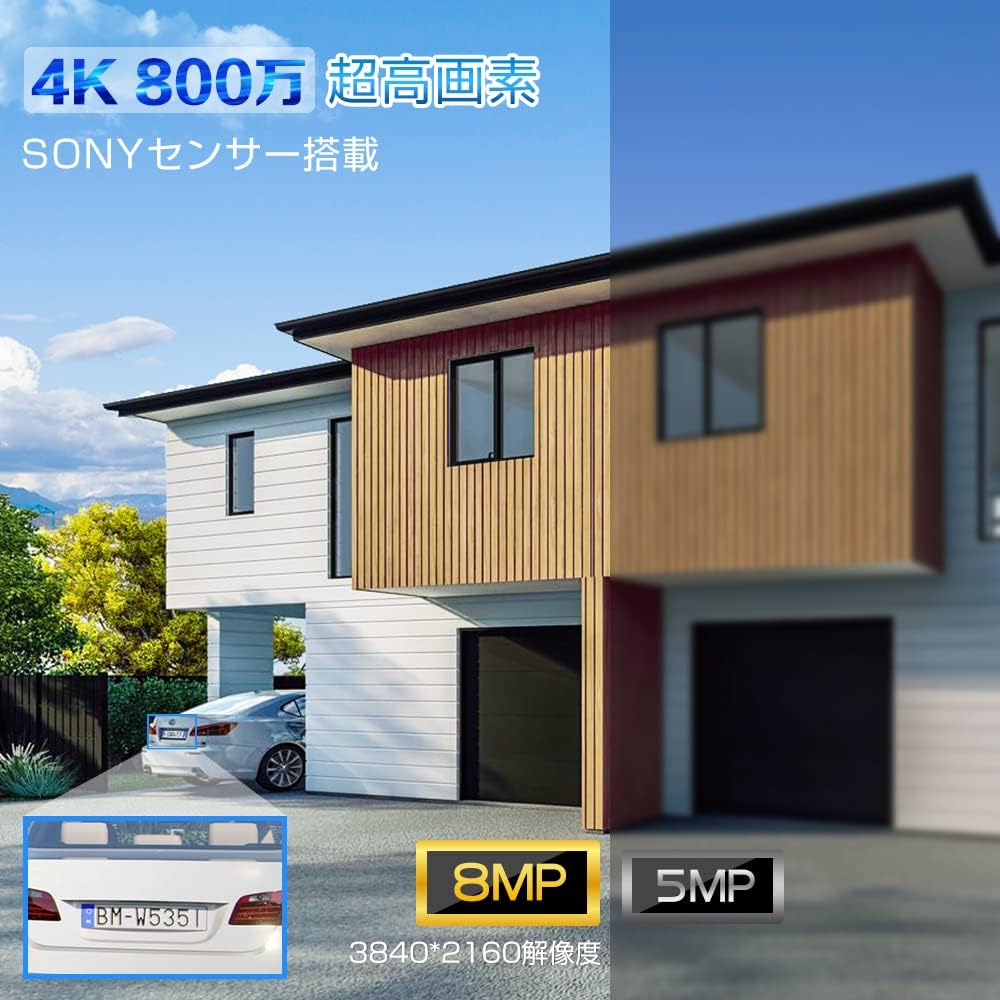
Figure 5.1: Visual comparison demonstrating the superior clarity of 4K 8MP resolution compared to lower resolutions, highlighting details like vehicle license plates.
5.2 Human, Vehicle, and Pet Detection with Auto-Tracking
Beyond basic motion detection, this camera features advanced AI-powered recognition for humans, vehicles, and pets. When a detected object enters the surveillance area, the camera can automatically track its movement, ensuring continuous monitoring.
- Menneskelig detektion: Identifies human figures, reducing false alarms from swaying trees or small animals.
- Registrering af køretøjer: Specifically recognizes vehicles, useful for monitoring driveways or parking areas.
- Pet Recognition: Distinguishes pets from other moving objects.
- Automatisk sporing: The camera automatically adjusts its pan/tilt to follow the detected object within its 360-degree range.

Figure 5.2: The camera's intelligent detection system highlights detected humans and vehicles, sending alerts and initiating auto-tracking.
5.3 Nattesynstilstande
The camera offers three distinct night vision modes to suit various needs:
- Infrarødt nattesyn: Provides clear black-and-white video in complete darkness using infrared LEDs.
- Nattesyn i fuld farve: Utilizes built-in spotlights to capture full-color video even in low-light conditions.
- Smart farve nattesyn: The camera operates in infrared mode normally, but automatically switches to full-color mode and activates spotlights when motion is detected, deterring intruders and capturing detailed evidence.

Figure 5.3: Illustration of the camera's night vision capabilities, including infrared and full-color modes, and the smart mode activation.
5.4 5G Wi-Fi Connectivity
This camera supports both 2.4GHz and the latest 5GHz Wi-Fi bands. 5GHz Wi-Fi offers higher speeds and less interference from other devices, providing a more stable and reliable connection for high-resolution video streaming, especially over shorter distances.

Figure 5.4: The camera's dual-band Wi-Fi antennas ensure stable and high-speed data transmission, reducing signal interference.
5.5 Lagringsmuligheder
The camera offers flexible recording and storage options:
- MicroSD-kort: Supports up to 256GB MicroSD cards for local storage. The camera will automatically overwrite older footage når kortet er fuldt.
- NVR/NAS: Compatible with Network Video Recorders (NVR) and Network Attached Storage (NAS) devices for continuous recording and larger storage capacity.
- FTP: Supports FTP protocol for uploading recorded videos to an FTP server.
- Optagetilstande: Choose from 24-hour continuous recording, motion-triggered recording, or scheduled recording based on your needs.

Figur 5.5: Overview of storage capabilities, including 256GB MicroSD card support, and compatibility with FTP, NAS, and ONVIF systems.
6. Vedligeholdelse
- Rengør linsen: Regularly wipe the camera lens with a soft, clean cloth to ensure clear image quality. Avoid abrasive cleaners.
- Tjek forbindelser: Periodically inspect all cable connections, especially power and network cables, to ensure they are secure and waterproof.
- Firmwareopdateringer: Check the Ctronics app regularly for firmware updates. Keeping your camera's firmware up-to-date ensures optimal performance, new features, and security enhancements.
- Power Cycle: If the camera experiences minor issues, try power cycling it by unplugging and re-plugging the power adapter.
7. Fejlfinding
| Problem | Mulig årsag | Løsning |
|---|---|---|
| Kamera offline/Kan ikke oprette forbindelse | Weak Wi-Fi signal, incorrect Wi-Fi password, power issue. |
|
| Dårlig billedkvalitet | Beskidt objektiv, svagt lys, netværksbåndbredde. |
|
| Bevægelsesdetektion virker ikke | Detection sensitivity too low, detection zone not set. |
|
| No audio/Two-way audio issues | Microphone/speaker disabled, network delay. |
|
8. Specifikationer
| Feature | Detalje |
|---|---|
| Modelnummer | CTSC-5S |
| Videooptagelsesopløsning | 4K (3840x2160) |
| Trådløs kommunikationsteknologi | Wi-Fi (2.4 GHz og 5 GHz) |
| Felt af View | 90 grader |
| Monteringstype | Vægmonteret |
| Billedhastighed | 15 fps |
| Materiale | Metal |
| Varens vægt | 980 g |
| Strømkilde | Elektrisk med ledning |
| Forbindelsesprotokol | Wi-Fi, ONVIF, FTP, HTTP, DHCP |
| Controller type | iOS/Android/Windows |
| Særlige funktioner | Auto Tracking, Vehicle Detection, Human Detection, Two-Way Audio, Night Vision |
| Brug | Udendørs sikkerhed |
9. Garanti og support
Ctronics provides customer support for its products. For warranty information, technical assistance, or any inquiries, please refer to the official Ctronics webwebstedet eller kontakt deres kundeservice direkte. Gem din købskvittering som købsbevis i tilfælde af garantikrav.
For further assistance, you may visit the Ctronics store on Amazon: Ctronics Store


