Indledning
The CZUR Portable Foldable Studio Box is a 24x24x24 inch (60x60x60 cm) professional tent kit designed to create an optimized environment for document scanning. It effectively isolates scanner light from external ambient light, ensuring better scanning results. This studio box is portable, easy to assemble and disassemble, and comes with a travel bag for convenient storage and transport.
Pakkens indhold
Kontroller, at alle komponenter er til stede, før du fortsætter med monteringen.

Figure 1: Components included in the CZUR Portable Foldable Studio Box package.
- Foldable Studio Box Body: 1 unit
- Frame Tube: 24 units
- Corner Piece: 8 units
- Cable-Hole Cover: 1 unit
- Carrying Bag: 1 unit
Monteringsvejledning
Assembling the CZUR Studio Box requires careful attention to ensure proper fit and stability. Assembling by 2 people is recommended.
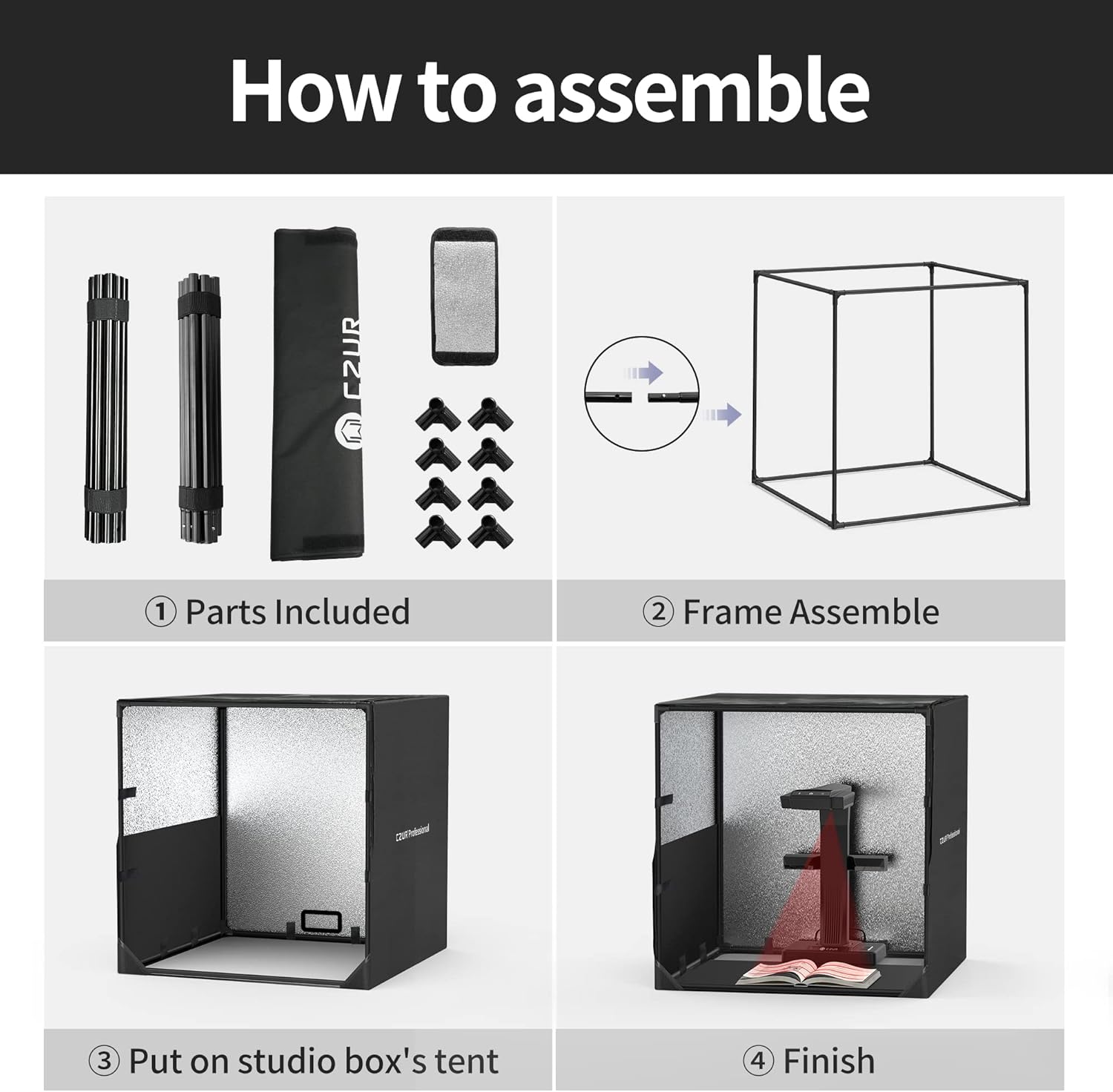
Figur 2: Visuel vejledning til monteringsprocessen.
- Identificer dele: Lay out all included parts and identify the frame tubes and corner pieces.
- Saml ramme: Connect the frame tubes using the corner pieces to form a cubic structure. Ensure all connections are secure.
- Attach Studio Box Tent: Carefully place the foldable studio box body over the assembled frame. Ensure the fabric aligns with the frame structure.
- Afslut opsætning: Secure the tent to the frame using any integrated fasteners (e.g., Velcro straps, zippers).
Video: Official assembly steps for the CZUR Studio Box, provided by the manufacturer.
Betjeningsvejledning
Scanner Integration
The primary function of the Studio Box is to create an optimal environment for document scanning by minimizing external light interference.

Figure 3: Document scanner positioned inside the studio box.
- Placering: Position your document scanner inside the assembled studio box. Ensure the scanner's camera is positioned correctly to capture the entire document area.
- Kabelstyring: Utilize the designated cable-hole cover to route any necessary cables (e.g., power, USB) out of the box, maintaining a tidy setup and preventing light leaks.
- Light Isolation: The silver-coated interior of the box, combined with its enclosed design, effectively isolates the scanning area from ambient room light, enhancing scan quality.
Specifikationer
- Produktdimensioner: 24 x 24 x 24 inches (60x60x60 cm)
- Varens vægt: 5.61 pund
- Materiale: Oxford cloth with silver-coated interior
- Funktioner: Durable, water-resistant, portable, easy assembly/disassembly, includes travel bag.
Opretholdelse
- Rensning: Wipe down the exterior and interior surfaces of the studio box with a soft, damp cloth. Avoid abrasive cleaners that may damage the material.
- Opbevaring: When not in use, disassemble the studio box and store it in the provided carrying bag to protect it from dust and damage. Store in a cool, dry place away from direct sunlight.
Fejlfinding
- Besvær med at samle: Ensure all frame tubes are fully inserted into the corner pieces. If the cloth box is difficult to mount, verify the frame is correctly aligned and consider having a second person assist.
- Zippers Not Closing: If zippers do not close completely, gently adjust the fabric around the frame to relieve tension and ensure proper alignment.
- Poor Scan Results: Ensure the studio box is fully enclosed to effectively block external ambient light. Verify your scanner's internal lighting is functioning correctly.
Garanti og support
Specific warranty and support information for this product is not available in the provided data. Please refer to the product packaging or the manufacturer's official website for detailed warranty terms and customer support contacts.


