Indledning
This manual provides comprehensive instructions for the installation, operation, and maintenance of your Natec Cabassu G2 Midi Tower PC Case. Please read this manual thoroughly before beginning installation to ensure proper setup and optimal performance.
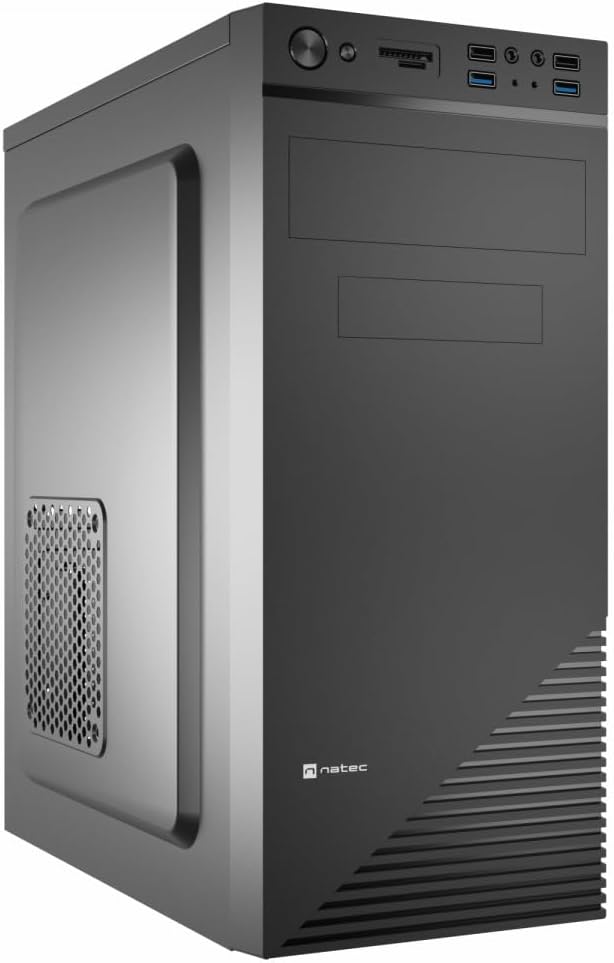
Figure 1: Natec Cabassu G2 Midi Tower PC Case. This image shows the front and left side of the black PC case, highlighting its sleek design and front panel layout.
Sikkerhedsoplysninger
- Afbryd altid strømforsyningen fra stikkontakten, før du installerer eller fjerner komponenter.
- Handle components with care to prevent damage from static electricity.
- Hold etuiet væk fra vand, fugt og ekstreme temperaturer.
- Sørg for korrekt ventilation for at forhindre overophedning.
- Do not attempt to open the power supply unit.
Pakkens indhold
Bekræft at alle varer er til stede i pakken:
- Natec Cabassu G2 Midi Tower PC Case
- Tilbehørssæt (skruer, afstandsstykker, kabelbindere)
- Brugervejledning (dette dokument)
Opsætning og komponentinstallation
1. Forberedelse af sagen
- Placer etuiet på en flad, stabil overflade.
- Remove the side panels by unscrewing the thumbscrews at the rear and sliding the panels backward.

Figur 2: Interiør view of the Natec Cabassu G2 case with the side panel removed, illustrating the internal layout for component installation.
2. Installation af bundkort
- Installer I/O-skjoldet i den bageste åbning af kabinettet.
- Align the motherboard with the pre-installed standoffs. The Cabassu G2 supports Mini ITX, Micro ATX, and ATX motherboards.
- Fastgør bundkortet med de medfølgende skruer.
3. Installation af strømforsyning
- Strømforsyningen monteres i bunden af kabinettet.
- Slide the power supply into its designated bay from the rear of the case.
- Secure it with screws from the rear.
4. Installation af lagerdrev
- 2.5" Drives (SSDs/HDDs): The case features 3 x 2.5" drive bays. Mount drives using the provided screws in the designated locations.
- 3.5" drev (harddiske): The case also supports 3.5" drives.
5. Installation af udvidelseskort
- Remove the necessary expansion slot covers from the rear of the case (7 expansion slots available).
- Indsæt dit grafikkort eller andre udvidelseskort i bundkortets PCIe-stik.
- Fastgør kortene med skruer.

Figur 3: Bagside view of the Natec Cabassu G2 case, detailing the I/O shield cutout, power supply opening, and seven expansion slots.
6. Kabelforvaltning
Route cables behind the motherboard tray where possible to improve airflow and aesthetics. Use the included cable ties to secure bundles.
7. Tilslutning af frontpanelkabler
Connect the front panel cables (USB 2.0, USB 3.0, audio, power switch, reset switch, HDD LED, power LED) to the corresponding headers on your motherboard. Refer to your motherboard manual for exact pin assignments.

Figure 4: Close-up of the Natec Cabassu G2 front panel, showing 2x USB 2.0 ports, 2x USB 3.0 ports, audio jacks, and power/reset buttons.
Betjeningsvejledning
Tænd/sluk
- Tænd: Tryk på tænd/sluk-knappen på frontpanelet.
- Sluk: Initiate shutdown through your operating system. For a forced shutdown, press and hold the power button for several seconds.
- Nulstil: Press the reset button on the front panel to restart the system.
Using Front Panel Ports
Frontpanelet giver nem adgang til:
- 2 x USB 2.0 porte
- 2 x USB 3.0 porte
- Audio input (microphone) and output (headphone) jacks
Connect compatible devices to these ports as needed.
Opretholdelse
Rensning
- Rengør regelmæssigt ydersiden af kabinettet med en blød, tør klud.amp klæde. Undgå slibende rengøringsmidler.
- Use compressed air to remove dust from fan filters and internal components. Ensure the system is powered off and unplugged before cleaning.
Støvfiltre
The case may include removable dust filters. Periodically remove and clean these filters to maintain optimal airflow and cooling performance.
Fejlfinding
| Problem | Mulig årsag | Løsning |
|---|---|---|
| Systemet tænder ikke. | Power cables not connected properly. Faulty power supply. | Check all power connections (motherboard, CPU, GPU, power supply to wall). Ensure power supply switch is ON. |
| USB-portene på frontpanelet virker ikke. | Front panel USB cables not connected to motherboard. | Verify that the USB 2.0 and USB 3.0 headers are correctly connected to the motherboard. |
| Excessive fan noise. | Dust accumulation. Loose fan. | Clean dust from fans and filters. Ensure all fans are securely mounted. |
Specifikationer
| Feature | Detalje |
|---|---|
| Modelnavn | Cabassu G2 |
| Varemodelnummer | S5624687 |
| Sagstype | Midi-tårnet |
| Dimensioner (LxBxH) | 19.69 x 19.69 x 11.02 tommer (50 x 50 x 28 cm) |
| Vægt | 7.04 pund (3.19 kg) |
| Materiale | Acrylonitrilbutadienstyren (ABS), legeret stål |
| Bundkort kompatibilitet | Mini ITX, Micro ATX, ATX |
| 2.5" drevbåse | 3 |
| Udvidelsesslots | 7 |
| Front I / O-porte | 2 x USB 2.0, 2 x USB 3.0, lyd ind/ud |
| Fan Support | 120mm (rear, pre-installed if applicable) |
| Afkølingsmetode | Luft |
| Strømforsyning Montering | Bundmontering |
Garantioplysninger
Natec products are covered by a manufacturer's warranty. Specific warranty terms and conditions may vary by region and retailer. Please refer to the warranty card included with your product or visit the official Natec website for detailed information regarding warranty coverage and claims.
Støtte
For technical assistance, troubleshooting, or further inquiries, please visit the official Natec support webwebstedet eller kontakt deres kundeserviceafdeling. Kontaktoplysninger kan typisk findes på produktemballagen eller det officielle mærke webwebsted.
Webwebsted: www.natec-zone.com (Eksamplinket, det faktiske link kan variere)


