1. Introduktion
Thank you for choosing the VANTRUE F1 Motorcycle Dash Cam. This device is designed to provide reliable video recording of your journeys, enhancing safety and providing evidence in case of incidents. The F1 features 4K front and 1080P rear recording, IP67 waterproofing, 5GHz WiFi, GPS, and advanced parking surveillance. Please read this manual thoroughly before installation and use to ensure proper operation and longevity of your device.

Image 1.1: VANTRUE F1 Dash Cam system overview, showing the main unit, front and rear cameras, remote control, and the accompanying smartphone application interface with GPS tracking.
2. Sikkerhedsoplysninger
- Ensure all cables are securely connected and routed away from moving parts or heat sources.
- Forsøg ikke at skille enheden ad eller ændre den. Dette vil ugyldiggøre garantien og kan forårsage skade.
- Hold enheden væk fra ekstreme temperaturer og direkte sollys i længere perioder.
- Use only original accessories provided by VANTRUE.
- Regularly check the memory card for errors and format it periodically to ensure optimal recording performance.
3. Pakkens indhold
Bekræft, at alle nedenstående varer er inkluderet i din pakke:
- F1 Dashcam Main Unit
- 4K frontkamera
- 1080P bagkamera
- Fjernbetjening
- Strømkabel
- Front Camera Cable
- Bagkamera kabel
- Støvfri klud
- O-shaped Ball Mount
- Host 3M Adhesive Pads (x2)
- Remote Control 3M Adhesive Pads (x2)
- Camera 3M Adhesive Pads (x2)
- Brugermanual

Image 3.1: Detailed diagram illustrating all components included in the VANTRUE F1 Dash Cam package, such as the main unit, front and rear cameras, remote, cables, and mounting accessories.
4. Produktet er slutview
The VANTRUE F1 system consists of a central processing unit, two high-resolution cameras, and a remote control for easy access to key functions. All components are designed for durability and weather resistance.
4.1 Nøglefunktioner
- 4K Front + 1080P Rear Recording: Optager klar videotage from both directions.
- IP67 vandtæt og støvtæt: Ensures reliable operation in various weather conditions.
- 5 GHz WiFi-forbindelse: For fast data transfer and seamless app integration.
- Indbygget GPS: Records speed, location, and driving route.
- WDR & HDR Technology: Enhances video clarity in challenging lighting.
- Sony STARVIS Night Vision: Provides superior low-light performance.
- EIS Anti-Shake: Reduces vibrations for stable video recording.
- 24-timers parkeringstilstand: Collision detection for continuous vehicle protection.
- Voice Alerts & Remote Control: Convenient operation and status updates.
- Support up to 512GB MicroSD Card: Ample storage for extended recordings.

Billede 4.1: En overview of the VANTRUE F1 Dash Cam's main features, including 4K+1080P recording, 5GHz WiFi, GPS, EIS, voltmeter, 24H parking mode, voice guidance, STARVIS night vision, 512GB support, and IP67 waterproofing. Product dimensions are also shown.
5. Installationsvejledning
Proper installation is crucial for the performance and durability of your VANTRUE F1 Dash Cam. It is recommended to have the installation performed by a qualified technician if you are unsure about any steps.
5.1 Montering af kameraerne
- Identify suitable locations for the front and rear cameras on your motorcycle. Ensure clear, unobstructed views.
- Rengør monteringsfladerne grundigt.
- Attach the cameras using the provided 3M adhesive pads or the O-shaped ball mount, ensuring they are securely fixed and angled correctly.
5.2 Montering af hovedenheden
- Find a protected, accessible location for the main unit, such as under the seat or in a storage compartment.
- Use the provided 3M adhesive pads to secure the main unit.
5.3 Ledningsforbindelser
- Connect the front and rear camera cables to the corresponding ports on the main unit.
- Connect the remote control cable to the main unit.
- Connect the power cable to the main unit and then to your motorcycle's power source (e.g., battery or ignition-switched power). Ensure correct polarity.
- Route all cables neatly and securely, avoiding interference with moving parts or exposure to excessive heat or moisture. Use cable ties if necessary.

Image 5.1: Illustration of the VANTRUE F1 Dash Cam's 4K front and 1080P rear cameras installed on a motorcycle, demonstrating optimal placement for recording.

Image 5.2: Visual representation of the VANTRUE F1 Dash Cam's IP67 fully waterproof rating, showing the main unit and cameras submerged in water.
6. Betjeningsvejledning
6.1 Tænd/sluk
- The dash cam will automatically power on and begin recording when your motorcycle's ignition is turned on (if wired to an ignition-switched power source).
- It will power off automatically when the ignition is turned off.
6.2 Fjernbetjeningsfunktioner
The multifunctional remote control provides quick access to essential features:
- Start/stop optagelse: Press the designated button to manually start or stop video recording.
- Wi-Fi til/fra: Toggle Wi-Fi connectivity for app access.
- Mikrofon til/fra: Aktiver eller deaktiver lydoptagelse.
- Låse File: Press to protect the current recording from being overwritten during loop recording.
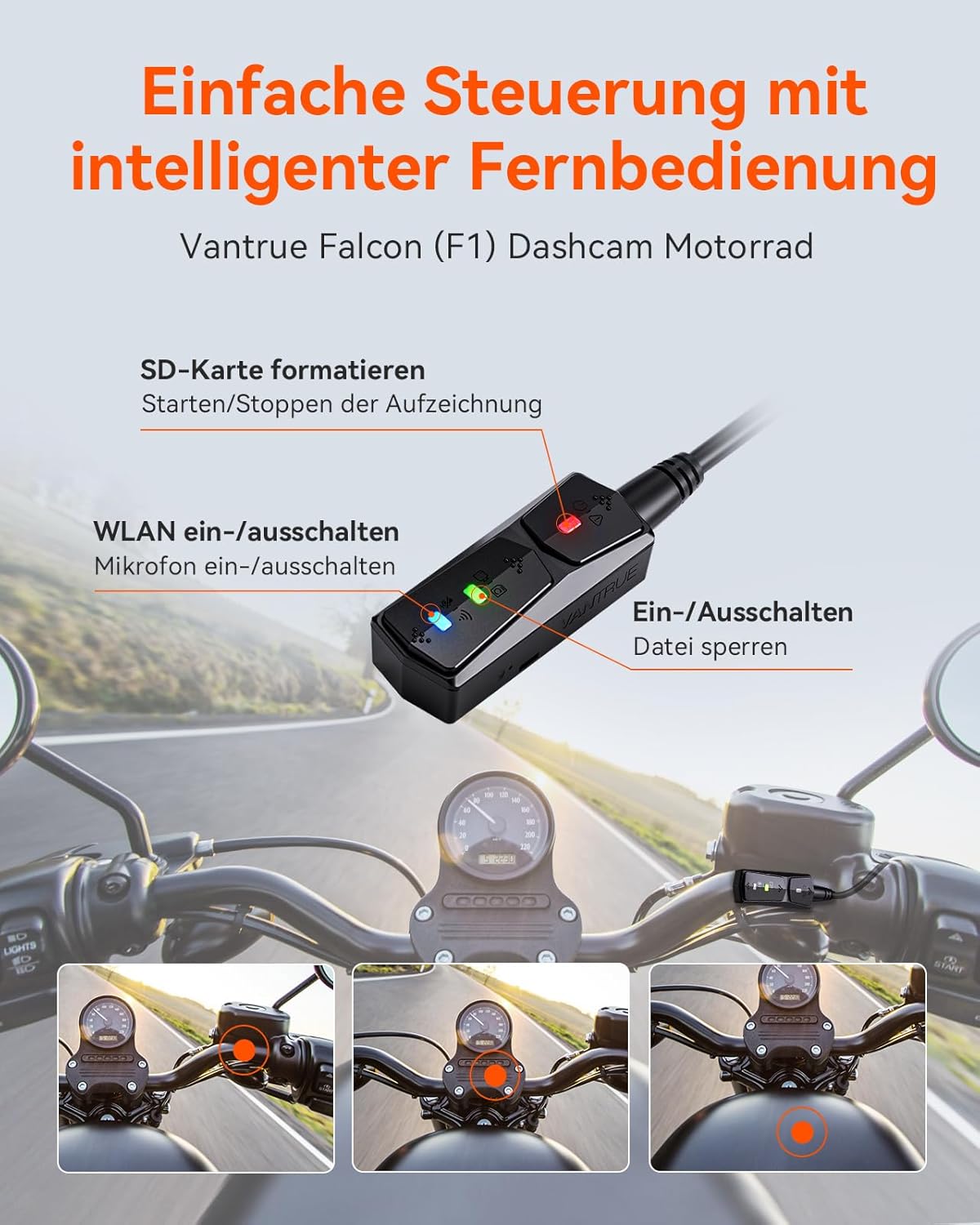
Billede 6.1: Detaljeret view of the VANTRUE F1 remote control, highlighting its buttons for formatting the SD card, starting/stopping recording, toggling Wi-Fi, turning the microphone on/off, and locking files. Eksamples of handlebar placement are also shown.
6.3 Smartphone App Usage
The VANTRUE F1 connects to your smartphone via 5GHz Wi-Fi for easy management and viewing.
- Download appen: Søg efter the official VANTRUE app on the App Store (iOS) or Google Play Store (Android).
- Opret forbindelse via Wi-Fi: Turn on the dash cam's Wi-Fi via the remote or app. Connect your phone to the dash cam's Wi-Fi network.
- Levende View & Afspilning: Brug appen til view live footage, afspil optagede videoer og download filedirekte til din telefon.
- Indstillinger: Adjust recording resolution, loop recording duration, G-sensor sensitivity, and other parameters.
- Firmwareopdateringer: The app allows for direct firmware updates, eliminating complex manual procedures.
- AR Mode: Experience an augmented reality driving view during playback, integrating GPS data with your video.
- Kilometerstatistik: Customize and export professional reports of your journey data, including start/end times, total mileage, average speed, and maximum speed.

Image 6.2: Depicts the VANTRUE F1's 5GHz WiFi and GPS capabilities, showing the smartphone app interface with live view, speed, and GPS tracking, along with download options for iOS and Android.

Image 6.3: Screenshot of the VANTRUE F1 app demonstrating the AR (Augmented Reality) mode, which overlays driving data onto the video footage for an interactive experience.

Image 6.4: Display of the VANTRUE F1's mileage statistics feature, showing detailed journey data such as start/end times, total mileage, and speed metrics, presented in a professional report format.
6.4 Stemmekontrol
The F1 features integrated voice control for hands-free operation, allowing you to manage certain functions without taking your hands off the handlebars.

Image 6.5: Illustration of the VANTRUE F1's voice control feature, showing the remote control with a microphone icon, indicating hands-free operation while riding.
6.5 Loop-optagelse
The dash cam continuously records, automatically overwriting the oldest files when the memory card is full. This ensures that you always have the most recent footage tilgængelig.

Image 6.6: Diagram illustrating the loop recording feature of the VANTRUE F1, showing how older videos are automatically overwritten and the storage capacity for different SD card sizes (64GB, 128GB, 256GB, 512GB).
6.6 GPS-funktionalitet
The integrated GPS module accurately records your motorcycle's speed, location, and driving route. This data can be viewed during video playback via the smartphone app, providing a comprehensive record of your journey.

Image 6.7: Visual representation of the VANTRUE F1's GPS localization feature, showing a driving route overlaid on a map with speed data, accessible through the app on a laptop and smartphone.
6.7 Parking Mode & Collision Detection
The F1 offers 24-hour parking surveillance. When a collision is detected while parked, the dash cam will automatically start recording and lock the footage, providing crucial evidence.

Image 6.8: Depicts the VANTRUE F1's collision detection parking mode, showing a motorcycle being hit by a car while parked, triggering recording. Also includes a comparison of low-light detection between Vantrue and other dash cams.

Image 6.9: Illustrates the 24-hour collision detection feature of the VANTRUE F1, showing the dash cam initiating recording and saving files upon impact, with a comparison of low-light detection.
6.8 Lav Voltage Beskyttelse
The app allows you to monitor the current battery voltage and set a low battery protection threshold. The dash cam will automatically disconnect if the voltage drops below the set level, preventing your motorcycle battery from draining completely.

Image 6.10: Shows the low voltage protection feature of the VANTRUE F1, accessible via the app, allowing users to monitor battery voltage and set a disconnection threshold to prevent battery drain.
6.9 Timelapse-optagelse
The F1 supports time-lapse video recording, compressing long periods into shorter videos. This feature optimizes storage space and can create engaging summaries of your rides.

Image 6.11: Illustrates the time-lapse video feature of the VANTRUE F1, showing how it compresses long recordings into shorter, more engaging videos while saving storage space.
7. Avancerede funktioner
7.1 Superior Video Quality
The F1 records in 4K (front) and 1080P (rear) resolutions, capturing detailed footage. Advanced technologies ensure clarity in various conditions:
- WDR (Wide Dynamic Range) & HDR (High Dynamic Range): These technologies balance exposure in scenes with both very bright and very dark areas, ensuring details are visible across the entire frame.
- Sony STARVIS Night Vision: Provides exceptional low-light performance, capturing clear and bright images even in challenging night conditions.

Image 7.1: Demonstrates the enhanced night vision capabilities of the VANTRUE F1, featuring Sony Starvis and HDR technology for excellent image quality even in low light conditions.

Image 7.2: Explains the STARVIS Night Vision feature of the VANTRUE F1, combined with HDR and WDR, showing how it handles overly bright or dark conditions to capture clear license plates and road details at night.
7.2 EIS Anti-Shake
Electronic Image Stabilization (EIS) technology minimizes vibrations and shakes, ensuring that your recorded footage remains stable and smooth, even on bumpy roads or during dynamic riding.

Image 7.3: Comparison image demonstrating the effectiveness of EIS (Electronic Image Stabilization) on the VANTRUE F1, showing a clear and stable image with EIS versus a blurry, shaky image without it.
8. Vedligeholdelse
- Rensning: Use the provided dust-free cloth to gently clean the camera lenses and main unit. Do not use harsh chemicals.
- Hukommelseskort: Format the microSD card regularly (e.g., once a month) to prevent data corruption and ensure optimal recording performance. Back up important files før formatering.
- Firmware: Check for firmware updates via the VANTRUE app to ensure your device has the latest features and bug fixes.
9. Fejlfinding
- Enheden tænder ikke: Check all power connections. Ensure the power cable is securely connected to both the main unit and the motorcycle's power source. Verify the motorcycle battery voltage.
- Recording issues (e.g., 'memory card full' alert): Format the microSD card. Ensure you are using a high-speed, reputable brand microSD card (e.g., VANTRUE 512GB, ASIN: B09SP5YYZF). Replace the card if issues persist.
- Problemer med Wi-Fi-forbindelse: Ensure Wi-Fi is enabled on the dash cam and your smartphone. Try restarting both devices. Check for interference from other wireless devices.
- Dårlig videokvalitet: Ensure camera lenses are clean. Check recording resolution settings in the app. Verify that cameras are securely mounted and not vibrating excessively.
- GPS registrerer ikke data: Sørg for, at GPS-modulet har en klar view of the sky. Check GPS settings in the app.
- Fjernbetjeningen reagerer ikke: Check the cable connection to the main unit. Ensure the remote is not damaged.
10. Specifikationer
| Feature | Specifikation |
|---|---|
| Mærke | VANTRUE |
| Modelnavn | F1 |
| Produktdimensioner | 2.54 x 7.5 x 7.5 cm |
| Varens vægt | 1.08 kilo |
| Flash-hukommelsestype | MicroSD (up to 512GB) |
| Kompatible enheder | Motorcykler |
| Yderligere funktioner | Loop Recording, 24H Collision Detection, Voice Alerts, GPS, 5GHz WiFi, WDR, HDR, Sony STARVIS Night Vision, EIS Anti-Shake, AR Mode, Mileage Statistics, Low Voltage Beskyttelse |
| Inkluderede komponenter | F1 Dashcam (main unit, front camera, rear camera, remote control, cables, mounting accessories) |
| Display Type | LCD or LED (on remote/app) |
| Video opløsning | 4K (front), 1080p (rear) |
| Batterier medfølger | No (Rechargeable battery for remote included) |
| Battericellesammensætning | Lithium Ion |
| Forbindelsesteknologi | Wi-Fi (5 GHz) |
| Monteringstype | Handlebar Mount / Adhesive Mount |
| Ægte Viewi vinkel | 160 Degrees (front), 145 Degrees (rear) |
| Farve | Sort |
| Vandtæt vurdering | IP67 |
11. Garanti og support
VANTRUE products come with a standard manufacturer's warranty. For detailed warranty information, product support, or technical assistance, please visit the official VANTRUE webwebstedet eller kontakt deres kundeservice direkte. Behold din købskvittering som købsbevis.


