1. Introduktion
This manual provides essential instructions for the safe and efficient use of your Claiks Mobile Standing Desk. Please read this manual thoroughly before assembly and operation, and retain it for future reference.
The Claiks Mobile Standing Desk is designed to offer a versatile and ergonomic workspace. Featuring pneumatic height adjustment, a tiltable desktop, and mobile wheels, it adapts to various working styles and environments.
2. Vigtige sikkerhedsoplysninger
Manglende overholdelse af disse sikkerhedsinstruktioner kan resultere i personskade eller beskadigelse af produktet.
- Vægtgrænse: This product has a maximum weight recommendation of 22 pund (10 kg). Do not exceed this limit. Exceeding the weight limit could cause instability, damage to the desk, or personal injury.
- Skrivebordsmateriale: The desktop is made of engineered wood. Handle with care to prevent damage.
- Pneumatic Adjustment: The desk features pneumatic height adjustment. Operate the adjustment mechanism carefully, ensuring hands and other objects are clear of moving parts to prevent pinching or injury.
- Stabilitet: Ensure all locking mechanisms (e.g., wheel locks) are engaged when the desk is stationary to prevent unintended movement.
- Børn og kæledyr: Keep children and pets away from the desk during adjustment or movement to prevent accidents.
- Forsamling: Assemble the desk according to the instructions provided. Ensure all components are securely fastened before use.
- Placering: Place the desk on a level surface. Avoid placing it near heat sources, direct sunlight, or in damp miljøer.
3. Pakkens indhold
Kontroller, at alle komponenter er til stede og ubeskadigede, før monteringen påbegyndes. Hvis der mangler eller er beskadigede dele, skal du kontakte kundesupport.
- Desktop with integrated tilt mechanism and anti-fall bracket
- Main support column with pneumatic cylinder
- Base with hidden sliding wheels and crescent-shaped feet
- Desk hook (optional attachment)
- Assembly hardware (screws, wrench, etc.)
- Instruktionsmanual (dette dokument)
4. Opsætning og montering
The Claiks Mobile Standing Desk is designed for straightforward assembly. It is recommended that one person performs the assembly.
4.1 Monteringstrin
- Udpak komponenter: Tag forsigtigt alle dele ud af emballagen. Læg dem på en ren, blød overflade for at undgå ridser.
- Fastgør base til søjle: Secure the main support column to the base using the provided hardware. Ensure all screws are tightened firmly.
- Vedhæft skrivebord: Connect the desktop to the top of the main support column. Follow the specific instructions in the included assembly guide for proper alignment and secure fastening.
- Install Desk Hook (Optional): If desired, attach the robust desk hook to the designated slot on the side of the desktop.
- Tjek stabilitet: Når skrivebordet er samlet, ryst det forsigtigt for at sikre, at alle forbindelser er fastgjort, og at skrivebordet er stabilt.

Figure 1: Assembled Claiks Mobile Standing Desk and its folded configuration.

Figure 2: Desk dimensions for upright and folded states.
5. Betjeningsvejledning
5.1 Justering af højde
The desk features a pneumatic height adjustment system, allowing for smooth transitions between sitting and standing positions.
- At hæve: Locate the height adjustment handle (typically on the side or underside of the desktop). Press the handle and gently lift the desktop. The pneumatic mechanism will assist in raising the desk. Release the handle at the desired height.
- At sænke: Press the height adjustment handle and apply gentle downward pressure on the desktop. The desk will smoothly lower. Release the handle at the desired height.
The adjustable height range is approximately 29.9 inches (76 cm) to 44.9 inches (114 cm).

Figure 3: Height adjustment and desktop tilt capabilities.
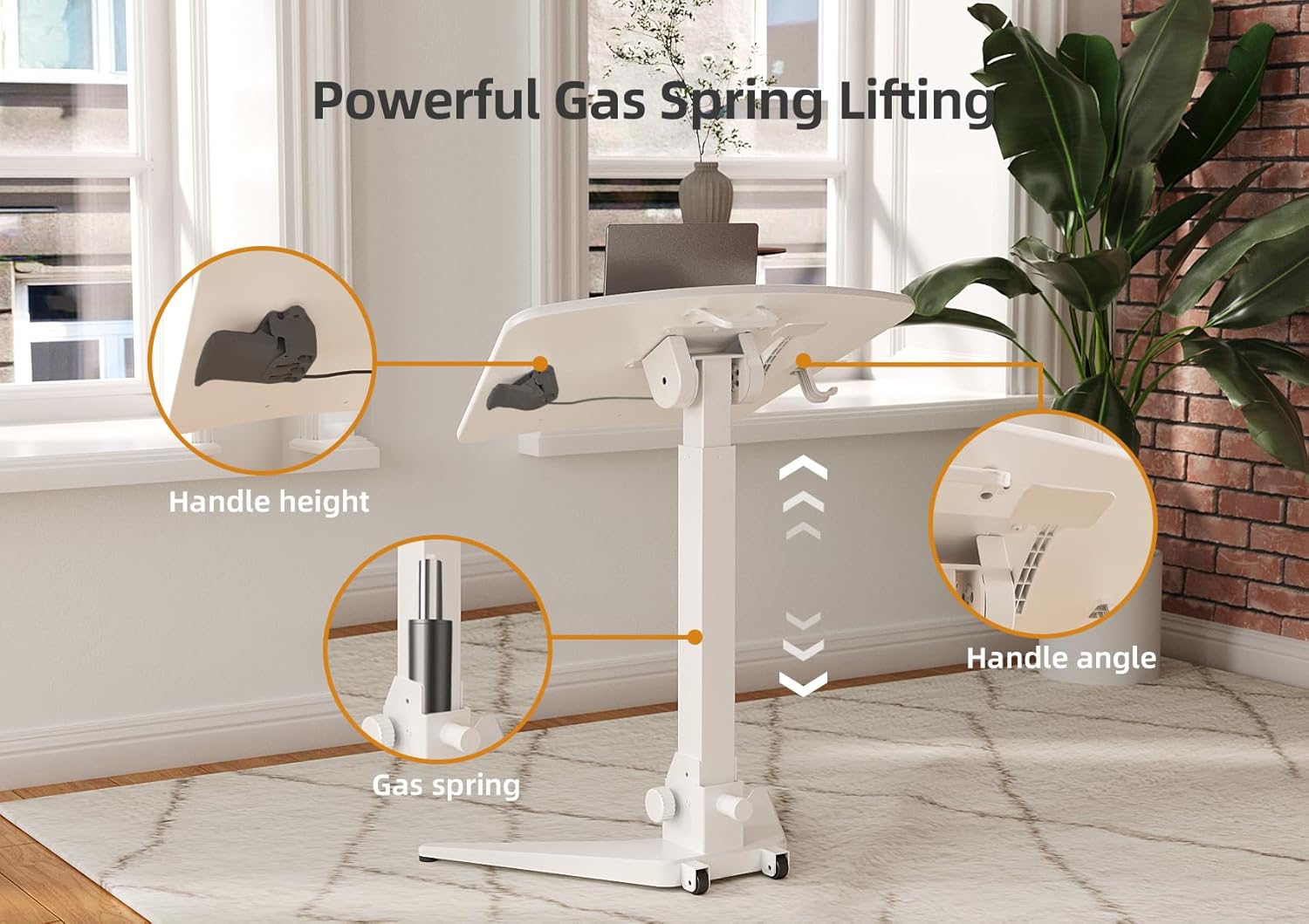
Figure 4: Components of the powerful gas spring lifting system.
5.2 Adjusting Desktop Tilt
The desktop can be tilted from 0° to 90° to accommodate various activities like reading, writing, or drawing.
- At vippe: Locate the tilt adjustment knob or lever (refer to your specific model's assembly guide for exact location). Loosen the knob/lever, adjust the desktop to the desired angle, and then tighten the knob/lever to secure it.
- Anti-Fall Bracket: The desktop includes an anti-fall bracket to prevent items from sliding off when tilted. Ensure items are placed securely against this bracket.

Figure 5: Anti-Fall Bracket for tilted use.

Figur 6: Eksamples of desktop tilt angles for different activities.
5.3 Moving the Desk
The desk is equipped with hidden sliding wheels for easy mobility.
- At flytte: Ensure the desktop is in a stable, horizontal position and any items are secured. Unlock the wheel locks if engaged. Gently push or pull the desk to its new location.
- For at sikre: Once in position, engage the wheel locks to prevent unintended movement.

Figure 7: Hidden sliding wheels and crescent-shaped base for mobility and stability.
5.4 Foldning til opbevaring
The desk can be folded for compact storage, making it suitable for small spaces.
- Step 1: Lower the Desk: Adjust the desk to its lowest height.
- Step 2: Flip Desktop: Adjust the desktop to a 90° vertical position.
- Step 3: Loosen Knob: Locate the folding knob at the base of the main column and loosen it.
- Step 4: Fold Base: Fold the base inwards until the desk is in its compact, folded state. Tighten the knob to secure.
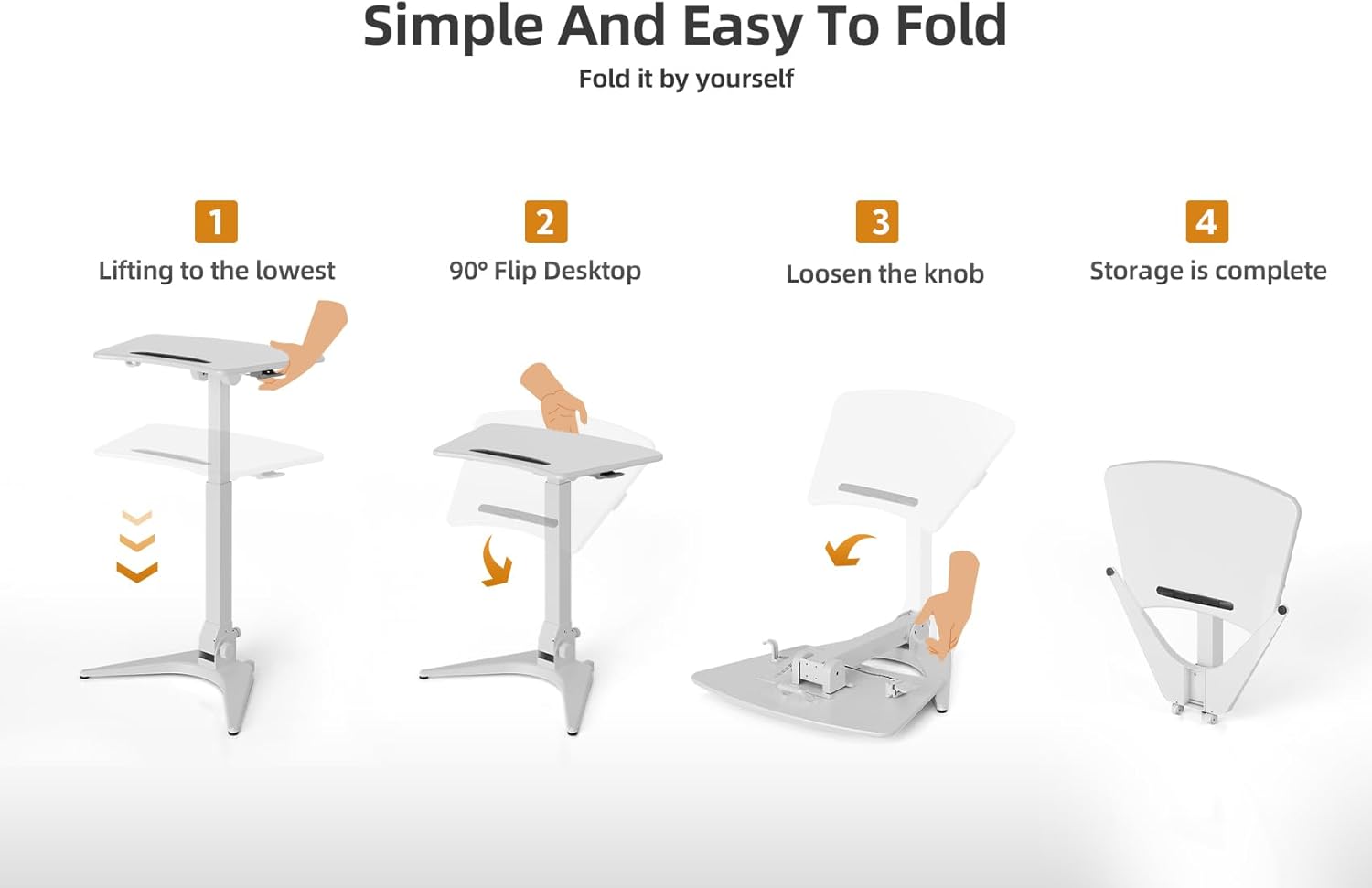
Figure 8: Step-by-step guide to folding the desk.
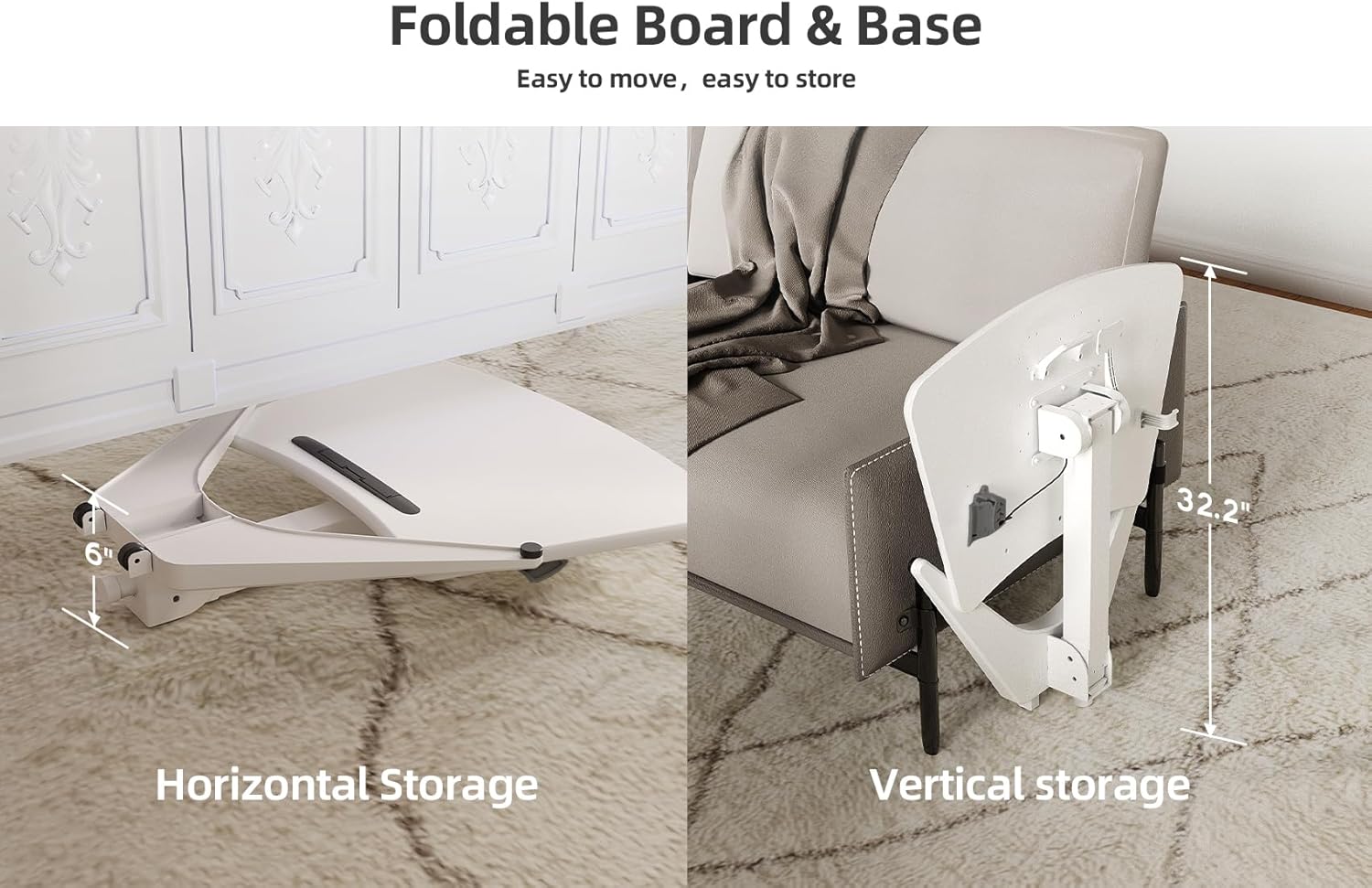
Figure 9: Horizontal and vertical storage options for the folded desk.
5.5 Using the Desk Hook
A robust hook is provided for hanging items such as headphones, bags, or cables, helping to keep your workspace organized.

Figure 10: Robust desk hook in use.
6. Vedligeholdelse
Regular maintenance ensures the longevity and optimal performance of your Claiks Mobile Standing Desk.
- Rensning: Tør skrivebordsoverfladerne af med snavsamp klud. Undgå slibende rengøringsmidler eller barske kemikalier, der kan beskadige overfladen.
- Inspektioner: Kontrollér regelmæssigt alle skruer og forbindelser for at sikre, at de forbliver fastspændte. Efterspænd om nødvendigt.
- Pneumatisk system: The pneumatic cylinder is maintenance-free. Do not attempt to lubricate or disassemble it.
- Hjul: Hold hjulene fri for snavs for at sikre en jævn bevægelse.
7. Fejlfinding
If you encounter issues with your Claiks Mobile Standing Desk, refer to the following common problems and solutions:
| Problem | Mulig årsag | Løsning |
|---|---|---|
| Skrivebordet er ustabilt eller vakkelvornt. | Loose connections; uneven floor; damaged base/feet. | Ensure all assembly screws are tightened. Move the desk to a level surface. Inspect the base for damage. |
| Vanskeligheder med at justere højden. | Mechanism obstruction; excessive weight on desktop; pneumatic cylinder issue. | Check for obstructions around the column. Reduce weight on the desktop (ensure it's below 22 lbs). If the issue persists, contact customer support. |
| Desktop does not tilt or secure properly. | Tilt knob/lever not tightened; mechanism obstruction. | Ensure the tilt adjustment knob/lever is fully tightened after adjusting the angle. Check for any foreign objects obstructing the tilt mechanism. |
| Wheels do not roll smoothly or are stuck. | Wheel locks engaged; debris in wheels; damaged wheels. | Disengage wheel locks. Clean any hair or debris from the wheels. If wheels are damaged, contact customer support for replacements. |
| Manglende eller beskadigede dele ved levering. | Forsendelsesskader; emballagefejl. | Do not proceed with assembly. Contact Claiks customer support immediately with your purchase details. |
If you experience a problem not listed here or if the suggested solutions do not resolve the issue, please contact Claiks customer support for further assistance.
8. Produktspecifikationer
| Feature | Detalje |
|---|---|
| Mærke | Claiks |
| Modelnummer | CLAIKS-S-86f974f8ea |
| Produktmål (D x B x H) | 49.8 cm D x 72.9 cm B x 114.3 cm H (19.6 cm D x 28.7 cm B x 45 cm H) |
| Farve | Hvid |
| Stil | Moderne |
| Grundmateriale | Metal (legeret stål) |
| Top materialetype | Konstrueret træ |
| Finish Type | Polished, Rust-resistant coating |
| Speciel funktion | Adjustable Height, Tiltable Desktop, Foldable, Mobile Wheels |
| Minimum højde | 29.9 tommer (75.9 cm) |
| Maksimal højde | 44.9 tommer (114 cm) |
| Maksimal hældningsvinkel | 90 grader |
| Maksimal vægtanbefaling | 22 pund (10 kg) |
| Varens vægt | 18.22 kilogram (ca. 40.17 lbs) |
| Påkrævet samling | Ja (Anbefales til 1 person) |
| Inkluderede komponenter | Desk, Assembly Hardware, Desk Hook |
| Produktplejevejledning | Tør med Damp Klæde |
9. Garanti og kundesupport
Claiks stands behind the quality of its products. For specific warranty details, please refer to the warranty card included with your purchase or visit the official Claiks webwebsted.
If you have any questions, require assistance with assembly, or need to report a missing/damaged part, please contact Claiks customer support:
- Webwebsted: Visit the Claiks Store on Amazon
- E-mail: Se produktemballagen eller garantikortet for direkte kontaktoplysninger.
- Telefon: Se produktemballagen eller garantikortet for direkte kontaktoplysninger.
Please have your model number (CLAIKS-S-86f974f8ea) and purchase date ready when contacting support.


