1. Introduktion
This manual provides comprehensive instructions for the operation and maintenance of your ANYSECU UV-K5 Dual Band Walkie Talkie. The UV-K5 is a versatile communication device featuring UHF/VHF dual-band capabilities, 200 memory channels, and advanced functions such as NOAA Weather Alert, DTMF, FM radio, and voice encryption. Please read this manual thoroughly to ensure proper usage and to maximize the performance of your device.

Figure 1.1: ANYSECU UV-K5 Dual Band Walkie Talkie
2. Hvad er der i æsken
Upon unboxing your ANYSECU UV-K5, please verify that all the following components are included:
- UV-K5 Radio Unit
- Antenne
- Batteri
- Charger (Desk Charger)
- Bælteclips
- Brugermanual

Figure 2.1: Included components of the UV-K5 package.
3. Produktet er slutview
Familiarize yourself with the various parts and controls of your UV-K5 radio:

Figure 3.1: Labeled diagram of the UV-K5 radio, showing the antenna, flashlight, switch/volume key, PTT, menu/confirm key, keys 1-9, up/down/return keys, headphone jack, and Type-C charger port.
- Antenne: Til at sende og modtage signaler.
- Switch/Volume Key: Tænder/slukker radioen og justerer lydstyrken.
- PTT (Push-to-Talk) knap: Tryk og hold nede for at sende, slip for at modtage.
- Menu/Confirm Key (M): Enters the menu and confirms selections.
- Op/Ned-taster: Navigate through menu options or adjust frequencies/channels.
- Numerisk tastatur: For direct frequency input, channel selection, and accessing shortcut functions.
- Type-C opladerport: Til direkte opladning af radioen.
- Hovedtelefonstik: For connecting an external earpiece or microphone.
4. Opsætning
4.1. Batteriinstallation og opladning
The UV-K5 comes with a rechargeable polymer lithium-ion battery. For air transport requirements, the battery may be pre-installed. This does not indicate a used product.

Figure 4.1: Important note regarding battery installation for shipping.
To charge the radio, you can use either the included desk charger or a Type-C cable directly. The radio supports multiple charging modes for convenience.
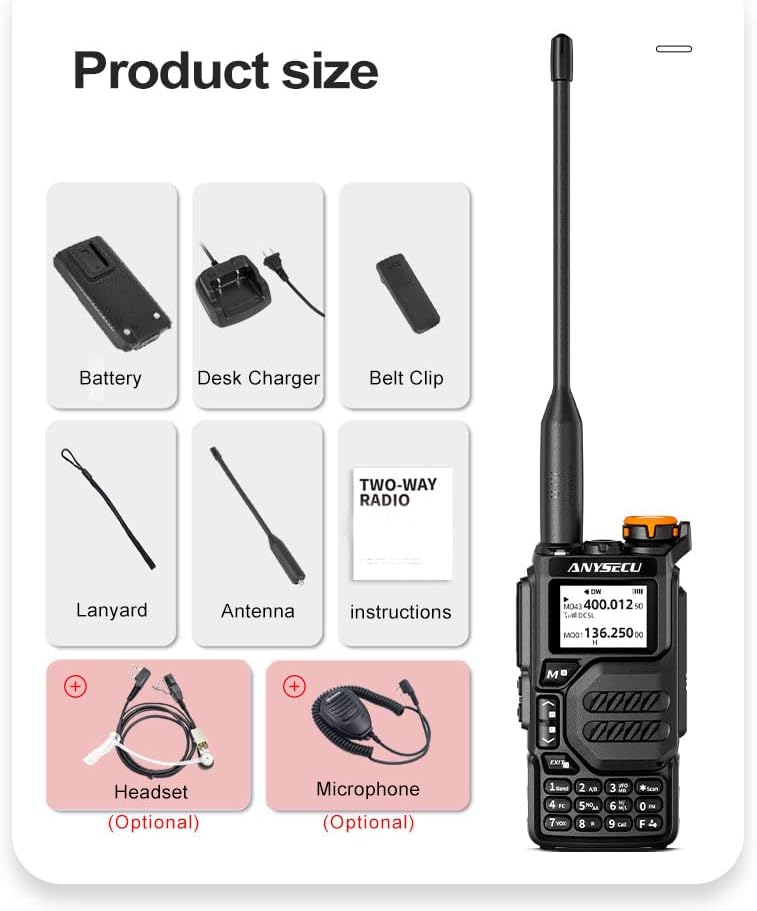
Figure 4.2: The UV-K5 supports both Type-C direct charging and traditional seat charging.
The battery provides durable power and long standby time, with a capacity of 1600mAh.

Figure 4.3: The UV-K5 features a 1600mAh polymer lithium-ion battery for extended use.
4.2. Antennetilslutning
Skru antennen med uret ind i antennestikket oven på radioen, indtil den er fingerstram. Spænd den ikke for hårdt.
5. Betjeningsvejledning
5.1. Tænd/sluk og justering af lydstyrke
To power on the radio, rotate the Switch/Volume key clockwise. To power off, rotate it counter-clockwise until it clicks. Rotate the key to adjust the volume level.
5.2. Mode Switching (Channel/Frequency Mode)
The UV-K5 supports both Channel Mode and Frequency (VFO) Mode. You can switch between these modes using the appropriate function key or menu option. In Frequency Mode, you can directly input frequencies using the numeric keypad. In Channel Mode, you can select from up to 200 pre-programmed channels.

Figure 5.1: The UV-K5 features a dual-band dual display, allowing simultaneous monitoring of two frequencies or channels.
5.3. Menu navigation
The UV-K5 has 51 menu options for various settings. Press the M (Menu/Confirm) key to enter the menu. Use the Op/Ned keys to navigate through options. Press M again to select an option, then use Op/Ned to change its value. Press M to confirm the change, or EXIT at annullere.
5.4. Nøglefunktioner
- NOAA Vejralarm: The radio can receive NOAA weather alerts. To hear the station, you need to press the RECEIVE side button (left side under PTT); it is not automatic RX.
- Fast Copy One Channel (Wireless Frequency Copy): This feature allows you to quickly copy a frequency from another radio.
- DTMF: To-tone multifrekvenssignalering til forskellige styrefunktioner.
- FM-radio: Listen to standard FM broadcast radio.
- Voice Encryption (Scrambler): Forbedrer kommunikationens privatliv.
- VOX funktion: Stemmeaktiveret transmission, der muliggør håndfri betjening.
- Nødalarm: Activates an alarm signal for emergency situations.
- Power-on Protection Password: Indstil en adgangskode for at forhindre uautoriseret brug.

Figure 5.2: Activating NOAA receive function requires pressing the side button.

Figure 5.3: Wireless frequency copy in action, showing two radios.

Figure 5.4: Visual representation of key features including Emergency Alert, Wireless Replication, Power-on Password, Voice Encryption, NOAA Weather Reminder, and Intercom.
5.5. Programmering af radioen
The UV-K5 can be programmed manually via the keypad or using dedicated software on a computer. A programming cable (same as Baofeng UV-5R 2-pin cable) is required for computer programming.
For software download and programming instructions, please refer to the official ANYSECU webwebsted:
- Download af software: http://www.szanysecu.com/h-col-106.html (named: UV-K5)
- Sådan programmeres: http://www.szanysecu.com/en/en/h-nd-37.html
5.6. Officiel produktvideo
Watch this official video for a demonstration of the ANYSECU UV-K5 Dual Band Radio's features and operation:
Video 5.1: Demonstration of the ANYSECU UV-K5 Dual Band Radio, showcasing its interface and basic functions.
6. Vedligeholdelse
To ensure the longevity and optimal performance of your UV-K5 radio, follow these maintenance guidelines:
- Rensning: Brug en blød, damp klud til at rengøre radioens yderside. Brug ikke skrappe kemikalier eller slibende rengøringsmidler.
- Batteripleje: Oplad batteriet regelmæssigt. Undgå at aflade batteriet helt ofte, da dette kan reducere dets levetid. Opbevar radioen og batteriet et køligt og tørt sted, når de ikke er i brug i længere perioder.
- Antennepleje: Handle the antenna carefully. Bending or forcing it can damage the connector.
- Miljøbeskyttelse: Protect the radio from extreme temperatures, direct sunlight, dust, and moisture. The radio is not water resistant.
7. Fejlfinding
If you encounter issues with your UV-K5 radio, refer to the following common troubleshooting tips:
| Problem | Mulig årsag | Løsning |
|---|---|---|
| Radioen tændes ikke | Low or dead battery; incorrect battery installation | Oplad batteriet; sørg for, at batteriet er korrekt installeret. |
| Kan ikke sende eller modtage | Incorrect frequency/channel; antenna not connected; squelch level too high | Verify frequency/channel settings; ensure antenna is securely attached; adjust squelch level. |
| Dårlig lydkvalitet | Weak signal; volume too low/high; microphone/speaker issues | Move closer to transmitting radio; adjust volume; check for obstructions on microphone/speaker. |
| Tastaturet reagerer ikke | Tastaturlås aktiveret | Deactivate keypad lock (refer to manual for specific key combination). |
For more complex issues or problems not listed here, please contact customer support or refer to the detailed troubleshooting section in the full user manual.
8. Specifikationer
Below are the technical specifications for the ANYSECU UV-K5 Walkie Talkie:
| Specifikation | Værdi |
|---|---|
| Mærke | ANYSECU |
| Modelnummer | UV K5 |
| Varens vægt | 15.5 ounce |
| Produktdimensioner | 1 x 3 x 5 tommer |
| Batterier | 1 A-batterier påkrævet (medfølger) |
| Farve | Sort |
| Antal kanaler | 200 (as per product title) |
| Speciel funktion | UHF, VHF, DTMF, FM, Scrambler, NOAA Weather Alert, Fast Copy One Channel |
| Frekvensområde | UHF, VHF |
| Maksimal talerækkevidde | 5 kilometer |
| Tuner-teknologi | UHF, VHF |
| Voltage | 7.4 volt |
| Vandmodstandsniveau | Ikke vandafvisende |
| Dato først tilgængelig | 3. april 2023 |
9. Garanti og support
The ANYSECU UV-K5 radio body comes with a 1 års garanti fra købsdatoen.
For technical support, software downloads, or further assistance, please visit the official ANYSECU website or contact their customer service. Relevant links for programming software and guides are provided in Section 5.5 of this manual.


