1. Introduktion
This manual provides detailed instructions for the proper setup, operation, and maintenance of your Walkers GWP-RSEMPAT Razor Slim Electronic Muff and Razor Walkie Talkie. Please read this manual thoroughly before using the product to ensure safe and effective operation.

Figur 1: Walkers GWP-RSEMPAT Razor Slim Electronic Muff and Razor Walkie Talkie. This image displays both the electronic hearing protection muff and the integrated walkie-talkie communication unit.
2. Sikkerhedsoplysninger
Always prioritize safety when using electronic hearing protection and communication devices. Failure to follow these instructions may result in hearing damage, equipment malfunction, or other hazards.
- Høreværn: These muffs are designed to protect against hazardous noise levels. Ensure they are properly fitted and functioning before exposure to loud environments.
- Batterisikkerhed: Use only the specified battery types. Do not mix old and new batteries, or different types of batteries. Dispose of batteries according to local regulations. Remove batteries during long periods of non-use.
- Miljøforhold: Avoid exposing the device to extreme temperatures, moisture, or corrosive substances.
- Rensning: Rengør enheden med en blød, damp klæde. Brug ikke skrappe kemikalier eller slibende rengøringsmidler.
- Ændringer: Do not attempt to modify or disassemble the device. Unauthorized modifications can void the warranty and pose safety risks.
3. Pakkens indhold
Bekræft at alle varer er til stede i din pakke:
- Walkers Razor Slim Electronic Muff
- Walkers Razor Walkie Talkie Unit
- Brugervejledning (dette dokument)
- Batteries (may be included or sold separately, check packaging)
4. Produktfunktioner
4.1. Walkers Razor Slim Electronic Muff
- Høreværn: Ultra lav-profile design with extra slim ear cups for a secure fit, protecting against hazardous noises.
- Sund Ampliifikation: Two hi-gain microphones provide clear omni-directional hearing, amplifying safe sounds. Low frequencies are enhanced for accurate, natural sound.
- Robust konstruktion: Features a rubberized coating and sound-dampening composite housing to protect internal electronics.
- Komfortabel pasform: Padded metal wire frame headband ensures comfort during extended use.
- Brugervenlig kontrol: Recessed volume control knob prevents accidental adjustments. External battery door for convenient access.
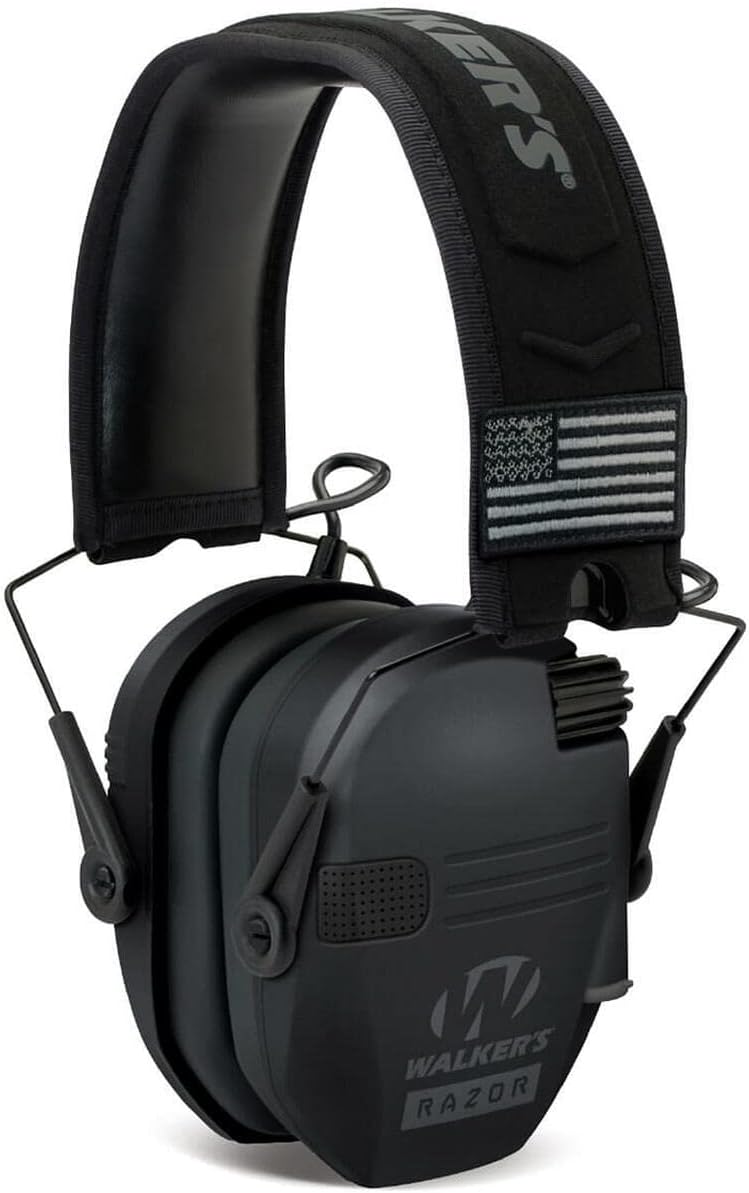
Figur 2: Walkers Razor Slim Electronic Muff. This image shows the electronic hearing protection muff with its low-profile design.
4.2. Walkers Razor Walkie Talkie
- Integreret design: Custom designed to integrate seamlessly onto Walkers Razor Muffs (muffs sold separately, not compatible with Razor Quads).
- Kommunikationstilstande: Supports Push-to-Talk (PTT) and Voice Activated Transmit (VOX) for hands-free communication.
- Udvidet rækkevidde: Allows for communication up to 3 miles in optimal conditions.

Figur 3: Walkers Razor Walkie Talkie Unit. This image displays the compact walkie-talkie unit with its controls and microphone.
5. Opsætning
5.1. Razor Slim Electronic Muff Setup
- Batteri installation: Locate the battery compartment on the exterior of each ear cup. Open the compartment and insert the required batteries (typically AAA, refer to packaging for exact type and quantity) according to the polarity indicators. Close the compartment securely.
- Justering af pandebåndet: Extend or retract the metal wire frame headband to ensure a snug yet comfortable fit over your ears. The ear cups should fully enclose your ears to provide optimal hearing protection and sound amplifikation.
- Tænd: Rotate the volume control knob on the right ear cup clockwise until you hear a click, indicating the unit is powered on.

Figur 4: Top view of Walkers Razor Slim Electronic Muff. This image shows the top of the muff, including the headband and an American flag patch, indicating the design and fit.
5.2. Razor Walkie Talkie Setup
- Attachment to Muff: The Walkie Talkie unit is designed to clip onto the side of the Walkers Razor Slim Electronic Muff. Align the attachment points on the walkie-talkie with the corresponding slots on the muff and firmly press until it clicks into place.
- Batteri installation: Open the battery compartment on the Walkie Talkie unit and insert the required batteries (refer to packaging for type and quantity) according to the polarity indicators. Close the compartment securely.
- Tænd: Press and hold the power button on the Walkie Talkie unit until the display illuminates.
6. Betjeningsvejledning
6.1. Razor Slim Electronic Muff Operation
- Tænd/sluk: Rotate the recessed volume control knob clockwise to power on and counter-clockwise to power off.
- Lydstyrkejustering: Once powered on, continue rotating the volume control knob to adjust the amplification level of ambient sounds. Start with a lower volume and increase as needed for comfortable listening.
6.2. Razor Walkie Talkie Operation
- Tænd/sluk: Tryk og hold tænd/sluk-knappen nede for at tænde eller slukke for enheden.
- Kanalvalg: Use the 'Up' and 'Down' arrow buttons to select your desired communication channel. Ensure all communicating parties are on the same channel.
- VOX (Voice Activated Transmit) Mode: To enable VOX, press the 'Mode' button until 'VOX' appears on the display. In VOX mode, the unit will automatically transmit when it detects your voice, allowing for hands-free communication. Adjust VOX sensitivity if needed (refer to specific unit instructions for sensitivity adjustment).
- PTT (Push-to-Talk) Mode: To use PTT, ensure VOX is disabled. Press and hold the PTT button (typically located on the side of the unit) to transmit your message. Release the button to listen.
- Rækkevidde: The effective communication range is up to 3 miles under ideal conditions. Obstacles such as buildings, dense foliage, and terrain can significantly reduce this range.
7. Vedligeholdelse
- Rensning: Regularly wipe down the ear cups and exterior of both units with a soft, slightly damp cloth. Do not immerse the units in water or use harsh cleaning agents.
- Udskiftning af batteri: Replace batteries in both the muff and walkie-talkie units when performance degrades or the low battery indicator appears. Always replace all batteries in a unit at the same time.
- Opbevaring: When not in use, store the device in a cool, dry place away from direct sunlight and extreme temperatures. Remove batteries if storing for extended periods to prevent leakage. The muffs can be folded for compact storage.

Figur 5: Folded Walkers Razor Slim Electronic Muff. This image demonstrates the compact, folded state of the electronic muff for easy storage and transport.
8. Fejlfinding
| Problem | Mulig årsag | Løsning |
|---|---|---|
| No sound from muff | Batteries dead or incorrectly inserted; Muff not powered on; Volume too low. | Check/replace batteries; Ensure muff is powered on; Increase volume. |
| Distorted sound from muff | Low batteries; Moisture in microphones; Volume too high. | Replace batteries; Allow unit to dry; Reduce volume. |
| Walkie Talkie not transmitting/receiving | Batteries dead or incorrectly inserted; Unit not powered on; Incorrect channel; Out of range; Obstructions. | Check/replace batteries; Power on unit; Verify channel with other party; Move closer; Find clear line of sight. |
| VOX not activating | VOX sensitivity too low; Speaking too softly. | Increase VOX sensitivity (if adjustable); Speak louder and closer to microphone. |
9. Specifikationer
- Produktmodel: GWP-RSEMPAT
- Høreværn: Razor Slim Electronic Muff
- Sund Ampliifikation: Two Hi-Gain Omni-Directional Microphones
- Communication Unit: Razor Walkie Talkie
- Kommunikationsområde: Op til 3 miles (sigtelinje)
- Kommunikationstilstande: Push-to-Talk (PTT), Voice Activated Transmit (VOX)
- Konstruktion: Rubberized coating, sound dampende komposithus
- Strømkilde: Batteries (specific type and quantity may vary, refer to product packaging)
10. Garanti og support
This product is covered by a manufacturer's warranty. Please refer to the warranty card included with your purchase or visit the official Walkers webhjemmeside for detaljerede garantivilkår.
For technical support, troubleshooting assistance, or to inquire about replacement parts, please contact Walkers customer service through their official webwebstedet eller kontaktoplysningerne på din produktemballage.


