1. Introduktion
This manual provides essential instructions for the safe and efficient operation of your RONGTA SE4770 Rugged PDA Barcode Scanner. This device is a high-performance mobile handheld terminal designed for various applications including retail, warehouse management, logistics, and inventory control. It combines the functionality of an Android 11 smartphone with an integrated Zebra SE4770 barcode scanner, offering robust performance and durability.
Læs venligst denne manual grundigt, inden du bruger enheden, og gem den til senere brug.
2. Produktet er slutview
2.1 Enhedskomponenter
The RONGTA SE4770 features a rugged design with a 6-inch HD touch screen and an integrated barcode scanner. Key components include:
- Forreste display: 6-inch FHD+ 1080P HD screen for clear visual interaction.
- Bagside: Integrated Zebra SE4770 barcode scanner, camera, and battery compartment.
- Sideknapper: Power button, volume controls, and dedicated scan buttons.
- Porte: USB-C-port til opladning og dataoverførsel.

Figur 2.1: Forside og bagside view of the RONGTA SE4770 PDA Barcode Scanner, showing the display and rear scanner module.
2.2 Nøglefunktioner
- Operativsystem: Android 11 for a familiar and versatile user experience.
- Processor: Octa-core 2.0GHz CPU for high performance and stability.
- Hukommelse og opbevaring: 4GB RAM + 64GB ROM, expandable via microSD card (not included).
- Vise: 6-inch FHD+ (1080P) HD touch screen, visible in strong outdoor light, supports multi-touch with gloves or wet hands.
- Stregkodescanner: Integrated Zebra SE4770 for fast and accurate scanning of 1D, 2D, and QR barcodes, even if blurred, dirty, or worn.
- Holdbarhed: IP68 rated for water and dust resistance, and 1.5m drop resistance.
- Batteri: 5000mAh large capacity battery with QC3.0 18W fast charging. Features a SuperCap power change solution for seamless battery swaps without shutdown.
- Forbindelse: 2.4G/5G Dual-band Wi-Fi, 4G Full Network support, and Bluetooth 5.1.
- Kamera: 1600W+500W Pixel Camera (details on usage in Operating Instructions).
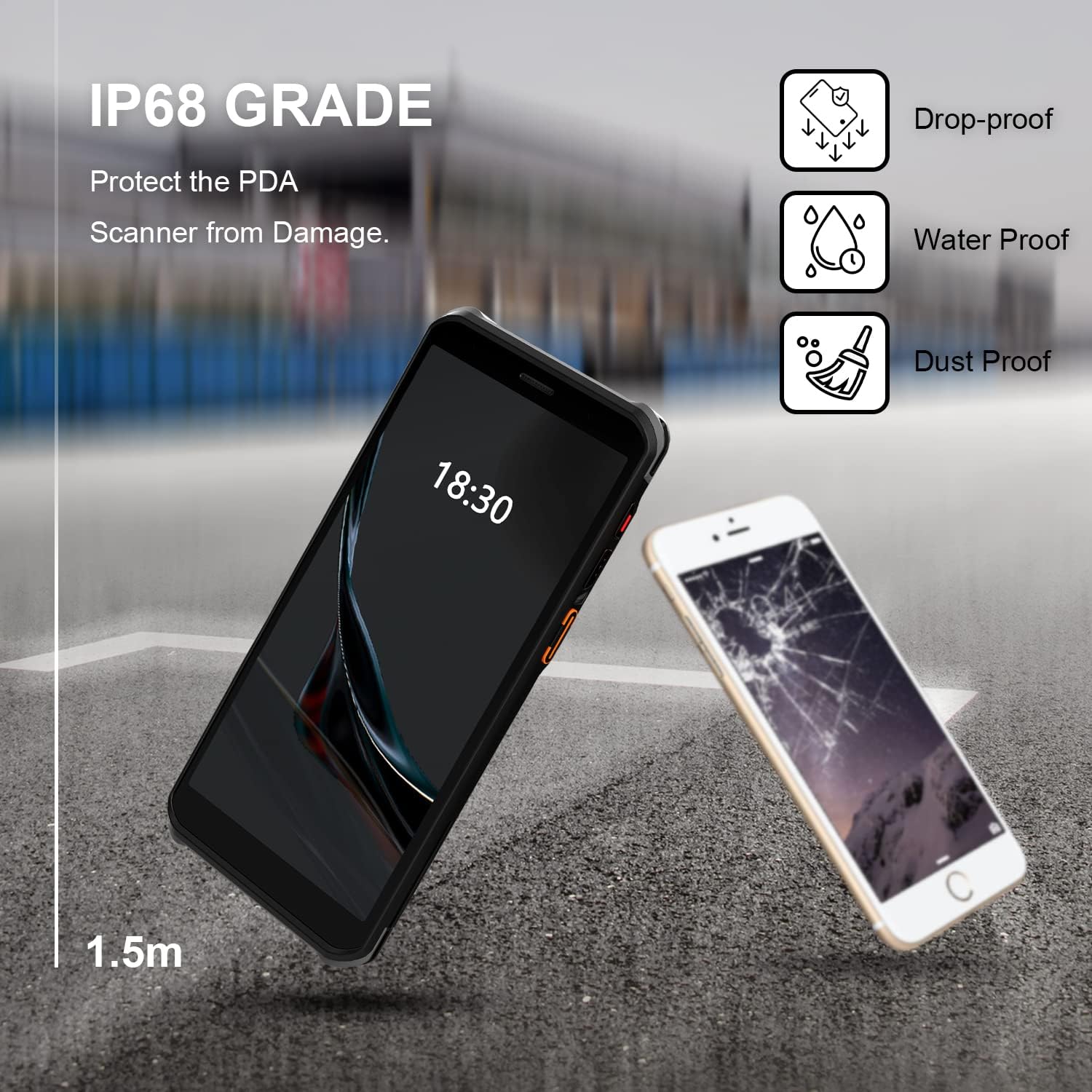
Figure 2.2: The RONGTA SE4770 PDA is designed with IP68 water and dust resistance and 1.5m drop protection, ensuring durability in demanding environments.

Figure 2.3: The device supports 2.4G/5G Dual-band WIFI and Bluetooth 5.1 for reliable wireless connectivity.
3. Opsætning
3.1 Udpakning og første inspektion
Carefully remove all components from the packaging. Verify that all items are present and undamaged. The package should include the RONGTA SE4770 PDA, a USB-C cable, a power adapter, and a hand-strap belt.
3.2 Batteriinstallation og opladning
- Find batterirummet på bagsiden af enheden.
- If the battery is not pre-installed, insert the 5000mAh Lithium-Ion battery, ensuring correct orientation.
- Luk batterirummet forsvarligt.
- Connect the USB-C cable to the device's charging port and the other end to the power adapter. Plug the adapter into a power outlet.
- Allow the device to charge fully before first use. The 18W fast charging feature will expedite this process.

Figure 3.1: The device charging, indicating battery status.
3.3 Tænd/sluk
- For at tænde: Press and hold the Power button on the side of the device until the RONGTA logo appears on the screen.
- For at slukke: Tryk på tænd/sluk-knappen og hold den nede, indtil menuen med strømindstillinger vises. Vælg 'Sluk'.
- For at genstarte: Press and hold the Power button until the power options menu appears. Select 'Restart'.
3.4 Indledende Android-opsætning
Upon first power-on, follow the on-screen prompts to complete the initial Android 11 setup. This typically includes selecting your language, connecting to a Wi-Fi network, setting up a Google account (optional), and configuring security settings.
4. Betjeningsvejledning
4.1 Brug af stregkodescanneren
The RONGTA SE4770 is equipped with a high-performance Zebra SE4770 scanner capable of reading various 1D, 2D, and QR barcodes.
- Open an application that requires barcode input (e.g., inventory management software, POS application).
- Point the scanner window, located on the top rear of the device, towards the barcode.
- Press one of the dedicated scan buttons on the side of the device. A red aiming beam will appear.
- Align the aiming beam with the center of the barcode. The device will emit a beep or vibrate upon successful scan, and the data will be entered into the active field of your application.

Figure 4.1: A user scanning a package barcode using the RONGTA SE4770 PDA.

Figure 4.2: The SE4770 Zebra scanner in use, demonstrating fast and accurate scanning in a warehouse environment.
4.2 Navigering i Android 11
The device operates on Android 11, providing a familiar interface. Use touch gestures to navigate:
- Tryk på: For at vælge et element eller åbne et program.
- Stryg: To scroll through lists or switch between home screens.
- Knib-for-at-zoome: For at zoome ind eller ud på billeder og web sider.
- Meddelelser: Stryg nedad fra toppen af skærmen for at få adgang til notifikationer og hurtigindstillinger.
4.3 Forbindelse
Enheden understøtter forskellige tilslutningsmuligheder:
- Wi-Fi: Go to Settings > Network & internet > Wi-Fi to connect to available wireless networks. Supports 2.4GHz and 5GHz bands.
- Bluetooth: Go to Settings > Connected devices > Connection preferences > Bluetooth to pair with Bluetooth-enabled devices like headsets or printers.
- Mobildata (4G): If equipped with a SIM card slot (check device specifications), insert a compatible SIM card to access mobile data.
4.4 Kamerabrug
The device includes a camera for capturing images or videos. Open the Camera application from the home screen or app drawer. Tap the screen to focus and press the shutter button to take a photo or start/stop video recording.
5. Vedligeholdelse
5.1 Rengøring af enheden
For at opretholde optimal ydeevne og udseende:
- Wipe the screen and device body with a soft, lint-free cloth.
- Til genstridige pletter, let dampRengør kluden med vand eller et skærmrensemiddel. Undgå skrappe kemikalier eller slibende materialer.
- Ensure the scanner window is clean and free of dust or debris for accurate scanning.
5.2 Pleje af batterier
Proper battery care extends the lifespan of your device:
- Charge the battery regularly using the provided charger.
- Undgå at aflade batteriet helt ofte.
- Hvis enheden opbevares i længere tid, skal batteriet oplades til ca. 50% og opbevares et køligt og tørt sted.
- The SuperCap power change solution allows for hot-swapping batteries without device shutdown, ensuring continuous operation.
5.3 Softwareopdateringer
Periodically check for software updates to ensure your device has the latest features and security patches. Go to Settings > System > System update.
6. Fejlfinding
This section addresses common issues you might encounter with your RONGTA SE4770 PDA.
| Problem | Mulig årsag | Løsning |
|---|---|---|
| Enheden tænder ikke | Low or depleted battery; device malfunction. | Oplad enheden i mindst 30 minutter. Hvis den stadig ikke tænder, skal du kontakte support. |
| Scanneren læser ikke stregkoder | Dirty scanner window; incorrect aiming; unsupported barcode type; application issue. | Clean the scanner window. Ensure the aiming beam covers the entire barcode. Verify the barcode type is supported. Restart the scanning application or the device. |
| Problemer med Wi-Fi/Bluetooth-forbindelse | Out of range; incorrect password; interference. | Move closer to the Wi-Fi router or Bluetooth device. Re-enter the password. Restart Wi-Fi/Bluetooth on the device. |
| Enheden er langsom eller reagerer ikke | Too many applications running; low storage; software glitch. | Close unnecessary applications. Clear cache. Restart the device. Consider a factory reset if issues persist (backup data first). |
7. Specifikationer
Detailed technical specifications for the RONGTA SE4770 PDA Barcode Scanner:
- Produktdimensioner: 3.03 x 0.51 x 6.41 tommer
- Varens vægt: 10.6 ounce
- Batterier: 1 Lithium Ion batteri påkrævet (medfølger)
- Strømkilde: Batteridrevet
- Fabrikant: RONGTA
- Kompatible enheder: Desktop, Laptop, Smartphone (for data transfer/management)
- Forbindelse teknologi: Bluetooth, Wi-Fi (2.4G/5G Dual-band), 4G
- Operativsystem: Android 11
- Processor: Octa-core 2.0 GHz
- Hukommelse: 4 GB RAM
- Opbevaring: 64 GB ROM
- Skærmstørrelse: 6 inches FHD+ (1080P) HD Touch Screen
- Scanner: Zebra SE4770 (1D, 2D, QR)
- Holdbarhed: IP68 Water and Dust Resistant, 1.5m Drop Protection
- Batterikapacitet: 5000mAh
- Opladning: QC3.0 18W Fast Charge
8. Garanti og support
For warranty information and technical support, please refer to the documentation included with your purchase or visit the official RONGTA website. If you encounter any issues not covered in this manual, please contact RONGTA customer service for assistance.


