1. Introduktion
Thank you for choosing the Vamav Nova12 12-inch Professional Amplified Speaker with DSP. This manual provides essential information for the safe and efficient operation of your new audio equipment. Please read this manual thoroughly before use and retain it for future reference.
2. Sikkerhedsinstruktioner
For at sikre sikker drift og forhindre skader skal følgende forholdsregler overholdes:
- Strømkilde: Connect the speaker only to a power supply specified in the specifications section. Ensure the power cable is not damaged or pinched.
- Ventilation: Bloker ikke ventilationsåbningerne. Sørg for tilstrækkelig luftgennemstrømning omkring enheden for at forhindre overophedning.
- Fugtighed: Do not expose the speaker to rain, moisture, or excessive humidity. This product is not waterproof.
- Placering: Place the speaker on a stable, level surface. Avoid placing it near heat sources or in direct sunlight.
- Rensning: Afbryd strømmen før rengøring. Brug en tør, blød klud. Brug ikke flydende rengøringsmidler eller aerosoler.
- Service: Forsøg ikke selv at servicere dette produkt. Overlad al service til kvalificeret servicepersonale.
3. Pakkens indhold
Bekræft at alle varer er til stede i pakken:
- Vamav Nova12 12-inch Professional Amplified Speaker with DSP
- Strømkabel
- Brugervejledning (dette dokument)
4. Produktet er slutview
The Vamav Nova12 is a professional amplified speaker featuring a 12-inch woofer and integrated Digital Signal Processing (DSP) for optimized audio performance. It is designed for various applications, including home theater systems, televisions, and game consoles.
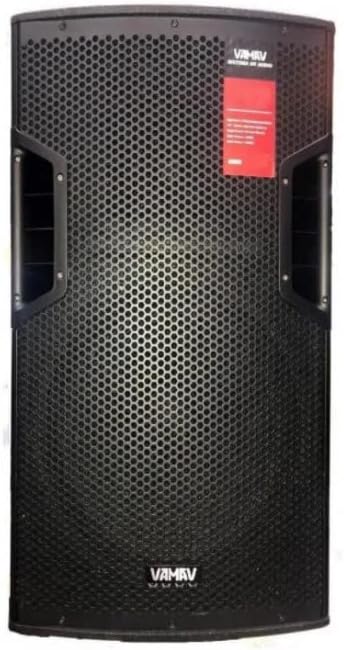
Figur 4.1: Forside View
This image displays the front of the Vamav Nova12 speaker, featuring a robust metal grille protecting the 12-inch woofer and tweeters. The Vamav logo is visible at the bottom, and handles are integrated on the sides for portability.

Figur 4.2: Bagside View
This image shows the rear panel of the Vamav Nova12 speaker, which houses the DSP control interface, various input and output connections (including RCA), and the power input. The cooling vents are also visible.
5. Opsætning
Follow these steps to set up your Vamav Nova12 speaker:
- Placering: Position the speaker on a stable, flat surface. Ensure there is sufficient space around the unit for proper ventilation. The speaker is designed for floor mounting.
- Strømtilslutning: Connect the provided power cable to the power input on the rear panel of the speaker, then plug the other end into a suitable electrical outlet.
- Lydindgang: Connect your audio source (e.g., home theater system, television, game console) to the RCA input ports on the rear panel of the speaker using an RCA cable (not included). Ensure correct left/right channel connections if applicable.
6. Betjeningsvejledning
Once the speaker is set up, follow these instructions for operation:
- Tænd: Locate the power switch on the rear panel and switch it to the 'ON' position. The DSP display should illuminate.
- Lydstyrkejustering: Use the master volume control knob on the rear panel to adjust the overall output level of the speaker. Start with a low volume and gradually increase it to a comfortable listening level.
- DSP Controls: The integrated DSP (Digital Signal Processor) allows for fine-tuning of the audio characteristics. Refer to the DSP interface on the rear panel to navigate menus and adjust settings such as equalization, crossover points, and other audio parameters. Specific DSP functions are controlled via the tactile interface.
- Lydafspilning: Begin playing audio from your connected source. Adjust the source volume and speaker volume as needed.
- Sluk: When finished, switch the power button on the rear panel to the 'OFF' position.
7. Vedligeholdelse
Korrekt vedligeholdelse sikrer din højttalers levetid og optimale ydeevne:
- Rensning: Regularly wipe the exterior of the speaker with a soft, dry, lint-free cloth. Do not use abrasive cleaners, waxes, or solvents.
- Ventilation: Kontrollér regelmæssigt, at ventilationsåbningerne er fri for støv og snavs. Brug en blød børste eller trykluft til at fjerne eventuelle blokeringer.
- Opbevaring: If storing the speaker for an extended period, disconnect it from power, clean it, and store it in a cool, dry place, preferably in its original packaging.
8. Fejlfinding
If you encounter issues with your Vamav Nova12 speaker, refer to the following common problems and solutions:
| Problem | Mulig årsag | Løsning |
|---|---|---|
| Ingen strøm | Power cable not connected; Power outlet not active; Power switch off | Ensure power cable is securely connected; Check power outlet with another device; Turn power switch to 'ON' |
| Ingen lyd | Audio cable not connected; Source device not playing; Speaker volume too low; DSP settings incorrect | Check RCA cable connections; Verify audio playback on source device; Increase speaker volume; Reset DSP settings if necessary |
| Forvrænget lyd | Volume too high (speaker or source); Damaged audio cable; DSP settings incorrect | Reduce volume on both speaker and source; Try a different audio cable; Adjust DSP settings |
9. Specifikationer
Detailed technical specifications for the Vamav Nova12 speaker:
| Feature | Specifikation |
|---|---|
| Model | Nova12 |
| Højttaler type | Bashøjttaler |
| Speciel funktion | Tweeters, DSP |
| Anbefalede anvendelser | Game Consoles, Home Theater Systems, Televisions |
| Kompatible enheder | Home Theater, Television, Game Console |
| Subwoofer diameter | 12 tommer |
| Farve | Sort |
| Vandtæt | falsk |
| Kontrolmetode | Taktil |
| Højttaler størrelse | 12 tommer |
| Strømkilde | Elektrisk med ledning |
| Gennemsnitlig batterilevetid | 5 Hours (if applicable, for internal components) |
| Produktets vægt | 25 kg |
| Forbindelsesteknologi | RCA |
| Lydudgangstilstand | Mono |
| Monteringstype | Gulvmontering |
10. Garanti og support
Vamav products are designed for reliability and performance. For specific warranty details, please refer to the warranty card included with your purchase or contact your retailer. Keep your proof of purchase for any warranty claims.
For technical support or service inquiries, please contact the retailer where you purchased the product or visit the official Vamav webwebsted for kontaktoplysninger.


