Indledning
This manual provides comprehensive instructions for the setup, operation, maintenance, and troubleshooting of your PROSCAN Elite 10.1" Quad Core Tablet/Portable DVD Combo. Designed for versatility, this device combines the functionality of an Android 11 tablet with a built-in DVD player, offering entertainment and productivity on the go. Please read this manual thoroughly before using your device to ensure optimal performance and longevity.

Figur 1: Forside view of the PROSCAN Elite 10.1" Quad Core Tablet/Portable DVD Combo. This image shows the device with a vibrant display, highlighting its compact and portable design.
Opsætning
1. Første opladning
Before first use, fully charge your PROSCAN Elite device. Connect the provided USB Type-C cable to the device's USB-C port and the other end to a compatible USB SV/2A charging adapter. A full charge ensures maximum battery life for initial operation.
2. Tænd/sluk
- To power on: Press and hold the power button located on the device's control panel until the screen illuminates.
- To power off: Press and hold the power button until a power-off menu appears, then select "Power off".
3. Inserting a DVD
The device features a built-in DVD player. To insert a disc:
- Gently open the disc tray located on the side of the device.
- Place the DVD, VCD, CD, or MP3 compatible disc onto the spindle with the label side facing up.
- Gently press down on the center of the disc until it clicks into place.
- Luk diskskuffen forsvarligt.

Figure 2: Illustration showing the device in both tablet mode and with the DVD tray open for disc insertion. This highlights the dual functionality of the product.
4. Network and Bluetooth Connection
- Wi-Fi: Naviger til Indstillinger > Netværk og internet > Wi-Fi. Select your desired network and enter the password if prompted. The device supports 802.11 b/g/n/a/ac.
- Bluetooth: Naviger til Indstillinger > Forbundne enheder > Bluetooth. Turn on Bluetooth and pair with your desired audio devices or accessories.
Betjeningsvejledning
1. Tablet Operation (Android 11 GO)
The PROSCAN Elite operates on Android 11 GO, providing a user-friendly interface. The multi-touch screen allows for intuitive navigation.
- Navigation: Use gestures like tap, swipe, pinch-to-zoom for interacting with apps and content.
- Appadgang: Få adgang til forudinstallerede apps, eller download nye fra Google Play Store.
- Google Voice Search: Utilize the built-in microphone for voice commands and search.

Figure 3: The 10.1-inch multi-touch screen displaying the Android interface, ready for user interaction.
2. DVD-afspilning
After inserting a disc, open the "DVD Player" application from the tablet's home screen or app drawer. The device will automatically begin loading and playing the disc. You can control playback (play, pause, skip) using the on-screen controls or physical buttons if available.
- Understøttede medier: DVD, VCD, CD, MP3 compatible discs.
- Genoptag afspilning: The device is designed to resume DVD playback from where it was last stopped, even after powering off.
3. Using as a Second Monitor
The PROSCAN Elite tablet can function as a second monitor for compatible devices (e.g., laptops) using specific applications like "SpaceDesk Viewer". This feature requires installing the corresponding server software on your primary device and the viewer app on the tablet. Connect the devices via Wi-Fi for extended display functionality.

Figure 4: The PROSCAN Elite tablet displaying content as a secondary screen alongside a laptop, demonstrating its utility for extended workspace.
Opretholdelse
1. Rensning
- Brug en blød, fnugfri klud til at rengøre skærmen og ydersiden.
- Undgå at bruge skrappe kemikalier, slibende rengøringsmidler eller aerosolspray.
- For stubborn smudges on the screen, slightly dampRengør kluden med vand eller en skærmrengøringsopløsning beregnet til elektronik.
2. Batteripleje
- For at forlænge batteriets levetid, undgå ekstreme temperaturer.
- Lad ikke enheden være helt afladet i længere perioder.
- Brug kun det medfølgende eller anbefalede opladningstilbehør.
3. Opbevaring
When not in use for extended periods, store the device in a cool, dry place away from direct sunlight and extreme temperatures. Ensure the disc tray is empty before storage.
Fejlfinding
| Problem | Mulig årsag | Løsning |
|---|---|---|
| Enheden tænder ikke. | Lav eller ingen batteriopladning. | Connect to power adapter and charge for at least 30 minutes before attempting to power on again. |
| DVD does not play. | Disken er snavset, ridset eller har et inkompatibelt format. | Clean the disc with a soft cloth. Check for deep scratches. Ensure the disc format (DVD, VCD, CD, MP3) is supported. Restart the DVD Player app. |
| Berøringsskærmen reagerer ikke. | Midlertidig softwarefejl eller interferens med skærmbeskytter. | Restart the device. Ensure screen is clean and free of debris. If using a screen protector, ensure it is properly applied and not causing issues. |
| Kan ikke oprette forbindelse til Wi-Fi. | Forkert adgangskode, uden for rækkevidde eller routerproblem. | Verify Wi-Fi password. Move closer to the Wi-Fi router. Restart your router and the device. |
Specifikationer
- Model: PELTDV1029
- Skærmstørrelse: 10.1 tommer
- Skærmopløsning: 1280 x 800 pixels (IPS)
- Processor: 2.0GHz Quad-Core MT8167B ARM Cortex-A53
- Operativsystem: Android 11 GO
- VÆDDER: 2 GB DDR SDRAM
- Intern opbevaring: 32GB (expandable via Micro SD port)
- Medietype: DVD, VCD, CD, MP3 Compatible disc
- Forbindelse: Integrated Bluetooth, Wi-Fi (802.11 b/g/n/a/ac)
- Porte: USB Type-C, 3.5mm earphone jack, Micro SD port, HDMI
- Kamera: Bag Webcam 2 MP
- Batteri: Genopladeligt lithium-ion batteri
- Varens vægt: 2.9 pund
- Farve: Sort
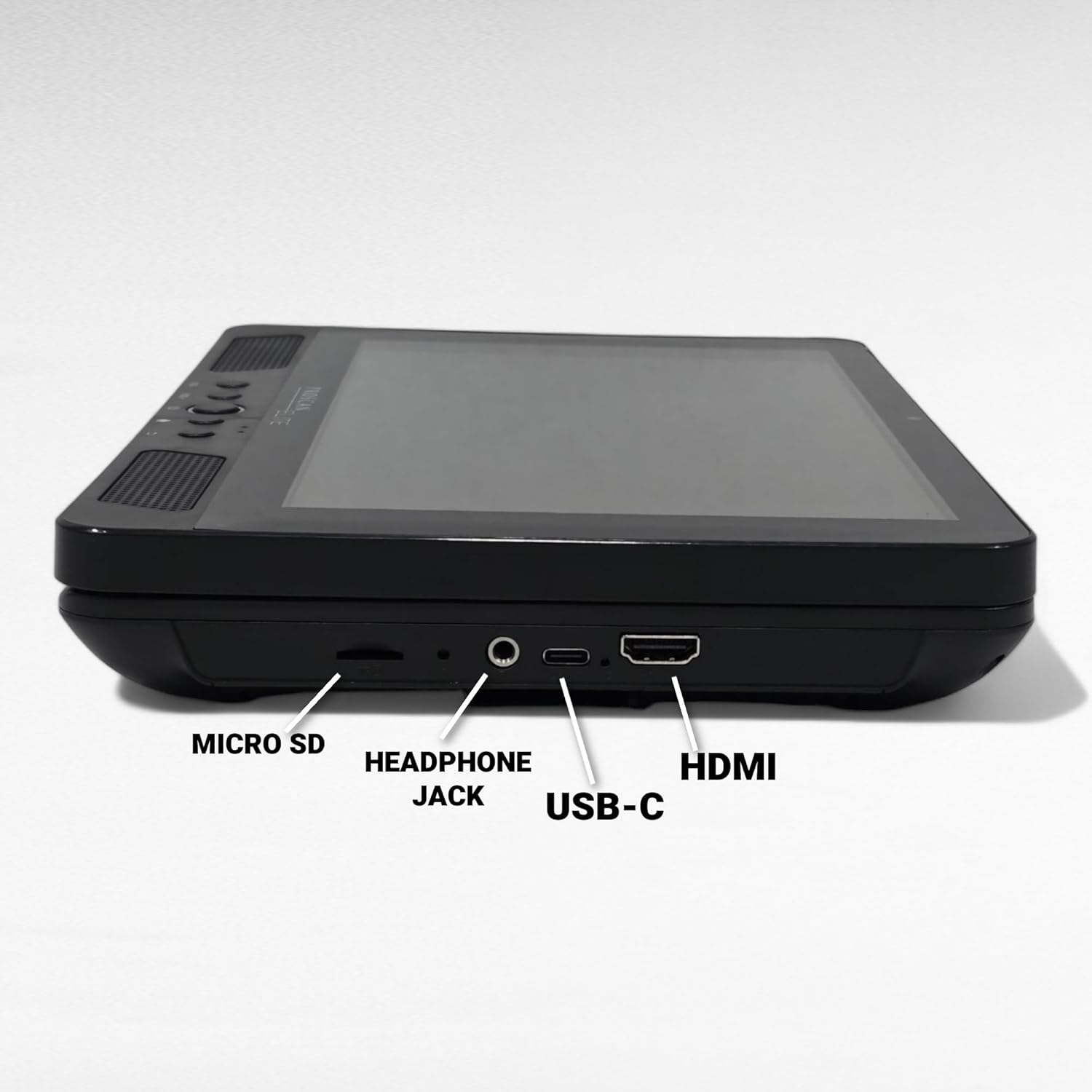
Figur 5: Detaljeret view of the device's side, highlighting the Micro SD slot, Headphone Jack, USB-C port, and HDMI port for various connectivity options.
Garanti og support
This product is manufacturer refurbished and comes with a 90 dages garanti. For technical support, warranty claims, or further assistance, please contact PROSCAN customer service. Refer to the product packaging or the official PROSCAN webhjemmeside for de seneste kontaktoplysninger.
For yderligere ressourcer og produktinformation kan du besøge PROSCAN Store on Amazon.


