Indledning
Tak for købetasing the JALL Colorful Digital Alarm Clock Radio. This device combines a modern alarm clock with a mirror surface, vibrant RGB color display, FM radio, and convenient USB charging. Please read this manual carefully to ensure proper use and to fully enjoy all its features.
Sikkerhedsoplysninger
- Udsæt ikke enheden for vand eller for høj luftfugtighed.
- Undgå ekstreme temperaturer.
- Du må ikke selv adskille eller forsøge at reparere enheden. Kontakt kvalificeret servicepersonale.
- Brug kun den medfølgende strømadapter.
- Opbevares utilgængeligt for børn.
Pakkens indhold
- JALL Colorful Digital Alarm Clock Radio (Model: CH-07)
- Instruktionsbog
- Strømadapter
Produkt overview
Familiarize yourself with the various parts and controls of your alarm clock radio.

Figur 1: Forside view of the JALL Colorful Digital Alarm Clock Radio, highlighting its mirror surface and large digital time display. A smartphone is shown charging via its USB port.

Figure 2: Function introduction diagram, illustrating the main features such as RGB changing number display, FM radio, dual alarm, HD mirror surface, USB charging port, sleep timer, adjustable brightness and volume, and 9-minute snooze.
Kontrolknapper og porte:
- Time Set / Dimmer Knob: Used to set time and adjust display brightness.
- Alarm 1 knap: Set and activate Alarm 1.
- Alarm 2 knap: Set and activate Alarm 2.
- Colors Button: Cycle through display color modes.
- FM Radio Button: Activate FM radio and scan stations.
- Volume / Tune Knob: Adjust radio volume and tune FM stations.
- Snooze / Sleep Timer Button: Activate snooze or set sleep timer.
- USB opladningsport: Til opladning af eksterne enheder.
- Strømindgang: Tilslut strømadapteren.
Opsætning
1. Strømtilslutning
- Connect the provided power adapter to the "DC IN" port on the back of the alarm clock.
- Sæt adapteren i en almindelig stikkontakt.
- Displayet lyser op, hvilket indikerer, at enheden er tændt.
2. Battery Backup (Not for operation)
The clock includes a battery backup feature. This function is designed to preserve your time and alarm settings during a power outage, not to operate the clock without AC power. When power is restored, the clock will display the correct time and settings.
Betjeningsvejledning
Indstilling af tid og dato
- Tryk og hold på Indstil tid button (often combined with Dimmer). The hour digits will start flashing.
- Drej på Time Set / Dimmer Knob to adjust the hour. Press the Indstil tid button again to confirm and move to minutes.
- Repeat the process to set minutes, then year, month, and day.
- Tryk på Indstil tid button one last time to save all settings.
Alarm Settings (Dual Alarms)
The clock supports two independent alarms (Alarm 1 and Alarm 2) with customizable settings.

Figure 3: Dual Alarm functionality, showing options for 8 wake-up sounds, 16 volume levels, 9-minute snooze, and flexible alarm modes (weekend/weekday/7-day).
- Tryk på Alarm 1 or Alarm 2 knappen. Alarmtidspunktet vil blinke.
- Drej på Time Set / Dimmer Knob to set the desired alarm hour, then press the alarm button again to confirm.
- Repeat to set alarm minutes.
- Next, select the alarm mode: Weekend, Weekday, or 7-day mode by rotating the knob and confirming with the alarm button.
- Choose from 8 wake-up sounds (beep, ring bell, cheerful music, piano, wind chime, bird song, insect chirping, soft music) and 16 volume levels. The volume will gradually increase.
- Press the alarm button one last time to save and activate the alarm. An alarm icon will appear on the display.
Snooze-funktion:
Når alarmen lyder, skal du trykke på Snooze / Sleep Timer button to activate snooze for an additional 9 minutes of sleep.
Turning Off Alarm:
To turn off the alarm for the day, press any other button (e.g., Alarm 1 or Alarm 2 button) except the Snooze button. To deactivate an alarm permanently, press the corresponding alarm button until the alarm icon disappears from the display.
Display Modes and Brightness
The clock offers 8 display modes and 5 levels of screen brightness.
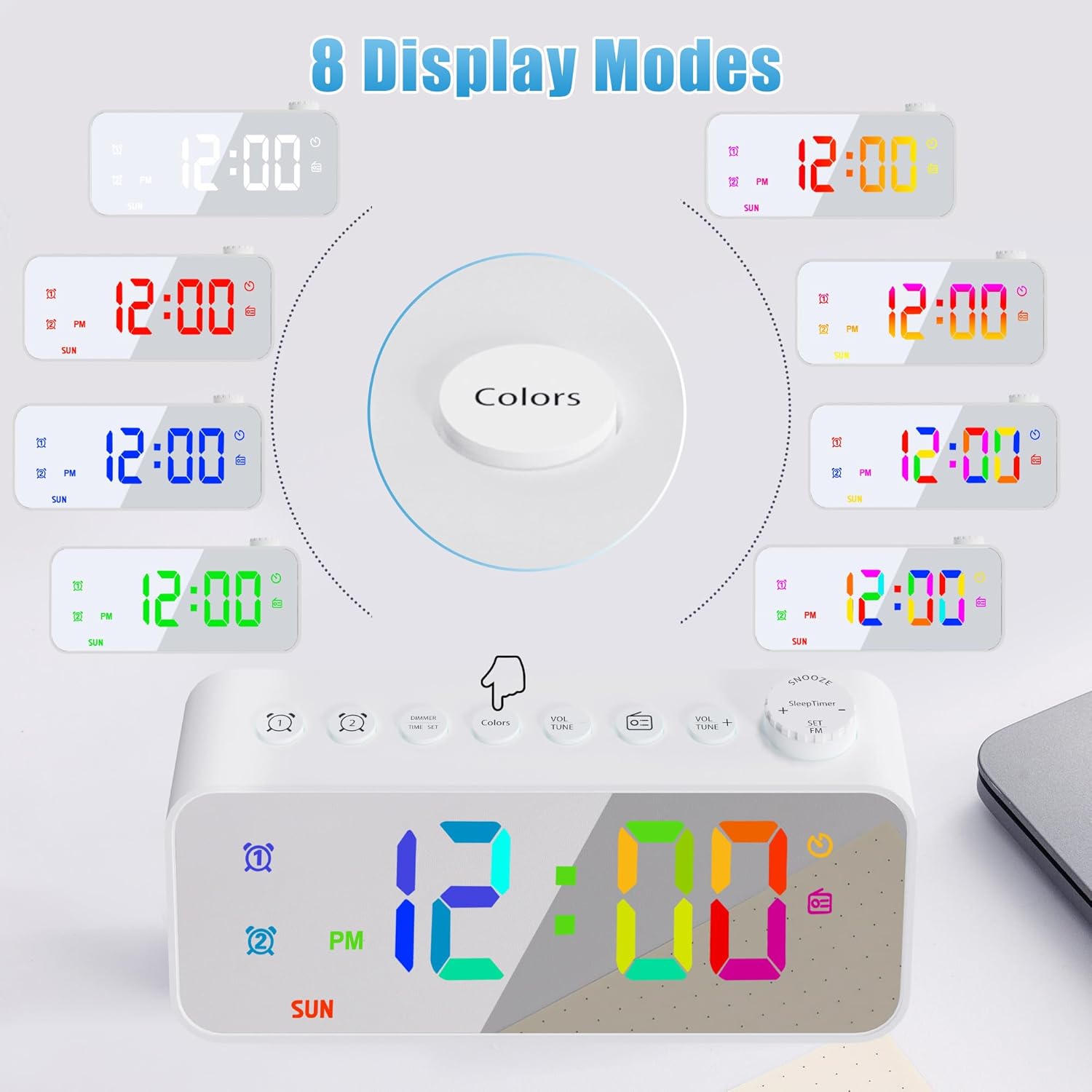
Figure 4: Eight distinct display color modes available on the JALL alarm clock, offering various aesthetic options from solid colors to dynamic gradients.

Figure 5: Brightness adjustment feature, detailing 5 levels of screen brightness from 0% (off) to 100% for optimal visibility in any lighting condition.
- Ændring af farver: Tryk på Farver button to cycle through the 8 display modes: white, red, green, blue, gradient, magic color, left and right gradient, up and down gradient.
- Justering af lysstyrke: Drej på Time Set / Dimmer Knob to adjust the screen brightness through 5 levels. The lowest setting can completely turn off the display.
FM Radio and Sleep Timer
Enjoy your favorite radio stations with the built-in FM radio and fall asleep to music with the sleep timer.

Figure 6: FM Radio and Sleep Timer features, detailing the frequency range, volume control, auto-search function, enhanced antenna, and various sleep timer durations.
- Activating FM Radio: Tryk på FM radio button. The radio will turn on.
- Tuning stationer: Drej på Volume / Tune Knob to manually tune to a specific frequency. Press and hold the FM radio button to auto-scan and save available stations.
- Justering af lydstyrke: Drej på Volume / Tune Knob to adjust the radio volume (0-16 levels).
- Sleep timer: Mens radioen spiller, skal du trykke på Snooze / Sleep Timer button repeatedly to select a sleep timer duration (10, 120, 180, 240 minutes). The radio will automatically turn off after the selected time.
USB-opladningsport
The alarm clock is equipped with a USB charging port for your convenience.

Figure 7: USB Charging Port, indicating its location and function for charging various electronic devices with a 5V output.
- Find USB-opladningsporten på bagsiden af enheden.
- Connect your smartphone or other USB-powered device using its charging cable.
- The clock will provide 5V output for charging.
Opretholdelse
- To clean the mirror surface and body, use a soft, dry cloth. For stubborn marks, a slightly damp en klud kan bruges, efterfulgt af en tør klud.
- Brug ikke slibende rengøringsmidler eller opløsningsmidler, da de kan beskadige overfladen.
- Sørg for, at enheden er taget ud af stikkontakten før rengøring.
Fejlfinding
| Problem | Mulig årsag | Løsning |
|---|---|---|
| Urvisningen er slukket. | No power; brightness set to 0%. | Check power connection. Rotate Dimmer knob to increase brightness. |
| Alarmen lyder ikke. | Alarm ikke aktiveret; lydstyrke for lav; forkert alarmtidspunkt. | Ensure alarm icon is displayed. Increase alarm volume. Verify alarm time and mode (weekday/weekend). |
| Dårlig FM-radiomodtagelse. | Antennen er ikke strakt ud; svagt signal. | Fully extend the wire antenna. Try repositioning the clock for better signal. |
| USB-opladning virker ikke. | Cable issue; device not compatible; clock not powered. | Ensure clock is powered. Try a different USB cable. Check device compatibility (5V output). |
Specifikationer
| Feature | Detalje |
|---|---|
| Mærke | JALL |
| Modelnummer | CH-07 |
| Display Type | Digital |
| Strømkilde | Elektrisk med ledning |
| Speciel funktion | Adjustable Brightness, Dual Alarm, FM Radio, Sleep Timer, USB Charging Port, Mirror Surface, RGB Color Changing Numbers |
| Materiale | Acrylonitril Butadien Styren (ABS) |
| Varens vægt | 4.8 ounces (0.3 pund) |
| Dimensioner | 6.18 x 3.74 x 1.89 tommer (pakke) |
| FM-radiofrekvens | 76.0 til 108.0 MHz |
| USB udgang | 5V |
Garanti og support
JALL is committed to providing high-quality products. This product comes with a 365-dages garanti from the date of purchase. If you encounter any issues or have questions, please contact JALL customer support through the retailer's platform or visit the official JALL store for assistance.
For mere information, besøg JALL-butik på Amazon.


