1. Introduktion
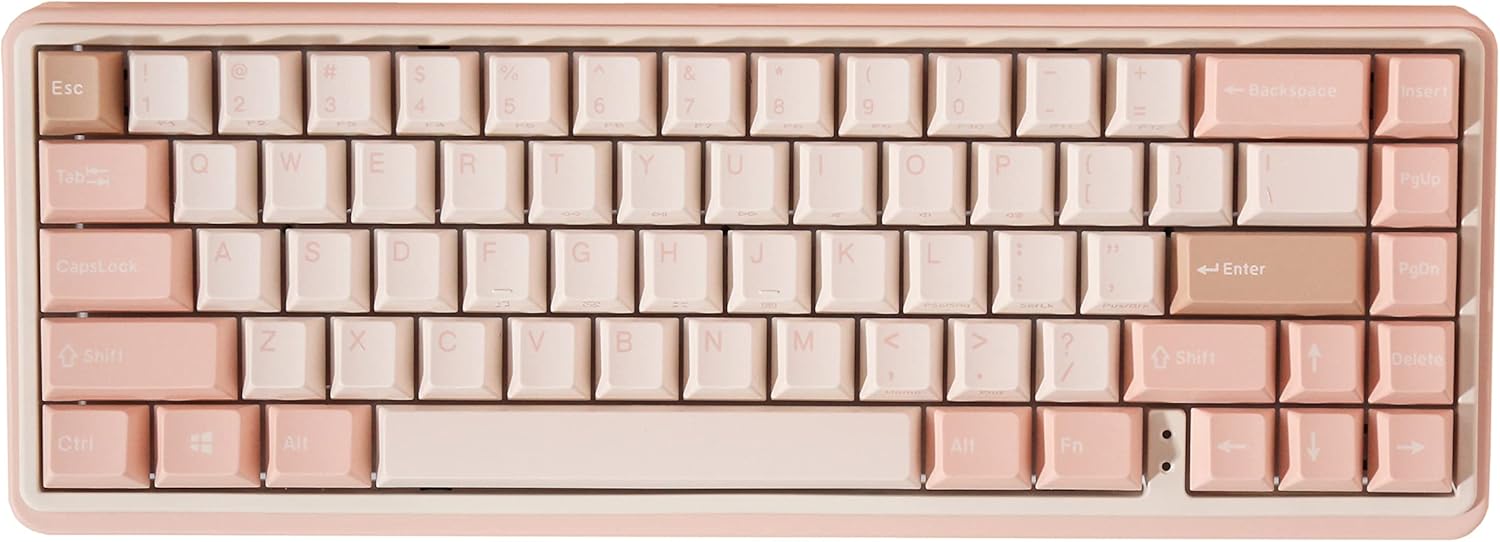
Thank you for choosing the Varmilo Minilo VXB67 Graptopetalum Mendozae 65% Bluetooth White LED Mechanical Keyboard. This manual provides detailed instructions on setting up, operating, maintaining, and troubleshooting your new keyboard to ensure optimal performance and longevity.
The Varmilo Minilo VXB67 combines wired and wireless connectivity, featuring Type-Cool sound dampening and the ability to connect to up to three Bluetooth devices. Its compact 65% layout is designed for efficiency and comfort.
2. Hvad er der i æsken
- Varmilo Minilo VXB67 Mechanical Keyboard
- USB kabel
Sørg for, at alle komponenter er til stede, før du fortsætter med opsætningen.
3. Opsætning
3.1 Kabelforbindelse
- Locate the USB-C port on the Varmilo Minilo VXB67 keyboard.
- Connect one end of the provided USB cable to the keyboard's USB-C port.
- Tilslut den anden ende af USB-kablet til en ledig USB-port på din computer.
- Tastaturet vil automatisk blive genkendt af dit operativsystem og er klar til brug.
3.2 Trådløs Bluetooth-forbindelse
The Varmilo Minilo VXB67 can connect to up to 3 Bluetooth devices.
- Enable Bluetooth Mode: Ensure the keyboard is in Bluetooth mode. Refer to the keyboard's physical switch or function key combination for Bluetooth activation (e.g., Fn + 1/2/3 for different profiles).
- Parringstilstand: Press and hold the designated Bluetooth pairing key (e.g., Fn + 1, Fn + 2, or Fn + 3) for a few seconds until the indicator light flashes, indicating it's in pairing mode.
- On Your Device:
- Go to your device's Bluetooth settings (PC, tablet, smartphone).
- Søg efter nye enheder.
- Select "Varmilo Minilo VXB67" (or similar name) from the list of available devices.
- Følg eventuelle anvisninger på skærmen for at fuldføre parringsprocessen.
- Skift enheder: Once paired with multiple devices, you can switch between them by pressing the corresponding Fn + (1, 2, or 3) key combination.
4. Betjeningsvejledning
4.1 Key Functions and Indicators
- Caps Lock-indikator: An indicator light next to the arrow keys will illuminate when Caps Lock is active.
- F-row Function Indicators: Indicator lights next to the arrow keys also show the status of F-row functions (e.g., Fn lock).
- Multimedienøgler: Use the Fn key in combination with the top row keys (F1-F12) to access multimedia controls (e.g., volume, play/pause). Refer to the keycaps for specific icons.
4.2 Batteri og opladning
- Advarsel om lavt batteri: A flashing indicator light will warn you when the battery is low.
- Opladning: Connect the keyboard to a USB power source using the provided USB cable. The Escape key will light up while charging.
- Batterilevetid: The keyboard features a rechargeable battery designed for extended use.
4.3 Type-Cool Sound Dampslutning
The Varmilo Minilo VXB67 incorporates Type-Cool sound dampening technology to provide a more pleasant typing experience by reducing unwanted noise.
5. Vedligeholdelse
- Rensning: Use a soft, dry cloth to wipe the keyboard surface. For deeper cleaning, gently remove keycaps (if applicable) and use compressed air to clear debris from between switches. Avoid using harsh chemicals or abrasive materials.
- Opbevaring: Opbevar tastaturet et køligt, tørt sted væk fra direkte sollys og ekstreme temperaturer.
- Væskespild: In case of liquid spills, immediately disconnect the keyboard from power, turn it upside down to drain liquid, and allow it to dry completely before reconnecting. Professional service may be required for severe spills.
6. Fejlfinding
| Problem | Mulig årsag | Løsning |
|---|---|---|
| Tastaturet svarer ikke (kablet) | Løs kabelforbindelse, defekt USB-port, driverproblem. |
|
| Tastatur opretter ikke forbindelse (Bluetooth) | Bluetooth not enabled, not in pairing mode, interference, low battery. |
|
| Nøgler registreres ikke eller dobbelttastning | Snavs under tastaturet, funktionsfejl på kontakten. |
|
| Batteri holder ikke opladning | Faulty cable, power source issue, battery degradation. |
|
7. Specifikationer
| Model | VXB67 |
| Mærke | Varmilo |
| Layout | 65 % (65 nøgler) |
| Forbindelse | Wired (USB-C), Bluetooth |
| Kompatible enheder | PC |
| Særlige funktioner | Rechargeable Battery, Type-Cool Sound Dampening, Connects up to 3 Bluetooth devices |
| Farve (Variant) | Varmilo EC Rose V2 |
8. Produktbilleder


9. Produktvideoer
This video showcases the Varmilo Minilo Graptopetalum Mendozae keyboard, highlighting its design and features. It demonstrates the keyboard's aesthetic appeal and compact form factor, noting its availability in two sizes.
10. Garanti og support
Varmilo products are designed for durability and performance. For specific warranty details, please refer to the warranty card included with your product or visit the official Varmilo webwebstedet. Behold din købskvittering som købsbevis.
For technical support, troubleshooting assistance beyond this manual, or warranty claims, please contact Varmilo customer service through their official channels. Contact information can typically be found on the Varmilo webwebstedet eller på produktemballagen.
Online ressourcer: For the latest drivers, firmware updates, and additional support resources, please visit the official Varmilo webwebsted: www.varmilo.com


