1. Introduktion
Thank you for choosing the ODK 40-Inch Computer Desk. This manual provides detailed instructions for assembly, usage, maintenance, and troubleshooting to ensure you get the most out of your new desk. Designed for multi-use, this desk offers ample space for work, study, or gaming, complete with storage solutions and an ergonomic monitor stand.

Figure 1: ODK 40-Inch Computer Desk (White)
This image displays the ODK 40-Inch Computer Desk in white, showcasing its monitor stand, two drawers, and side shelves. The desk is set up with two monitors, a keyboard, mouse, and various office accessories, highlighting its functional design.
2. Sikkerhedsoplysninger
- Sørg for, at alle dele er forsvarligt fastgjort før brug.
- Overbelast ikke hylder eller skuffer ud over deres bæreevne.
- Hold små dele væk fra børn under montering for at undgå kvælningsfare.
- Undgå at placere varme genstande direkte på skrivebordets overflade uden beskyttelse.
- Stå ikke på eller klatr ikke på skrivebordet.
3. Pakkens indhold
Før monteringen påbegyndes, skal du kontrollere, at alle nedenstående komponenter er til stede og ubeskadigede. Hvis der mangler eller er beskadigede dele, bedes du kontakte kundeservice.

Figure 2: Desk components prior to assembly.
This image shows the various components of the ODK Computer Desk laid out on a carpeted floor, including metal frame pieces, wooden panels for the desktop, monitor stand, and shelves, along with a bag of hardware and the instruction manual.
- Skrivebordspanel (1)
- Monitor Stand Shelf (1)
- Side Shelf Panels (2)
- Metalrammekomponenter (forskellige)
- Stofskuffer (2)
- Hardwarepakke (skruer, bolte, værktøj)
- Instruktionsmanual (1)
4. Opsætning og montering
Assembly is designed to be straightforward. It is recommended to have two people for assembly, though one person can complete it. Follow the numbered steps in the provided manual and refer to the diagrams.
Vigtige monteringstrin:
- Pak alle komponenter ud, og verificer dem i forhold til styklisten.
- Assemble the main metal frame structure using the provided hardware.
- Attach the desktop panel to the assembled frame.
- Install the side shelf panels. Note that the top shelf is adjustable to two different heights.
- Assemble the fabric drawers and insert them into the designated slots.
- Attach the monitor stand shelf to the desktop. This component is also removable if a flat surface is preferred.
- Ensure all screws are tightened and the desk is stable. Adjustable foot pads can be used to level the desk on uneven surfaces.
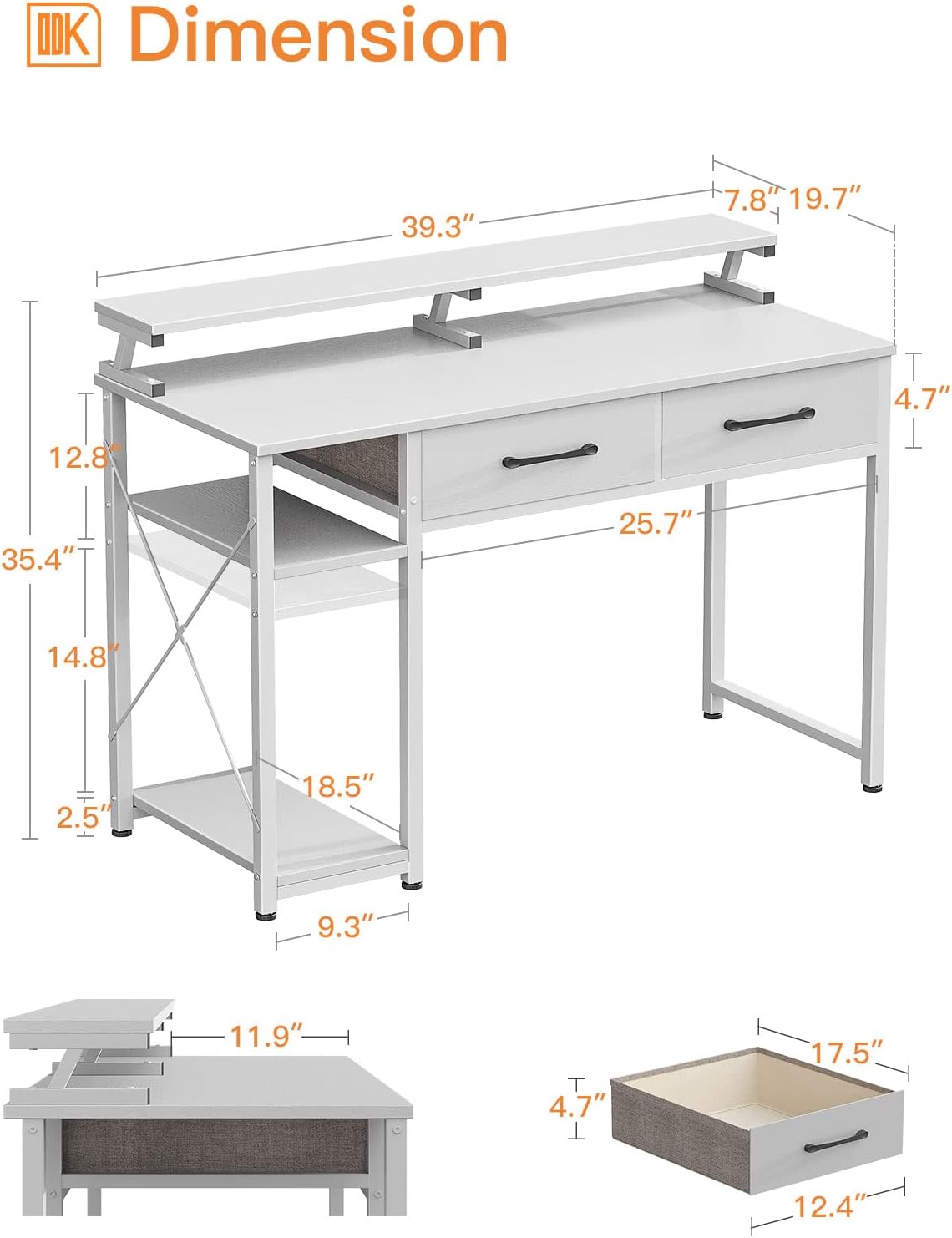
Figur 3: Bordmål og strukturel overbygningview.
This diagram illustrates the overall dimensions of the ODK Computer Desk, including the height of the monitor stand, desktop, and side shelves. It also shows the internal dimensions of the fabric drawers.
Note: No official product videos from the seller were available for embedding. The assembly process is detailed in the included written instructions.
5. Funktioner
- Multi-Use Design: The 40" x 19.7" surface provides ample space for writing, working, and gaming. The desk's industrial and modern design complements various decor styles.
- Integreret opbevaring: Two drawers offer convenient under-desk storage for books, documents, and office supplies. Open shelves keep frequently used items within easy reach.
- Justerbare hylder: The side shelves feature a 2-level adjustable height, allowing accommodation for different-sized items, including a computer tower.
- Monitor Stand Shelf: A 6.7” high monitor shelf raises your screen for improved visibility and helps reduce neck and back strain. It provides ample space for one or two monitors. This shelf is also reversible and removable.
- Robust og stabil: Constructed with a thicker metal frame and sturdy wood board, ensuring durability and stability. Adjustable table foot pads enhance stability and protect floors.

Figure 4: Detail of a fabric drawer.
This close-up image shows the interior of one of the ODK Computer Desk's fabric drawers, filled with various items like headphones, a smartphone, and glasses, demonstrating its storage capacity.

Figure 5: Adjustable side shelf.
This image highlights the adjustable nature of the ODK Computer Desk's side shelves, showing how the middle shelf can be positioned at different heights to accommodate items like a computer tower or storage baskets.

Figure 6: Ergonomic viewoplevelse.
This diagram illustrates the ergonomic benefits of the ODK Computer Desk's monitor stand, showing a user maintaining a comfortable posture with their screen at eye level, reducing strain on the neck and back.
6. Brugs- og betjeningsvejledning
- Opsætning af arbejdsstation: Place your monitor(s) on the elevated stand for optimal viewing. Utilize the main desktop for your keyboard, mouse, and writing space.
- Lagerudnyttelse: Use the fabric drawers for organizing smaller office supplies, documents, or personal items. The side shelves are ideal for a computer tower, books, or decorative items. Adjust the shelf height as needed for taller items.
- Kabelstyring: Route cables neatly behind the monitor stand and through the desk's structure to maintain a tidy workspace.
7. Vedligeholdelse
- Rensning: Tør skrivebordsoverfladerne af med snavsamp cloth for general cleaning. For stubborn marks, use a mild, non-abrasive cleaner. Dry immediately with a soft, dry cloth.
- Undgå barske kemikalier: Brug ikke skrappe kemikalier, slibende rengøringsmidler eller opløsningsmidler, da disse kan beskadige overfladen.
- Regelmæssig kontrol: Kontrollér regelmæssigt alle skruer og fastgørelseselementer for at sikre, at de forbliver stramme. Spænd om nødvendigt.
8. Fejlfinding
- vaklende skrivebord: Ensure all screws are fully tightened. Adjust the foot pads on the bottom of the desk legs to level the desk on uneven floors.
- Skuffer glider ikke jævnt: Check that the fabric drawers are correctly assembled and inserted. Ensure no obstructions are in the drawer slots.
- Manglende dele: If any parts are missing upon delivery, refer to the 'Package Contents' section and contact customer service for assistance.
9. Specifikationer
| Feature | Specifikation |
|---|---|
| Mærke | ODK |
| Form | Rektangulær |
| Skrivebordsdesign | Computer skrivebord |
| Produktmål (D x B x H) | 19.7" D x 39.3" B x 35.4" H |
| Farve | Hvid |
| Stil | Moderne |
| Grundmateriale | Metal Stål |
| Top materialetype | Konstrueret træ |
| Finish Type | Pulverlakeret |
| Speciel funktion | Vendbar |
| Antal skuffer | 2 |
| Antal hylder | 2 (side shelves) |
| Påkrævet samling | Ja |
| Anbefalet antal personer til forsamling | 2 |
10. Garanti og support
ODK is committed to providing quality products and customer satisfaction. For any problems or inquiries regarding your ODK Computer Desk, please feel free to contact our customer service team. We aim to respond within 24 hours.
Gem venligst din købskvittering i tilfælde af garantikrav.


