1. Introduktion
This manual provides detailed instructions for the setup, operation, and maintenance of your VYSER F2 Projector. Please read this manual thoroughly before using the projector to ensure proper functionality and to maximize your viewing experience. The VYSER F2 Projector is a versatile device designed for various entertainment and presentation needs, offering high-definition projection with multiple connectivity options.
2. Hvad er der i æsken
Upon unboxing your VYSER F2 Projector, please verify that all the following items are included:
- VYSER F2 Projector
- Fjernbetjening
- Brugervejledning (dette dokument)
- HDMI kabel
- Strømkabel
3. Produktet er slutview
Familiarize yourself with the components and ports of your VYSER F2 Projector.

Figure 3.1: VYSER F2 Projector with key features highlighted.
3.1 Foran View
- Fokusobjektiv: Justerer klarheden af det projicerede billede.
- IR-modtager: Modtager signaler fra fjernbetjeningen.
3.2 Side og bagside Views (Porte og kontroller)
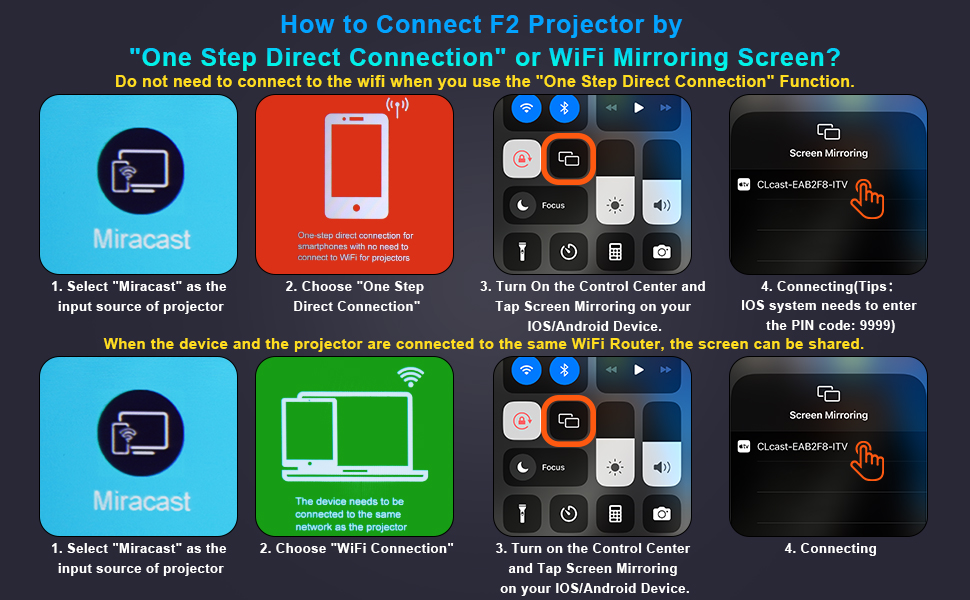
Figure 3.2: Multiple connection options on the VYSER F2 Projector.
- HDMI-porte (x2): Connect to devices like laptops, TV sticks, gaming consoles (e.g., PS5/Xbox).
- USB-porte (x2): Tilslut USB-drev til medieafspilning.
- AV-port: Tilslut til ældre enheder ved hjælp af et AV-kabel.
- 3.5 mm lydudgang: Tilslut eksterne højttalere eller hovedtelefoner.
- Strømindgang: Tilslut strømkablet.
- Cooling Windows: Sørg for korrekt ventilation til varmeafledning.
- Indbyggede kontroller: Buttons for power, menu, input source, and navigation.
3.3 360 Degree View af projektoren
Video 3.1: A comprehensive 360-degree view of the VYSER F2 Projector, showcasing its design and various ports from all angles.
4. Opsætning
Follow these steps to set up your VYSER F2 Projector for the first time.
4.1 Placering
Place the projector on a stable, flat surface. Ensure there is adequate ventilation around the projector to prevent overheating. The projection distance can range from 5-15 feet, allowing for an adjustable screen size of 50-300 inches.
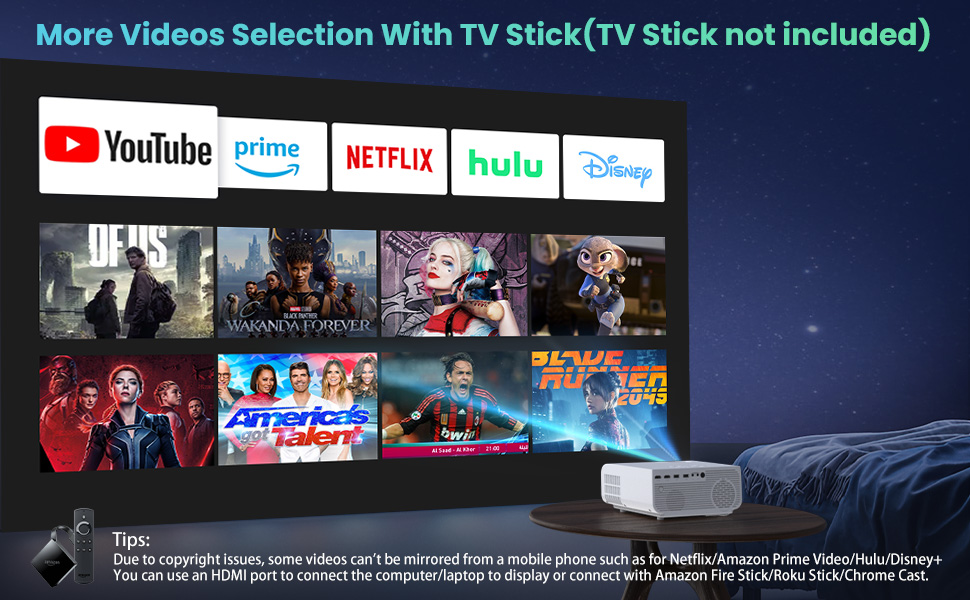
Figure 4.1: Adjustable display size from 50 to 300 inches.
The projector can be placed on a table, mounted on a tripod, or ceiling-mounted. Use the adjustable foot at the bottom of the projector to fine-tune the projection angle if needed.
4.2 Strømtilslutning
- Connect the power cable to the Power Input port on the projector.
- Sæt den anden ende af strømkablet i en stikkontakt.
- Press the Power button on the projector or remote control to turn it on.
4.3 Fokus- og Keystone-korrektion
- Fokusjustering: Rotate the focus lens ring on the front of the projector until the image appears clear and sharp.
- Keystone-korrektion: Use the keystone correction dial (usually on top or side) to adjust the image shape if it appears trapezoidal. The projector supports ±15° keystone correction.
5. Betjeningsvejledning
Learn how to connect your devices and utilize the various features of your projector.
5.1 Tilslutning af enheder
The VYSER F2 Projector offers multiple ways to connect your devices:
- HDMI: For high-definition video and audio from laptops, gaming consoles, TV boxes, etc.
- USB: Til afspilning af medier files direkte fra et USB-flashdrev.
- AV: For connecting older devices with AV output.
5.2 Wireless Connectivity (Screen Mirroring)
The projector supports 5G/2.4G WiFi for seamless screen mirroring from your smartphone or tablet.
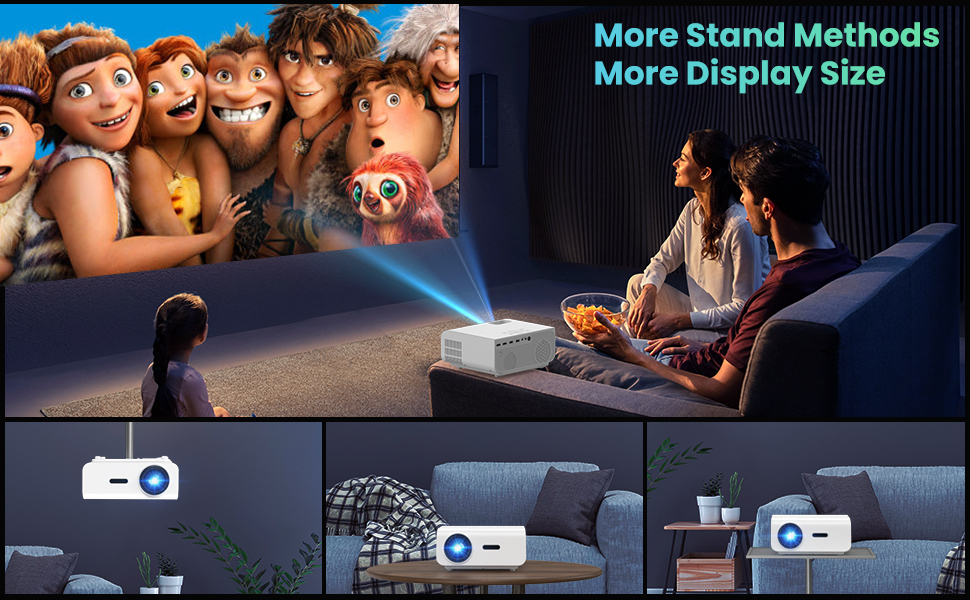
Figure 5.1: 5G/2.4G WiFi Screen Mirroring for various devices.
One-Step Direct Connection: This feature allows direct connection to your phone without needing a WiFi network. Ideal for outdoor use or when a router is unavailable.
Video 5.1: Demonstration of the F2 Projector's One-Step Direct Connection with WiFi and Bluetooth, showing quick setup for phone mirroring.
For detailed steps on screen mirroring, refer to the on-screen instructions by selecting "Miracast" from the input source menu.
Note: Due to copyright restrictions, some streaming services (e.g., Netflix, Amazon Prime Video, Hulu, Disney+) may block screen mirroring. For these services, it is recommended to use an HDMI connection with a compatible device like a Fire TV Stick, Roku Stick, or laptop.
5.3 Bluetooth-forbindelse
The projector features Bluetooth 5.1 for connecting to external Bluetooth speakers or headphones, enhancing your audio experience.

Figure 5.2: Bluetooth connection for external audio devices.
To connect: Navigate to the Bluetooth settings on the projector, enable Bluetooth, and select your desired audio device from the list of available devices. (Note: The projector connects to Bluetooth speakers, not directly to smartphones/tablets via Bluetooth for audio input).
5.4 Menunavigation
Use the remote control or the on-board buttons to navigate the projector's menu. Options typically include input source selection, picture settings (brightness, contrast, color), sound settings, and system settings.
6. Vedligeholdelse
Korrekt vedligeholdelse sikrer projektorens levetid og optimale ydeevne.
- Rengøring af linser: Brug en blød, fnugfri klud, der er specielt designet til optiske linser, til forsigtigt at rengøre projektorlinsen. Undgå slibende materialer eller barske kemikalier.
- Fjernelse af støv: Regularly clean the cooling vents to prevent dust buildup, which can affect performance and lifespan. Use a soft brush or compressed air.
- Opbevaring: Når projektoren ikke er i brug i længere perioder, skal den opbevares et køligt og tørt sted, helst i dens originale emballage eller et beskyttende etui.
- Sluk korrekt: Sluk altid projektoren med tænd/sluk-knappen, og lad den køle af, før du tager stikket ud eller flytter den.
7. Fejlfinding
Hvis du støder på problemer med din projektor, skal du se følgende almindelige fejlfindingstrin:
| Problem | Mulig årsag/løsning |
|---|---|
| No image or "No Signal" message |
|
| Sløret billede |
|
| Trapezoidal image |
|
| Ingen lyd eller lav lyd |
|
| Screen mirroring issues (e.g., Netflix not working) |
|
| Projector overheating or shutting down |
|
8. Specifikationer
Key technical specifications for the VYSER F2 Projector:
| Feature | Detalje |
|---|---|
| Mærke | VYSER |
| Model | F2 projektor |
| Indfødt opløsning | 1920 x 1080 (oprindelig 1080P) |
| Lysstyrke | 12000 Lux (350 ANSI Lumens) |
| Kontrastforhold | 10000:1 (implied from image comparison) |
| Projektionsstørrelse | 50-300 tommer |
| Projektionsafstand | 5-15 fod |
| Forbindelsesteknologi | Wireless (5G/2.4G WiFi), Bluetooth 5.1, HDMI (x2), USB (x2), AV, 3.5mm Audio Out |
| Keystone korrektion | ±15° Manuel |
| Varens vægt | 4.11 pund |
| Farve | White-White |
9. Garanti og support
VYSER is committed to providing excellent customer service and technical support for your projector.
- Livsvarig kundeservice: Enjoy lifetime customer service and technical support for your VYSER F2 Projector.
- For any inquiries, technical assistance, or warranty claims, please contact VYSER customer support through the platform where you purchased the product or refer to the official VYSER webwebsted for kontaktoplysninger.


