1. Introduktion
Thank you for choosing the MAGIC SELECT B2222 Portable 4-in-1 Air Pump and Vacuum Cleaner. This versatile device combines a cordless air compressor, a car and home vacuum cleaner, a tire pressure detection system, and an integrated SOS LED flashlight. Designed for convenience and efficiency, it is ideal for inflating car, motorcycle, and bicycle tires, as well as balls and other inflatables, and for quick cleaning tasks.
Læs venligst denne manual omhyggeligt, inden du bruger produktet, for at sikre sikker og optimal ydeevne. Gem denne manual til senere brug.
2. Hvad er der i æsken
- 1 x Cordless Air Compressor / Vacuum Cleaner Unit
- 1 x Inflation Tube
- 1 x LED Emergency Light (integrated)
- 1 x USB Type-C opladningskabel
- Various inflation nozzles/adapters
- Vacuum cleaner attachments (e.g., brush nozzle)

3. Produktfunktioner
- 4-i-1 funktionalitet: Air compressor, vacuum cleaner, tire pressure detection, and SOS LED light.
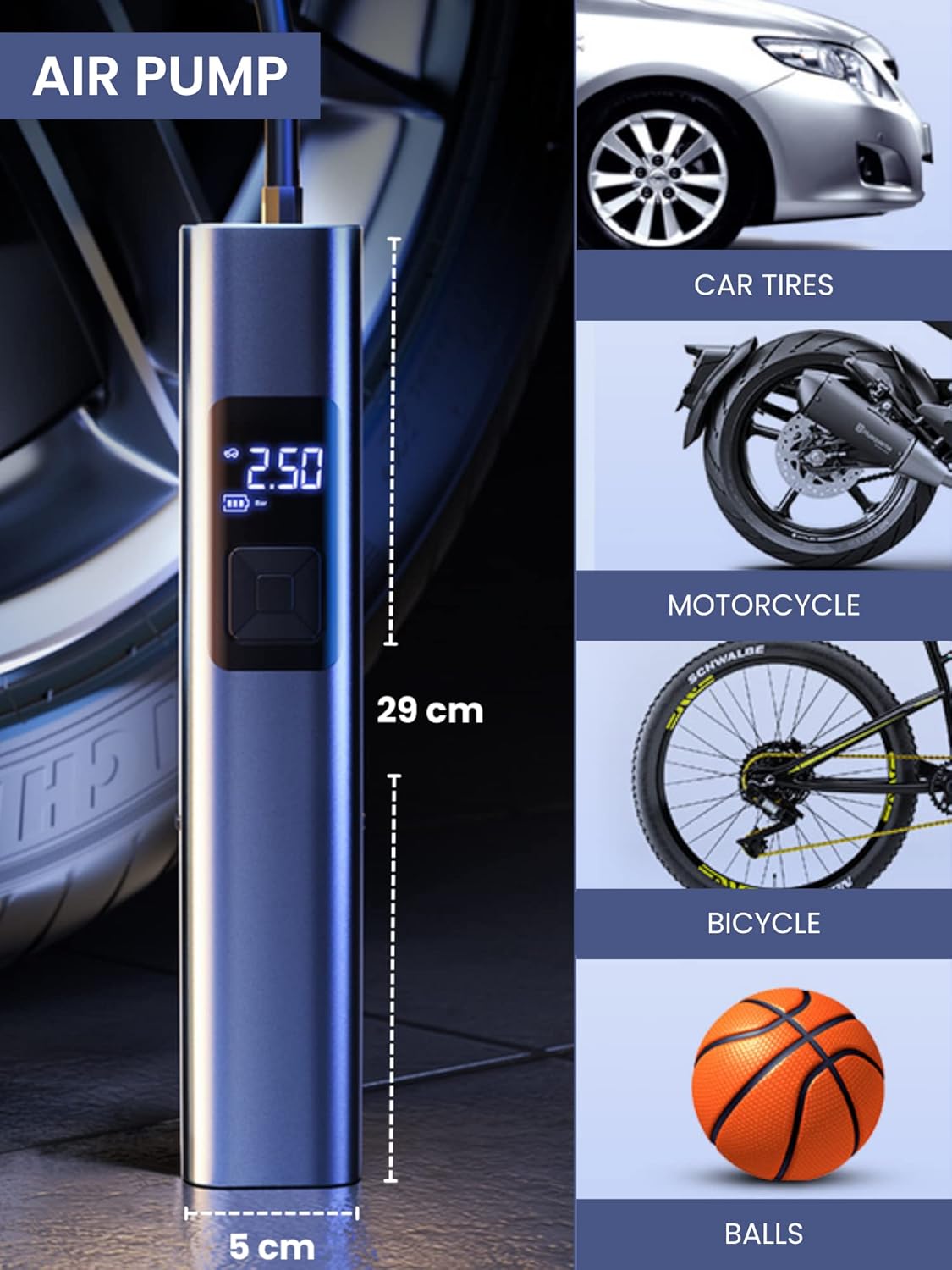
- Kraftig inflation: Suitable for car, motorcycle, bicycle tires, and various balls/inflatables.
- Smart Induction Chip: Automatically stops inflation once the preset pressure is reached, ensuring safety and preventing over-inflation.
- Integreret støvsuger: Efficiently cleans car interiors and small areas in the home.
- LED nødlys: Features 3 lighting modes: steady light, medium-speed flashing, and alternating medium/high-speed flashing for emergency situations.
- Langtidsholdbart batteri: Equipped with a 4400mAh lithium-ion battery, rechargeable via USB Type-C.
- Digital skærm: Clear digital screen to monitor tire pressure and settings.
- Kompakt design: Bærbar og nem at gemme.


4. Opsætning
4.1 Opladning af enheden
- Locate the USB Type-C charging port on the upper side of the compressor.
- Tilslut det medfølgende USB Type-C-kabel til enheden.
- Plug the other end of the USB cable into a compatible USB power adapter (not included) or a USB port on a computer.
- Det digitale display viser opladningsstatus. Sørg for, at enheden er fuldt opladet inden første brug for at opnå optimal batterilevetid.
4.2 Montering af tilbehør
- Til inflation: Screw the inflation tube into the designated hole at the top of the unit. Attach the appropriate nozzle for your item (car tire, bicycle valve, ball needle, etc.) to the other end of the inflation tube.
- Til støvsugning: Insert the vacuum attachment into the hole located at the bottom of the unit.

5. Betjeningsvejledning
5.1 Kontrolpanel overview
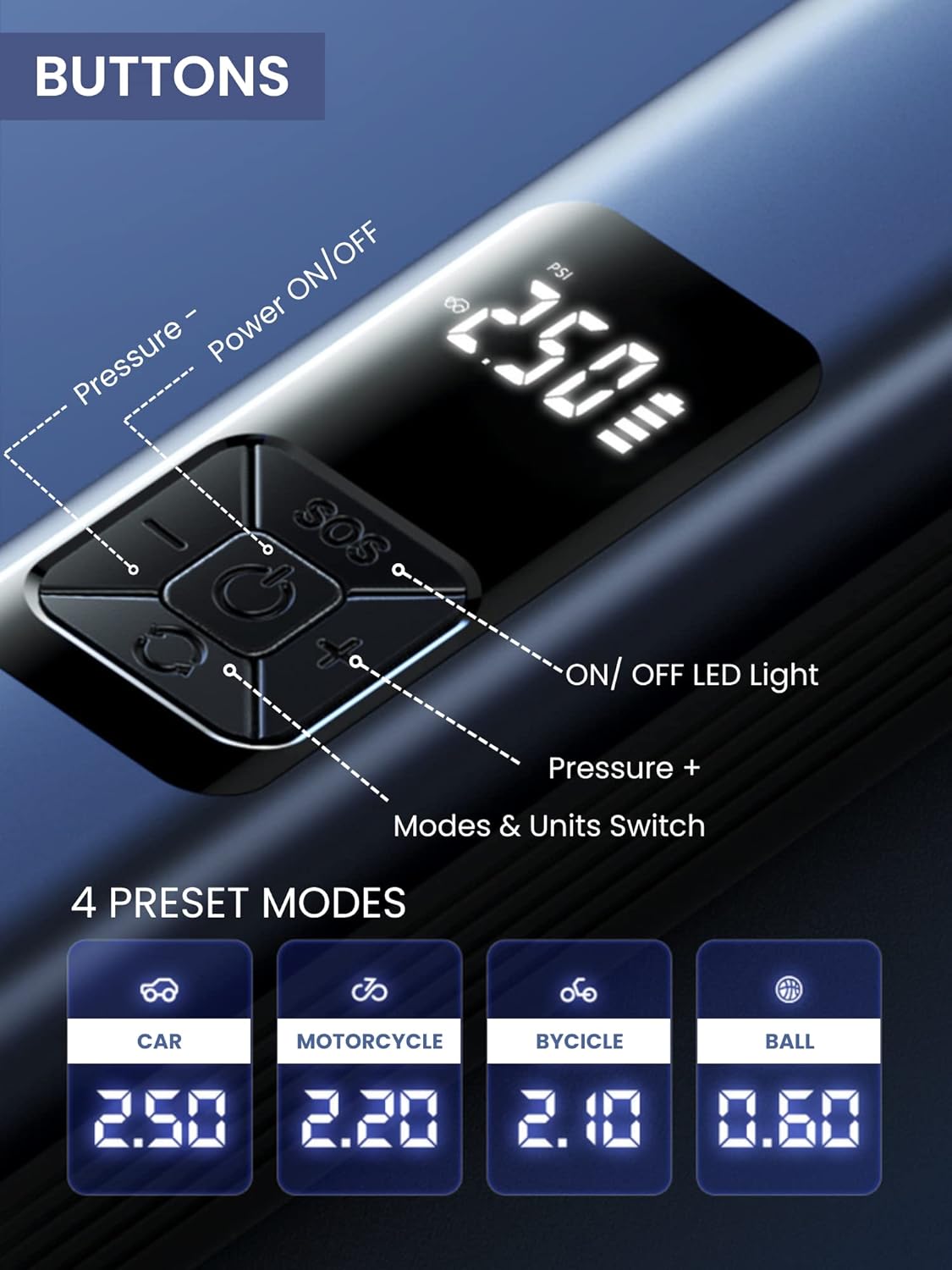
The device features a digital display and 5 control buttons:
- Tænd/sluk -knap: Central button to turn the device on/off and start/stop inflation or vacuuming.
- Pressure - Button: Reducerer måltrykket.
- Pressure + Button: Øger måltrykket.
- LED lys ON/OFF knap: Aktiverer og skifter mellem LED-lystilstande.
- Mode & Units Switch Button: Changes between preset inflation modes (Car, Motorcycle, Bicycle, Ball) and switches pressure units (e.g., PSI, Bar).
5.2 Using the Air Compressor (Inflation)
- Forbinde: Screw the inflation tube onto the device and attach the correct nozzle to the item you wish to inflate.
- Tænd: Press the Power ON/OFF button to turn on the device. The digital display will show the current tire pressure.
- Vælg tilstand: Press the Mode & Units Switch button to cycle through preset modes (Car, Motorcycle, Bicycle, Ball) or to change pressure units (PSI, Bar).
- Sæt tryk: Use the Pressure + and Pressure - buttons to set your desired target pressure.
- Start inflation: Press the Power ON/OFF button again to begin inflation. The device will automatically stop when the preset pressure is reached.
- Afbryde: Once inflation is complete, disconnect the nozzle from the item and then unscrew the inflation tube from the device.
5.3 Brug af støvsugeren
- Vedhæft: Insert the desired vacuum attachment into the vacuum port at the bottom of the device.
- Tænd: Press the Power ON/OFF button to activate the vacuum function.
- Ren: Use the device to vacuum dust, crumbs, and small debris from car interiors (seats, trunk, center console) or small areas in your home (sofas, lamp tables, windowsills, keyboards).
- Sluk: Press the Power ON/OFF button again to turn off the vacuum.

5.4 Brug af LED-nødlyset
- Aktiver: Press the LED Light ON/OFF button to turn on the light.
- Cyklustilstande: Press the LED Light ON/OFF button repeatedly to cycle through the three lighting modes:
- First press: Steady light
- Second press: Medium-speed flashing light
- Third press: Alternating medium/high-speed flashing light (SOS signal)
- Sluk: Continue pressing the LED Light ON/OFF button until the light turns off, or hold the button for a few seconds.
6. Vedligeholdelse
6.1 Rengøring af enheden
- Tør ydersiden af enheden af med en blød, damp klæde. Brug ikke skrappe kemikalier eller slibende rengøringsmidler.
- For the vacuum function, regularly empty the dust collection bin and clean the filter to maintain optimal suction power. The filter is washable; ensure it is completely dry before reinserting.
6.2 Opbevaring
- Opbevar enheden og dens tilbehør et køligt, tørt sted, væk fra direkte sollys og ekstreme temperaturer.
- Sørg for, at enheden er fuldt opladet inden langtidsopbevaring for at bevare batteriets sundhedstilstand.
7. Fejlfinding
| Problem | Mulig årsag | Løsning |
|---|---|---|
| Enheden tændes ikke. | Lavt batteri. | Oplad enheden med det medfølgende USB Type-C-kabel. |
| Luftkompressoren puster sig ikke op. | Inflation tube or nozzle not properly connected. Incorrect pressure setting. | Ensure all connections are secure. Check and adjust the target pressure. |
| Vacuum suction is weak. | Dust bin full. Filter clogged. | Empty the dust bin. Clean or replace the filter. |
| Device stops unexpectedly during operation. | Overheat protection activated. Battery low. | Lad enheden køle af. Genoplad batteriet. |
8. Specifikationer
| Feature | Detalje |
|---|---|
| Modelnummer | B2222 |
| Mærke | MAGISK UDVALG |
| Batterikapacitet | 4400 mAh Lithium-ion |
| Motor Speed (Vacuum) | 30000r/min |
| Dimensioner (L x B x H) | 29 x 6 x 5.5 cm (ca.) |
| Vægt | 850 g |
| Opladningsport | USB Type-C |
| Særlige funktioner | LED Emergency Light, Digital Display, Automatic Shut-off (Inflation) |
9. Garanti og support
For warranty information and customer support, please refer to the documentation provided with your purchase or contact MAGIC SELECT customer service directly. Keep your proof of purchase for warranty claims.
For further assistance or inquiries, please visit the official MAGIC SELECT website or contact their support team through the contact details provided on their packaging or product page.


