Indledning
This manual provides comprehensive instructions for the GMKtec G10 Mini PC, a compact desktop computer featuring an AMD Ryzen 5 3500U processor. It is designed for various applications including office work, home entertainment, and light gaming. This guide covers initial setup, operational procedures, maintenance tips, troubleshooting common issues, and detailed product specifications to ensure optimal performance and user experience.
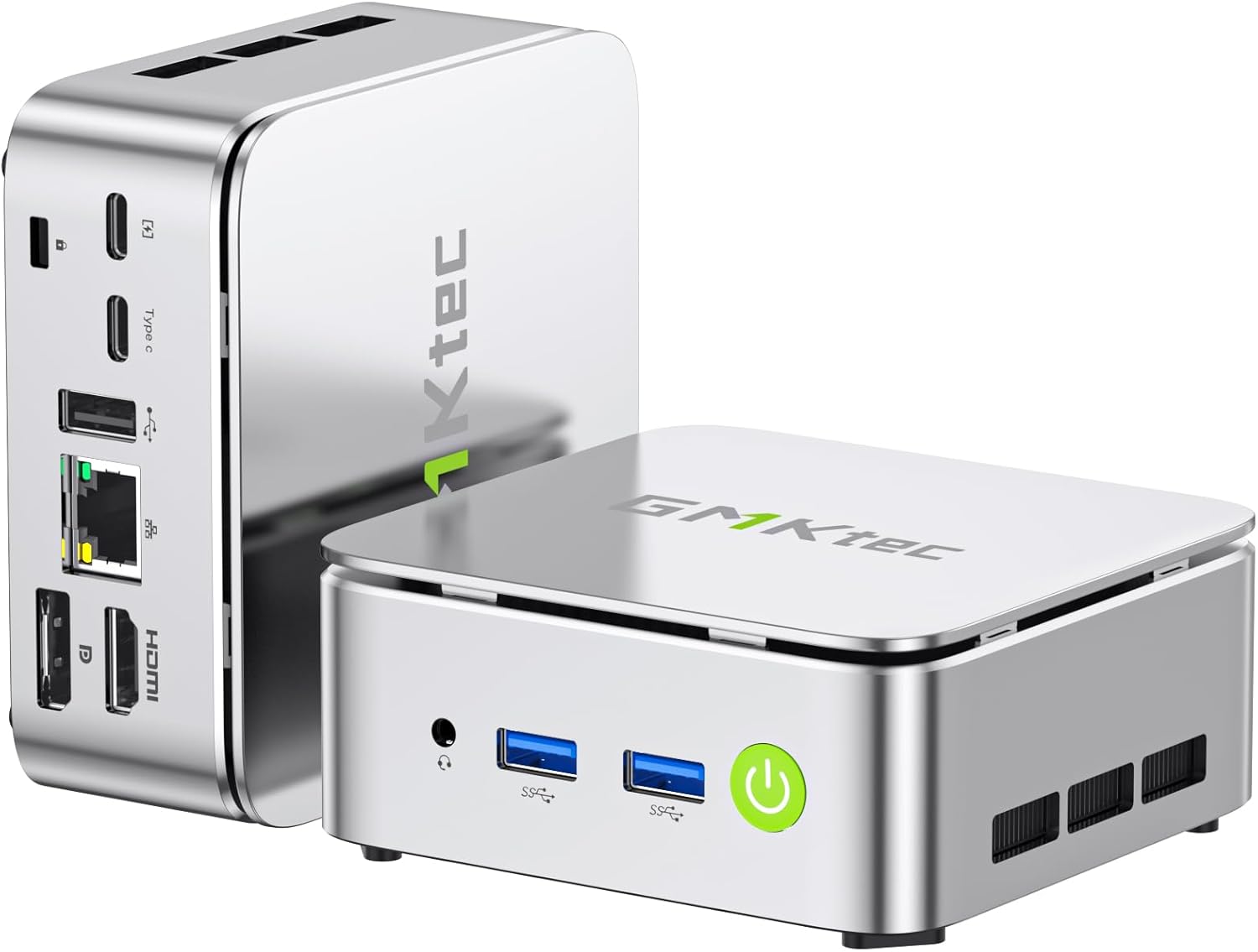
Image: The GMKtec G10 Mini PC, showcasing dens kompakte design og forskellige porte.
Hvad er der i æsken
Upon opening the GMKtec G10 Mini PC package, you should find the following items:
- GMKtec Nucbox G10 Mini PC Ryzen 5 3500U Mini PC Computer
- HDMI kabel
- Type-C strømforsyning
- VESA Mount
- Brugermanual
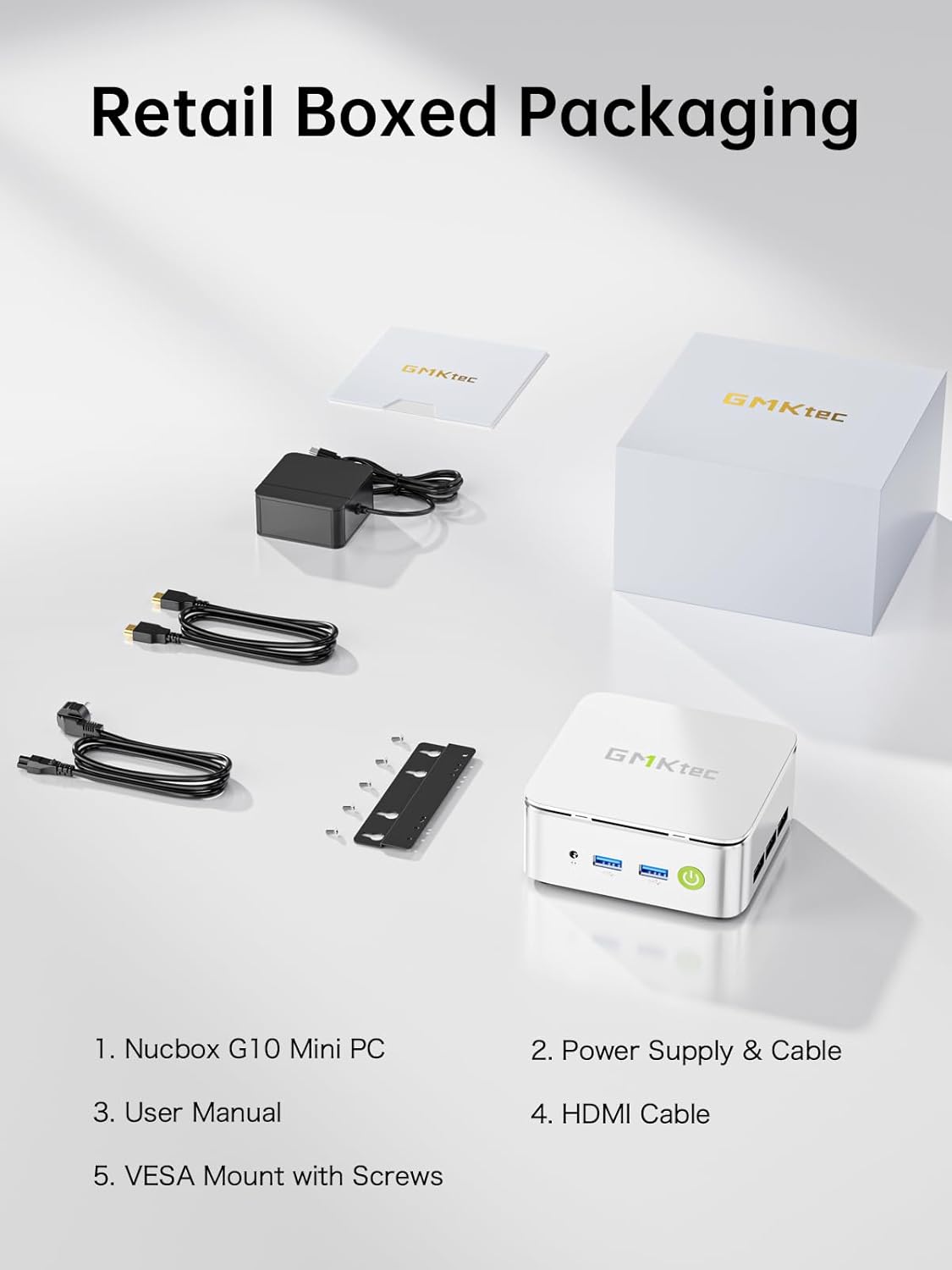
Image: All components included in the GMKtec G10 Mini PC retail packaging.
Opsætningsvejledning
Følg disse trin for at konfigurere din GMKtec G10 Mini PC:
- Tilslut ydre enheder: Connect your keyboard, mouse, and monitor(s) to the available USB and display ports (HDMI, DisplayPort, or USB-C).
- Strømtilslutning: Connect the Type-C power supply to the designated power input port on the mini PC and then plug it into a power outlet.
- Tænd: Press the power button located on the front of the device. The power indicator light will illuminate.
- Initial Operating System Setup: If this is the first boot, follow the on-screen instructions to complete the operating system setup (e.g., Windows 11 Pro).

Billede: Detaljeret view of the GMKtec G10 Mini PC's front and rear ports, including USB, HDMI, DisplayPort, and LAN.
Betjeningsvejledning
Grundlæggende betjening
- Tænd/sluk: Press the power button to turn the device on. To turn off, use the operating system's shutdown function or press and hold the power button for 5 seconds.
- Genstart: Brug operativsystemets genstartsfunktion.
Skærmopsætning
The GMKtec G10 supports triple 4K@60Hz display output via HDMI 2.1, DisplayPort 1.4, and a full-function USB-C port. Connect up to three monitors for extended desktop or mirrored display configurations.

Image: A GMKtec G10 Mini PC powering a triple monitor setup for enhanced productivity.
Netværk
The device features a 2.5GbE RJ45 LAN port for high-speed wired internet, WiFi 5 for wireless connectivity, and Bluetooth 5.2 for connecting wireless peripherals.

Image: The GMKtec G10 Mini PC demonstrating its wireless and wired networking capabilities.
Storage and Memory Expansion
The GMKtec G10 comes with 16GB dual-channel DDR4 RAM and a 512GB M.2 PCIe 3.0 SSD. Both are upgradeable:
- VÆDDER: Expandable up to 32GB DDR4.
- Opbevaring: Features dual M.2 2280 PCIe 3.0 slots, supporting up to 2x 8TB SSDs for a total of 16TB.

Billede: Eksploderet view of the GMKtec G10's internal components, highlighting the dual SO-DIMM DDR4 and M.2 SSD slots for upgrades.
Produkt overview Video
Video: En overview of the GMKtec G10 Mini PC, detailing its features, ports, and internal components.
Opretholdelse
Korrekt vedligeholdelse sikrer din mini-pc's lange levetid og optimale ydeevne.
- Rensning: Regularly clean the exterior of the mini PC with a soft, dry cloth. Use compressed air to gently clear dust from the ventilation grilles to prevent overheating. Ensure the device is powered off and unplugged before cleaning.
- Softwareopdateringer: Keep your operating system and drivers updated to the latest versions. This improves security, stability, and performance.
- Kølesystem: The G10 features an advanced cooling system designed for quiet operation. Ensure the vents are not obstructed to allow for proper airflow.

Image: A graph demonstrating the low noise output of the G10 Mini PC's silent cooling system compared to typical office and outdoor noise levels.

Image: An exploded diagram illustrating the internal structure of the GMKtec G10, highlighting the cooling components.
Fejlfinding
If you encounter issues with your GMKtec G10 Mini PC, refer to the following common solutions:
- Ingen strøm:
- Sørg for, at strømadapteren er korrekt tilsluttet både mini-pc'en og en fungerende stikkontakt.
- Kontroller, at stikkontakten fungerer ved at tilslutte en anden enhed.
- Ingen visning:
- Check all display cable connections (HDMI, DisplayPort, USB-C) between the mini PC and the monitor(s).
- Sørg for, at skærmen er tændt og indstillet til den korrekte inputkilde.
- Prøv at tilslutte til en anden skærm eller bruge et andet kabel.
- Ingen internetforbindelse:
- For wired connection, ensure the Ethernet cable is properly connected to the 2.5GbE LAN port and your router/modem. Check router status.
- For Wi-Fi, verify that Wi-Fi is enabled in the operating system and you are connected to the correct network with the correct password.
- Langsom ydeevne:
- Luk unødvendige programmer, der kører i baggrunden.
- Ensure the cooling vents are clear of obstructions to prevent thermal throttling.
- Check for and install any available operating system or driver updates.
If these steps do not resolve your issue, please contact GMKtec customer support for further assistance.
Specifikationer
Detailed technical specifications for the GMKtec G10 Mini PC:
| Feature | Specifikation |
|---|---|
| Processor | AMD Ryzen 5 3500U (4C/8T, op til 3.7 GHz) |
| Grafik | AMD Radeon Vega 8-grafikkort (1200 MHz) |
| VÆDDER | 16GB DDR4 (Dual-channel, expandable up to 32GB) |
| Opbevaring | 512GB M.2 PCIe 3.0 SSD (Dual M.2 2280 slots, expandable up to 2x 8TB) |
| Operativsystem | OS Pro (Windows 11 Pro compatible) |
| Video output | HDMI 2.1, DisplayPort 1.4, USB-C (Triple 4K@60Hz display support) |
| LAN | 1x 2.5GbE RJ45 |
| Trådløs forbindelse | WiFi 5, Bluetooth 5.2 |
| USB-porte | 2x USB 3.2 Gen1, 1x USB 2.0, 1x USB-C (Full-Function: PD/DP/Data) |
| Lyd | 3.5 mm lydstik |
| Dimensioner | 3.86 x 1.65 x 4.06 tommer |
| Vægt | 2.03 pund |
Garanti og support
GMKtec er forpligtet til at levere pålidelige produkter og fremragende kundeservice.
Garantioplysninger
The GMKtec G10 Mini PC includes a full 1 års garanti from the date of purchase. This warranty covers all hardware faults due to manufacturing defects or workmanship. Please retain your proof of purchase for warranty claims.
Kundesupport
For any questions, technical assistance, or warranty claims, please contact our professional after-sales team:
- E-mail support: support@gmktec.com
- Online support: Visit the GMKtec store on Amazon and navigate to the 'Contact Seller' option through your order history.

Image: GMKtec customer support details, including email and online contact methods.


