Indledning
This manual provides detailed instructions for the use and maintenance of your TOZO Golden X1 Wireless Earbuds. Please read this manual thoroughly before using the product to ensure proper operation and to maximize your listening experience.

Image: The TOZO Golden X1 Wireless Earbuds shown with their charging case, illustrating the product's design and compact form factor.
Hvad er der i æsken
Bekræft at alle komponenter er til stede ved udpakning:
- TOZO Golden X1 trådløse øretelefoner
- Trådløs opladningsetui
- Flere størrelser af ørepropper
- USB-C (A to C) Charging Cable (30cm)
- Brugermanual
Produkt overview

Billede: En eksploderet view diagram of the TOZO Golden X1 earbud, highlighting the Balanced Armature Drivers and 12mm Dynamic Driver components.
The TOZO Golden X1 earbuds feature a hybrid driver system, combining a Balanced Armature Driver for clear treble and a 12mm Dynamic Driver for rich bass. They support advanced audio technologies like LDAC and Hi-Res Audio Wireless, ensuring a high-fidelity listening experience.
Opsætning
1. Opladning af øretelefoner og etuiet
Oplad ørepropperne og opladningsetuiet helt inden første brug.
- Kablet opladning: Connect the provided USB-C cable to the charging case and a power adapter. The LED digital display on the case will show the battery percentage.
- Trådløs opladning: Place the charging case on a compatible wireless charging pad. The LED display will indicate charging status.
A full charge typically takes approximately 2 hours. The case provides up to 32 hours of total listening time with multiple charges for the earbuds.

Image: The TOZO Golden X1 charging case displaying battery percentage, indicating its capacity to provide up to 32 hours of total battery life.
2. Eartip Selection and Fit
Proper eartip selection is crucial for optimal sound quality and noise cancellation. Experiment with the included eartips to find the best fit for your ears.
- Choose eartips that create a snug seal in your ear canal.
- A good seal enhances bass response and improves passive noise isolation.

Image: A visual guide demonstrating the various sizes of silicone eartips included with the TOZO Golden X1, emphasizing the importance of selecting the correct size for a comfortable and secure fit.
3. Parring med en Bluetooth-enhed
- Åbn opladningsetuiet. Ørepropperne går automatisk i parringstilstand.
- Aktiver Bluetooth på din enhed (smartphone, tablet, bærbar computer).
- Søg efter 'TOZO Golden X1' in the list of available Bluetooth devices and select it to connect.
- Når forbindelsen er oprettet, vil en stemmemeddelelse bekræfte den gennemførte parring.
4. Installation af TOZO-appen
For enhanced features and customization, download the TOZO App from your device's app store.
- The app allows for EQ adjustments, noise cancellation mode selection, and firmware updates.
- Utilize the EarTune AI Technology within the app for personalized sound profiles based on a hearing test.
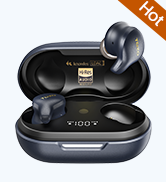
Image: Screenshot of the TOZO App's EarTune AI Technology interface, showing a hearing test in progress to customize audio output.
Betjeningsvejledning
Tryk på kontrolelementer
The TOZO Golden X1 earbuds feature touch-sensitive controls on each earbud. The functions are as follows:
Image: A diagram illustrating the touch control functions for the left and right TOZO Golden X1 earbuds, detailing single, double, triple tap, and long press actions for various commands.
| Handling | Venstre øretelefon (L) | Højre øretelefon (R) |
|---|---|---|
| Single Press (X1) | Afspil/Pause, Besvar opkald | Afspil/Pause, Besvar opkald |
| Dobbelttryk (X2) | Forrige sang | Næste sang |
| Tredobbelt tryk (X3) | Læg på opkald | Stemmeassistent |
| Hold (2 sekunder) | Reject Call, Volume Down | Reject Call, Volume Up |
| Single Press (X1) | ANC/Transparenstilstand Skift | N/A |
Aktiv støjreduktion (ANC) og transparenstilstand
The earbuds feature Active Noise Cancellation (ANC) to reduce ambient noise and Transparency Mode to allow you to hear your surroundings.
- Toggle between ANC, Transparency Mode, and Normal Mode by single-pressing the left earbud.
- ANC can reduce ambient noise by up to 42dB.
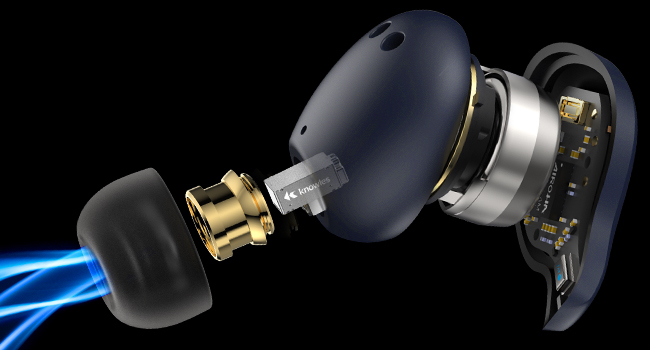
Image: An illustration demonstrating the Active Noise Cancellation capability of the TOZO Golden X1 earbuds, showing a reduction of up to 42dB in ambient noise.
EQ Modes and Customization
The TOZO App provides 16 preset EQ modes and allows for custom sound settings.
- Access the EQ settings via the TOZO App to select presets like Rock, Classical, Jazz, Hip-Pop, or create your own.
- The app also allows for customization of noise reduction intensity.

Image: Screenshots of the TOZO App, showcasing the interface for selecting 16 preset EQ modes and 6 noise reduction modes, along with options for customized touch controls and firmware updates.
Opretholdelse
Rensning
- Rengør regelmæssigt ørepropperne og opladningsetuiet med en blød, tør og fnugfri klud.
- Fjern ørepropperne, og rengør dem med mild sæbe og vand. Tør dem derefter grundigt, inden de sættes på igen.
- Ensure charging contacts on both earbuds and case are free of debris.
Opbevaring
- Opbevar øretelefonerne i deres opladningsetui, når de ikke er i brug for at beskytte dem og holde dem opladet.
- Undgå opbevaring i ekstreme temperaturer eller høj luftfugtighed.
Vandmodstand
The TOZO Golden X1 earbuds are waterproof. However, this does not mean they are suitable for swimming or prolonged submersion. They are designed to withstand sweat and light splashes.
- Do not charge the earbuds or case if they are wet.
- Dry them completely before placing them back in the charging case or connecting a charging cable.
Image: The TOZO Golden X1 earbuds shown with water droplets, illustrating their water-resistant design suitable for protection against sweat and splashes.
Fejlfinding
| Spørgsmål | Mulig løsning |
|---|---|
| Øretelefoner parrer ikke | Ensure earbuds are charged. Place them back in the case, close, then reopen to re-enter pairing mode. Check your device's Bluetooth settings. |
| Kun én øretelefon virker | Ensure both earbuds are charged. Try resetting the earbuds (refer to the TOZO App or full user manual for specific reset instructions). |
| Dårlig lydkvalitet/lav lydstyrke | Check eartip fit for a secure seal. Clean earbuds and eartips. Ensure your device's volume is up. Disable ANC if not needed. |
| Ladeetui oplader ikke | Check USB-C cable connection and power source. Ensure wireless charging pad is compatible and correctly aligned. |
| Berøringskontroller reagerer ikke | Sørg for, at ørepropperne er rene og tørre. Genstart ørepropperne ved at placere dem i etuiet og tage dem ud. |
Specifikationer
| Feature | Detalje |
|---|---|
| Modelnavn | TOZO Golden X1 |
| Støjkontrol | Aktiv støjreduktion (op til 42 dB) |
| Audio driver type | Hybrid Driver (Balanced Armature & 12mm Dynamic) |
| Frekvensområde | 12Hz til 44.1kHz |
| Forbindelse | Bluetooth 5.3 |
| Bluetooth rækkevidde | Op til 12 meter |
| Lydafkodning | LDAC, Hi-Res Audio Wireless |
| Batterilevetid (ørepropper) | Cirka 8 timer (enkelt opladning) |
| Batterilevetid (med etui) | Op til 32 timer |
| Opladningstid | Ca. 2 timer |
| Opladningsgrænseflade | USB-C, trådløs opladning |
| Vandmodstandsniveau | Waterproof (sweat and splash resistant) |
| Kontroltype | Touch Control, TOZO APP |
| Varens vægt | 193.4 Grams (total package) |
| Kuffert batterikapacitet | 500 mAh |
Garanti og support
TOZO products are designed for reliability and performance. For warranty information and customer support, please refer to the official TOZO webhjemmeside eller kontakt deres kundeservice direkte.
- Online support: Besøg TOZO Brand Store for ofte stillede spørgsmål og produktinformation.
- Kontakte: Refer to the contact details provided in the product packaging or on the official TOZO webwebsted for teknisk assistance.


