1. Introduktion
Welcome to the Kinstone 10.1" 4G LTE Android Tablet user manual. This guide provides comprehensive instructions for setting up, operating, and maintaining your new tablet. Designed for both work and play, this tablet features an octa-core processor, 8GB RAM, 128GB internal storage (expandable up to 1TB), an 8000mAh battery, and dual SIM slots for enhanced connectivity.

Figur 1.1: Forside og bagside view of the Kinstone 10.1" Android Tablet, showcasing dets elegante design og kameramodul.
2. Produktet er slutview
2.1 Komponenter og funktioner
Your Kinstone tablet is equipped with advanced features for a superior user experience. Key components include:
- Vise: 10.1-inch Full HD IPS screen with 1920x1200 resolution, 178° wide viewing angle, and low blue light technology for eye comfort.
- Processor: High-performance octa-core processor (hexa-core @2.0 GHz Cortex-A55 and dual-core @1.8 GHz Cortex-A75) with 2025 AI Chip.
- Hukommelse og opbevaring: 8 GB RAM og 128 GB intern lagerplads, der kan udvides op til 1 TB via microSD-kort.
- Kameraer: 13MP bagkamera og 5MP frontkamera.
- Batteri: 8000mAh batteri til længere tids brug.
- Forbindelse: 4G VoLTE dual SIM support, Bluetooth 5.0, 2.4/5G dual-band Wi-Fi.
- Lyd: Dual speakers for stereo effect.
- Porte: Type-C charging port, 3.5mm earphone jack.

Figur 2.1: Overview of the Android 12 OS features, highlighting efficiency, safety, entertainment, and display enhancements.

Figure 2.2: Visual summary of the Kinstone Android tablet's core features and specifications.
3. Opsætning
3.1 Indledende opladning
Before first use, fully charge your tablet. Connect the provided Type-C charging cable to the tablet's charging port and the other end to the charger. Plug the charger into a power outlet. The charging indicator will show the charging status. A full charge typically takes approximately 2 hours.

Figure 3.1: Illustration of the tablet's long-lasting 8000mAh battery life, supporting various activities.
3.2 Tænd/sluk
- For at tænde: Press and hold the Power button until the Kinstone logo appears on the screen.
- For at slukke: Tryk på tænd/sluk-knappen og hold den nede, indtil menuen med strømindstillinger vises. Vælg "Sluk", og bekræft.
- For at genstarte: Fra menuen med strømindstillinger skal du vælge "Genstart".
3.3 Guide til indledende opsætning
Når tabletten tændes første gang, vil den guide dig gennem en indledende opsætningsguide. Følg instruktionerne på skærmen for at:
- Vælg dit sprog.
- Opret forbindelse til et Wi-Fi-netværk.
- Log ind med din Google-konto (eller opret en).
- Konfigurer skærmlås (pinkode, mønster, adgangskode eller Face ID).
- Review og accepterer vilkår og betingelser.
4. Betjeningsvejledning
4.1 Navigering i Android-grænsefladen
Your tablet runs on Android 12, offering an intuitive user interface. Common gestures include:
- Tryk på: For at vælge et element eller åbne en app.
- Stryg: Til at rulle gennem skærme eller lister.
- Knib for at zoome: For at zoome ind eller ud på billeder og web sider.
- Langt tryk: For at få adgang til kontekstmenuer eller flytte appikoner.
4.2 Installation af applikationer
Applications can be downloaded and installed from the Google Play Store. Ensure you are connected to the internet before downloading.
- Åbn Play Butik app.
- Søg efter den ønskede anvendelse.
- Tryk på Installere og følg instruktionerne på skærmen.
4.3 Brug af Face ID
The tablet supports Face Recognition for unlocking. To set up Face ID:
- Gå til Indstillinger > Sikkerhed og privatliv > Ansigtslås.
- Følg vejledningen for at registrere dit ansigt.

Figure 4.1: Display features, including Face Recognition for secure and fast unlocking.
5. Forbindelse
5.1 Wi-Fi-forbindelse
Connect to Wi-Fi for internet access:
- Gå til Indstillinger > Netværk og internet > Internettet.
- Slå Wi-Fi til.
- Vælg dit ønskede netværk, og indtast adgangskoden, hvis det kræves.

Figure 5.1: Connectivity options, including dual-band Wi-Fi for fast and stable connections.
5.2 Bluetooth -parring
Pair your tablet with Bluetooth devices like headphones or speakers:
- Gå til Indstillinger > Tilsluttede enheder > Forbindelsespræferencer > Bluetooth.
- Slå Bluetooth til.
- Vælg den enhed, du vil parre, fra listen over tilgængelige enheder.
5.3 4G LTE and Dual SIM
The tablet supports 4G VoLTE with dual SIM slots, allowing for simultaneous calls and browsing. You can use two SIM cards or one SIM card and one microSD card.
- Find SIM-kortbakken på siden af tabletten.
- Brug det medfølgende SIM-kortudløserværktøj til at åbne bakken.
- Insert your Nano-SIM cards and/or microSD card into the designated slots.
- Skub forsigtigt bakken tilbage i tabletten.

Figure 5.2: Dual card slot functionality for SIM cards and expandable storage.
6. Kamerabrug
Your tablet is equipped with a 13MP rear camera and a 5MP front camera for capturing photos and videos, and for video calls.
- Åbn Kamera app fra startskærmen eller appskuffen.
- Skift mellem for- og bagkamera ved hjælp af kameraikonet.
- Tryk på udløserknappen for at tage et billede eller på optageknappen for at starte/stoppe videooptagelse.
- Få adgang til forskellige kameratilstande og -indstillinger i appen.
7. Batteristyring
8000mAh-batteriet giver ampstrøm til daglig brug. Sådan optimerer du batteriets levetid:
- Reducer skærmens lysstyrke.
- Turn off Wi-Fi, Bluetooth, and 4G when not in use.
- Luk baggrundsapplikationer.
- Aktivér batterisparetilstand i Indstillinger > Batteri.
The tablet supports fast charging via its Type-C port.
8. Lagerstyring
Your tablet comes with 128GB of internal storage, which can be expanded up to 1TB using a microSD card.
- To check storage usage: Go to Indstillinger > Opbevaring.
- To free up space: Delete unnecessary files, uninstall unused apps, or move large files til et microSD-kort.

Figure 8.1: Visual representation of the tablet's generous storage capabilities.
9. Vedligeholdelse
To ensure the longevity and optimal performance of your Kinstone tablet:
- Keep the tablet clean using a soft, lint-free cloth. Avoid harsh chemicals.
- Protect the screen with a screen protector (one is included).
- Undgå at udsætte tabletten for ekstreme temperaturer, direkte sollys eller fugt.
- Regularly update the operating system and applications to the latest versions.
- Perform periodic backups of important data.
10. Fejlfinding
Hvis du støder på problemer med din tablet, kan du bruge følgende almindelige løsninger:
| Problem | Mulig løsning |
|---|---|
| Tablet tænder ikke | Sørg for, at batteriet er opladet. Tryk på tænd/sluk-knappen og hold den nede i mindst 10-15 sekunder for at fremtvinge en genstart. |
| Problemer med Wi-Fi-forbindelse | Restart your Wi-Fi router. Go to Settings > Network & internet > Internet, forget the network, and reconnect. Ensure the tablet is within range. |
| Apps fryser eller går ned | Close the app and reopen it. Clear the app's cache (Settings > Apps > [App Name] > Storage & cache > Clear cache). Ensure the app is updated. |
| Langsom ydeevne | Luk ubrugte apps. Ryd cache og midlertidige files. Check storage space and free up if necessary. Restart the tablet. |
| Batteriet aflades hurtigt | Reduce screen brightness. Disable unnecessary features like GPS, Bluetooth, or Wi-Fi when not in use. Check battery usage in settings to identify power-hungry apps. |
If problems persist, contact Kinstone customer support for further assistance.
11. Specifikationer
Detailed technical specifications for your Kinstone tablet:
| Feature | Specifikation |
|---|---|
| Modelnummer | KST102SA_ROW |
| Operativsystem | Android 12 |
| Skærmstørrelse | 10.1 tommer |
| Skærmopløsning | 1920x1200 pixels |
| Processor | 2 GHz Octa-Core (Unisoc) |
| VÆDDER | 8 GB DDR4 SDRAM |
| Intern opbevaring | 128 GB (flashhukommelse) |
| Udvidelig opbevaring | Up to 1 TB via MicroSD |
| Grafik coprocessor | Mali-G57 MP1 |
| Trådløs type | 802.11a, 802.11ac (2.4G/5G Dual-band Wi-Fi) |
| Bluetooth | 5.0 |
| Bagkamera | 13 MP |
| Forreste kamera | 5 MP |
| Batterikapacitet | 8000 mAh (litiumpolymer) |
| Gennemsnitlig batterilevetid | 8 timer |
| Varens vægt | 2 pund |
| Produktdimensioner | 15.8 x 24.1 x 0.8 tommer |
| Farve | Grå |
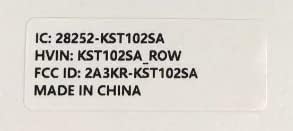
Figure 11.1: Product label with model number and regulatory information.
12. Garanti og support
12.1 Garantiservice
Kinstone provides a warranty service for your tablet. Within three months from the date of purchase, Kinstone offers replacement services for eligible issues, not repair. Please retain your proof of purchase.
12.2 Kundesupport
For any questions, technical assistance, or warranty claims, please contact Kinstone customer support. You may also be eligible to receive a compatible leather case by contacting the seller after receiving your tablet.
Visit the official Kinstone store for more information and support: Kinstone Store on Amazon


