1. Produktet er slutview
The Fantech MAXFIT81 is a 75% form factor wireless mechanical keyboard designed for gaming and productivity. It features PBT Dye-Sub keycaps, a customizable OLED display, a programmable rotary encoder knob, and hot-swappable switches. The keyboard supports multiple connectivity options including wired, Bluetooth 5.0, and Fantech's STRIKESPEED wireless technology, ensuring a versatile and responsive user experience. Its transparent retro case and sound-proofing design contribute to both aesthetics and typing comfort.

2. Opsætning og tilslutning
2.1 Kabelforbindelse
To use the keyboard in wired mode, connect the provided USB-C cable from the keyboard's port to an available USB port on your computer. The keyboard will automatically be recognized and ready for use. This mode provides the most stable connection and charges the keyboard's internal battery.
2.2 Wireless Connection (Bluetooth & STRIKESPEED)
The MAXFIT81 supports both Bluetooth 5.0 and Fantech's 2.4GHz STRIKESPEED wireless technology, allowing connection to up to 5 devices. Use the switch on the keyboard to select your desired wireless mode.
- Bluetooth-parring:
- Skift tastaturet til Bluetooth-tilstand.
- Aktiver Bluetooth på din enhed (pc, bærbar computer, tablet) og søg efter nye enheder.
- Select 'Fantech MAXFIT81' from the list of available devices to pair.
- STRIKESPEED Wireless (2.4GHz):
- Insert the 2.4GHz USB receiver into an available USB port on your computer.
- Switch the keyboard to 2.4GHz wireless mode.
- Tastaturet skal automatisk oprette forbindelse til modtageren.

3. Nøglefunktioner og betjening
3.1 Customizable OLED Display
The 1-inch OLED display on the MAXFIT81 provides real-time information and customization options. Users can display custom GIFs, PNGs, and artwork. It also shows essential keyboard status, PC information, time, and battery status.

3.2 Programmable Encoder Knob
Beyond standard volume control, the rotary encoder knob is fully programmable. It can be assigned various macros, including scrolling, changing songs, adjusting productivity settings, or even acting as a weapon wheel in games.

3.3 Hot-swap-kontakter
The MAXFIT81 features hot-swappable south-facing sockets, allowing users to easily change mechanical switches without soldering. This enables customization of typing feel and sound to personal preference.

3.4 Dense-Gasket & Foam Design
The keyboard incorporates a Dense-Gasket design and multiple layers of foam (plate foam, PCB dampener, case foam). This construction provides a stable and durable typing experience, reduces hollow sounds, and enhances overall usability by absorbing shock from keystrokes.
3.5 Personalization Software
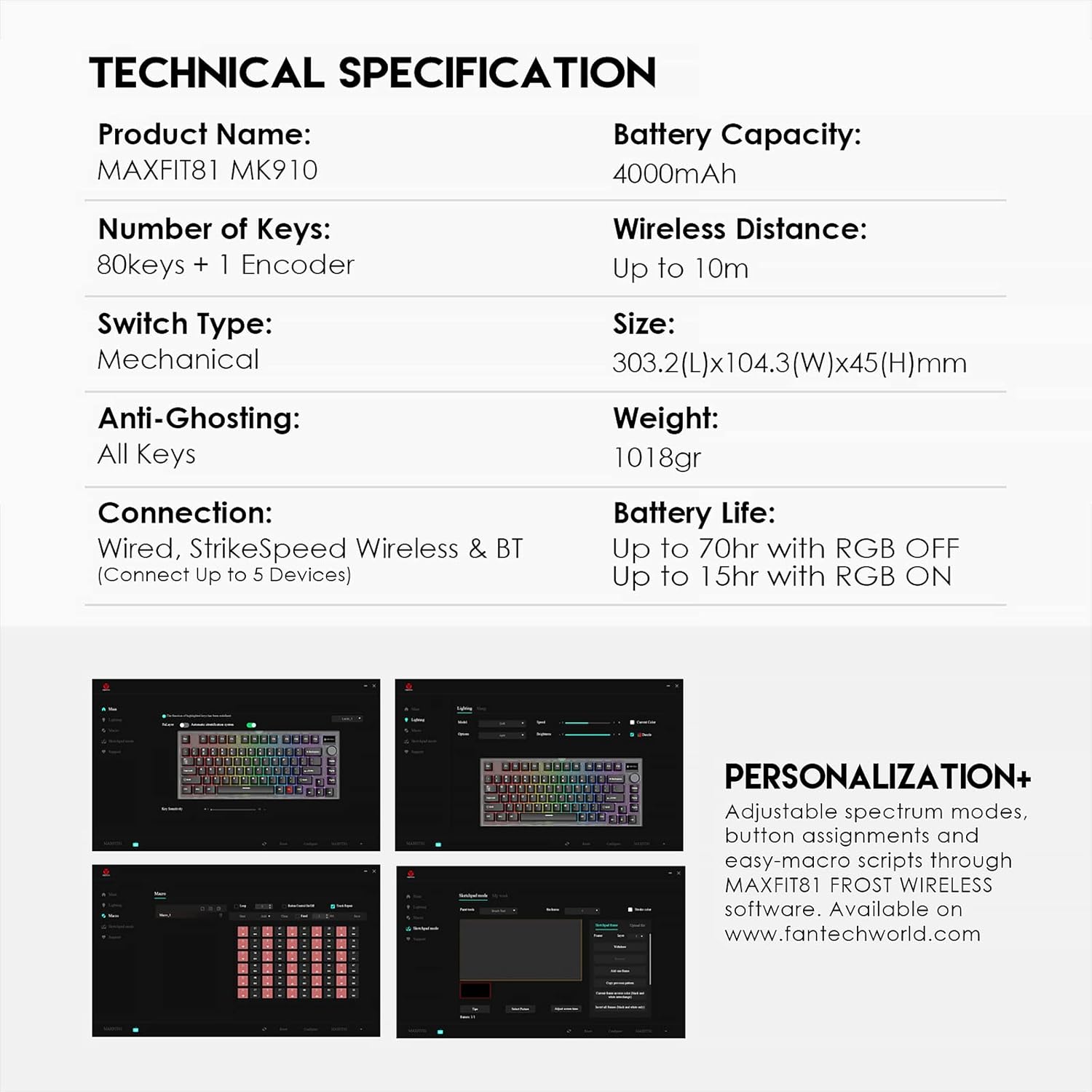
For advanced customization, the MAXFIT81 FROST WIRELESS software allows for adjustable spectrum modes, button assignments, and easy-macro scripts. This software is available for download from the official Fantech webwebsted.
4. Vedligeholdelse
4.1 Rengøring
Regelmæssig rengøring hjælper med at bevare tastaturets ydeevne og udseende.
- Taster: Use a soft brush or compressed air to remove dust and debris between keycaps. For deeper cleaning, keycaps can be carefully removed using a keycap puller and washed with mild soap and water. Ensure they are completely dry before reattaching.
- Sag: Wipe the keyboard case with a soft, damp klæde. Undgå at bruge skrappe kemikalier eller slibende materialer.
4.2 Udskiftning af kontakt
Due to the hot-swappable design, switches can be replaced without soldering. Use a switch puller tool to gently remove the existing switch. Align the pins of the new switch with the sockets on the PCB and press down firmly until it clicks into place. Ensure pins are not bent during insertion.
5. Fejlfinding
If you encounter issues with your Fantech MAXFIT81 keyboard, refer to the following common solutions:
| Problem | Mulig årsag | Løsning |
|---|---|---|
| Tastaturet svarer ikke (kablet) | Loose cable connection, faulty USB port. | Ensure USB-C cable is securely connected. Try a different USB port on your computer. |
| Tastaturet svarer ikke (trådløst) | Low battery, incorrect mode selected, pairing issue, receiver not connected. | Charge the keyboard. Ensure correct wireless mode (BT/2.4GHz) is selected. Re-pair Bluetooth or re-insert 2.4GHz receiver. |
| Specifikke taster virker ikke | Løs eller defekt kontakt, snavs under tastaturet. | Remove keycap and check for debris. If hot-swappable, remove and re-insert the switch, or try a different switch. |
| OLED display not working | Software issue, power saving mode. | Check keyboard settings via the Fantech software. Ensure keyboard is powered on. |
| RGB-belysning fungerer ikke | RGB mode off, software settings. | Check keyboard's RGB controls (usually Fn + keys) or adjust settings in the Fantech software. |
6. Tekniske specifikationer
| Feature | Specifikation |
|---|---|
| Produktnavn | MAXFIT81 MK910 |
| Antal nøgler | 80 keys + 1 Encoder |
| Switch Type | Mekanisk (hot-swap) |
| Anti-Ghosting | Alle nøgler |
| Forbindelse | Wired (USB-C), StrikeSpeed Wireless (2.4GHz), Bluetooth (BT5.0) |
| Tilsluttelige enheder | Op til 5 enheder |
| Batterikapacitet | 4000mAh |
| Trådløs afstand | Op til 10m |
| Dimensioner (L x B x H) | 303.2 x 104.3 x 45 mm |
| Vægt | 1018 g |
| Batterilevetid (RGB FRA) | Op til 70 timer |
| Batterilevetid (RGB tændt) | Op til 15 timer |
| Operativsystemkompatibilitet | Windows (7 or Newer), PC |
| Særlige funktioner | Customizable OLED Display, Rotary Encoder Knob, Retro Frosted Transparent Case, Hot-Swappable |
| Skærmstørrelse | 1 tommer |
| Strømkilde | Batteridrevet |
| Materiale | Plast |
7. Garanti og support
Fantech products are manufactured to high-quality standards. For information regarding warranty coverage, terms, and conditions, please refer to the warranty card included with your product or visit the official Fantech website. For technical support, driver downloads, and frequently asked questions, please visit www.fantechworld.com.


