1. Introduktion
This manual provides essential instructions for the safe and efficient use of your C idea CM822 Smart 8-inch Kids Tablet. Please read this manual thoroughly before operating the device to ensure proper functionality and to prevent damage. Keep this manual for future reference.
2. Sikkerhedsoplysninger
Before using your tablet, please observe the following safety guidelines:
- Always charge the tablet battery before initial use.
- Use only the provided UK charger and Type-C cable for charging. Do not use other chargers.
- Avoid exposing the tablet to extreme temperatures, direct sunlight, or humid environments.
- Forsøg ikke selv at skille tabletten ad eller reparere den. Kontakt kvalificeret servicepersonale.
- Hold tabletten væk fra vand og andre væsker.
- Ensure children use the tablet under adult supervision.
3. Pakkens indhold
Bekræft at alle varer er til stede i pakken:
- Android Tablet (C idea CM822) x 1
- UK Charger x 1
- Type-C-kabel x 1
- Skærmbeskytter x 1
- Book Cover x 1
- OTG Adapter x 1
- Kids Watch x 1
- Tryk på Pen x 1
- TWS Bluetooth Headset x 1
- Colour Marker x 6
- Random Cartoon Stickers x 1
- Sand Painting Kit x 1
- Nøglering x 1
- Finger Buckle x 1
- Brugervejledning x 1
4. Produktet er slutview
The C idea CM822 is an 8-inch Android tablet designed for kids' learning and entertainment. It features Wi-Fi and 5G LTE connectivity, a responsive touch screen, and dual cameras.

Figur 4.1: Forside og bagside view of the C idea CM822 tablet. The tablet features a sleek design with multiple camera lenses on the rear.

Figur 4.2: Rear panel of the C idea CM822 tablet, showing the camera module and branding details.

Figur 4.3: Frontskærm view of the C idea CM822 tablet, displaying the user interface and side buttons.
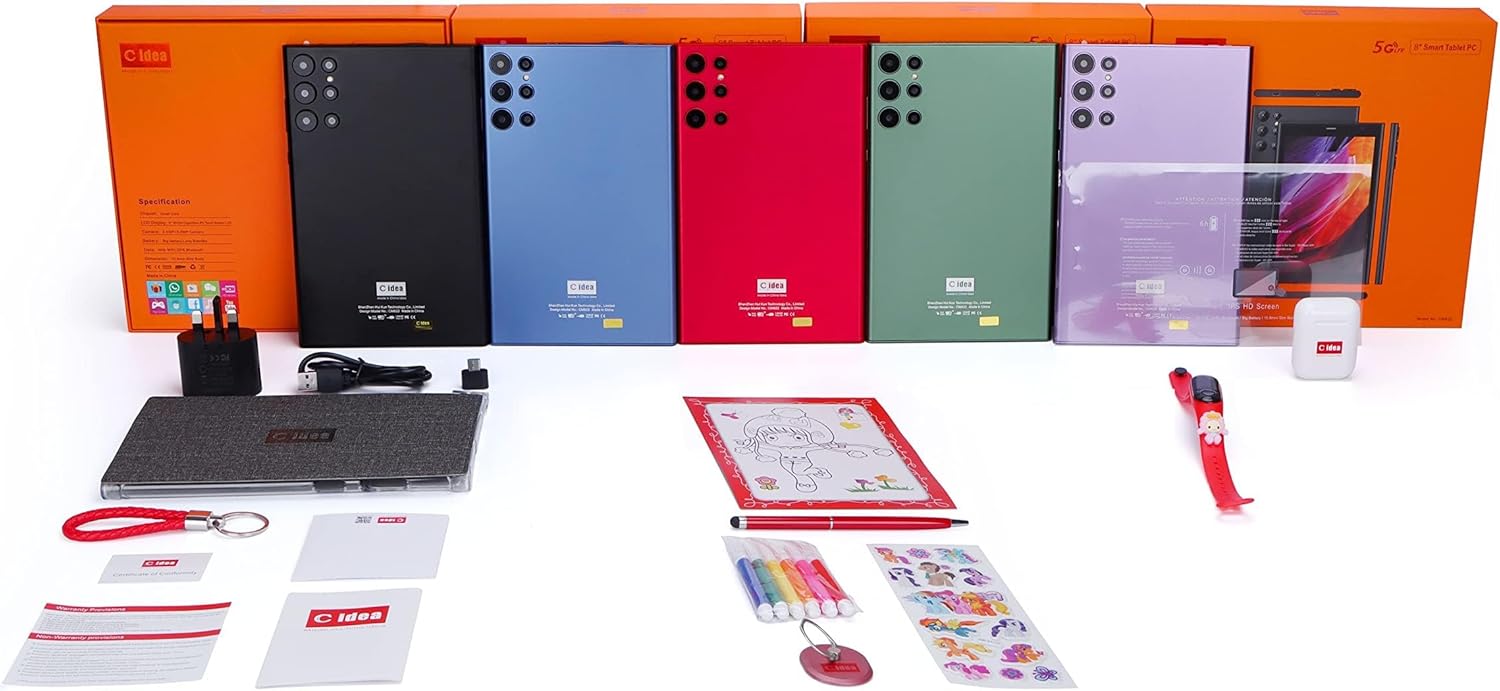
Figur 4.4: Overview of the C idea CM822 tablet and its included accessories, such as charger, cables, and various kids' items.
5. Opsætning
5.1 Indledende opladning
Before first use, connect the provided Type-C cable to the tablet's charging port and the UK charger to a power outlet. Allow the tablet to charge fully. The battery indicator on the screen will show charging status.
5.2 Tænd/sluk
- For at tænde: Tryk på tænd/sluk-knappen (placeret på siden), og hold den nede, indtil skærmen lyser.
- For at slukke: Tryk og hold tænd/sluk-knappen nede, og vælg derefter "Sluk" fra mulighederne på skærmen.
- For at genstarte: Tryk og hold tænd/sluk-knappen nede, og vælg derefter "Genstart" fra mulighederne på skærmen.
5.3 Isætning af SIM-kort og TF-kort
The tablet supports a Micro Single-SIM card for 5G LTE connectivity and a TF (MicroSD) card for expandable memory up to 64GB.
- Find SIM-/TF-kortstikket på siden af tabletten.
- Åbn forsigtigt dækslet til åbningen.
- Insert the Micro SIM card with the gold contacts facing down, ensuring it is correctly oriented.
- Insert the TF card into its designated slot.
- Luk dækslet til åbningen forsvarligt.
5.4 Tilslutning til Wi-Fi
- Stryg ned fra toppen på startskærmen for at åbne panelet Hurtige indstillinger.
- Tap and hold the Wi-Fi icon to go to Wi-Fi settings.
- Slå Wi-Fi til.
- Vælg dit ønskede Wi-Fi-netværk fra listen.
- Indtast netværksadgangskoden, hvis du bliver bedt om det, og tryk derefter på "Opret forbindelse".
6. Betjeningsvejledning
6.1 Grundlæggende navigation
- Berøringsskærm: Tryk for at vælge, swipe for at rulle, knib for at zoome.
- Startskærm: Hovedskærmen, hvor du kan få adgang til apps og widgets.
- Navigationslinje: Typisk nederst på skærmen findes knapperne Tilbage, Hjem og Seneste apps.
- Meddelelsespanel: Stryg ned fra toppen af skærmen til view notifikationer og hurtigindstillinger.
6.2 Ansøgninger
- Forudinstallerede apps: The tablet comes with 46 pre-installed applications. These are accessible from the app drawer or home screen.
- Installation af nye apps: You can download and install additional applications from the Google Play Store. Ensure you have a stable internet connection and a Google account.
6.3 Kamerabrug
Tabletten er udstyret med et 2MP frontkamera og et 5MP bagkamera.
- Open the "Camera" application.
- Tryk på skærmen for at fokusere.
- Tryk på udløserknappen for at tage et billede eller starte/stoppe videooptagelse.
- Use the camera switch icon to toggle between front and rear cameras.
6.4 Ansigtslås
The tablet supports Face Unlock for convenient security.
- Go to "Settings" > "Security" > "Face Unlock".
- Følg instruktionerne på skærmen for at registrere dit ansigt.
- Once registered, you can unlock the tablet by looking at the front camera.
7. Vedligeholdelse
- Rensning: Brug en blød, fnugfri klud til at rengøre skærmen og tablettens kabinet. Undgå at bruge skrappe kemikalier eller slibende materialer.
- Batteripleje: To prolong battery life, avoid fully discharging the battery frequently. Charge the tablet when the battery level is low.
- Softwareopdateringer: Tjek regelmæssigt for systemopdateringer i "Indstillinger" > "System" > "Systemopdatering" for at sikre optimal ydeevne og sikkerhed.
- Lagerstyring: Fjern regelmæssigt unødvendigt fileog afinstaller ubrugte apps for at frigøre lagerplads og opretholde ydeevnen.
8. Fejlfinding
| Problem | Mulig løsning |
|---|---|
| Tabletten tænder ikke. | Sørg for, at batteriet er opladet. Tilslut opladeren, og vent et par minutter, før du forsøger at tænde igen. |
| Problemer med Wi-Fi-forbindelse. | Tjek om Wi-Fi er aktiveret i indstillingerne. Genstart din Wi-Fi-router. Glem netværket, og genopret forbindelsen. |
| Langsom ydeevne. | Close unused applications. Clear cache. Check for available storage space and free up if necessary. Restart the tablet. |
| Apps crashing. | Clear the app's cache and data in "Settings" > "Apps". Reinstall the app. Ensure the tablet's software is up to date. |
| Batteriet aflades hurtigt. | Reduce screen brightness. Close background apps. Disable Wi-Fi/Bluetooth when not in use. Check battery usage in settings to identify power-hungry apps. |
If the problem persists, please refer to the warranty and support section for further assistance.
9. Specifikationer
| Feature | Detalje |
|---|---|
| Mærke | C idé |
| Model | CM822 |
| Vise | 8" WVGA Capacitive IPS Touch Screen LCD |
| Opløsning | 1024x600 pixels (WVGA), supports 1920x1080 video playback |
| Operativsystem | Android 12.0 (non-updated version) |
| Netværk | 5G-LTE |
| Processor | Quad-Core (MediaTek, 2 GHz) |
| Intern opbevaring | 256GB (Actual usable space may be less) |
| VÆDDER | 6GB (Effective speed may vary) |
| Udvidbar hukommelse | Op til 64 GB via TF-kort |
| SIM-type | Micro Single-SIM |
| Batterikapacitet | 5000mAh (Approx. 3-4 hours play time, 3.84 hours average battery life) |
| Kameraer | Front: 2MP, Rear: 5MP (Kids version) |
| Flash lys | Ja |
| Forbindelse | Wi-Fi (802.11g), Bluetooth |
| Ansigtslås | Ja |
| Opladningsmetode | Type-C (Power Input: 5V/2A) |
| Lydstik | 3.5 mm |
| Dimensioner (LxBxH) | 206.2 x 129 x 9.2 mm |
| Vægt | 880 g |
10. Garanti og support
10.1 Garantiservice
The C idea CM822 tablet comes with a 6 måneders garanti. This warranty service is limited to products purchased directly from the SmartLife-Elec store only. Please retain your proof of purchase for warranty claims.
10.2 Kundesupport
For technical assistance, troubleshooting beyond this manual, or warranty inquiries, please contact the retailer or the SmartLife-Elec store where the product was purchased. Provide your model number (CM822) and purchase details when seeking support.


