1. Introduktion
Thank you for choosing the ZIPRO Colt Treadmill. This manual provides essential information for the safe and efficient operation, assembly, and maintenance of your new treadmill. Please read this manual thoroughly before first use and keep it for future reference.
The ZIPRO Colt is a foldable home treadmill designed for effective cardiovascular training. It features adjustable speed, multiple pre-defined programs, and a compact design for easy storage.
2. Vigtige sikkerhedsinstruktioner
To reduce the risk of serious injury, read all instructions before using the ZIPRO Colt Treadmill. Keep these instructions in a safe place for future reference.
- Always place the treadmill on a level surface. Ensure adequate clear space (at least 2 meters behind and 0.6 meters on each side) for safe operation.
- Hold børn og kæledyr væk fra løbebåndet under drift.
- Brug passende sportsfodtøj og -tøj. Undgå løstsiddende tøj, der kan sætte sig fast i bevægelige dele.
- Always attach the safety key clip to your clothing before starting the treadmill. In case of an emergency, the safety key will detach, stopping the machine.
- Brug ikke løbebåndet, hvis ledningen eller stikket er beskadiget, hvis det ikke fungerer korrekt, eller hvis det er blevet tabt eller beskadiget.
- Rådfør dig med en læge, før du starter et træningsprogram, især hvis du har eksisterende helbredsproblemer.
- Overskrid ikke den maksimale brugervægt på 110 kg (242 lbs).
- Ensure the treadmill is unplugged before cleaning or performing any maintenance.
3. Pakkens indhold
Pak forsigtigt alle komponenter ud, og bekræft, at du har modtaget følgende:
- 1 x ZIPRO Colt Foldable Treadmill unit
- Brugervejledning (dette dokument)
- Sikkerhedsnøgle
- Samleværktøj (hvis nødvendigt, typisk inkluderet)
Hvis der mangler eller er beskadigede dele, bedes du straks kontakte kundesupport.
4. Opsætning og montering
The ZIPRO Colt Treadmill features a Quick Fold system for easy setup and storage. Follow these steps to prepare your treadmill for use:
4.1 Udfoldning af løbebåndet
- Placer løbebåndet på en flad, stabil overflade.
- Gently lower the running deck from its folded position until it locks into place. Ensure the deck is fully flat and stable before proceeding.
- Adjust the console and handlebars to your desired position, if applicable, and secure them.

Image: The ZIPRO Colt Treadmill fully unfolded and ready for use. This shows the main unit with the running deck lowered and the console upright.

Billede: Side view of the ZIPRO Colt Treadmill, illustrating its profile when fully assembled and ready for operation.
4.2 Tilslutning af strøm
Plug the power cord into a grounded electrical outlet. Ensure the power switch (usually located near the front of the treadmill) is in the "ON" position.
4.3 Montering af sikkerhedsnøglen
The safety key is a crucial safety feature. Attach the clip end of the safety key to your clothing, and insert the magnetic end into the designated slot on the console. The treadmill will not operate without the safety key in place.

Image: Close-up of the treadmill console, showing the display, control buttons, and the red safety key attached to its slot.
5. Betjeningsvejledning
Familiarize yourself with the control panel before beginning your workout.
5.1 Konsol Overview
Image: The main control console of the ZIPRO Colt Treadmill, featuring an LCD display and various control buttons.
The LCD display shows key workout metrics such as Speed, Distance, Time, Calories Burned, and Heart Rate (if applicable). The console also includes quick speed buttons and program selection.

Image: The treadmill console featuring a dedicated holder for mobile devices, allowing users to place a tablet or smartphone during workouts.
5.2 Start af træning
- Ensure the safety key is properly inserted.
- Tryk på STARTE knappen. Båndet vil begynde at bevæge sig med lav hastighed.
- Øg gradvist hastigheden ved hjælp af HASTIGHED + button on the console or handlebars.
- Tryk på for at stoppe STOP knappen eller træk sikkerhedsnøglen ud.

Image: Close-up of the handlebar controls, showing buttons for adjusting speed during a workout.
5.3 Justering af hastighed og hældning
- Hastighed: Adjust speed from 0.8 to 12 km/h using the SPEED + / - buttons on the console or handlebars. Quick speed buttons (e.g., 2, 4, 6, 8, 10, 12 km/h) are also available on the console.
- Hælde: The treadmill offers 3 levels of manual incline. To adjust the incline, you must stop the treadmill, manually adjust the incline mechanism located at the rear of the running deck, and then restart your workout.

Image: Detail of the treadmill's base, showing transport wheels and the manual incline adjustment mechanism.
5.4 Using Pre-defined Programs
The ZIPRO Colt Treadmill includes 12 pre-defined workout programs. Press the PROGRAM button to cycle through the available programs. Each program has varying speed and incline profiles to challenge your workout. Once a program is selected, press STARTE at begynde.
5.5 Media Features
The treadmill is equipped with integrated speakers and a mobile device holder. Connect your device to the treadmill's audio input (if available) or use the holder to enjoy music or videos during your workout.
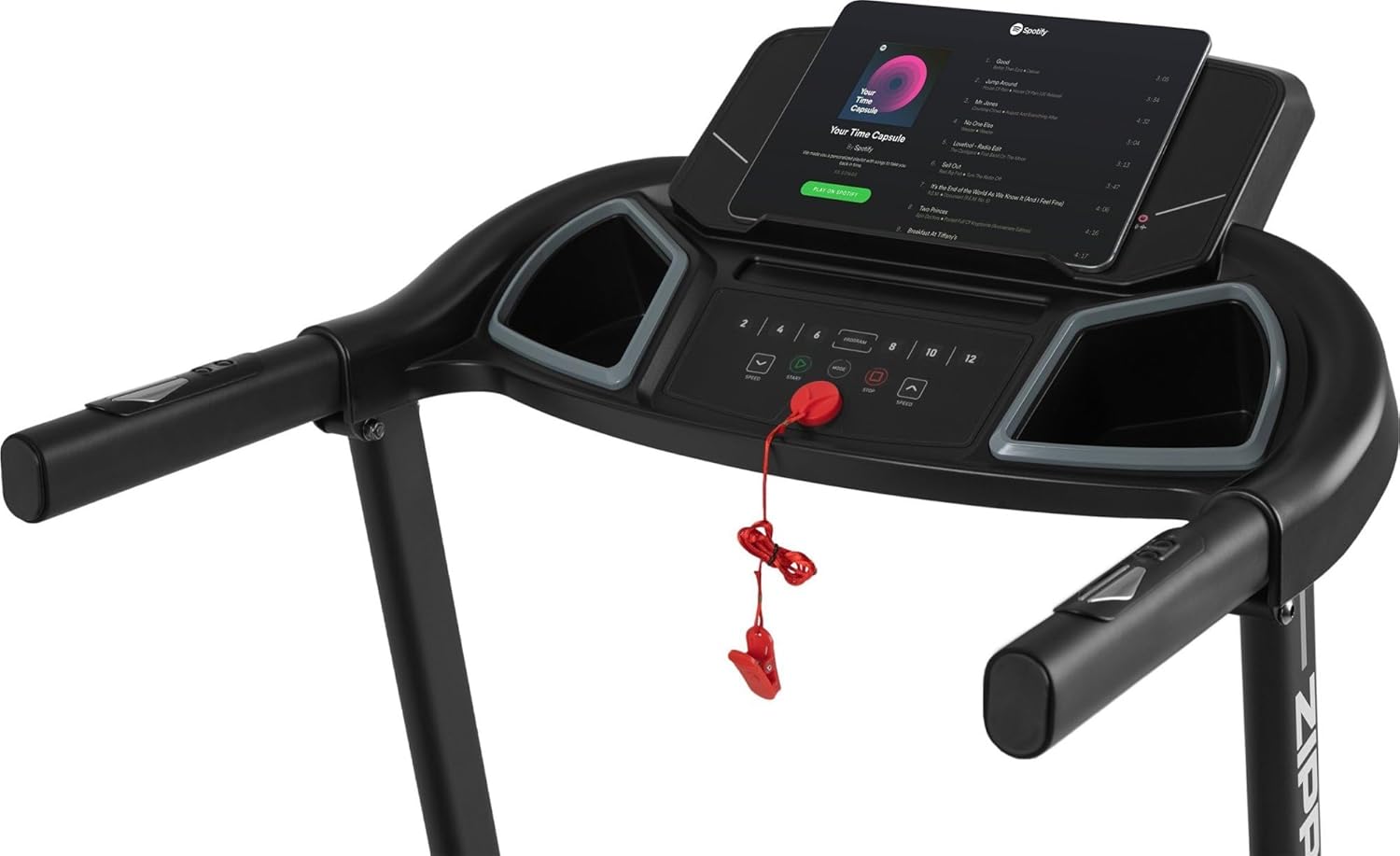
Image: The treadmill console with a tablet placed in the holder, displaying a music streaming application, demonstrating the media integration feature.
6. Vedligeholdelse
Regelmæssig vedligeholdelse sikrer dit løbebånds levetid og optimale ydeevne.
- Rensning: Tør løbebåndet af efter hver brug med en reklameamp klud til at fjerne sved og støv. Brug ikke slibende rengøringsmidler eller opløsningsmidler.
- Smøring: Løbebåndet kræver periodisk smøring for at reducere friktion. Se de specifikke instruktioner, der følger med dit smøremiddel, eller kontakt kundesupport for vejledning.
- Bæltejustering: Over time, the running belt may become misaligned or loose. Consult the troubleshooting section or contact support for instructions on how to adjust belt tension and centering.
- Opbevaring: Når løbebåndet ikke er i brug, kan det foldes sammen for kompakt opbevaring. Sørg for, at stikket er taget ud, inden det foldes sammen.

Image: The ZIPRO Colt Treadmill shown in its upright, folded position, demonstrating its compact storage capability.
7. Fejlfinding
If you encounter any issues with your ZIPRO Colt Treadmill, refer to the following common problems and solutions:
| Problem | Mulig årsag | Løsning |
|---|---|---|
| Løbebåndet starter ikke | Power cord unplugged, safety key not inserted, power switch off. | Check power connection, ensure safety key is fully inserted, turn power switch ON. |
| Løbebåndet glider eller tøver | Belt too loose, belt needs lubrication, motor overload. | Adjust belt tension, lubricate the belt, reduce user weight or speed. |
| Usædvanlig støj under drift | Løse komponenter, forkert remjustering, motorproblem. | Inspect for loose bolts, adjust belt centering, contact customer support if noise persists. |
| Display fungerer ikke | Loose cable connection, power issue. | Check all cable connections to the console, ensure stable power supply. |
If the problem persists after attempting these solutions, please contact ZIPRO customer support.
8. Specifikationer
Detailed technical specifications for the ZIPRO Colt Treadmill:
- Model: Hingst
- Modelnummer: 11709309
- Dimensioner (udfoldet): 150 cm (L) x 70 cm (B) x 121 cm (H)
- Dimensioner (foldet): 82 cm (L) x 69.5 cm (B) x 121 cm (H)
- Vægt: 38.8 kg
- Maksimal brugervægt: 110 kg
- Hastighedsområde: 0.8-12 km/t
- Hældningsniveauer: 3 (Manuel)
- Motor hestekræfter: 1 HK
- Programmer: 12 Pre-defined
- Skærmtype: LCD (shows Distance, Heart Rate/Calories Burned, Time, Speed)
- Særlige funktioner: Easy Run cushioning system, Quick Fold mechanism, Integrated speakers, Mobile device holder.
- Rammemateriale: Aluminium
- Hovedmateriale: Polyethylen (PE)
9. Garanti og support
ZIPRO products are designed for durability and performance. For warranty information, please refer to the documentation included with your purchase or visit the official ZIPRO webwebsted.
For technical assistance, spare parts, or any questions regarding your ZIPRO Colt Treadmill, please contact ZIPRO customer support:
- Webwebsted: www.zipro.pl (eller relevant regionalt webwebsted)
- E-mail: Refer to your purchase documentation
- Telefon: Refer to your purchase documentation
Når du kontakter support, bedes du have dit modelnummer (11709309) og købsdatoen klar.


