1. Introduktion
The Soliom BF08 Smart Bird Feeder with Camera offers an innovative way to observe wild birds directly from your smartphone. Featuring a 2K live view camera, AI bird species identification, and solar power, this feeder provides instant notifications of bird arrivals and allows for two-way communication. Its durable metal construction and large seed capacity ensure a reliable and enjoyable bird-watching experience.
2. Hvad er der i æsken
- Soliom BF08 Bird Feeder with Camera
- 5W solpanel
- Mounting Kit (includes mounting strap, universal pole mount connector, wall mount bracket)
- 32 GB Micro SD-kort (forinstalleret eller inkluderet)
- Brugermanual
- USB opladningskabel
3. Opsætningsvejledning
3.1 Indledende opladning
Before first use, fully charge the camera's built-in 5000mAh rechargeable battery using the provided USB cable. A full charge typically takes 8 hours.
3.2 Fysisk installation
The Soliom BF08 offers versatile mounting options:
- Tree/Pole Mount: Use the included mounting strap or universal pole mount connector to secure the feeder to a tree or pole.
- Vægbeslag: Attach the feeder to a wall using the provided wall mount bracket.

Figure 1: Installation steps for the bird feeder.

Figure 2: Bird feeder mounted on a pole, showcasindens design og kapacitet.
3.3 App Connection (Soliom Pro App)
- Download Soliom Pro app fra din enheds appbutik.
- Opret en konto eller log ind.
- Follow the in-app instructions to add your BF08 bird feeder. Ensure your Wi-Fi network is 2.4GHz, as the camera does not support 5G Wi-Fi.
- Position the feeder within a stable 2.4G Wi-Fi signal range for optimal performance.
3.4 Placering af solpaneler
The included 5W solar panel provides constant charging for the camera. Position the solar panel in an area that receives direct sunlight for most of the day to ensure continuous power.
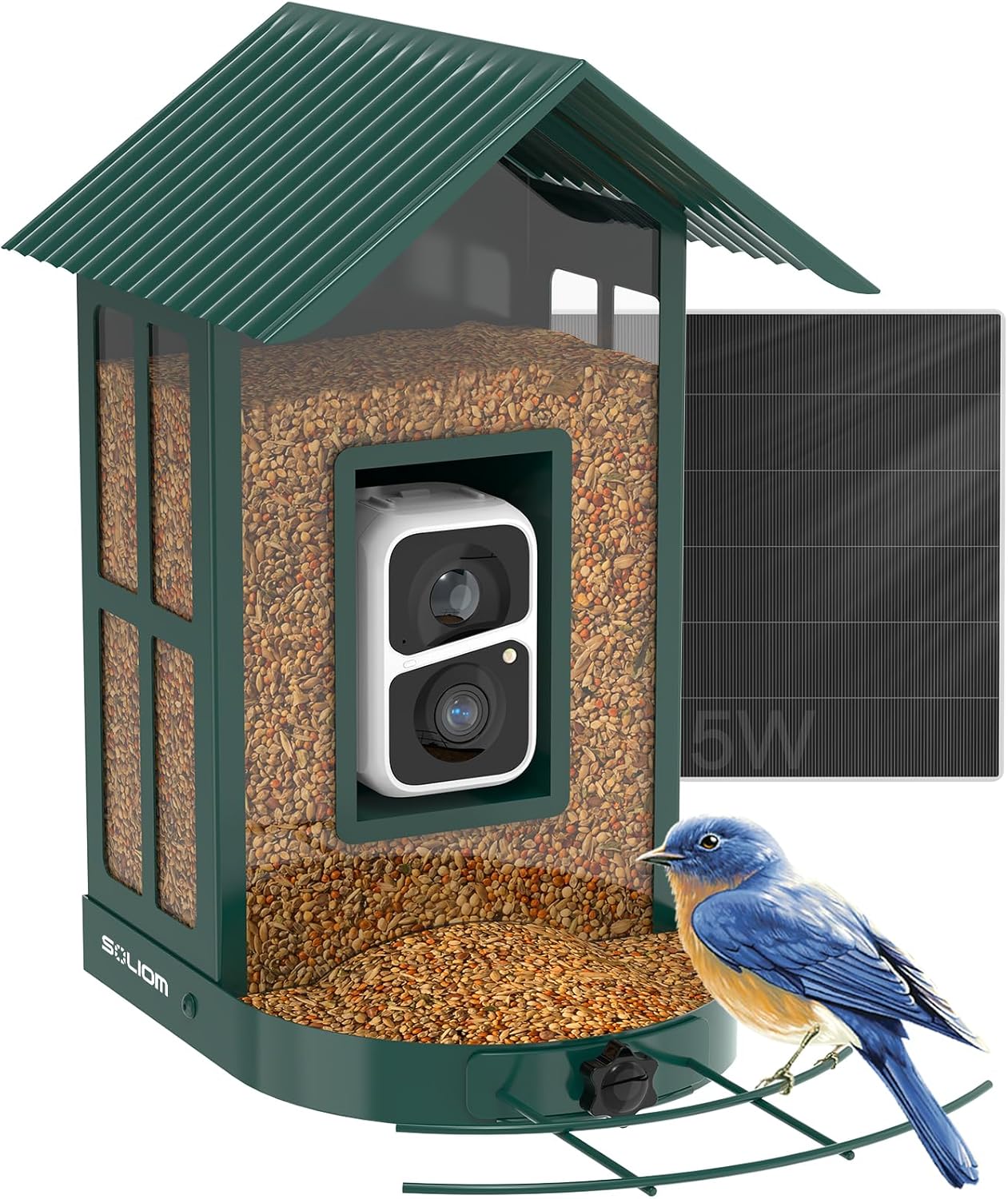
Figure 3: Soliom BF08 bird feeder with solar panel.
4. Betjeningsvejledning
4.1 Bird Detection and Notifications
The BF08 camera automatically captures and records videos of birds visiting the feeder. You will receive instant real-time notifications on your phone via the Soliom Pro app, including a high-resolution snapshot image of the detected bird.

Figure 4: Instant bird arrival notification on your phone.
4.2 AI Species Identification
Utilizing an advanced AI algorithm, the camera can identify over 10,000 bird species. You can view detailed information about identified species directly within the Soliom Pro app, enhancing your bird watching and educational experience.

Figure 5: AI bird recognition feature in the Soliom Pro app.
4.3 Two-Way Talk and Deterrence
The camera supports two-way audio, allowing you to speak through the app. You can also activate a siren or spotlight to deter squirrels or other unwanted visitors from the feeder.
4.4 Live View og Opbevaring
Access a 2K live view of your bird feeder anytime through the Soliom Pro app. Recorded videos are stored in the Cloud for up to 3 days of loop recording. Additionally, the included 32GB Micro SD card provides local storage for your recordings.

Figure 6: Cloud and Micro SD card storage options.
4.5 Officiel produktvideo
Se denne video for en overview of the great features of the Soliom Bird Feeder BF08:
Video: The great features for Soliom Bird feeder BF08. This video demonstrates the key functionalities and benefits of the Soliom BF08 smart bird feeder.
5. Vedligeholdelse
5.1 Refilling Bird Food
The feeder has a large 2.7L seed capacity, reducing the frequency of refills. To refill, simply open the top of the feeder and pour in your desired bird food.
5.2 Rengøring
The feeding tray is designed with drainage holes to prevent seeds from becoming soggy. Regularly clean the feeder to maintain hygiene and attract more birds. Handle the metal feeder with care during cleaning.
5.3 Generel pleje
Ensure the solar panel is securely attached and positioned for optimal sunlight exposure. Position the feeder away from potential hazards. Use appropriate bird food suitable for the feeder type.
6. Fejlfinding
6.1 Problemer med Wi-Fi-forbindelse
- Ensure your Wi-Fi network is 2.4Ghz. The camera does not support 5G Wi-Fi.
- Check the distance between the feeder and your Wi-Fi router. For best performance, a distance of 12-15 feet or less is recommended.
- Verify that the Wi-Fi signal strength is adequate at the feeder's location.
- If the camera loses connection after the battery drains, manually charge it before it powers off completely to facilitate easier reconnection.
6.2 Solar Charging Problems
- Ensure the solar panel is positioned in direct sunlight and not obstructed by trees or shadows.
- Clean the surface of the solar panel regularly to remove dust or debris that may hinder charging efficiency.
- Verify that the solar panel cable is securely connected to the camera.
7. Specifikationer
| Feature | Detalje |
|---|---|
| Mærke | SOLIOM |
| Modelnummer | BF08 |
| Produktdimensioner | 7.95 cm L x 2.52 cm B x 12.3 cm H |
| Varens vægt | 6.6 pund (3 kilo) |
| Materiale | Metal |
| Farve | Grøn |
| Strømkilde | Battery Solar Powered (5000mAh rechargeable battery, 5W solar panel) |
| Kapacitet | 2.7 liter |
| Særlige funktioner | Bird feeder with camera, Squirrel Chew Proof, Heavy Duty, Easy-Refill Top, Rust Resistant, AI Identify 10000+ Bird Species, 2K Live View, Instant Arrival Alerts, Two-Way Talk |
| Monteringstype | Freestanding, Universal Pole Mount (Connector included), Wall Mount (Bracket included) |
| Wi-Fi support | 2.4G Wi-Fi only (does not support 5G Wi-Fi) |
| Opbevaring | Free 3-Day Loop Cloud Service, Free 32GB SD Card |
| UPC | 710917158656 |
8. Garanti og support
Soliom provides a lifetime guarantee for the BF08 Smart Bird Feeder with Camera. For any product-related inquiries, technical support, or warranty claims, please refer to the contact information provided in your product packaging or visit the official Soliom webwebsted.


