Indledning
This user manual provides comprehensive instructions for the setup, operation, maintenance, and troubleshooting of your UNITED LED24HS82A11 24-inch HD Ready Smart Android TV. Please read this manual thoroughly before using your television to ensure proper and safe operation.
The UNITED LED24HS82A11 is a versatile 24-inch HD Ready Smart TV powered by Android 11, offering a wide range of entertainment options. It features pre-installed applications, built-in Chromecast and Airplay for seamless content streaming, and full internet connectivity via Wi-Fi and Ethernet. It also supports DVB/T2/S2/C, MPEG-4, and HEVC Main 10 for various broadcasting standards.
Sikkerhedsoplysninger
Overhold altid følgende sikkerhedsforanstaltninger for at forhindre brand, elektrisk stød eller personskade:
- Udsæt ikke TV'et for regn eller fugt.
- Bloker ikke ventilationsåbninger.
- Sørg for, at netledningen ikke kommer i klemme eller går på.
- Tag stikket ud af tv'et under tordenvejr eller når det ikke bruges i længere perioder.
- Overlad al service til kvalificeret servicepersonale.
Opsætning
1. Udpakning og montering af stativ
Carefully remove the TV and all accessories from the packaging. Place the TV face down on a soft, clean surface to prevent screen damage.
Attach the two stand feet to the bottom of the TV using the provided screws. Ensure they are securely fastened.

Figur 1: Side view of the UNITED LED24HS82A11 TV, illustrating its slim profile and potential port locations.
2. Tilslutningskabler
- Magt: Tilslut netledningen til tv'ets strømindgang og derefter til en stikkontakt.
- Antenne/kabel: Connect your antenna or cable TV coaxial cable to the "RF In" port.
- HDMI-enheder: Connect external devices like Blu-ray players, game consoles, or set-top boxes to the HDMI ports.
- Ethernet (valgfrit): For a wired internet connection, connect an Ethernet cable from your router to the TV's LAN port.
3. Initial Setup Wizard
Once powered on, the TV will guide you through the initial setup process. Follow the on-screen prompts to:
- Vælg dit foretrukne sprog.
- Connect to your Wi-Fi network (if not using Ethernet).
- Log ind med din Google-konto (valgfrit, men anbefales for at få alle Smart TV-funktioner).
- Scan for available TV channels (Antenna/Cable).
Drift
Fjernbetjening overview
Familiarize yourself with the buttons on the remote control for easy navigation and control of your TV's functions.
Grundlæggende tv-funktioner
- Tænd/sluk: Tryk på tænd/sluk-knappen på fjernbetjeningen eller tv'et.
- Lydstyrkekontrol: Brug knapperne for lydstyrke op/ned.
- Kanalvalg: Brug knapperne Kanal op/ned eller det numeriske tastatur.
- Inputkilde: Press the "Source" or "Input" button to switch between HDMI, TV, and other inputs.
Smart TV Features (Android 11)
Your TV runs on Android 11, providing access to a vast ecosystem of apps and services.

Figure 2: The UNITED LED24HS82A11 TV showcasing its Android TV home screen, featuring popular streaming applications like YouTube, Prime Video, and Netflix.
- Startskærm: Navigate the home screen to access pre-installed apps (Netflix, YouTube, Prime Video), recommended content, and settings.
- Google Play Butik: Download additional apps, games, and content from the Google Play Store.
- Chromecast indbygget: Cast content directly from your compatible smartphone, tablet, or computer to the TV. Look for the Cast icon in supported apps.
- Airplay: For Apple devices, use Airplay to stream videos, photos, and music from your iPhone, iPad, or Mac to the TV.
- Internetforbindelse:
- Wi-Fi: Go to Settings > Network & Internet to connect to your wireless network.
- Ethernet: If an Ethernet cable is connected, the TV will automatically use the wired connection.
Opretholdelse
Rengøring af TV
- Tag altid stikket ud af tv'et inden rengøring.
- Brug en blød, fnugfri klud til forsigtigt at tørre skærmen af. Ved genstridige mærker, dampRengør kluden let med vand eller en skærmrens, der er specielt designet til elektronik.
- Tør fjernsynet afasinmed en blød, tør klud. Undgå at bruge slibende rengøringsmidler eller opløsningsmidler.
Softwareopdateringer
Your TV may receive software updates to improve performance and add new features. You can check for updates via Settings > Device Preferences > About > System update.
Fejlfinding
Hvis du støder på problemer med dit tv, kan du se følgende almindelige problemer og løsninger:
| Problem | Mulig årsag/løsning |
|---|---|
| Ingen strøm | Kontroller, om netledningen er korrekt tilsluttet tv'et og stikkontakten. Prøv en anden stikkontakt. |
| Intet billede / Ingen lyd | Ensure the correct input source is selected (e.g., HDMI 1, TV). Check cable connections. For TV channels, perform a channel scan. |
| Kan ikke oprette forbindelse til Wi-Fi | Bekræft din Wi-Fi-adgangskode. Genstart din router og dit tv. Sørg for, at tv'et er inden for rækkevidde af dit Wi-Fi-signal. |
| Fjernbetjeningen virker ikke | Kontrollér og udskift batterierne. Sørg for, at der ikke er nogen forhindringer mellem fjernbetjeningen og tv'ets IR-sensor. |
| Apps indlæses ikke / Langsom ydeevne | Check your internet connection speed. Clear app cache (Settings > Apps > [App Name] > Clear cache). Restart the TV. |
Specifikationer
Below are the technical specifications for the UNITED LED24HS82A11 TV:
| Feature | Specifikation |
|---|---|
| Mærke | Forenet |
| Modelnummer | LED24HS82A11 |
| Skærmstørrelse | 24 tommer |
| Displayteknologi | LED |
| Opløsning | 768p (1366 x 768 pixels) |
| Opdateringshastighed | 60 Hz |
| Operativsystem | Android 11 |
| Forbindelse | Wi-Fi, Ethernet, HDMI, RF, USB |
| Særlige funktioner | Flat Screen, Chromecast Built-in, Airplay, Pre-installed Apps (Netflix, YouTube, Prime Video) |
| Aspektforhold | 16:9 |
| Produktmål (L x B x H) | 12D x 60.5W x 43.2H centimeter |
| Inkluderede komponenter | 1 mini AV adapter cable, 1 remote control with 2 AAA 1.5V batteries |
| Energieffektivitetsklasse | F |
| Strømforbrug (SDR) | 21.0 W |
| Strømforbrug (HDR) | 21.0 W |
| Strømforbrug (standby) | 0.3 W |

Figure 3: The energy efficiency label for the UNITED LED24HS82A11 TV, indicating an 'F' energy class rating and 21 kWh per 1000 hours of operation.
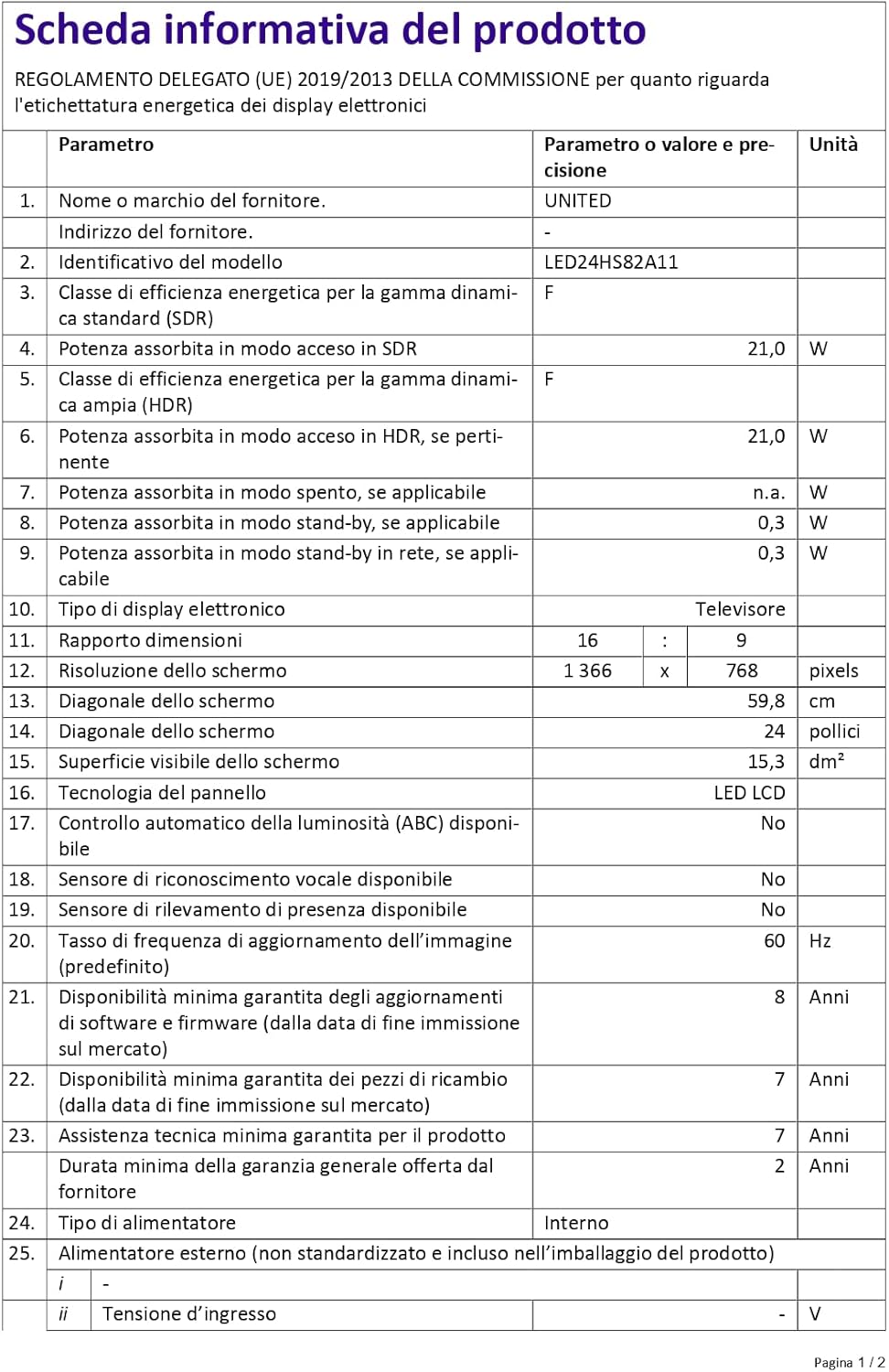
Figure 4: A detailed product information sheet for the UNITED LED24HS82A11 TV, providing comprehensive technical specifications and compliance details.
For more detailed information, please refer to the official EPREL database: https://eprel.ec.europa.eu/qr/1087921
Garanti og support
Your UNITED LED24HS82A11 TV comes with the following support and warranty provisions:
- Minimum General Warranty: 2 år
- Technical Assistance Availability: 7 år
- Softwareopdateringer garanteret indtil: 8 Years from market placement date
- Tilgængelighed af reservedele: 7 Years from market placement date
For technical support or warranty claims, please contact your retailer or the manufacturer's authorized service center. Keep your proof of purchase for warranty validation.


