1. Introduktion
This manual provides detailed instructions for the assembly, operation, and maintenance of your CADA C61081W Mobile Heavy Duty Crane. Please read this manual thoroughly before beginning assembly or operation to ensure proper use and to maximize the product's lifespan. This model is a complex building block set designed for enthusiasts, featuring motorized functions and remote control capabilities.
2. Sikkerhedsoplysninger
ADVARSEL: KVÆLNINGSFARE - Små dele. Ikke egnet til børn under 3 år.
- Keep all small parts out of reach of young children.
- Ensure all electrical components (motors, battery box, remote control) are handled carefully and kept dry.
- Do not attempt to modify the product or its components, as this may lead to malfunction or injury.
- Use only recommended batteries for the remote control and power functions.
- The material is Acrylonitrile Butadiene Styrene (ABS) and is non-toxic.
3. Pakkens indhold
Verify that all components are present before starting assembly. The CADA C61081W set includes approximately 1831 pieces, along with motors and a remote control unit.

Figur 3.1: Overview of the CADA C61081W set, showing the assembled crane, its packaging, remote control, and various motor components.
- Building blocks (approx. 1831 pieces)
- Motors for various functions
- Fjernbetjeningsenhed
- Battery box (for motors)
- USB charging cable (for battery box)
- Instruktionsmanual (dette dokument)
4. Opsætning og montering
Follow the included step-by-step building instructions carefully. Assembly typically involves:
- Chassis konstruktion: Begin by assembling the main chassis of the crane truck.
- Cabin and Outriggers: Construct the driver's cabin and the extendable outriggers for stability.
- Crane Boom Assembly: Build the multi-section crane boom, incorporating the necessary gears and mechanisms for lifting and extension.
- Motor- og ledningsinstallation: Integrate the motors into the designated positions as per the building guide. Carefully route and connect the wiring to the battery box.
- Powering the Battery Box: Ensure the battery box is charged using the provided USB cable.
- Fjernbetjeningsparring: Turn on the battery box and the remote control. They should automatically pair. Refer to the remote control section for detailed pairing instructions if needed.

Figur 4.1: The fully assembled CADA C61081W crane, ready for operation with the remote control.
5. Betjeningsvejledning
The CADA C61081W crane is operated using the included remote control. Familiarize yourself with the remote control layout and functions.
5.1 Fjernbetjeningsfunktioner
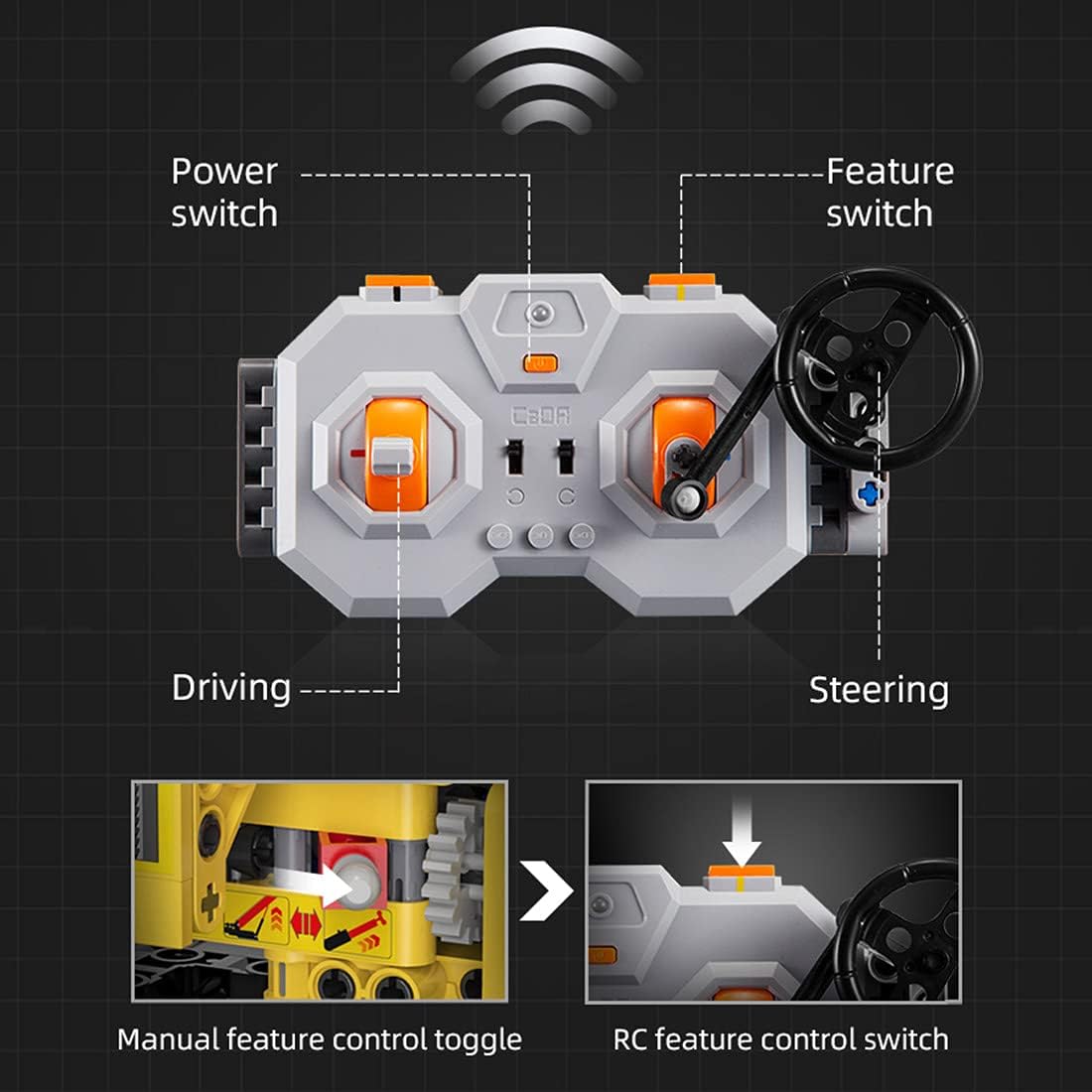
Figur 5.1: Remote control layout with labeled functions: Power switch, Feature switch, Driving controls, and Steering controls. It also shows the manual feature control toggle and RC feature control switch.
- Afbryderen: Tænder/slukker fjernbetjeningen.
- Feature Switch: Toggles between different crane functions (e.g., boom lift, boom extension, winch).
- Kørekontrol: Used to move the crane truck forward and backward.
- Steering Controls: Used to steer the crane truck left and right.
- Manual Feature Control Toggle: A physical switch on the crane itself to enable/disable remote control of certain features.
- RC Feature Control Switch: A switch on the remote control to activate specific motorized functions.
5.2 Crane Operations
5.2.1 Styring
The crane truck features steering knobs for precise control. Use the steering controls on the remote to maneuver the vehicle.
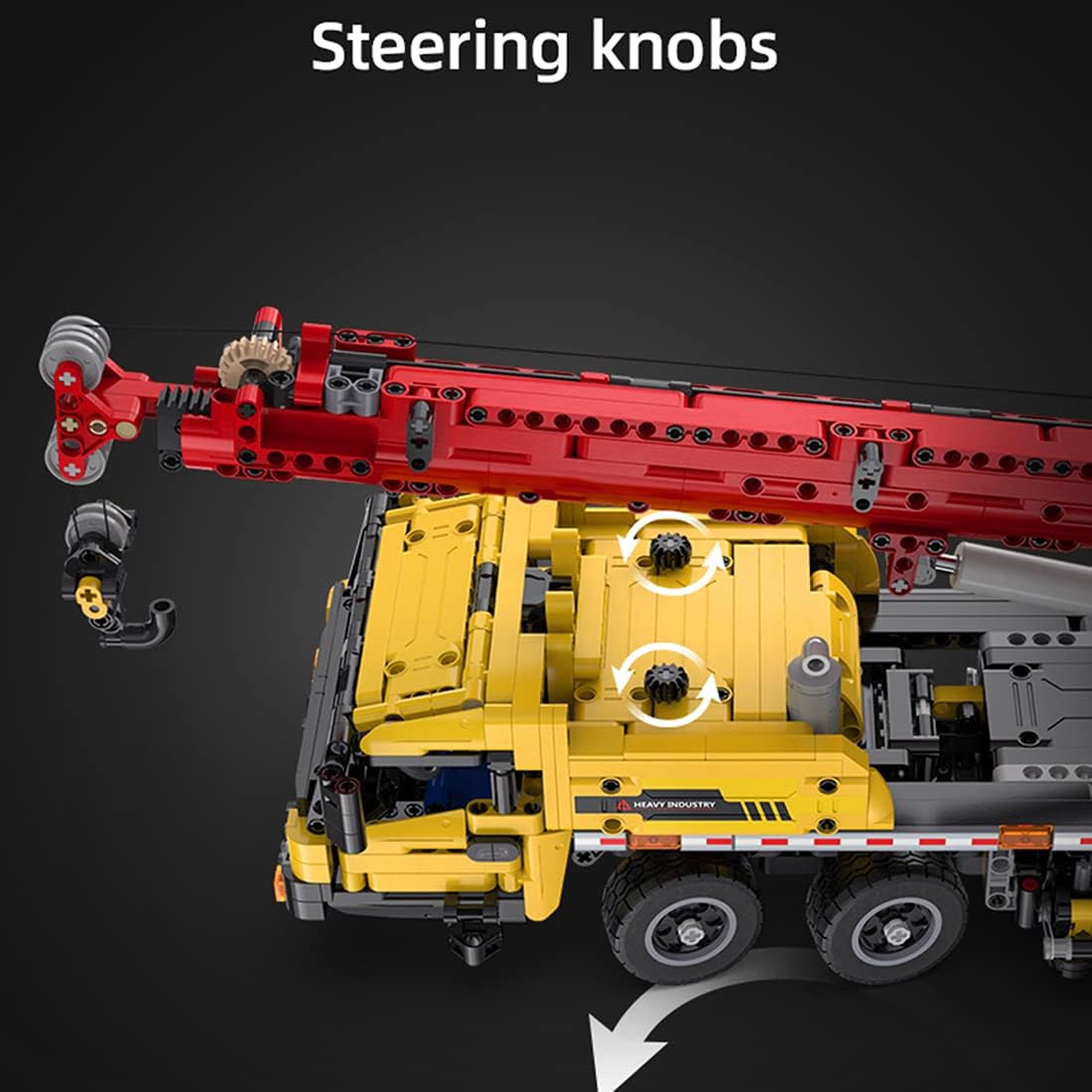
Figur 5.2: Detail of the steering knobs on the crane truck, indicating rotational movement for steering.
5.2.2 Boom Lift Control (50° Range)
To raise or lower the crane boom, activate the appropriate feature on the remote control and use the designated controls. The boom has a lift range of approximately 50 degrees.

Figur 5.3: Illustration of the boom lift control, showing the toggle B switch and spear wheel for adjusting the boom angle up to 50 degrees.
5.2.3 Boom Extension Control (34 cm)
Extend or retract the crane boom using the remote control. The boom can extend by approximately 34 cm.
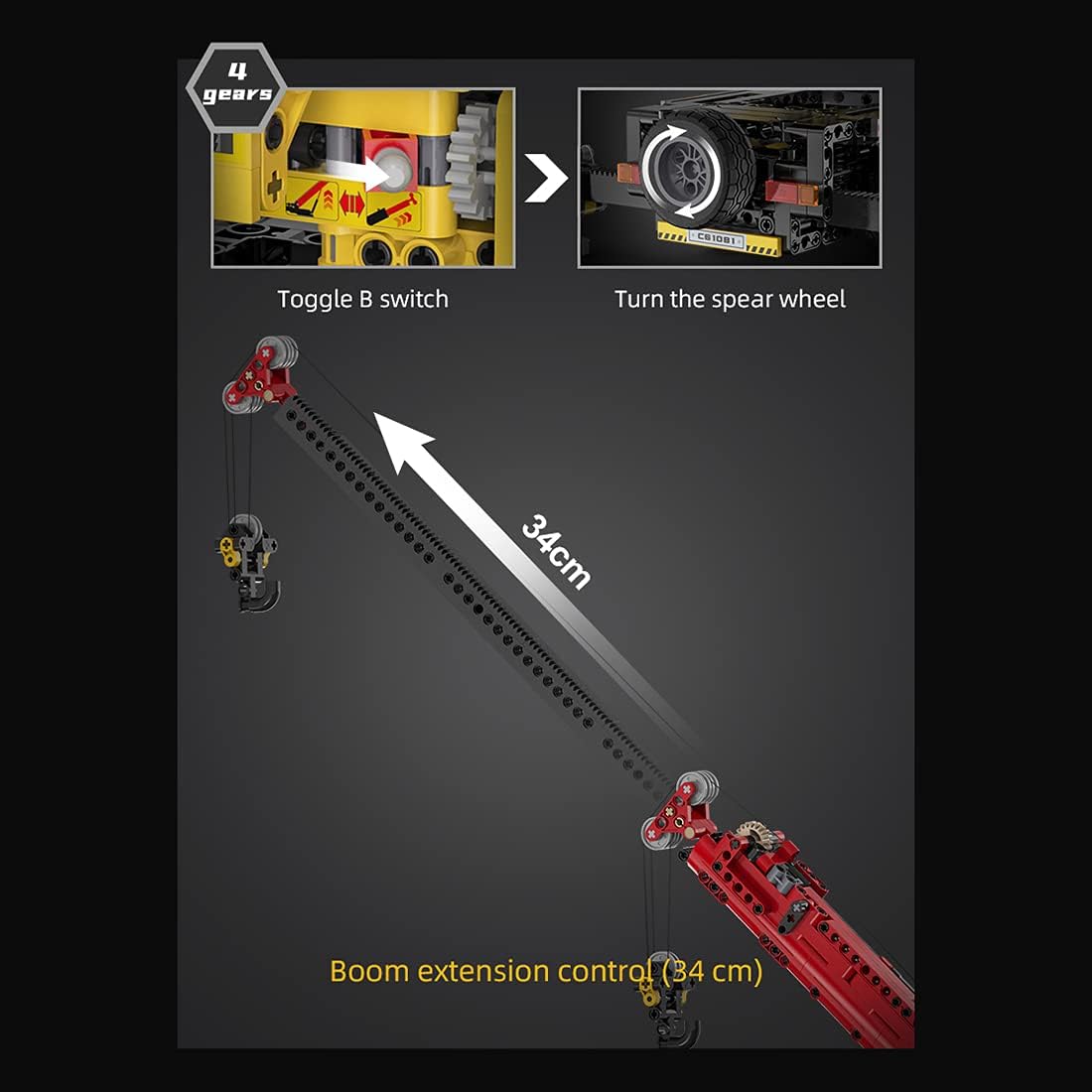
Figur 5.4: Illustration of the boom extension control, detailing the toggle B switch and spear wheel for extending the boom by 34 cm.
Note: Specific controls for winch operation (hook up/down) are typically integrated with the feature switch. Refer to the detailed building instructions for precise control mapping.
6. Vedligeholdelse
- Rensning: Use a soft, dry cloth to clean the model. Avoid water or harsh chemicals.
- Opbevaring: Opbevar modellen et køligt, tørt sted væk fra direkte sollys for at forhindre materialenedbrydning.
- Batteripleje: If not in use for an extended period, remove batteries from the remote control and ensure the battery box is fully charged before storage.
- Komponentkontrol: Periodically inspect all connections and gears for wear or damage. Replace any broken parts promptly.
7. Fejlfinding
| Problem | Mulig årsag | Løsning |
|---|---|---|
| Kranen reagerer ikke på fjernbetjeningen. |
|
|
| Motor functions are weak or slow. |
|
|
| Parts are loose or falling off. |
|
|
8. Specifikationer
- Modelnummer: C61081W
- Mærke: CADA
- Materiale: Acrylonitril Butadien Styren (ABS)
- Antal stykker: Cirka 1831
- Kontrollere: Remote Control (2.4GHz)
- Strømkilde: Rechargeable battery box (for motors), standard batteries (for remote control, not included)
- Særlige funktioner: Motorized boom lift (50°), motorized boom extension (34 cm), steering, driving. Non-toxic materials.
9. Garanti og support
For warranty information, please refer to the documentation provided at the point of purchase or contact your retailer. For technical support or replacement parts, please contact CADA customer service through their official channels. You may find additional resources and product information on the manufacturer's webwebsted.
For more information, you may visit: CADA Official Webwebsted


