1. Introduktion
Thank you for choosing the KONIX Folding Piano Keyboard. This portable 88-key electronic piano is designed for musicians of all levels, offering a full-size semi-weighted keyboard with innovative light-up keys to assist in learning. Its foldable design ensures maximum portability, allowing you to enjoy music anywhere.
Nøglefunktioner omfatter:
- Bærbart foldbart design: Folds 180 degrees for compact storage and easy transport.
- Full-Size Semi-Weighted Keys: Provides a realistic piano feel with adjustable touch response.
- Lystaster: Guides users during learning and practice sessions.
- Alsidig tilslutning: Bluetooth for app integration and MIDI/USB for computer connection.
- Omfattende lydbibliotek: 128 tones, 128 rhythm patterns, and 20 built-in demo songs.
- Flere funktioner: Includes dual keyboard, split, teach mode, dual voice, record, playback, polyphonic metronome, and transpose.
- Lang batterilevetid: Built-in rechargeable lithium battery for 6-8 hours of play time.
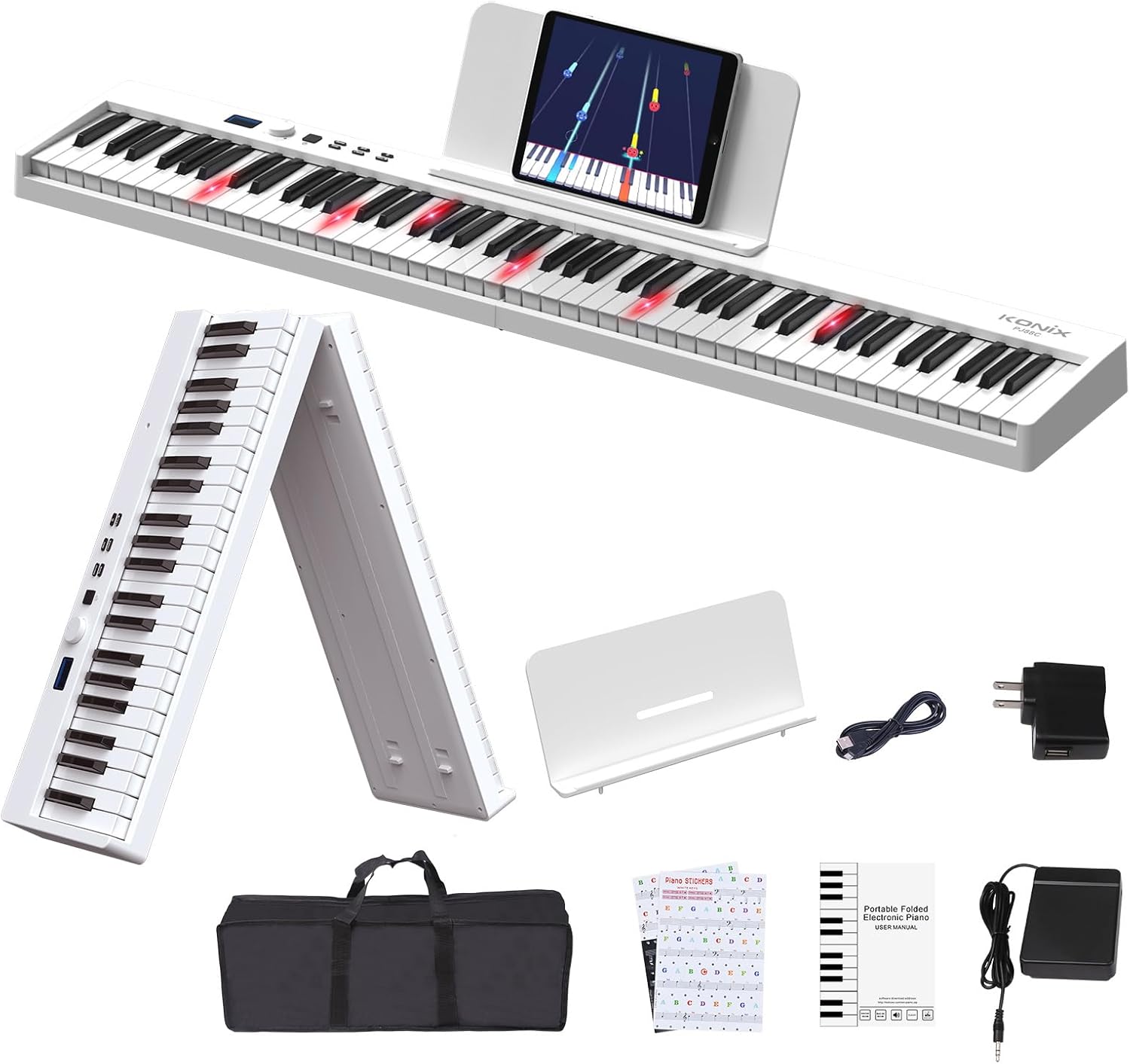
Figure 1.1: The KONIX Folding Piano Keyboard with all included accessories, showcasing dens kompakte og bærbare design.
2. Pakkens indhold
Kontroller venligst, at alle varer er til stede i din pakke:
- KONIX Folding Piano Keyboard (White)
- Sustain pedal
- Tastaturklistermærker
- Music Stand (for sheet music or tablet)
- Piano Bag (portable travel carry bag)
- USB opladningskabel
- Strømadapter
- Brugervejledning (dette dokument)
3. Opsætningsvejledning
3.1 Unfolding the Keyboard
The KONIX Folding Piano Keyboard is designed for easy setup. To unfold:
- Place the folded keyboard on a flat, stable surface.
- Gently pull the two halves apart until they fully extend and lock into place. Ensure the locking mechanism engages securely.

Figure 3.1: Illustration of the one-click folding mechanism, showing how the two halves of the keyboard separate and lock into place.
3.2 Tænd
The keyboard can be powered via the included power adapter or its built-in rechargeable battery.
- Brug af strømadapter: Connect the USB charging cable to the keyboard's USB port and the power adapter, then plug into a wall outlet.
- Brug af batteri: Ensure the built-in lithium battery is charged. The keyboard can play for 6-8 hours on a full charge.
3.3 Tilslutning af tilbehør
- Sustain pedal: Plug the sustain pedal into the 'SUS' port on the keyboard.
- Hovedtelefoner/højttalere: Connect 3.5mm headphones or external speakers to the headphone jack for private practice or ampforstærket lyd.
- Musikstativ: Attach the included music stand to the designated slots on the keyboard for holding sheet music or a tablet.

Figur 3.2: Overview of the various connection ports on the keyboard, including headphone/speaker, MP3/PC/Phone/Tablet, Microphone, Sustain pedal, and Power/MIDI.
Video 3.1: This video demonstrates the folding and unfolding of the KONIX Piano Keyboard, showing its compact storage and quick setup. It also highlights the various connectivity options and the light-up key feature in action.
4. Betjeningsvejledning
4.1 Grundlæggende betjening
- Tænd/sluk: Press and hold the power button to turn the keyboard on or off.
- Lydstyrkekontrol: Use the rotary knob to adjust the master volume.
- Tonevalg: Rotate the knob to browse through 128 different tones displayed on the LCD screen. Press the 'Tone' button to confirm.
- Rytmevalg: Rotate the knob to select from 128 rhythm patterns. Press the 'Rhythm' button to confirm.
- Demo sange: Rotate the knob to choose from 20 built-in demo songs. Press the 'Demo' button to play.

Figur 4.1: Nærbillede view of the full-size semi-weighted keys, illustrating the 1:1 ratio to traditional piano keys and the concept of adjustable touch response for dynamic playing.
4.2 Learning Features
- Lystaster: The light-up keys illuminate to guide you on which notes to play, making learning easier, especially with demo songs or connected apps.
- Undervisningstilstand: Activate teach mode to follow along with built-in lessons or app-based tutorials.
- Keyboard Stickers: Apply the included keyboard stickers to help identify notes for beginners.
4.3 avancerede funktioner
- Bluetooth-forbindelse: Enable Bluetooth on the keyboard and your smart device (phone, tablet, computer). Pair with piano learning apps like Garage Band, Perfect Piano, or Pop Piano for interactive lessons and games.
- MIDI/USB Interface: Connect the keyboard to a computer via USB to use it as a MIDI controller. This allows you to edit music, compose, and use various music production software (e.g., Cakewalk, Sonar, Cubase, Nuendo, VST/VSTi).
- Optag og afspilning: Use the record function to capture your performances and the playback function to listen to them.
- Dual Keyboard/Split: Divide the keyboard into two sections, allowing two players or different instrument sounds in each section.
- Dobbeltstemme: Layer two different instrument sounds to be played simultaneously with each key press.
- Polyphonic Metronome: Use the built-in metronome to practice with precise timing.
- Transponer: Adjust the pitch of the entire keyboard up or down to play in different keys without changing your finger positions.

Figure 4.2: The MIDI function allows connection to educational apps like Garageband, Perfect Piano, and Pop Piano, enhancing the learning experience.

Figur 4.3: En overview of the various function options available on the keyboard, designed to assist users in their musical journey.
5. Vedligeholdelse
5.1 Rengøring
Sådan bevarer du tastaturets udseende og funktionalitet:
- Tør overfladen af med en blød, tør klud.
- Til genstridigt snavs, let dampRengør kluden med vand og en mild sæbeopløsning, og tør derefter straks efter.
- Undgå at bruge slibende rengøringsmidler, opløsningsmidler eller kemiske spraymidler, da disse kan beskadige overfladen.
5.2 Opbevaring
When not in use, store the keyboard in its included piano bag to protect it from dust and scratches. Store in a cool, dry place away from direct sunlight and extreme temperatures.
5.3 Pleje af batterier
Sådan forlænger du levetiden på det indbyggede litiumbatteri:
- Oplad batteriet helt inden første brug.
- Undgå at aflade batteriet helt ofte.
- If storing for an extended period, charge the battery to about 50% every few months.

Figure 5.1: The keyboard supports USB/Power Bank/Lithium Battery power, offering ultra-long battery life for use anywhere.
6. Fejlfinding
If you encounter issues with your KONIX Folding Piano Keyboard, please refer to the following common problems and solutions:
| Problem | Mulig årsag | Løsning |
|---|---|---|
| No sound from keyboard. | Volume is too low; headphones are plugged in; power issue. | Increase volume. Unplug headphones if not needed. Ensure keyboard is powered on and charged. |
| Keys are not lighting up. | Light-up feature is off; low battery. | Check keyboard settings to ensure light-up feature is enabled. Charge the battery. |
| Bluetooth-forbindelse mislykkes. | Tastatur ikke i parringstilstand; enhed Bluetooth slukket; interferens. | Ensure keyboard Bluetooth is active. Restart both keyboard and device. Move closer to the device. |
| Sustainpedalen virker ikke. | Pedal not fully inserted; faulty pedal. | Ensure the sustain pedal is firmly plugged into the 'SUS' port. Test with another compatible pedal if available. |
If the problem persists, please contact KONIX customer support for further assistance.
7. Specifikationer
| Feature | Detalje |
|---|---|
| Modelnavn | KONIX 88 Key Folding Electric Progressive Counterweight Keyboard Piano |
| Modelnummer | PJ88CD-W |
| Antal nøgler | 88 |
| Nøgletype | Full Size Semi-Weighted, Light-Up Keys |
| Dimensioner (foldet) | 24.8 x 8 x 4.7 cm (omtrentligt) |
| Dimensioner (udfoldet) | 50 x 8.5 x 4.5 cm (omtrentligt) |
| Varens vægt | 4.05 kilo (8.91 pund) |
| Strømkilde | Battery Powered (3.7V/1800mAh), Corded Electric (USB 5V/1A) |
| Batterilevetid | 6-8 timer (fuldt opladet) |
| Forbindelse | Bluetooth, MIDI/USB |
| Hovedtelefonstik | 3.5 mm jack |
| Toner | 128 |
| Rytmemønstre | 128 |
| Demo sange | 20 |
| Understøttet OS | Win XP/Vista/7/8, Mac OSX |
| Understøttet software | Cakewalk, Sonar, Cubase, Nuendo, VST/VSTi |
| Færdighedsniveau | Nybegynder |
| Finish Type | Glossy or Lacquered |
| Farve | Hvid |

Figure 7.1: Detailed product information including weight, number of keys, and folded/unfolded dimensions.
8. Garanti og support
KONIX products are manufactured to high-quality standards. For specific warranty information, please refer to the warranty card included in your product packaging or visit the official KONIX webwebsted.
If you require technical support, have questions about product operation, or need assistance with troubleshooting, please contact KONIX customer service. Contact details can typically be found on the product packaging, the official KONIX webhjemmeside eller gennem din forhandler.


