1. Produktet er slutview
The Logicool Brio 300 is a Full HD 1080p webcam designed to enhance your online meeting experience. It features automatic light correction, a noise-reduction microphone, and a convenient privacy shutter. With its modern design and compatibility with major video conferencing platforms, the Brio 300 ensures clear visuals and audio for all your virtual interactions.

Figure 1: Logicool Brio 300 Webcam
2. Nøglefunktioner
- Fuld HD 1080p-video: Delivers crisp and clear video at 30 frames per second, ensuring you look your best in every call.
- RightLight 2-teknologi: Automatically corrects lighting conditions, from dim environments to direct sunlight, to ensure natural and balanced images.
- Noise Reduction Microphone: The built-in mono microphone captures your voice clearly while suppressing ambient background noise, ensuring your message is heard without distraction.
- Integreret privatlivslukkere: A simple twist of the integrated shutter instantly blocks the camera lens, providing complete privacy when the webcam er ikke i brug.
- Bæredygtigt design: Constructed with over 48% recycled plastic, contributing to a more climate-positive world.
- Certificeret kompatibilitet: Officially certified for Zoom, Microsoft Teams, and Google Meet, ensuring seamless integration and reliable performance across popular video conferencing platforms.
- Logi Tune Software: Free software available for download to customize webcam settings, including color tone, screen resolution, and automatic firmware updates. (Note: Logi Tune currently supports English, French, German, Italian, Spanish, and Portuguese only.)

Figure 2: Full HD 1080p Video Quality

Figure 3: RightLight 2 Automatic Light Correction

Figure 4: Noise Reduction Microphone

Figure 5: Privacy Shutter in Action

Figure 6: Environmentally Conscious Product
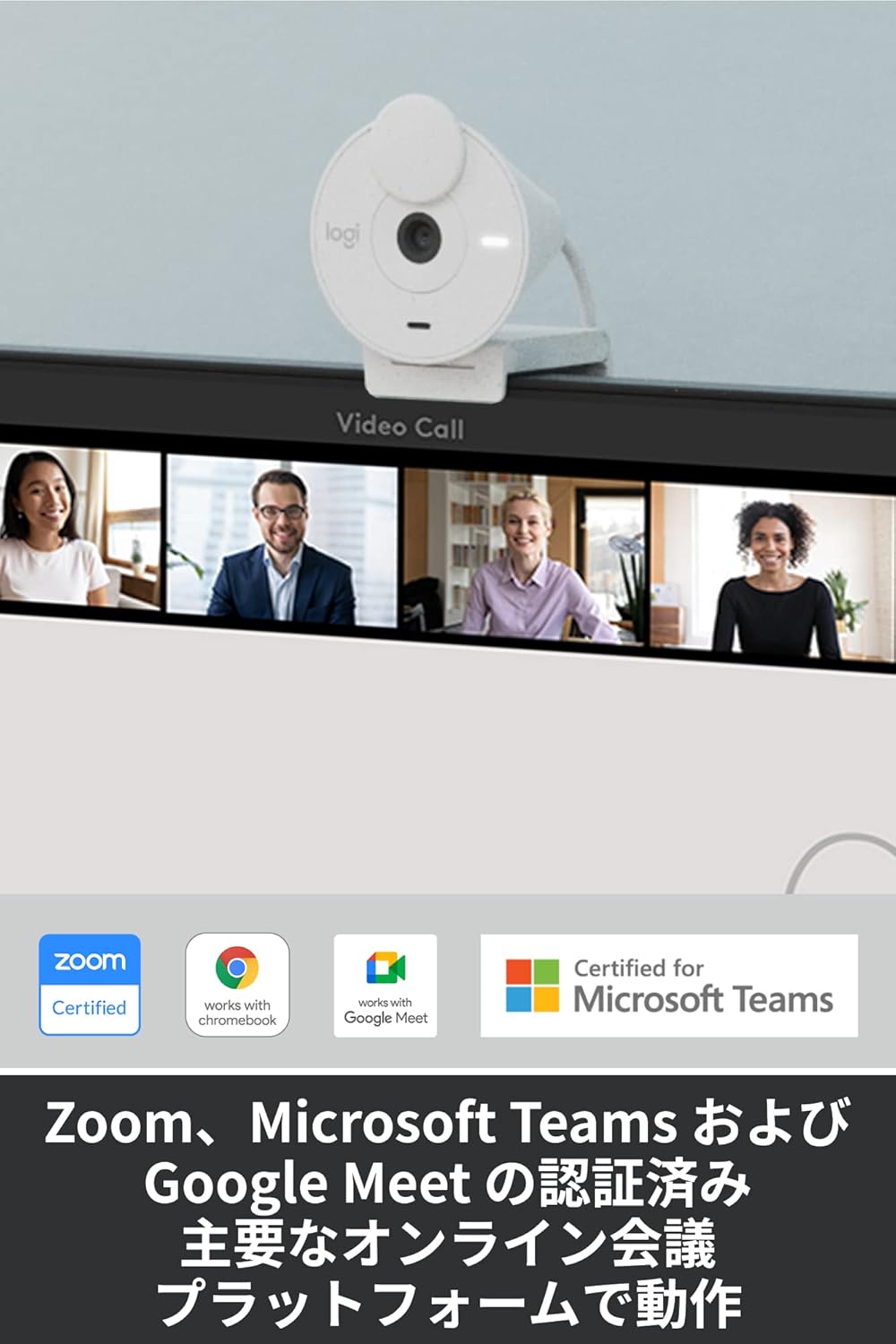
Figure 7: Certified for Major Platforms
3. Opsætning
3.1 Fysisk forbindelse
- Unpack the Brio 300 webkameraet ud af emballagen.
- Connect the integrated USB-C cable from the webcam to an available USB-C port on your computer (laptop or desktop).
- De webKameraet er plug-and-play og burde automatisk blive genkendt af dit operativsystem.
3.2 Montering
The Brio 300 comes with a versatile mount clip suitable for laptops and monitors.
- Open the mount clip to fit over the top edge of your laptop screen or monitor.
- Sørg for webcam is stable and positioned centrally for optimal framing.
3.3 Softwareinstallation (valgfrit)
For advanced customization and features, download the free Logi Tune software from the official Logicool webwebsted.
- Visit the Logicool support webwebsted.
- Locate and download the Logi Tune software compatible with your operating system (Windows or macOS).
- Følg instruktionerne på skærmen for at installere softwaren.
4. Betjeningsvejledning
4.1 Brug af privatlivslukkeren
- To block the camera lens and ensure privacy, simply rotate the integrated privacy shutter until it covers the lens completely.
- To use the camera, rotate the shutter back to expose the lens.
4.2 Adjusting Settings with Logi Tune
Once Logi Tune is installed, you can fine-tune your webcam's performance:
- Open the Logi Tune application.
- Adjust settings such as color tone, brightness, contrast, and resolution to suit your preferences and lighting conditions.
- Enable automatic firmware updates to keep your webcam's software current.
4.3 Compatibility with Video Conferencing Applications
The Brio 300 is designed for seamless use with most video conferencing platforms:
- Launch your preferred video conferencing application (e.g., Zoom, Microsoft Teams, Google Meet, Skype).
- In the application's video settings, select the Logicool Brio 300 as your camera and microphone input.
- Ensure the privacy shutter is open before starting your video feed.
5. Vedligeholdelse
- Rensning: Brug en blød, tør klud til at rengøre webkameralinse og hus. Undgå slibende rengøringsmidler eller opløsningsmidler.
- Opbevaring: Når den ikke er i brug, skal du opbevare den webcam in a clean, dry place. Utilize the privacy shutter to protect the lens from dust and scratches.
- Kabelpleje: Undgå skarpe bøjninger eller kink på USB-C-kablet for at forhindre skader.
6. Fejlfinding
- Ingen video/lyd:
- Ensure the USB-C cable is securely connected to your computer.
- Check that the privacy shutter is open.
- Verify that the Logicool Brio 300 is selected as the camera and microphone in your video conferencing application's settings.
- Prøv at forbinde webcam to a different USB-C port or a different computer to rule out port issues.
- Dårlig billedkvalitet:
- Sørg for, at linsen er ren og fri for pletter.
- Check your lighting conditions. While RightLight 2 helps, adequate lighting is always beneficial.
- Use Logi Tune software to adjust brightness, contrast, and color settings.
- Dårlig lydkvalitet:
- Sørg for, at mikrofonen ikke er blokeret.
- Minimér baggrundsstøj i dine omgivelser.
- Verify microphone levels in your computer's sound settings and the conferencing application.
7. Specifikationer
| Feature | Detalje |
|---|---|
| Modelnummer | C700OW |
| Dimensions (with mount clip) | Højde: 65.63 mm, Bredde: 53.1 mm, Dybde: 45 mm |
| Vægt | 74.6 g |
| Video opløsning | 1080p/30fps (1920x1080 pixels) or 720p/30fps (1280x720 pixels) |
| Camera Megapixels | 2 MP |
| Fokus Type | Fast fokus |
| Diagonalt felt af View (dFoV) | 70° |
| Hardware Zoom | 1x digital zoom |
| Automatic Light Correction | HøjreLys 2 |
| Linsetype | Logi custom 4-element lens with anti-reflective coating |
| Mikrofontype | Mono with noise reduction |
| Mikrofon pickup rækkevidde | Op til 1.2 m |
| Forbindelse | USB-C Plug & Play |
| Kabellængde | 1.5 m |
| Kompatibilitet | Windows 10 eller nyere, macOS 10.15 eller nyere, Chrome OS |
| Certificeringer | Zoom, Microsoft Teams, Google Meet, Works with Chromebook |

Figure 8: Product Dimensions and Cable Length
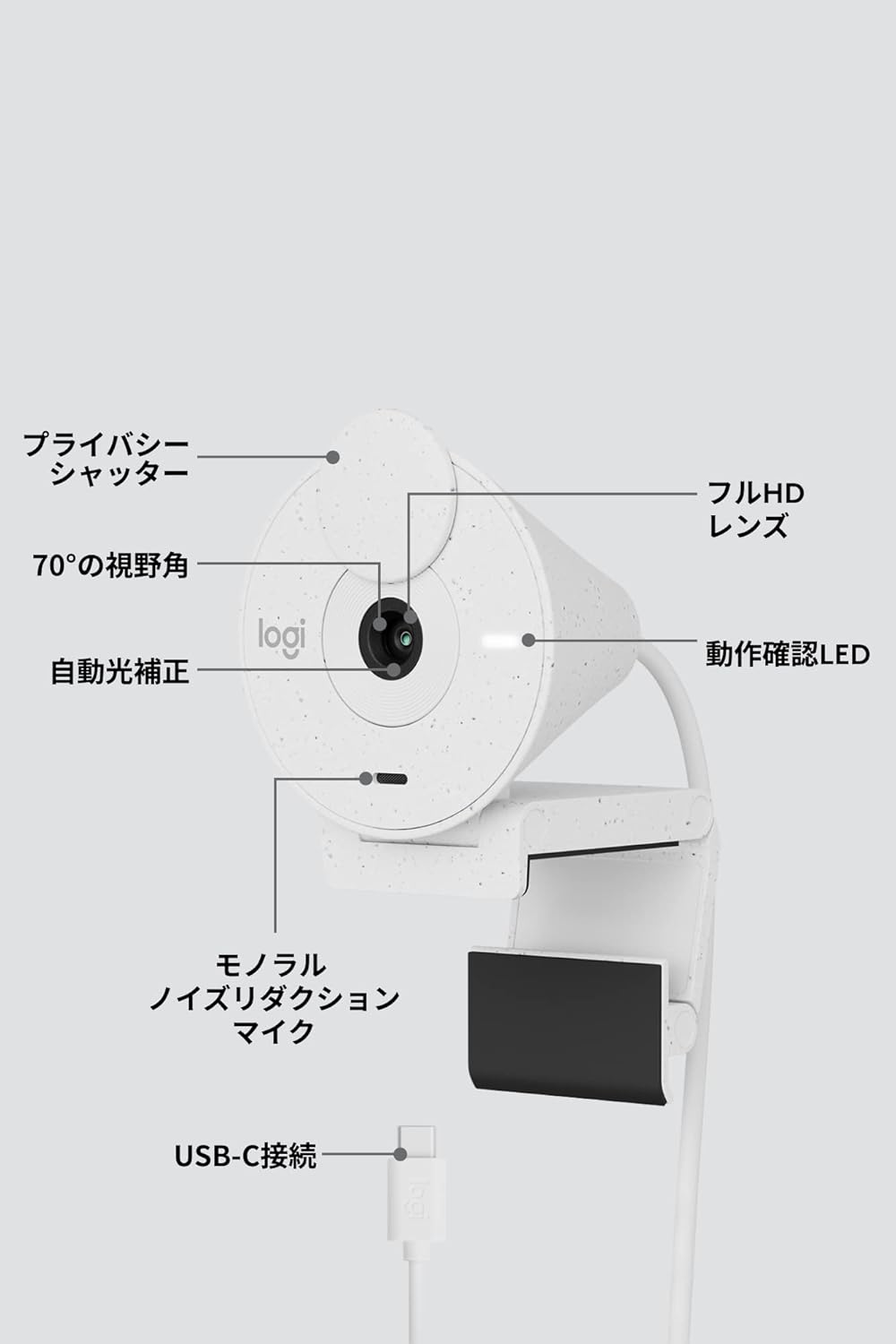
Figur 9: Webcam Component Diagram
8. Garanti og support
8.1 Producentens garanti
This Logicool Brio 300 webkameraet leveres med et 1 års producentgaranti fra købsdatoen. Denne garanti dækker fejl i materialer og udførelse ved normal brug.
Pakkens indhold inkluderer:
- Product Body (with integrated USB-C cable)
- Mount Clip and Removable Adapter
- Garantikort
- Garantibestemmelser
8.2 Kundesupport
For product defects or technical assistance, please contact the Logicool Customer Center:
- Telefonnummer: 050-3196-5644
- Driftstider: Monday - Friday (excluding holidays and December 31 - January 2), 9:00 AM - 6:00 PM JST
- Web Forespørgsel: https://support.logi.com/hc/ja/
Please note: The Logicool brand is used for products sold in Japan. Logitech is the international brand. Warranty coverage applies to genuine domestic products.


