1. Produktet er slutview
The UeeVii Dual Band Wireless Bridge (Model CPE5824) is an outdoor WiFi CPE device designed for long-range wireless network extension. It operates on both 2.4GHz and 5.8GHz frequencies, featuring a 15dBi high-gain antenna capable of transmitting network signals up to 5 kilometers (3.1 miles). Equipped with a Gigabit Ethernet port and 24V Power over Ethernet (PoE) support, this device is ideal for creating point-to-point wireless connections, extending internet access to remote buildings, or expanding camera monitoring ranges. Its IP65 waterproof rating ensures reliable performance in various outdoor weather conditions.

Image 1.1: UeeVii Dual Band Wireless Bridge units.

Image 1.2: Illustrates the 5KM transmission distance capability of the wireless bridge.

Image 1.3: The IP65 waterproof design ensures durability in outdoor environments.
2. Opsætning og installation
2.1 Pakkens indhold
Før installationen påbegyndes, skal du kontrollere, at alle komponenter er til stede i pakken:
- UeeVii Wireless Bridge Units (2-Pack)
- PoE Adapters (2 units)
- Ethernet Cables (2 units)
- Mounting Straps/Clamps
- Brugermanual

Image 2.1: Package contents of the UeeVii Wireless Bridge.
2.2 Initial Configuration (IP Address Setup)
To configure the wireless bridge units, you may need to manually assign an IP address to your computer's network adapter to match the default IP range of the devices. This is a common step for initial access to the device's web interface.
- Connect one UeeVii wireless bridge unit directly to your computer's Ethernet port using an Ethernet cable.
- Manually configure your computer's IP address to be within the same subnet as the bridge's default IP address (e.g., if the bridge is 192.168.1.254, set your computer to 192.168.1.X, where X is not 254).
- Åbn a web browser and enter the default IP address of the bridge to access its configuration interface.
- Follow the on-screen instructions to set up network parameters, including the desired operating mode (Master/Slave).
2.3 A-B Dialing Pairing
The UeeVii wireless bridges feature an easy A-B dialing pairing mechanism for establishing a point-to-point connection. This simplifies the setup process by allowing direct pairing without complex software configuration.
- Designate one unit as the 'Master' and the other as the 'Slave'.
- On the Master unit, set the dialing switch to 'A'.
- On the Slave unit, set the dialing switch to 'B'.
- Ensure both units are powered on via their respective PoE adapters.
- The units will automatically attempt to pair. Successful pairing is indicated by the status lights.
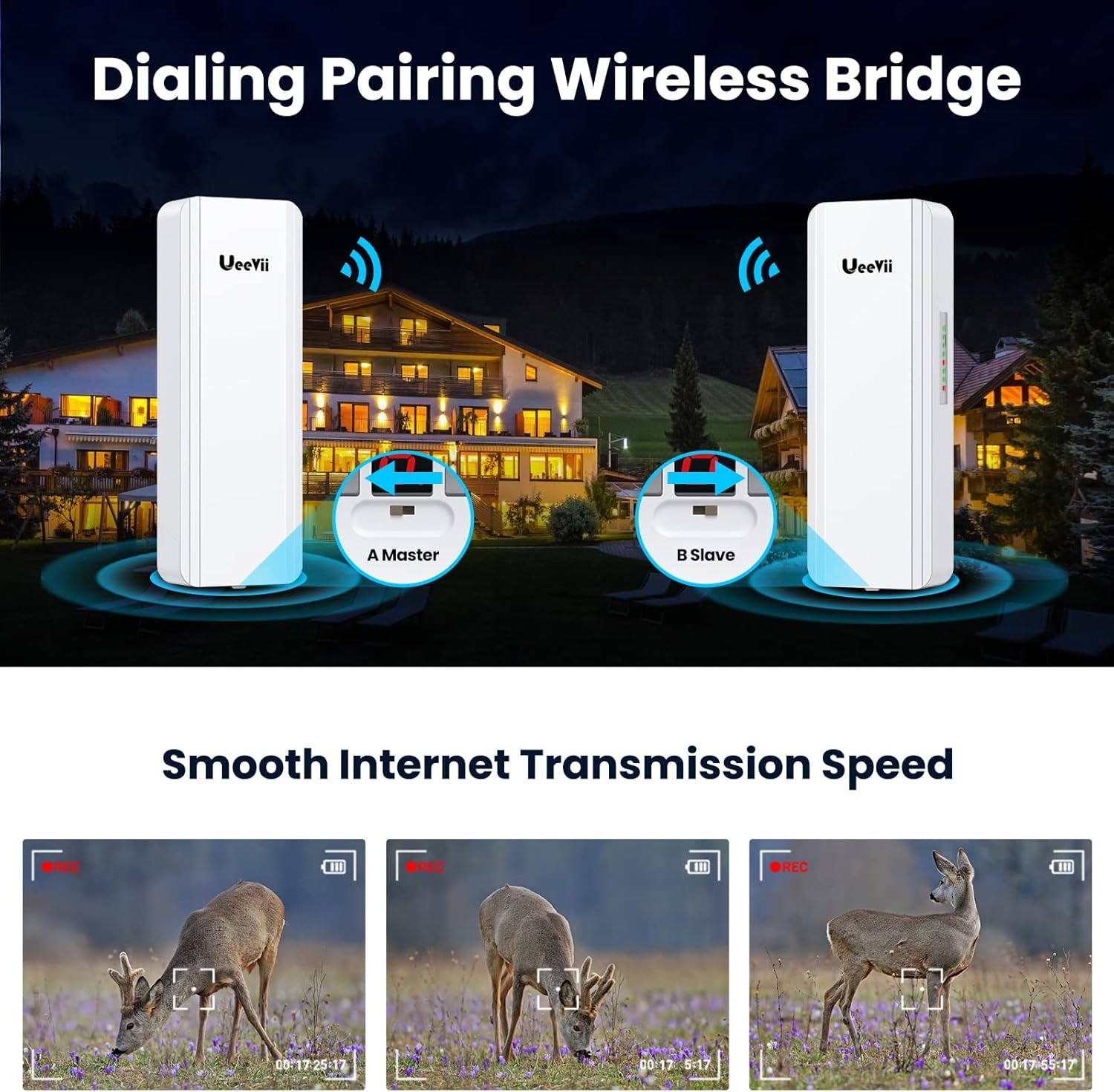
Image 2.2: A-B Dialing Pairing for Master and Slave units.
2.4 Fysisk montering
For optimal performance, ensure a clear line of sight between the two wireless bridge units. Mount the units securely using the provided straps or clamps in an elevated position, such as on a pole or building exterior.
- Vælg et monteringssted, der giver en uhindret view between the Master and Slave units.
- Securely attach the mounting brackets to a stable surface (e.g., pole, wall).
- Attach the wireless bridge units to the mounting brackets.
- Adjust the angle of each unit to point directly towards the other for maximum signal strength.

Billede 2.3: Eks.ample of pole mounting for the wireless bridge.

Billede 2.4: Eks.ample of wall mounting for the wireless bridge.
3. Betjeningsvejledning
3.1 Point-to-Point Network Extension
The primary function of the UeeVii wireless bridge is to extend a network connection from one location to another, creating a virtual Ethernet cable over a long distance.
- Connect the Master CPE unit to your main network (e.g., router, switch) via its LAN port using an Ethernet cable.
- Connect the Slave CPE unit to the network device at the remote location (e.g., computer, router, access point) via its LAN port.
- Once paired, the network connection will be extended wirelessly between the two points.

Image 3.1: Point-to-point network extension and camera monitoring range extension.
3.2 Indikatorlys
The units are equipped with indicator lights that provide visual feedback on their status and signal strength. These lights are crucial for verifying successful pairing and assessing connection quality.
- Strømindikator (PWR): Angiver om enheden er tændt.
- LAN1/LAN2: Angiv Ethernet-portaktivitet.
- WLAN Signal Light: Multiple LEDs indicate the strength of the wireless signal. More lights illuminated typically mean a stronger connection.
- Digital Tube Display: Shows the operating mode (e.g., 'A' for Master, 'B' for Slave) and can display signal strength or error codes.

Image 3.2: Helpful indicator lights and digital tube display.
3.3 Gigabit Ethernet-port
Each UeeVii wireless bridge unit includes a Gigabit Ethernet port (1000Mbps) for high-speed wired connections, in addition to a 100Mbps port. For optimal network performance, connect your devices to the 1000Mbps port.

Image 3.3: One 1000Mbps RJ45 Port for high-speed connectivity.
4. Vedligeholdelse
The UeeVii Dual Band Wireless Bridge is designed for outdoor use with an IP65 waterproof rating, minimizing the need for extensive maintenance. However, periodic checks can help ensure long-term reliability.
- Rensning: Periodically inspect the exterior of the units for dirt, dust, or debris accumulation. Gently wipe clean with a soft, damp klæde. Brug ikke skrappe kemikalier eller slibende rengøringsmidler.
- Kabelinspektion: Check all connected Ethernet cables and power cables for any signs of wear, damage, or corrosion. Replace damaged cables immediately.
- Monteringsstabilitet: Ensure the mounting hardware remains secure and the units are firmly in place, especially after severe weather conditions.
- Synslinje: Verify that the line of sight between the two units remains unobstructed by new foliage growth or other obstacles.
5. Fejlfinding
This section addresses common issues you might encounter with your UeeVii Dual Band Wireless Bridge.
5.1 No Connection / Intermittent Connection
- Tjek strøm: Ensure both units are powered on and the Power Indicator (PWR) light is solid. Verify PoE adapters are functioning correctly.
- Bekræft parring: Confirm that the Master and Slave units are correctly paired using the A-B dialing switch. Check the digital tube display and WLAN signal lights.
- Synslinje: Ensure there is a clear, unobstructed line of sight between the two units. Any physical barrier can significantly degrade signal quality.
- Signalstyrke: Observe the WLAN signal lights. If only a few lights are illuminated, reposition the units for better alignment.
- Kabelforbindelser: Ensure all Ethernet cables are securely connected to the correct ports (LAN1/LAN2, PoE).
- Genstart enheder: If connection drops occur, try power cycling both wireless bridge units, your router, and any connected network devices. Power on the modem first, then the router, then the bridges, and finally other devices.
5.2 Difficulty Accessing Web Interface
- IP-adressekonflikt: Ensure your computer's IP address is manually set within the same subnet as the bridge's default IP address for initial configuration. Remember to revert your computer's IP settings to automatic (DHCP) after configuration if needed for internet access.
- Standard IP: Confirm you are using the correct default IP address for the device. Refer to the included user manual for the exact default IP.
- Firewall/antivirus: Temporarily disable any firewall or antivirus software on your computer that might be blocking access to the device's web interface.
5.3 Langsom netværkshastighed
- Gigabit Port Usage: Ensure all high-bandwidth devices are connected to the 1000Mbps port on the bridge units.
- Signalkvalitet: A weak wireless signal will result in lower speeds. Optimize alignment and ensure clear line of sight.
- Interferens: While dual-band, environmental interference can affect performance. Consider adjusting channels in the web interface if possible.
6. Specifikationer
| Feature | Specifikation |
|---|---|
| Modelnummer | CPE5824 |
| Produktdimensioner | 10 x 3.5 x 2.1 tommer |
| Varens vægt | 2.66 pund |
| Frekvensbåndsklasse | Dobbeltbånd (2.4 GHz og 5.8 GHz) |
| Antenne Gain | 15dBi High-Gain |
| Maksimal transmissionsrækkevidde | 5 kilometer (3.1 miles) |
| Ethernet-porte | 100Mbps and 1000Mbps (Gigabit) RJ45 |
| Strømforsyning | 24V PoE Power |
| Vandtæt vurdering | IP65 |
| Kompatible enheder | Security Cameras, Computers, Routers, Switches |
| Dato først tilgængelig | 20. december 2022 |
7. Garanti og support
For warranty information and technical support, please refer to the documentation included with your product or contact UeeVii customer service directly through their official channels. Details for contacting support are typically found on the manufacturer's webwebstedet eller produktemballagen.


