1. Introduktion
This manual provides essential information for the safe and efficient operation of your KLIM K9000 Portable Air Conditioner. Please read it thoroughly before use and retain it for future reference. The KLIM K9000 is a versatile 3-in-1 unit offering cooling, dehumidification, and fan functions.
2. Sikkerhedsinstruktioner
To reduce the risk of fire, electrical shock, or injury, always follow these basic precautions:
- Læs alle instruktioner før brug af apparatet.
- Sørg for, at strømforsyningen matcher voltage angivet på mærkatet.
- Betjen ikke enheden med en beskadiget ledning eller stik.
- Hold apparatet væk fra varmekilder og direkte sollys.
- Bloker ikke luftindtag eller -udtag.
- Tag altid stikket ud af stikkontakten før rengøring eller servicering.
- Dette apparat er ikke beregnet til brug af personer (inklusive børn) med nedsatte fysiske, sensoriske eller mentale evner, eller mangel på erfaring og viden, medmindre de har fået opsyn eller instruktion i brugen af apparatet af en person, der er ansvarlig for deres sikkerhed.
- Brug ikke apparatet i våde omgivelser eller i nærheden af vand.
- Brug kun tilbehør anbefalet af producenten.
3. Pakkens indhold
Bekræft at alle varer er til stede i pakken:
- KLIM K9000 Air Conditioner Unit
- Fjernbetjening
- Udstødningsslange
- Udstødningsport
- Stik til udstødningsslange
- Afløbsslange
- Window Seal Fixing Plate
- Window Cover Extension
- 2 AAA Alkaline Batteries (for remote control, if included)
4. Produktet er slutview
The KLIM K9000 is a compact and efficient portable air conditioner designed to provide comfort in various environments. It integrates three primary functions: cooling, dehumidification, and fan operation.

Figur 4.1: KLIM K9000 Portable Air Conditioner unit with remote control, illustrating air circulation.
Its 3-in-1 functionality allows it to cool rooms, circulate air as a fan, and reduce humidity levels, making it suitable for various climate control needs.

Figur 4.2: The KLIM K9000 offers 3-in-1 comfort: cooling, dehumidifying, and fan functions, with a 9000 BTU cooling capacity.
5. Opsætning og installation
Proper installation is crucial for optimal performance. Follow these steps for quick setup:
- Placering: Place the unit on a flat, stable surface, ensuring at least 30 cm (12 inches) of space around it for proper airflow.
- Fastgør udstødningsslange: Connect the exhaust hose to the unit's exhaust port. Extend the hose and connect the window seal fixing plate or window cover extension.
- Vinduesinstallation: Secure the window seal fixing plate or extension in a compatible window opening (sliding windows). For tilt windows, a separate seal kit is required and sold separately. Ensure the hot air is expelled outdoors.
- Strømtilslutning: Sæt netledningen i en jordet stikkontakt.
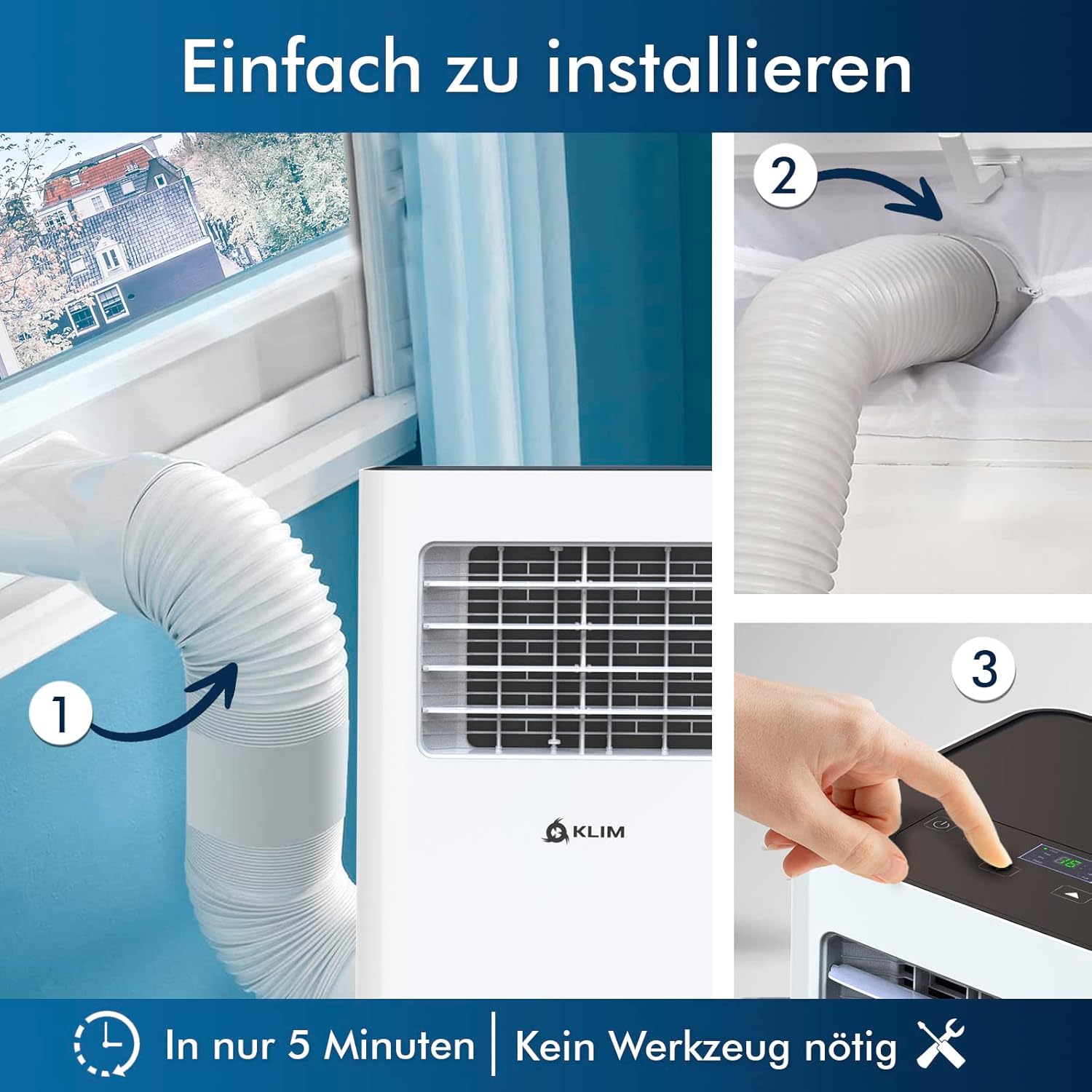
Figur 5.1: Visual guide for quick installation, typically completed in 5 minutes without special tools.

Figur 5.2: Illustration of window kit compatibility, showing options for sliding windows and mentioning a separate seal for tilt windows.
6. Betjeningsvejledning
The KLIM K9000 can be operated via the control panel on the unit or the included remote control.
6.1. Kontrolpanel og fjernbetjening
The remote control allows convenient operation from a distance. Ensure AAA batteries are correctly inserted. The control panel on the unit provides direct access to all functions.
6.2. Driftstilstande
- Køletilstand: Activates the compressor to cool the room. Set your desired temperature (down to 16°C). This mode is effective for rooms up to 20 m² (80 m³).
- Ventilatortilstand: Circulates air without cooling. Adjustable fan speeds are available.
- Affugtertilstand: Removes excess moisture from the air. In this mode, the unit collects water, which will need to be drained.
- Sove mode: Designed for quiet operation during rest. The unit operates at a reduced noise level (approx. 65 dB) and may adjust temperature settings automatically for comfort.

Figur 6.1: The sleep mode provides a cool and quiet environment for restful sleep, operating at approximately 65 dB.
To switch between modes, press the "Mode" button on the control panel or remote control.
7. Vedligeholdelse
Regular maintenance ensures the longevity and efficiency of your KLIM K9000.
7.1. Rengøring af luftfilteret
The air filter should be cleaned every two weeks or more frequently depending on usage. A dirty filter can reduce cooling efficiency and airflow.
- Tag klimaanlæggets stik ud af stikkontakten.
- Find og fjern luftfilteret (normalt på bagsiden eller siden af enheden).
- Vask filteret med varmt sæbevand. Skyl grundigt, og lad det lufttørre helt, før det sættes i igen.
- Sæt tørfilteret i igen, og sæt stikket i enheden igen.
7.2. Vandafledning
The unit features an auto-evaporation system in cooling mode, reducing the need for frequent drainage. However, in high humidity or dehumidifier mode, water will accumulate and needs to be drained.
- Kontinuerlig dræning: For continuous dehumidification, attach the drainage hose to the drain outlet and direct it to a suitable container or floor drain.
- Manuel dræning: When the internal water tank is full, the unit may stop operating and display an indicator. To drain manually, unplug the unit, place a shallow pan or tray under the drain plug, and remove the plug. Be aware that the internal water container can be cumbersome to empty, and it may require two people to safely tilt the unit for complete drainage if using the bottom drain.
8. Fejlfinding
Se dette afsnit for almindelige problemer og deres løsninger.
| Problem | Mulig årsag | Løsning |
|---|---|---|
| Enheden tænder ikke. | No power, tripped circuit breaker, full water tank. | Check power cord, reset breaker, drain water tank. |
| Utilstrækkelig køling. | Dirty air filter, blocked air intake/outlet, open windows/doors, room too large, exhaust hose not properly installed. | Clean filter, clear obstructions, close windows/doors, ensure proper exhaust hose installation. |
| Enheden er støjende. | Normal operation sound (compressor/fan), unit not on a level surface. | The unit operates at approximately 65 dB, which is normal. Ensure it is on a flat surface. |
| Vandlækage. | Drain plug not securely closed, drainage hose improperly connected. | Check drain plug, ensure drainage hose is securely attached and not kinked. |
Hvis problemet fortsætter efter at have forsøgt disse løsninger, bedes du kontakte kundesupport.
9. Specifikationer
| Mærke | KLIM |
| Modelnummer | K9000WH |
| Kølekapacitet | 9000 BTU |
| Anbefalet rumstørrelse | Up to 20 m² (80 m³) |
| Funktioner | Køling, Affugter, Ventilator |
| Energieffektivitetsklasse | A |
| Årligt elforbrug | 960 watt |
| Støjniveau | 65 decibel |
| Kølemiddel | R-290 (Natural Refrigerant) |
| Dimensioner (L x B x H) | 29.5 x 32.5 x 70.4 cm |
| Vægt | 25.58 kg |
| Materiale | ABS |
| Strømkilde | El-kabel |

Figur 9.1: The KLIM K9000's high energy efficiency (Class A) contributes to cost savings and environmental protection.
10. Garanti og support
The KLIM K9000 Portable Air Conditioner comes with a 5 års garanti, hvilket sikrer ro i sindet med hensyn til dens kvalitet og ydeevne.
For technical assistance, warranty claims, or any questions not covered in this manual, please contact KLIM customer support through their official website or the retailer where the product was purchased. Please have your model number (K9000WH) and purchase date ready.


