1. Introduktion
Thank you for choosing the MokerLink 5-Port 2.5 Gigabit PoE Switch with 10G SFP+. This unmanaged network switch is designed to provide high-speed network connectivity and Power over Ethernet (PoE) capabilities for various applications, including home entertainment, small offices, and advanced networking setups. This manual provides detailed instructions for setting up, operating, and maintaining your device to ensure optimal performance and longevity.
2. Produktet er slutview
The MokerLink 5-Port 2.5 Gigabit PoE Switch features five 2.5 Gigabit Ethernet ports, with four of these ports supporting IEEE802.3af/at PoE. Additionally, it includes one 10G SFP+ port for high-speed uplink connections. Its fanless, unmanaged design ensures quiet and stable operation, making it suitable for various environments.

Figur 2.1: Forside view of the MokerLink 5-Port 2.5 Gigabit PoE Switch, showing the five Ethernet ports and one SFP+ port.
3. Nøglefunktioner
- 2.5G Ethernet Ports: Equipped with 5 x 2.5Gigabit Ethernet Ports, compliant with IEEE802.3bz (2.5G) standard, supporting 10/100/1000M/2.5G adaptive speeds.
- 10G SFP+ Uplink: Includes 1 x 10G SFP+ Port, compatible with 1G/2.5G SFP modules (module not included), offering high-bandwidth uplink capabilities.
- PoE Support: Ports 1-4 support IEEE802.3af/at PoE, providing up to 30W per port with a total power budget of 65W. Features a built-in power supply for simplified installation. Bemærk: Understøtter ikke passiv 24V PoE.
- Høj ydeevne: Offers 45Gbps backplane bandwidth and excellent data forwarding performance.
- Plug and Play: Unmanaged design requires no configuration. Simply connect the power cord and Ethernet cables.
- Holdbar og støjsvag: Features a durable metal casing and a fanless design for low energy consumption, quiet operation, and stable performance.
- Nem vedligeholdelse: Power and port LED indicators clearly display the running status and port speed, simplifying monitoring and maintenance.
- Alsidig installation: Supports both desktop placement and wall-mounting, suitable for various environments.
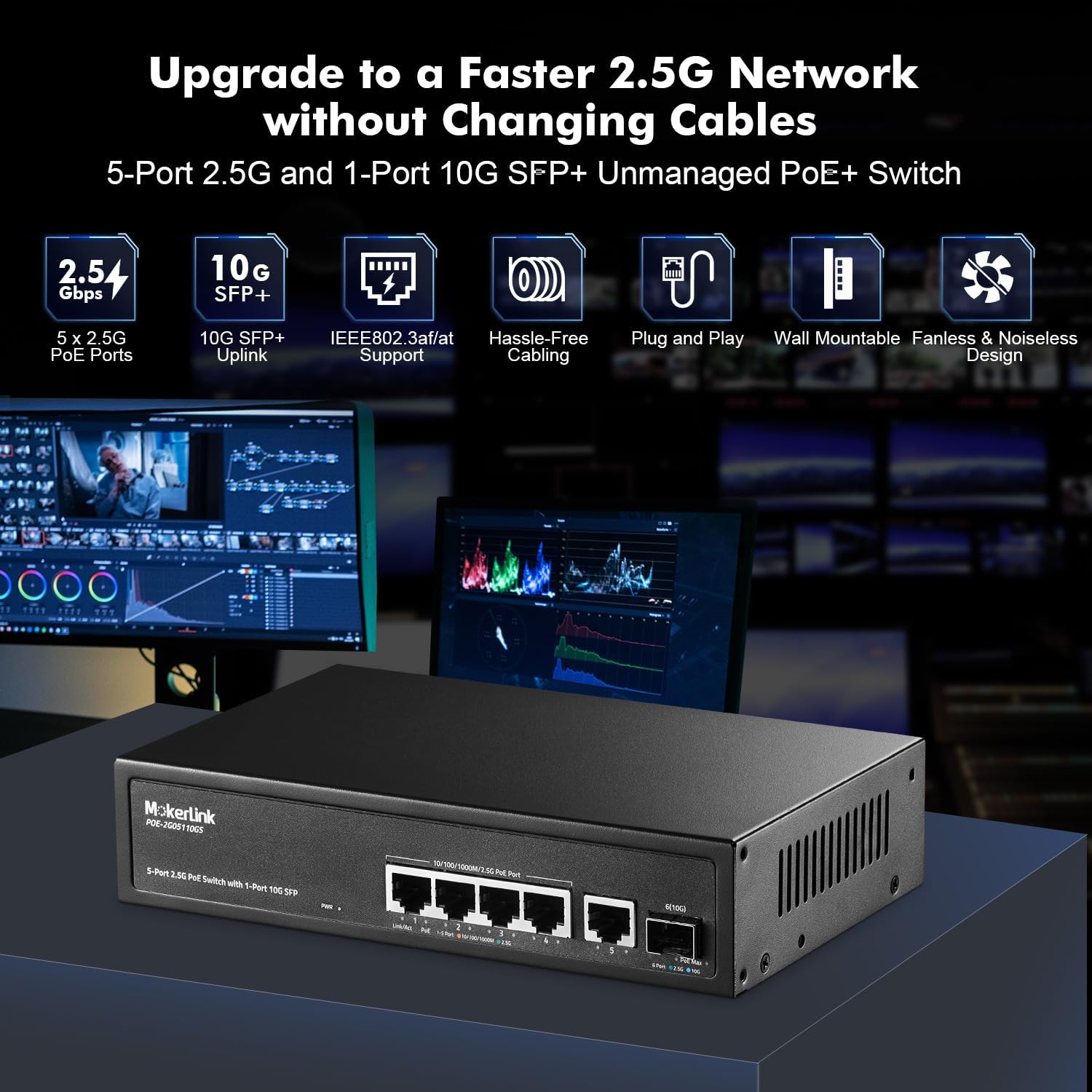
Figure 3.1: Visual representation of the switch's key features, including 2.5G PoE ports, 10G SFP+ uplink, IEEE802.3af/at support, and fanless design.

Figure 3.2: Diagram illustrating how Power over Ethernet (PoE) delivers both power and data to devices like IP cameras, wireless access points, and IP phones.
4. Pakkens indhold
Please verify the contents of your package. If any items are missing or damaged, contact your vendor.
- MokerLink 5-Port 2.5 Gigabit PoE Switch (Model: 5*2.5G POE)
- Strømledning
- Brugervejledning (dette dokument)
5. Opsætningsvejledning
The MokerLink 5-Port 2.5 Gigabit PoE Switch is designed for simple plug-and-play operation. Follow these steps for initial setup:
- Placering: Choose a suitable location for the switch. It can be placed on a desktop or mounted on a wall. Ensure adequate ventilation around the device.
- Tilslut strøm: Connect the included power cord to the AC input port on the switch and then to a standard electrical outlet. The Power LED indicator will illuminate.
- Tilslut netværksenheder:
- For non-PoE devices (e.g., router, computer, NVR), connect an Ethernet cable from the device to any of the 2.5G Ethernet ports (1-5) on the switch.
- For PoE-powered devices (e.g., IP cameras, wireless APs, IP phones), connect an Ethernet cable from the device to PoE-enabled ports (1-4) on the switch.
- For high-speed uplink, insert a compatible 1G/2.5G/10G SFP+ module (not included) into the SFP+ port and connect it to your network backbone using an appropriate fiber optic cable.
- Bekræft forbindelser: Check the LED indicators for each connected port. A solid green or orange light indicates a successful link.

Figur 5.1: Detaljeret view of the switch's ports, including 2.5G PoE ports, 10G SFP+ uplink, and the DC power input, along with LED indicator descriptions.

Figure 5.2: Illustration of the switch's wall-mounting capability and its fanless design for silent operation and good heat dissipation.
6. Betjeningsvejledning
Once connected, the MokerLink switch operates automatically without requiring any software configuration. It supports auto MDI/MDIX and auto-negotiation for port speeds.
LED-indikatorer:
- PWR (strømindikator):
- Tændt: Enheden er tændt.
- Slukket: Enheden er slukket.
- Link/Act (Per Port):
- Orange (Left): 10/100/1000Mbps link established.
- Green (Left): 2.5Gbps link established.
- Green (Right): PoE On (for PoE ports 1-4).
- Off: No link or PoE Off.
- PoE Max (PoE Power Light):
- Green: PoE usage < 95%.
- Flashing: PoE usage 95% - 100%.
- Off: PoE usage > 100% or no PoE devices connected.

Figure 6.1: The switch connected to various 2.5G devices such as a WiFi 6 AP, WiFi 6 Router, 2.5G NAS, and 2.5G Gaming PC, demonstrating its application in high-performance networks.
7. Vedligeholdelse
For at sikre din MokerLink-switchs levetid og optimale ydeevne, skal du overholde følgende vedligeholdelsesretningslinjer:
- Rensning: Rengør jævnligt ydersiden af kontakten med en blød, tør klud. Undgå at bruge flydende rengøringsmidler eller rengøringsmidler på sprayform.
- Ventilation: Ensure that the ventilation openings on the sides of the switch are not obstructed. Although fanless, proper airflow helps dissipate heat.
- Kabelstyring: Keep network cables neatly organized to prevent strain on ports and accidental disconnections.
- Miljøforhold: Operate the switch within its specified temperature and humidity ranges to prevent damage.
8. Fejlfinding
If you encounter issues with your MokerLink switch, refer to the following troubleshooting tips:
- Ingen strøm:
- Sørg for, at netledningen er korrekt tilsluttet til afbryderen og stikkontakten.
- Kontroller, at stikkontakten fungerer.
- Ingen link/aktivitet på en port:
- Check if the Ethernet cable is properly connected at both ends.
- Prøv et andet Ethernet-kabel.
- Sørg for, at den tilsluttede enhed er tændt og fungerer korrekt.
- For SFP+ port, ensure the SFP+ module is correctly inserted and compatible.
- PoE-enhed modtager ikke strøm:
- Confirm the device is connected to one of the PoE-enabled ports (1-4).
- Verify the PoE device is IEEE802.3af/at compliant. This switch does not support passive 24V PoE.
- Check the PoE Max LED. If it's off or flashing, the total power budget might be exceeded. Disconnect some PoE devices or use an external power source for some devices.
- Ensure the Ethernet cable is capable of carrying PoE (e.g., CAT5e or higher).
- Langsom netværkshastighed:
- Ensure all connected devices and cables support 2.5 Gigabit speeds for optimal performance.
- Check the Link/Act LED color for the port; green indicates 2.5Gbps, orange indicates 10/100/1000Mbps.
- Verify that the SFP+ module and connected fiber are rated for 10G speeds if using the uplink port.
9. Specifikationer
| Feature | Beskrivelse |
|---|---|
| Mærke | MokerLink |
| Modelnummer | 5*2.5G POE |
| Interface Type | PoE, SFP+ |
| Antal havne | 5 x 2.5G Ethernet (4 PoE), 1 x 10G SFP+ |
| PoE Standard | IEEE802.3af/at |
| PoE-strømudgang | Up to 30W per port, 65W total |
| Dataoverførselshastighed | 10/100/1000Mbps/2.5Gbps (Ethernet), 1G/2.5G/10Gbps (SFP+) |
| Backplane båndbredde | 45 Gbps |
| Pakkevideresendelseshastighed | 33.48 MPps |
| MAC-adressetabel | 4K |
| Jumbo Frame | 12Kbytes |
| Etui materiale | Metal |
| Køling | Vifteløs |
| Produktdimensioner | 9.84 x 7.87 x 3.15 tommer |
| Varens vægt | 1.94 pund |
| Voltage | 24 Volts (Internal Power Supply) |
| Kompatible enheder | Desktop, Gaming Console, Server, WiFi 6 AP, NAS, IP Cameras |
10. Garantioplysninger
This MokerLink product comes with a standard manufacturer's warranty. For specific details regarding warranty coverage, duration, and terms, please refer to the warranty card included with your product or visit the official MokerLink webwebsted. Behold din købskvittering som købsbevis i tilfælde af garantikrav.
11. Support
For technical assistance, product inquiries, or further support, please visit the official MokerLink webwebsted. Det webWebstedet indeholder typisk ofte stillede spørgsmål, driverdownloads og kontaktoplysninger til kundeservice.
Official MokerLink Store: MokerLink-butik på Amazon


