1. Introduktion
Tak for købetasing the SpeaKa Professional SP-HDA-510 HDMI Audio Extractor. This device is designed to enhance your audio-visual experience by allowing you to extract audio from an HDMI source and output it to various audio systems, including soundbars with eARC, or traditional audio receivers via S/PDIF (optical) or analog audio outputs. It also features multiple HDMI inputs for connecting various devices and a single HDMI output for your display.
2. Sikkerhedsoplysninger
- Læs alle instruktioner omhyggeligt, før du betjener enheden.
- Gem denne vejledning til fremtidig reference.
- Udsæt ikke enheden for fugt, regn eller ekstreme temperaturer.
- Sørg for korrekt ventilation omkring enheden for at forhindre overophedning.
- Brug kun den medfølgende strømadapter.
- Forsøg ikke at skille enheden ad eller ændre den. Overlad al service til kvalificeret personale.
- Afbryd strømmen under tordenvejr eller når den ikke bruges i længere perioder.
3. Pakkens indhold
Kontroller venligst indholdet af din pakke. Hvis der mangler eller er beskadigede dele, skal du kontakte din forhandler.
- SpeaKa Professional SP-HDA-510 HDMI Audio Extractor Unit
- Strømadapter (DC 5V)
- Fjernbetjening
- Brugervejledning (dette dokument)
- Installation Hardware (if applicable)
4. Produktet er slutview

Figur 4.1: Øverst foran view of the SpeaKa Professional SP-HDA-510, showing the brand logo, 4K UHD indicator, input LEDs (IN-1, IN-2, IN-3), audio channel LEDs (2CH, 5.1CH, 7.1CH, eARC), and the 'SELECT' button.
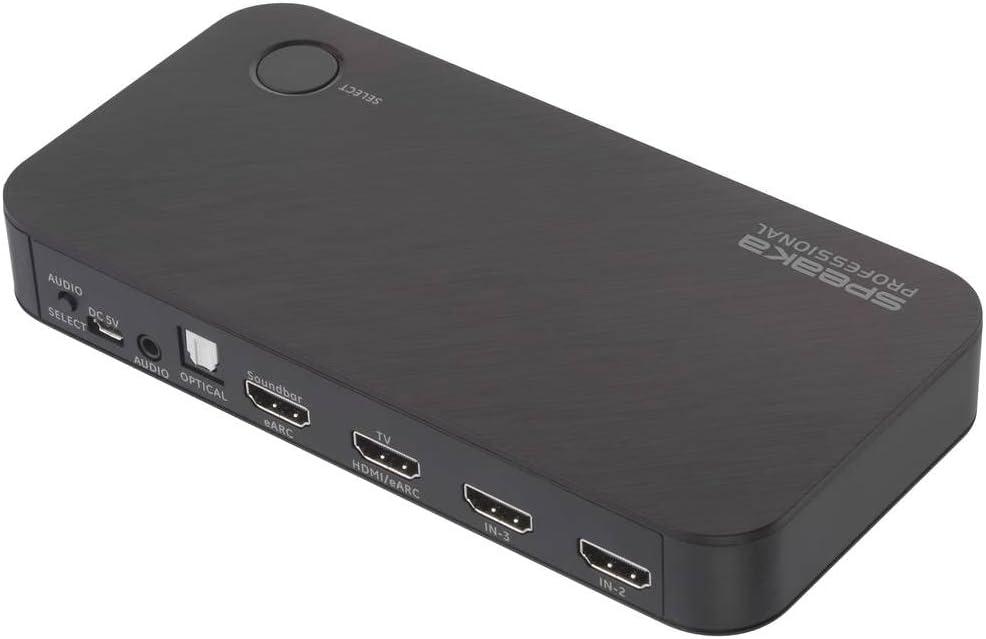
Figur 4.2: Bagside view of the SpeaKa Professional SP-HDA-510, highlighting the various input and output ports including HDMI inputs, HDMI output to TV, eARC output, Optical, and Analog audio outputs, along with the DC 5V power input and Audio Select button.
4.1 Frontpanelfunktioner

Figur 4.3: Detaljeret view of the front panel, showing the HDMI input indicators (IN-1, IN-2, IN-3) and audio mode indicators (2CH, 5.1CH, 7.1CH, eARC).
- 4K UHD Indicator: Lights up when a 4K UHD signal is detected.
- IN-1 / IN-2 / IN-3 LEDs: Indicate which HDMI input is currently active.
- 2CH / 5.1CH / 7.1CH / eARC LEDs: Indicate the current audio output mode.
- SELECT -knap: Used to manually switch between HDMI input sources.
4.2 Bagpanelfunktioner

Figur 4.4: Detaljeret view of the rear panel, showing all connectivity ports.
- DC 5V: Strømindgang. Tilslut den medfølgende strømadapter her.
- AUDIO SELECT: Button to cycle through audio output modes (2CH, 5.1CH, 7.1CH, eARC).
- AUDIO (3.5mm Jack): Analog stereolydudgang.
- OPTICAL (S/PDIF): Digital optisk lydudgang.
- Soundbar (eARC): HDMI output specifically for connecting to an eARC-compatible soundbar. This port supports Audio Return Channel.
- TV (HDMI/eARC): HDMI output for connecting to your television or display. This port also supports eARC functionality.
- IN-3 / IN-2 / IN-1: HDMI input ports for connecting source devices such as game consoles, Blu-ray players, or streaming devices.
5. Opsætning
Follow these steps to set up your SpeaKa Professional SP-HDA-510:
- Tilslut HDMI-kilder: Connect your HDMI source devices (e.g., PC, game console, satellite receiver) to the HDMI IN-1, IN-2, or IN-3 ports on the rear panel of the SP-HDA-510.
- Tilslut til TV/skærm: Connect an HDMI cable from the "TV (HDMI/eARC)" output port on the SP-HDA-510 to an HDMI input on your television or display.
- Tilslut lydudgang (valgfrit):
- For eARC Soundbar: Connect an HDMI cable from the "Soundbar (eARC)" output port on the SP-HDA-510 to the eARC/ARC input on your soundbar.
- For Optical Audio: Connect an optical cable from the "OPTICAL" port on the SP-HDA-510 to the optical input on your audio receiver or sound system.
- For Analog Audio: Connect a 3.5mm audio cable from the "AUDIO" port on the SP-HDA-510 to the analog input on your audio system.
- Tilslut strøm: Connect the provided DC 5V power adapter to the "DC 5V" port on the SP-HDA-510, then plug the adapter into a power outlet. The unit will power on automatically.
- Tænd enheder: Power on your TV/display and all connected HDMI source devices.
6. Betjeningsvejledning
6.1 Switching HDMI Sources
- Automatisk skift: The SP-HDA-510 is designed to automatically detect and switch to the active HDMI input source.
- Manual Switching (Device): Press the "SELECT" button on the top of the unit to cycle through the HDMI input sources (IN-1, IN-2, IN-3). The corresponding LED will illuminate.
- Manuel skift (fjernbetjening): Use the dedicated input selection buttons on the included remote control to directly select the desired HDMI input.
6.2 Lydudgangstilstande
The SP-HDA-510 supports various audio output modes. You can select the desired mode using the "AUDIO SELECT" button on the rear panel or the remote control.
- 2CH: Stereo audio output. Suitable for 2-channel audio systems.
- 5.1CH: 5.1 channel surround sound output.
- 7.1CH: 7.1 channel surround sound output.
- eARC: Enhanced Audio Return Channel. This mode allows audio from your TV (e.g., smart TV apps, broadcast TV) to be sent back to the SP-HDA-510 and then output to an eARC-compatible soundbar or audio receiver connected to the "Soundbar (eARC)" port. Ensure your TV and soundbar also support eARC for this functionality.
7. Vedligeholdelse
- Rensning: Use a soft, dry cloth to clean the surface of the device. Do not use liquid or aerosol cleaners.
- Opbevaring: Hvis enheden opbevares i længere tid, skal den afbrydes fra strømmen og opbevares et køligt og tørt sted.
8. Fejlfinding
| Problem | Mulig årsag | Løsning |
|---|---|---|
| Ingen video- eller lydudgang. |
|
|
| Intermittent screen blackouts (e.g., 2-3 seconds). |
|
|
| eARC/ARC not working. |
|
|
9. Specifikationer
| Modelnummer | SP-10102940 (SP-HDA-510) |
| Video opløsning | Up to 3840 x 2160 pixels (4K@60Hz) |
| HDMI -indgange | 3 |
| HDMI-udgange | 2 (1x TV/HDMI/eARC, 1x Soundbar/eARC) |
| Lydudgange | Optical (S/PDIF), Analog (3.5mm Jack), eARC via HDMI |
| Understøttede lydformater | 2CH, 5.1CH, 7.1CH, eARC |
| Dimensioner (L x B x H) | 9 x 11 x 36 cm (ca. 3.54 x 4.33 x 14.17 tommer) |
| Vægt | 156.33 gram (ca. 0.34 lbs) |
| Strømforsyning | DC 5V (via medfølgende strømadapter) |
| Farve | Sort |
10. Garanti og support
SpeaKa Professional provides a warranty for a minimum period of 2 år fra købsdatoen for dette produkt. Denne garanti dækker materiale- og fabrikationsfejl ved normal brug.
For technical support, troubleshooting assistance, or warranty claims, please contact your original retailer or visit the official SpeaKa Professional webwebsted for kontaktoplysninger.
Gem venligst din købsbevis af garantihensyn.


