1. Vigtige sikkerhedsinstruktioner
Please read this instruction manual carefully before installing, operating, or performing maintenance on the Cecotec EnergySilence Aero 5500 ceiling fan. Retain this manual for future reference.
- Elektrisk sikkerhed: Always disconnect power at the main circuit breaker before installing, cleaning, or servicing the fan. Ensure all electrical connections comply with local codes and regulations. If you are unsure about wiring, consult a qualified electrician.
- Installation: The fan must be securely mounted to a ceiling joist or a structure capable of supporting a minimum of 4.6 kg (10.1 lbs). Ensure the fan blades are at least 2.3 meters (7.5 feet) above the floor and have adequate clearance from walls or other obstructions.
- Klingesikkerhed: Do not insert any objects into the path of the rotating blades. Keep hands, hair, and clothing clear of the fan blades during operation.
- IP44-klassificering: This fan has an IP44 rating, indicating protection against solid objects larger than 1mm and splashing water from any direction. It is suitable for outdoor use in covered areas where it is protected from direct rain or water jets. Do not expose the fan to direct, heavy rainfall or immerse it in water.
- Børn og kæledyr: Keep children and pets away from the fan during operation and ensure they do not tampmed enheden.
2. Produktet er slutview
The Cecotec EnergySilence Aero 5500 is a high-performance 40W ceiling fan designed for both indoor and covered outdoor use. It features a 52-inch (132 cm) diameter with three aerodynamic blades, a DC motor for efficient and quiet operation, and smart control options via Wi-Fi and an included remote control. The fan offers 6 speed settings, a timer function, and a reversible motor for summer and winter modes.
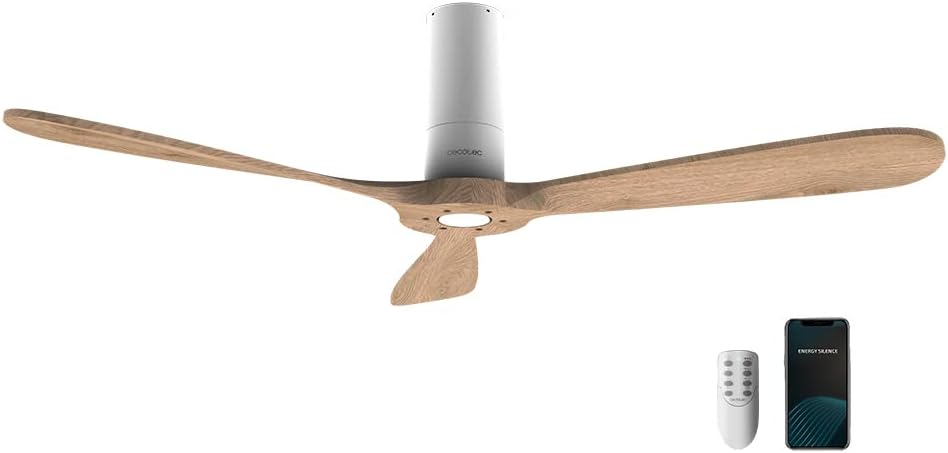
This image shows the Cecotec EnergySilence Aero 5500 ceiling fan, highlighting its sleek design. Included are the remote control and a smartphone, demonstrating the fan's Wi-Fi connectivity and app control capabilities.

The ceiling fan is shown installed on a covered outdoor patio, illustrating its suitability for outdoor use in protected areas.

This image emphasizes the fan's IP44 protection, showing it in an outdoor setting with simulated rain, indicating its resistance to splashing water.
3. Opsætning og installation
Follow these general steps for setting up your ceiling fan. For detailed wiring and mounting instructions, refer to the separate installation guide provided with your product.
3.1 Udpakning
- Fjern forsigtigt alle komponenter fra emballagen.
- Verify that all parts listed in the packing contents are present and undamaged.
3.2 Montering af ventilatoren
- Sørg for, at strømforsyningen til installationsområdet er afbrudt ved afbryderen.
- Attach the mounting bracket securely to a ceiling joist or a suitable electrical junction box rated for fan support.
- Connect the electrical wiring according to the wiring diagram in the detailed installation guide and local electrical codes.
- Løft forsigtigt ventilatormotorenheden op, og fastgør den til monteringsbeslaget.
3.3 Montering af knivene
- Attach each of the three fan blades to the motor housing using the provided screws. Ensure they are tightened securely.
3.4 Opsætning af fjernbetjening
- Åbn batterirummet på fjernbetjeningen.
- Insert the required batteries (not included) ensuring correct polarity.
- Luk batterirummet.
3.5 Opsætning af Wi-Fi-forbindelse
- Download the official Cecotec app (or specified app) from your smartphone's app store.
- Opret en konto eller log ind.
- Follow the in-app instructions to add your EnergySilence Aero 5500 fan. This typically involves putting the fan into pairing mode and connecting it to your home Wi-Fi network.
4. Betjeningsvejledning
The Cecotec EnergySilence Aero 5500 can be operated using the included remote control or via the dedicated smartphone application.
4.1 Basic Operation (Remote Control & App)
- Tænd/sluk: Tryk på tænd/sluk-knappen for at tænde eller slukke for ventilatoren.
- Hastighedskontrol: Use the speed buttons to cycle through the 6 available fan speeds. Higher numbers indicate faster rotation and greater airflow.
- Timer funktion: Press the timer button to set the fan to automatically turn off after 1, 2, 4, or 8 hours.
4.2 Sommer- og vintertilstande
The fan features a reversible motor to optimize air circulation for different seasons. A switch on the fan motor housing (or via remote/app, depending on model) controls the direction.

This diagram explains the fan's reversible motor function, showing how it circulates cool air downwards in summer and redistributes warm air from the ceiling in winter.
- Sommertilstand (rotation mod uret): In this mode, the fan creates a downward airflow, producing a cooling effect. This is ideal for warmer months.
- Vintertilstand (rotation med uret): In this mode, the fan creates an upward airflow, which helps to redistribute warm air trapped near the ceiling throughout the room, improving heating efficiency. This is ideal for colder months.
4.3 Wi-Fi-app-kontrol
The smartphone app provides all the functionalities of the remote control, plus the convenience of controlling the fan from anywhere with an internet connection. Refer to the app's interface for specific controls and settings.
5. Vedligeholdelse
Regular maintenance ensures the longevity and optimal performance of your Cecotec EnergySilence Aero 5500 ceiling fan.
- Rensning: Before cleaning, ensure the fan is turned off and the power supply is disconnected at the circuit breaker. Use a soft, damp cloth to wipe down the fan blades and motor housing. Do not use abrasive cleaners, solvents, or harsh chemicals, as these can damage the finish.
- Fjernelse af støv: Regularly dust the fan blades and motor to prevent dust buildup, which can affect performance and balance.
- Tæthedskontrol: Periodically check all screws and fasteners on the fan and mounting hardware to ensure they are secure. Loose connections can cause wobbling or noise.
- Ingen smøring nødvendig: The fan's motor is permanently lubricated and does not require additional oiling.
6. Fejlfinding
Hvis du støder på problemer med din ventilator, kan du se følgende almindelige problemer og løsninger:
| Problem | Mulig årsag | Løsning |
|---|---|---|
| Ventilator starter ikke | Ingen strømforsyning Fjernbetjeningens batterier er døde Forkert ledningsføring | Kontroller afbryderen og vægafbryderen Udskift fjernbetjeningens batterier Verify wiring connections (consult electrician if needed) |
| Ventilatoren vibrerer overdrevent | Løst monteringsbeslag Løse knivskruer Ubalancerede klinger | Ensure mounting bracket is securely fastened Spænd alle knivskruer Use a blade balancing kit (if necessary) |
| No response from remote control or app | Fjernbetjeningens batterier er døde Fan not paired with app/remote Problemer med Wi-Fi-forbindelse | Udskift fjernbetjeningens batterier Refer to pairing instructions in the setup section Check your Wi-Fi router and network connection |
| Støjende drift | Løse skruer Obstruction in fan's path Motorproblemer | Kontroller og spænd alle skruer Ensure nothing is touching the blades Hvis støjen fortsætter, kontakt kundesupport |
7. Specifikationer

A visual representation of the fan's 132 cm (52-inch) diameter, highlighting its wide coverage for effective air circulation.
| Feature | Specifikation |
|---|---|
| Mærke | Cecotec |
| Modelnummer | 08237 |
| Magt | 40 watt |
| Voltage | 230 volt |
| Dimensioner (L x B x H) | 132 x 132 x 31 cm (52 x 52 x 12.2 tommer) |
| Vægt | 4.6 kilo (10.1 lbs) |
| Materiale | Plast |
| Antal hastigheder | 6 |
| Særlige funktioner | Wi-Fi Compatible, Summer/Winter Function, IP44 Rating |
| Fan Design | Loft Fan |
| Strømkilde | Elektrisk med ledning |
8. Garanti og support
Cecotec er forpligtet til at levere kvalitetsprodukter. Dette produkt er designet til holdbarhed og ydeevne.
- Tilgængelighed af reservedele: Spare parts for the Cecotec EnergySilence Aero 5500 are available for up to 10 years from the date of purchase.
- Kundesupport: For any technical assistance, warranty claims, or inquiries regarding your product, please contact Cecotec customer support through their official webwebstedet eller kontaktoplysningerne i din købsdokumentation.


