1. Introduktion
Thank you for choosing the SEHMUA 2K Light Bulb Security Camera. This manual provides detailed instructions for the setup, operation, and maintenance of your new security camera. Please read this manual thoroughly before use to ensure proper functionality and safety.

Figure 1: SEHMUA 2K Light Bulb Security Camera and Mobile Application Interface.
2. Produktet er slutview
2.1 Pakkens indhold
- SEHMUA 2K Light Bulb Security Camera (Model L1)
- Brugermanual
- Mounting Accessories (if applicable, not specified in data but common)
2.2 Nøglefunktioner
- 2K Full HD Resolution: Giver klar og detaljeret videofootage.
- 360° Pan/Tilt/Zoom (PTZ) & Remote Control: Allows for comprehensive area coverage and remote adjustment via mobile app.
- Farve Night Vision: Enhanced visibility in low-light conditions with integrated spotlight.
- Motion Detection & Siren Alert: Automatically detects movement and can trigger an audible siren for deterrence.
- Automatisk sporing: Follows detected motion within its field of view.
- Tovejs lyd: Enables communication through the camera's built-in microphone and speaker.
- SD Card & Cloud Storage: Supports local storage (SD card not included) and optional cloud storage for continuous recording.
- Nem installation: Designed for E26/E27 light bulb sockets.
- Wi-Fi-forbindelse: Connects to your home 2.4GHz Wi-Fi network.
- Alexa-kompatibilitet: Integrates with Amazon Alexa for voice control.
3. Opsætning
3.1 Download af app og kontoregistrering
- Scan the QR code provided on the product packaging or in the quick start guide to download the official SEHMUA security camera application from your device's app store (iOS or Android).
- Open the application and follow the on-screen prompts to register a new account or log in if you already have one.
3.2 Kamerainstallation
The SEHMUA Light Bulb Security Camera is designed for easy installation into standard E26/E27 light bulb sockets. Ensure the power to the socket is turned off before installation.
- Locate a suitable E26/E27 light bulb socket where you wish to install the camera. This can be indoors or outdoors, provided the socket is protected from direct weather exposure if outdoors (IP65 rating means it's dust tight and protected against water jets, but not submersion).
- Carefully screw the camera into the light bulb socket until it is securely fastened. Do not overtighten.
- Turn on the power to the light bulb socket. The camera will power on and initiate its startup sequence.

Figure 2: Easy installation into an E27 socket.

Figur 3: Installation examples for indoor and outdoor use.
3.3 Netværksforbindelse
Once powered on, the camera will enter pairing mode (indicated by a specific light pattern or voice prompt). Follow these steps to connect it to your Wi-Fi network:
- In the SEHMUA app, tap "Add Device" or the "+" icon.
- Vælg din kameramodel fra listen.
- Follow the in-app instructions to connect the camera to your 2.4GHz Wi-Fi network. This typically involves entering your Wi-Fi password and scanning a QR code generated by the app with the camera's lens.
- Once connected, the camera will confirm successful pairing, and you can begin viewlive-feedet.
4. Betjeningsvejledning
4.1 Live View and Remote Control (PTZ)
Access the live video feed from your camera through the SEHMUA mobile application. The app allows you to remotely control the camera's pan (horizontal) and tilt (vertical) movements for a 360-degree viewvinkel.
- Open the SEHMUA app and select your camera from the device list.
- The live feed will display. Use the directional controls within the app to pan the camera horizontally (350°) and tilt it vertically (90°).

Figure 4: Pan, Tilt, and Zoom (PTZ) functionality.

Figure 5: The camera provides 2K Full HD resolution for clearer details.
4.2 Optagelse og opbevaring
The camera supports 24/7 continuous recording and event-triggered recording. Footage can be stored locally on a microSD card (not included) or via optional cloud storage.
- MicroSD-kort: Insert a compatible microSD card (up to 128GB, Class 10 or higher recommended) into the camera's SD card slot. The camera will automatically begin recording.
- Cloud Storage: Subscribe to the cloud storage service through the SEHMUA app for secure, off-site storage of your video recordings.
- View optaget footage by navigating to the "History" or "Cloud" sections within the app.

Figure 6: Storage options include Cloud and SD Card (not included).
4.3 Bevægelsesdetektion og advarsler
The camera is equipped with motion detection capabilities to alert you to activity in its monitored area.
- Aktivér bevægelsesdetektion: In the app settings for your camera, enable motion detection. You can adjust sensitivity levels to minimize false alerts.
- Aktivitetszoner: Definer specifikke områder inden for kameraets view where you want motion detection to be active, ignoring other areas.
- Realtidsadvarsler: Modtag push-notifikationer på din smartphone, når der registreres bevægelse.
- Automatisk sporing: When enabled, the camera will automatically pan and tilt to follow detected motion.
- Sirene og strobelys: Configure the camera to activate an audible siren and/or a bright strobe light upon motion detection for deterrence.

Figure 7: Motion detection with real-time alerts and auto tracking.

Figure 8: Adjusting activity zones for precise motion detection.

Figure 9: Auto-tracking feature in action.

Figure 10: Deterrence with siren and strobe light.
4.4 Nattesyn
The camera features color night vision, providing clear images even in very low light conditions, enhanced by an integrated spotlight.
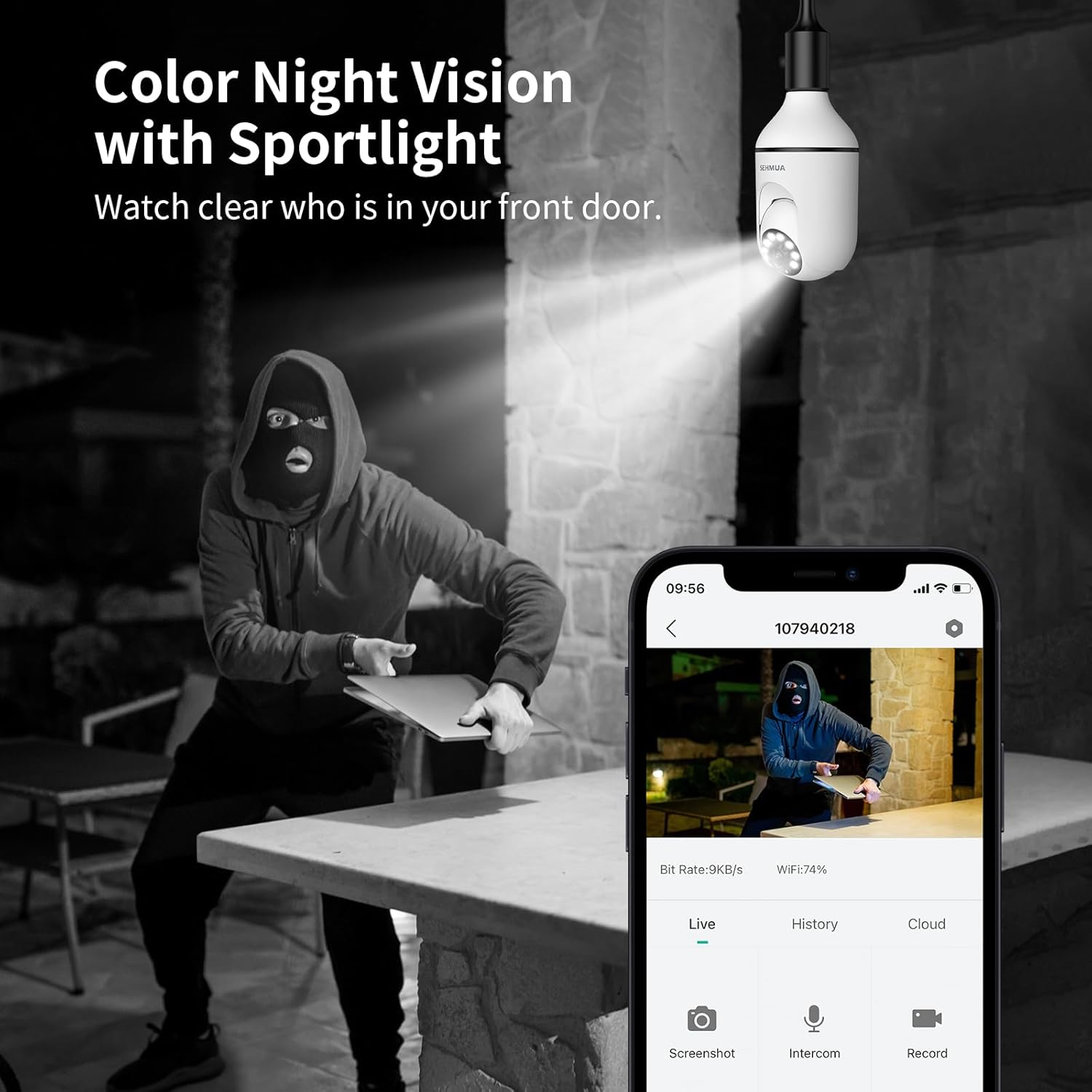
Figure 11: Color Night Vision with spotlight.
4.5 Tovejslyd
Kommuniker med besøgende eller afskræk ubudne gæster ved hjælp af kameraets tovejslydfunktion.
- Fra live view Tryk på mikrofonikonet i appen for at tale gennem kameraets højttaler.
- The camera's built-in microphone will capture audio from the camera's location, which you can hear through your phone.

Figur 12: Tovejs lydkommunikation.
4.6 Amazon Alexa-integration
The SEHMUA camera can be integrated with Amazon Alexa for convenient voice control and viewpå kompatible smart-skærme.
- Åbn Alexa-appen på din smartphone.
- Søg efter and enable the "SEHMUA" skill.
- Link your SEHMUA account with your Alexa account.
- Discover devices. You can now use voice commands like "Alexa, show me the [camera name]" on your Echo Show or other compatible devices.
5. Vedligeholdelse
- Rensning: Tør forsigtigt kameralinsen og huset af med en blød, tør klud. Brug ikke skrappe kemikalier eller slibende rengøringsmidler.
- Firmwareopdateringer: Regularly check the SEHMUA app for available firmware updates to ensure optimal performance and security.
- Miljøforhold: While rated IP65 for outdoor use, avoid exposing the camera to extreme temperatures, direct water submersion, or high-pressure water jets.
6. Fejlfinding
| Problem | Mulig årsag | Løsning |
|---|---|---|
| Kameraet tænder ikke. | No power to the socket; camera not screwed in properly. | Ensure the light socket has power. Re-screw the camera firmly into the socket. |
| Kan ikke oprette forbindelse til Wi-Fi. | Forkert Wi-Fi-adgangskode; kamera for langt fra routeren; 5 GHz Wi-Fi-netværk. | Verify Wi-Fi password. Move camera closer to the router during setup. Ensure you are connecting to a 2.4GHz Wi-Fi network. |
| Ingen bevægelsesdetektionsalarmer. | Motion detection disabled; sensitivity too low; activity zones not set correctly. | Enable motion detection in the app. Adjust sensitivity. Check and configure activity zones. |
| Dårlig videokvalitet. | Svagt Wi-Fi-signal; snavset linse. | Improve Wi-Fi signal strength (e.g., use a Wi-Fi extender). Clean the camera lens. |
| Tovejslyd virker ikke. | Mikrofon/højttaler slået fra i appen; lydstyrken er for lav. | Check audio settings in the app. Ensure microphone and speaker are not muted and volume is adequate. |
7. Specifikationer
| Feature | Detalje |
|---|---|
| Modelnummer | L1 |
| Opløsning | 2K fuld HD |
| Forbindelse | 2.4 GHz Wi-Fi |
| Strømkilde | Corded Electric (E26/E27 Socket) |
| Pan / tilt vinkel | 350° Pan, 90° Tilt (360° Field of View) |
| Nattesyn | Color Night Vision with Spotlight |
| Opbevaringsmuligheder | MicroSD Card (up to 128GB, not included), Cloud Storage (optional) |
| Lyd | To-vejs lyd |
| Advarsler | Motion Detection, Siren, Strobe Light |
| Kompatibilitet | Amazon Alexa, Smartphone (iOS/Android) |
| Indendørs/Udendørs brug | Udendørs (IP65-klassificeret) |
| Varens vægt | 10.5 ounce |
| Pakkedimensioner | 6.89 x 3.31 x 3.23 tommer |
8. Garanti og support
For detailed warranty information and technical support, please refer to the warranty card included with your product or visit the official SEHMUA webDu kan også finde yderligere ressourcer og ofte stillede spørgsmål på produktsupportsiden.
For further assistance, please contact SEHMUA customer service through the contact information provided on their official webwebstedet eller i mobilapplikationen.
A PDF version of the Instructions for Use (IFU) is available for download her.


