1. Introduktion
This manual provides essential information for the installation, operation, and maintenance of the Cisco Catalyst C9124AXI Dual Band 802.11ax Wireless Access Point. This device is designed for outdoor environments, offering high-performance wireless connectivity with Wi-Fi 6 (802.11ax) capabilities.
The Catalyst 9124AX Series is engineered to support high-density networks and IoT deployments, providing robust security, resilience, and operational flexibility. It offers flexible deployment options for service providers and enterprise networks requiring fast links for mobile clients and wireless backhaul.
2. Sikkerhedsoplysninger
Before installing or operating this device, please read all safety warnings and instructions carefully. Failure to comply with safety guidelines may result in injury or damage to the equipment.
- Sørg for korrekt jordforbindelse til enheden.
- Må ikke installeres under tordenvejr.
- Use only Cisco-approved power supplies and accessories.
- Installation skal udføres af kvalificeret personale.
- Overhold alle lokale og nationale elektriske forskrifter.
3. Pakkens indhold
Verify that all items are present and undamaged. If any items are missing or damaged, contact your vendor.
- Cisco Catalyst C9124AXI Wireless Access Point
- Mounting bracket (if included with specific model variant)
- Dokumentation (hurtigstartguide, sikkerhedsoplysninger)
- Note: Power adapter and Ethernet cables are typically sold separately.
4. Produktet er slutview
The Cisco Catalyst C9124AXI is an outdoor-rated wireless access point. It features dual-band 802.11ax (Wi-Fi 6) connectivity, offering high-speed data transfer and robust performance in challenging environments. This model includes internal antennas for reliable connectivity.
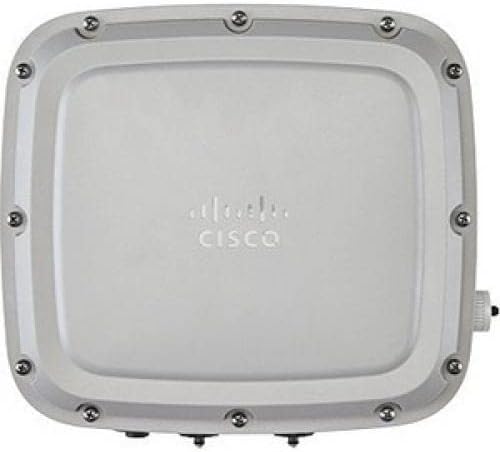
Figur 1: Forside view of the Cisco Catalyst C9124AXI Wireless Access Point. The device is a rectangular, light-colored unit with the Cisco logo centrally embossed. Multiple screws are visible around the perimeter, securing the casing. A small connector is visible on the right side.
Nøglefunktioner:
- 802.11ax (Wi-Fi 6) Standard: Provides enhanced capacity, efficiency, and performance.
- Dobbeltbåndsdrift: Supports both 2.4 GHz and 5 GHz frequencies.
- Udendørs bedømt: Designed for deployment in outdoor environments.
- Interne antenner: Integrated antennas for streamlined installation.
- 2.5 Gigabit Ethernet: High-speed wired connectivity.
- Datakryptering: Forbedrede sikkerhedsfunktioner.
5. Opsætning og installation
Proper installation is crucial for optimal performance and device longevity. This section outlines the general steps for setting up your access point.
5.1 Forberedelse af stedet
- Valg af sted: Choose a location that provides optimal wireless coverage and is protected from direct physical impact. Consider line-of-sight for best performance.
- Strømkilde: Ensure a suitable power source (e.g., Power over Ethernet - PoE) is available within reach of the installation site.
- Kabelføring: Plan for necessary Ethernet cabling runs, ensuring outdoor-rated cables are used if exposed to elements.
5.2 Montering af adgangspunktet
- Attach the mounting bracket (if applicable) to the desired surface (pole or wall) using appropriate hardware.
- Securely attach the access point to the mounting bracket. Ensure all fasteners are tightened according to manufacturer specifications.
- Verify the access point is stable and correctly oriented for optimal signal propagation.
5.3 Tilslutningskabler
- Connect an Ethernet cable from your network switch (with PoE capabilities) to the Ethernet port on the access point.
- If using an external power adapter (not typically included), connect it to the power input port.
- Ensure all connections are secure and weatherproofed if exposed to outdoor conditions.
5.4 Indledende opstart
Once all connections are made, power on the device. Observe the LED indicators for status. Refer to the operating section for LED status interpretations.
6. Betjening
After successful installation, the access point will begin its operational sequence. Configuration is typically performed via a network controller or standalone web interface.
6.1 LED-indikatorer
The access point features LED indicators to provide status information. Consult the official Cisco documentation for a detailed breakdown of LED patterns and their meanings. Generally:
- Solid grøn: Normal operation, device is powered and functioning.
- Blinkende grønt: Booting up or performing a firmware upgrade.
- Solid Amber/Orange: Warning or minor error.
- Flashing Amber/Orange: Major error or fault.
- Slukket: Enheden er slukket eller har et strømproblem.
6.2 Netværkskonfiguration
The Cisco Catalyst 9124AXI can be managed through a Cisco Wireless LAN Controller (WLC) or configured in standalone mode via its web-based interface. Refer to the Cisco documentation for specific configuration procedures, including:
- Setting up SSIDs (Wireless Network Names)
- Configuring security protocols (WPA3, WPA2)
- Adjusting radio settings (channels, power levels)
- Integrating with RADIUS servers for authentication
7. Vedligeholdelse
Regular maintenance ensures optimal performance and extends the lifespan of your access point.
7.1 firmwareopdateringer
Tjek Cisco-supporten med jævne mellemrum website for new firmware versions. Firmware updates often include performance enhancements, security patches, and new features. Follow Cisco's recommended procedures for firmware upgrades to avoid service interruptions.
7.2 Fysisk inspektion
For outdoor deployments, conduct periodic visual inspections:
- Check for any physical damage to the casing or mounting hardware.
- Ensure all cable connections are secure and free from corrosion or damage.
- Clean any accumulated dirt or debris from the device surface, using a soft, damp klæde. Brug ikke skrappe kemikalier.
7.3 Konfigurationssikkerhedskopiering
Regularly back up your access point's configuration settings. This allows for quick restoration in case of a device failure or misconfiguration.
8. Fejlfinding
Dette afsnit indeholder løsninger på almindelige problemer, du kan støde på.
8.1 Ingen strøm / Enheden tænder ikke
- Tjek strømkilden: Ensure the Ethernet cable is connected to a PoE-enabled port on a switch or a functional PoE injector.
- Kabelintegritet: Inspect the Ethernet cable for damage. Try a different cable.
- Switch Port: Verify the switch port is active and providing power.
8.2 No Wireless Connectivity
- LED-status: Check the LED indicators. If they show an error, refer to the operating section or Cisco documentation.
- Konfiguration: Verify that SSIDs are broadcasted and security settings are correctly configured.
- Klientenhed: Sørg for, at klientenheder er inden for rækkevidde og har den korrekte Wi-Fi-adgangskode.
- Interferens: In outdoor environments, check for potential sources of wireless interference.
8.3 Langsom ydeevne
- Signalstyrke: Check the signal strength at the client device's location.
- Kanaloverbelastning: Use network analysis tools to identify congested Wi-Fi channels and adjust the access point's channel settings if necessary.
- Firmware: Ensure the access point is running the latest firmware.
- Netværksbelastning: Assess the number of connected devices and their bandwidth usage.
9. Specifikationer
| Feature | Detalje |
|---|---|
| Model | C9124AXI |
| Trådløs Standard | 802.11ax (Wi-Fi 6) |
| Frekvensbånd | Dobbeltbånd (2.4 GHz, 5 GHz) |
| Maksimal trådløs hastighed | 5.38 Gbit/s |
| Ethernet-forbindelse | 2.5 Gigabit Ethernet |
| Antenne type | Indre |
| Operativsystem | Cisco IOS |
| Dimensioner (L x B x H) | 16 x 13.9 x 7.9 tommer |
| Varens vægt | 8.9 pund |
| Forbindelsesteknologier | Ethernet, Bluetooth |
| Fabrikant | Cisco Systems, Inc. |
10. Garantioplysninger
Cisco products typically come with a limited hardware warranty. For detailed warranty terms and conditions, including duration and coverage, please refer to the official Cisco warranty statement available on their website or contact Cisco support directly. Keep your proof of purchase for warranty claims.
11. Teknisk support
For technical assistance, additional documentation, or to report issues, please contact Cisco Technical Support. You can find support resources, including knowledge bases, forums, and contact information, on the official Cisco webwebsted:
Cisco Support Webwebsted: www.cisco.com/c/en/us/support/index.html
When contacting support, have your product model (C9124AXI) and serial number ready.


