1. Produktet er slutview
The QIACHIP 433 MHz Remote Control Relay Switch is a versatile wireless control system designed for various applications in homes, farms, factories, offices, and laboratories. It features high reception sensitivity and strong anti-interference capabilities, allowing for control up to 50 meters in open areas, even through walls, floors, and doors.
This single-channel receiver can store up to 15 portable transmitters and supports three operating modes: Momentary, Toggle, and Latching, providing flexible control options for connected devices such as lights, ventilation systems, and other electrical appliances.

Image 1.1: The QIACHIP 433 MHz remote control relay switch receiver module and its accompanying remote control transmitter.
2. Specifikationer
| Feature | Detalje |
|---|---|
| Modelnummer | KR2201-4 |
| Operation Voltage | AC 85V-250V |
| Frekvens | 433 MHz |
| Maks. Strøm | 10A |
| Fjernbetjenings rækkevidde | Op til 50 meter (åbent område) |
| Modtager dimensioner | 70 x 38 x 21 mm |
| Fjernbetjenings batteri | 2 x CR2 (included), Lithium Manganese Dioxide |
| Kontaktmateriale | Sølvlegering |
| Driftstilstand | Automatisk |
| Certificeringer | CCC, CE, RoHS |
3. Opsætning og installation
The receiver is designed for easy installation and can be hidden due to its compact size. It is compatible with AC 85V-250V power sources, including common 110V, 220V, 230V, and 240V systems.
3.1 Ledningsdiagram
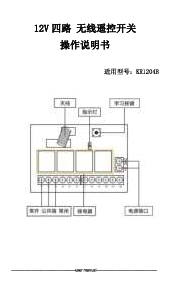
Connect the receiver according to the following diagram. Ensure power is disconnected before wiring to prevent electrical shock.

Image 3.1: Detailed wiring diagram for the receiver module, showing connections for Live (L), Neutral (N), and Output (OUT) to a light fixture. The learning button is also indicated.
- Connect the Live (L) wire from your power source to the 'L' terminal on the receiver.
- Connect the Neutral (N) wire from your power source to the 'N' terminal on the receiver.
- Connect the device you wish to control (e.g., a light) to the 'OUT' terminals. One wire of the device connects to one 'OUT' terminal, and the other wire connects to the other 'OUT' terminal.
- Sørg for, at alle forbindelser er sikre.
3.2 Pairing the Remote Control (Learning Modes)
The receiver supports three operating modes. The LED indicator on the switch control must be lit to set the operating mode. It is recommended to perform a reset before programming new modes.
3.2.1 Nulstil indstillinger
To clear all previously stored remote control data from the receiver's memory:
- Press the receiver's learning button eight times.
- The receiver's LED will flash, indicating that the reset function is complete and all remote data has been cleared.
3.2.2 Set Momentary Mode (Hold to ON, Release to OFF)
In this mode, the device remains on only as long as the remote button is pressed. Releasing the button turns the device off.
- Click the "Settings" (learning) button on the receiver once.
- Wait for the LED on the receiver to light up, indicating it has entered the setting status.
- Press the desired button on the remote control once (e.g., Button A).
- When the indicator light on the receiver flashes and goes out, the momentary mode is successfully set.
3.2.3 Set Toggle Mode (Press ON, Press OFF)
In this mode, one press of the remote button turns the device on, and another press turns it off. This mode is suitable for controlling one receiver with one remote control button.
- Click the "Settings" (learning) button on the receiver twice.
- Wait for the LED on the receiver to light up, indicating it has entered the setting status.
- Press the desired button on the remote control once (e.g., Button A).
- When the indicator light on the receiver flashes and goes out, the toggle mode is successfully set.
3.2.4 Set Latching Mode (Button A for ON, Button B for OFF)
This mode requires at least two remote control buttons. One button turns the device on, and another button turns it off. This mode can also be used for one remote control to manage multiple receivers.
- Click the "Settings" (learning) button on the receiver three times.
- Wait for the LED on the receiver to light up, indicating it has entered the setting status.
- Press the button on the remote control for "ON" once (e.g., Button A). The indicator light on the receiver will flash and light up again.
- Then, press the button on the remote control for "OFF" once (e.g., Button B). The indicator light on the receiver will flash and go out. The latching mode is successfully set.
4. Betjening af enheden
Once the remote control is successfully paired with the receiver in your desired mode, you can operate your connected device wirelessly.
- Momentan Mode: Press and hold the paired remote button to turn on the device. Release the button to turn off the device.
- Skift tilstand: Press the paired remote button once to turn on the device. Press the same button again to turn off the device.
- Latching Mode: Press the designated "ON" button on the remote to turn on the device. Press the designated "OFF" button on the remote to turn off the device.

Image 4.1: The remote control system can be conveniently used in various rooms such as the living room, kitchen, and bedroom to control connected devices.

Image 4.2: The relay switch can be integrated into existing lighting systems without rewiring, controlling ceiling lights, cabinet lights, fan lights, wall lamps, sengekant lamps og skrivebord lamps.
5. Vedligeholdelse
5.1 Udskiftning af batteri i fjernbetjening
The remote control is powered by two CR2 Lithium Manganese Dioxide batteries. If the remote control's range decreases or it becomes unresponsive, the batteries may need replacement.

Image 5.1: Details of the remote control, including its silicone buttons, chrome bezel, metal keychain, and the CR2016 3V batteries required for operation.
- Carefully disassemble the remote control casing.
- Find batterirummet.
- Fjern de gamle CR2-batterier.
- Insert new CR2 batteries, ensuring correct polarity.
- Saml fjernbetjeningen igen casing.
Bortskaf gamle batterier ansvarligt i henhold til lokale regler.
6. Fejlfinding
- Fjernbetjeningen reagerer ikke:
- Check if the remote control batteries need replacement (refer to Section 5.1).
- Ensure the receiver is powered on and its LED indicator is functioning.
- Try re-pairing the remote control with the receiver (refer to Section 3.2).
- Enheden tænder/slukker ikke:
- Verify that the wiring connections to the receiver and the controlled device are secure (refer to Section 3.1).
- Confirm that the correct operating mode (Momentary, Toggle, Latching) is set for your intended use.
- If the remote control loses programming, perform a reset (Section 3.2.1) and re-pair.
- Limited Remote Control Range:
- Ensure there are no significant obstructions (thick walls, metal objects) between the remote and the receiver.
- While the system is designed to work through walls, extreme distances or multiple obstructions can reduce range.
- Udskift batterierne i fjernbetjeningen, hvis de er lave.
7. Garanti og support
For warranty information or technical support, please contact QIACHIP customer service through the retailer where you purchased the product or visit the official QIACHIP brand store for more details.
You can find more information and products from QIACHIP at their Amazon store: QIACHIP Amazon Store.