1. Introduktion
The Sparkleiot ESP32-C3F is a compact and powerful single-core Wi-Fi and Bluetooth 5 (LE) microcontroller System-on-Chip (SoC). Based on the open-source RISC-V architecture, it integrates a 32-bit RISC-V processor operating at up to 160 MHz, along with 4MB of built-in SPI flash memory. This module is designed for a wide range of Internet of Things (IoT) applications, offering robust wireless connectivity and versatile peripheral interfaces.
Nøglefunktioner:
- Single-core Wi-Fi and Bluetooth 5 (LE) microcontroller SoC.
- Based on open-source RISC-V architecture.
- 32-bit RISC-V single-core processor, up to 160 MHz.
- Built-in 4MB SPI flash memory.
- 400 KB SRAM (16 KB for cache) and 384 KB ROM.
- Comprehensive Wi-Fi subsystem (IEEE 802.11b/g/n, Station, SoftAP, promiscuous modes).
- Bluetooth LE subsystem supporting Bluetooth 5 and Bluetooth mesh.
- Multiple configurable GPIOs for various applications.
- Suitable for Smart Home, Industrial Automation, Health Care, Consumer Electronics, Smart Agriculture, and Audio Devices.
2. Pakkens indhold
Hver pakke indeholder følgende varer:
- 5 x Sparkleiot ESP32-C3F WiFi Bluetooth Modules
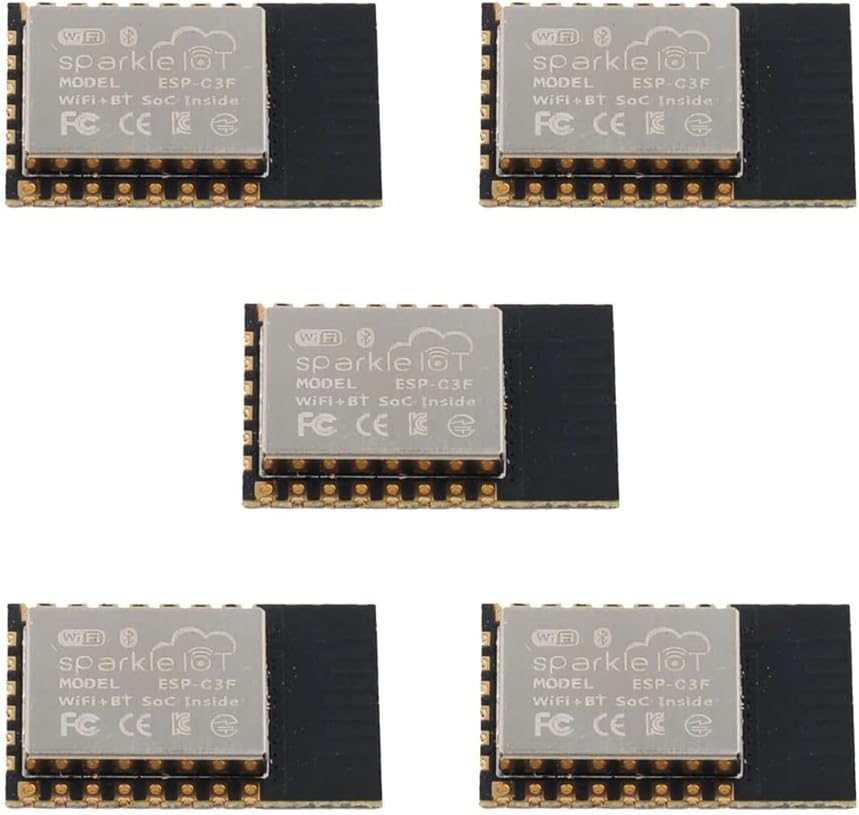
Figure 2.1: Five Sparkleiot ESP32-C3F WiFi Bluetooth Modules. This image shows a pack of five Sparkleiot ESP32-C3F WiFi Bluetooth Modules, highlighting the quantity included in the package.
3. Tekniske specifikationer
| Feature | Beskrivelse |
|---|---|
| Chipsæt | ESP32-C3FH4 (RISC-V single-core) |
| CPU hastighed | Op til 160 MHz |
| Flash-hukommelse | 4MB SPI Flash |
| SRAM | 400 KB (16 KB for cache) |
| ROM | 384 KB |
| Wi-Fi-standard | IEEE 802.11b/g/n (2.4 GHz) |
| Bluetooth standard | Bluetooth 5 (LE) and Bluetooth Mesh |
| Operation Voltage | 3.3V |
| Perifere grænseflader | GPIO (x15), 2xUART, I2C, I2S, SPI, PWM, ADC, USB |
| Modulets dimensioner | 16 mm x 24 mm x 3 mm (0.63 x 0.94 x 0.12 tommer) |
| Driftstemperatur | -40°C to 85°C (standard), -40°C to 105°C (optional) |
4. Modul overståetview and Pinout
The ESP32-C3F module features a compact design with clearly labeled pins for easy integration into various projects. Understanding the pinout is crucial for proper connection and functionality.

Figure 4.1: ESP32-C3F Module Views. Detailed views of the ESP32-C3F module, displaying the top side with the metal shield and the bottom side with pin assignments and model number.

Figure 4.2: ESP32-C3F Pinout and Dimensions. This diagram provides a detailed pinout configuration for the ESP32-C3F module, including GPIO assignments, power pins, and physical dimensions in millimeters.

Figure 4.3: Module Structure and Working Modes. A block diagram illustrating the internal components of the ESP32-C3F, such as the RISC-V CPU, 4MB Flash, and various peripherals. Below it, a table outlines different working modes and their corresponding GPIO9 levels.
5. Setup and Programming Guide
To begin using your ESP32-C3F module, you will typically need to flash firmware onto it. This section outlines the general steps for programming the module.
5.1 Basic Connection for Programming
The module operates at 3.3V. Ensure your power supply and logic levels are compatible. A common setup involves connecting the module to a USB-to-TTL converter for serial communication and power.

Figure 5.1: Basic 3.3V Circuit Diagram. This image presents a graph of the recommended soldering temperature profile for the module, along with a schematic diagram showing a basic circuit for operating the module at 3.3V, including buttons and a USB-to-TTL converter.
5.2 Firmware Flashing Process
Follow these steps to flash firmware onto your ESP32-C3F module using the ESP32 Download Tool:
- Download and install the ESP32 Download Tool (ESPFlashDownloadTool).
- Connect your ESP32-C3F module to your computer via a USB-to-TTL converter.
- Open the ESPFlashDownloadTool.
- Select "ESP32-C3" as the chip type and "develop" as the work mode. Click "OK".
- In the tool, upload the necessary
.binfirmware files. Ensure the correct addresses are set (typically address 0 for the main firmware). - Select the correct COM port corresponding to your connected module and set the baud rate (e.g., 115200 or 921600).
- Press the "FLASH" button on the ESP32-C3F module and hold it down.
- Click the "START" button in the ESPFlashDownloadTool.
- Release the "FLASH" button once the download process begins.
- The tool will indicate "FINISH" upon successful programming.
Video 5.1: ESP32-C3F Firmware Programming Guide. This video demonstrates the process of flashing firmware onto the Sparkleiot ESP32-C3F module using the ESPFlashDownloadTool, including connecting the module and initiating the download.
6. Driftsforhold
For optimal performance and longevity of your ESP32-C3F module, adhere to the following operating conditions:
- Strømforsyning: The module requires a stable 3.3V DC power supply. Exceeding this voltage kan beskadige modulet.
- Driftstemperatur: Standard operating temperature range is -40°C to 85°C. An optional version supports -40°C to 105°C. Ensure the module operates within these limits to prevent malfunction.
- Nuværende forbrug: Refer to the ESP32-C3 datasheet for detailed current consumption figures under various operating modes (e.g., Wi-Fi active, Bluetooth active, deep sleep).
7. Vedligeholdelse
The ESP32-C3F module is designed for low maintenance. However, consider the following for best practices:
- Opbevaring: Store modules in an anti-static environment, away from moisture and extreme temperatures.
- Rensning: If necessary, gently clean the module with a soft, dry, anti-static brush or cloth. Avoid using liquids or abrasive materials.
- Lodning: When soldering, follow the recommended temperature curve to prevent damage to the module components.
Figure 7.1: Recommended Soldering Temperature Curve. This image presents a graph of the recommended soldering temperature profile for the module, along with a schematic diagram showing a basic circuit for operating the module at 3.3V, including buttons and a USB-to-TTL converter.
8. Fejlfinding
If you encounter issues with your ESP32-C3F module, consider the following troubleshooting steps:
- Modulet tændes ikke:
- Verify the 3.3V power supply is correctly connected and stable.
- Check for any short circuits on the module or connected components.
- Firmware Flashing Failure:
- Ensure the correct COM port is selected in the download tool.
- Confirm the baud rate setting matches the recommended value.
- Make sure the "FLASH" button is pressed and held during the initial phase of the download process.
- Check that the USB-to-TTL converter drivers are correctly installed.
- Bekræft integriteten af
.binfirmware files.
- Problemer med Wi-Fi/Bluetooth-forbindelse:
- Check your code for correct Wi-Fi/Bluetooth initialization and credentials.
- Ensure the antenna area on the module is not obstructed or shielded by other components.
- Test in an environment with minimal wireless interference.
- Uventet adfærd:
- Review din kode for logiske fejl.
- Check all external connections for proper wiring.
- Ensure the module is not overheating.
9. Ansøgninger
The versatility of the ESP32-C3F module makes it suitable for a wide array of applications, including but not limited to:
- Smart Home devices (e.g., smart lighting, environmental sensors)
- Industrial Automation (e.g., remote monitoring, control systems)
- Health Care (e.g., wearable health trackers, medical device connectivity)
- Consumer Electronics (e.g., smart toys, remote controls)
- Smart Agriculture (e.g., soil moisture sensors, automated irrigation)
- Audio Devices (e.g., wireless audio streaming, smart speakers)
- Generic Low-power IoT Sensor Hubs and Data Loggers
10. Garanti og support
For warranty information, technical support, or further inquiries regarding your Sparkleiot ESP32-C3F module, please refer to the official Sparkleiot webwebstedet eller kontakt deres kundeservice direkte. Gem din købskvittering til garantikrav.
Fabrikant: Sparkleiot
Mærkebutik: Visit the Sparkleiot Store on Amazon


