1. Introduktion
Thank you for choosing the Alfox Laptop Power Bank. This high-capacity portable charger is designed to provide fast and efficient power to a wide range of devices, including laptops, tablets, and smartphones. With its 100W Power Delivery output and 30,000mAh capacity, it ensures your devices stay charged on the go. Please read this manual carefully before use to ensure proper operation and to maximize the lifespan of your device.
2. Sikkerhedsoplysninger
For at forhindre personskade eller beskadigelse af din enhed, bedes du overholde følgende sikkerhedsforanstaltninger:
- Do not expose the power bank to extreme temperatures (above 45°C or below 0°C).
- Undgå at tabe, slå eller skille enheden ad.
- Holdes væk fra vand, fugt og brandfarlige materialer.
- Må ikke anvendes, hvis powerbanken er beskadiget, hævet eller utæt.
- Opbevares utilgængeligt for børn.
- Bortskaf powerbanken ansvarligt i henhold til lokale regler.
- Brug kun certificerede opladningskabler og adaptere.
3. Pakkens indhold
- Alfox Laptop Power Bank (AF-PB007)
- USB-C til USB-C opladerkabel
- Brugermanual
4. Produktet er slutview
Familiarize yourself with the components of your Alfox Laptop Power Bank.
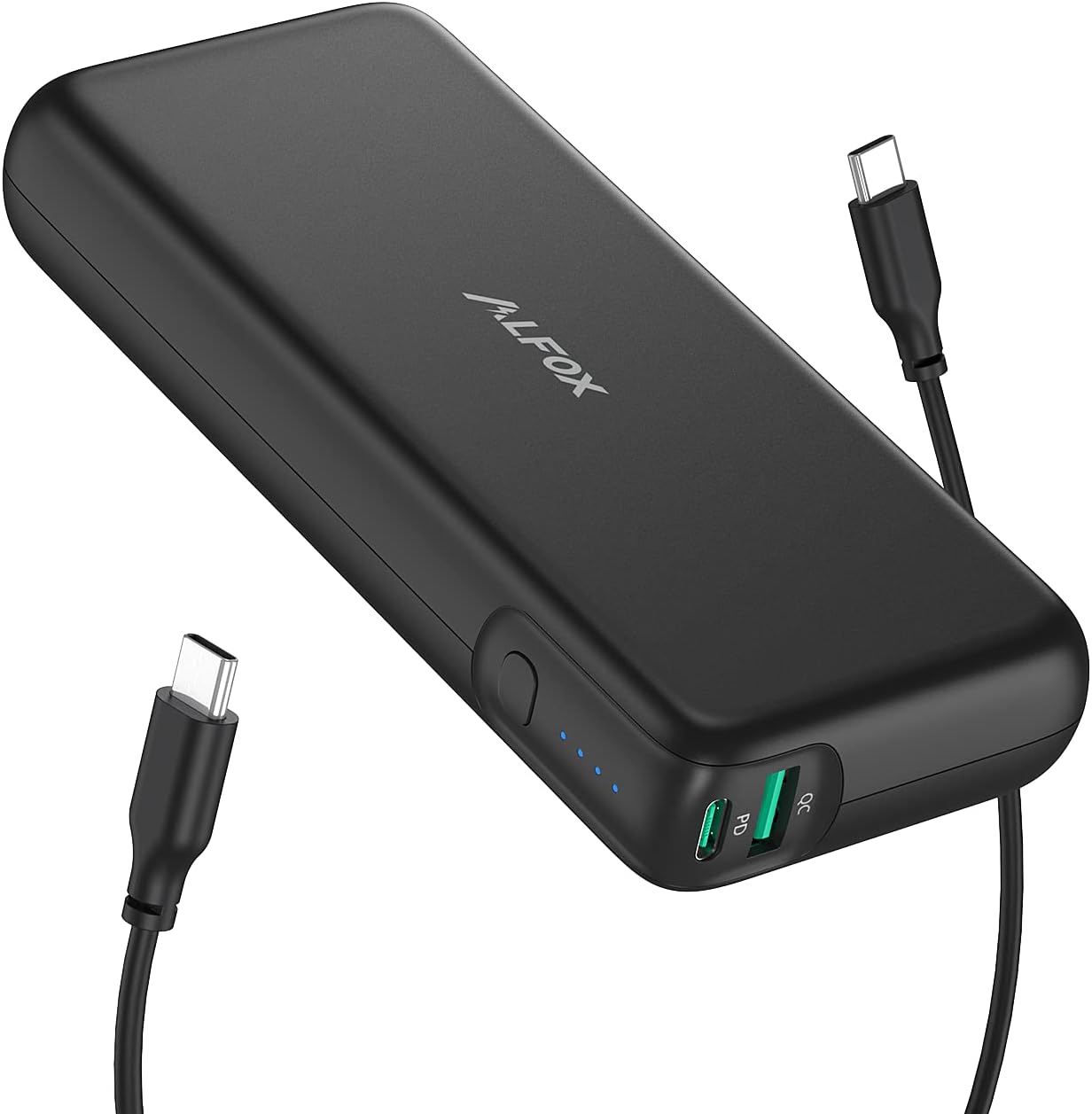
Image: The Alfox Laptop Power Bank, a black rectangular device, is shown with two USB-C cables connected. The power bank features a power button and LED indicators on its side, and two USB-C ports labeled 'PD' and 'QC' on one end.
Komponenter:
- Power knap: Press once to check battery level, press and hold to turn on/off (if applicable).
- LED-indikatorer: Four blue LEDs indicate the remaining battery capacity (e.g., 4 LEDs = 75-100%, 1 LED = 0-25%).
- USB-C PD-port: Power Delivery input/output port for fast charging compatible devices and recharging the power bank.
- USB-C QC Port: Quick Charge output port for fast charging compatible devices.
5. Opsætning
Første opladning af powerbanken:
- Before first use, fully charge your Alfox Laptop Power Bank.
- Connect the provided USB-C to USB-C cable to the USB-C PD port on the power bank.
- Connect the other end of the cable to a compatible USB-C Power Delivery wall charger (not included, 100W recommended for fastest charging).
- The LED indicators will light up sequentially, indicating the charging progress. All four LEDs will be solid when fully charged.
A full charge may take several hours depending on the power of your wall charger.
6. Betjeningsvejledning
Opladning af dine enheder:
- Ensure the power bank is sufficiently charged. Press the power button once to check the LED indicators.
- Connect your device (laptop, tablet, smartphone) to one of the USB-C output ports (PD or QC) on the power bank using an appropriate charging cable.
- Powerbanken begynder automatisk at oplade din enhed. Hvis ikke, skal du trykke én gang på tænd/sluk-knappen for at starte opladningen.
- The LED indicators will show the remaining battery level during charging.
- Frakobl din enhed, når den er fuldt opladet, eller når du ikke længere har brug for at oplade den.
The USB-C PD port supports up to 100W output, ideal for fast-charging laptops like MacBook Pro/Air, Dell XPS, and other compatible devices. The USB-C QC port provides fast charging for smartphones and tablets.
Genopladning af Power Bank:
Refer to the "Initial Charging of the Power Bank" section under Setup. Always use a USB-C PD compatible wall charger for optimal recharging speed.
7. Vedligeholdelse
- Rensning: Tør powerbanken af med en blød, tør klud. Brug ikke skrappe kemikalier eller slibende materialer.
- Opbevaring: Store the power bank in a cool, dry place away from direct sunlight and extreme temperatures. For long-term storage, it is recommended to charge the power bank to about 50-75% every three months to maintain battery health.
- Håndtering: Undgå at tabe eller udsætte powerbanken for kraftige stød.
8. Fejlfinding
- Powerbanken oplader ikke:
- Sørg for, at opladningskablet er korrekt tilsluttet til både powerbanken og vægopladeren.
- Verify that the wall charger is functional and provides sufficient power (preferably a USB-C PD charger).
- Try a different charging cable or wall charger.
- Enheden oplades ikke fra powerbanken:
- Check if the power bank has sufficient charge (press the power button to check LEDs).
- Sørg for, at opladningskablet er korrekt tilsluttet til både powerbanken og din enhed.
- Try pressing the power button on the power bank to initiate charging.
- Try a different port on the power bank or a different charging cable.
- Verify your device is compatible with the power bank's output specifications.
- Langsom opladning:
- Sørg for at bruge et kompatibelt opladningskabel af høj kvalitet.
- For laptops, use the USB-C PD port and a cable capable of handling 100W.
- Check if your device supports fast charging protocols (PD, QC).
9. Specifikationer
| Feature | Detalje |
|---|---|
| Modelnummer | AF-PB007 |
| Batterikapacitet | 30,000 mAh |
| Max udgangseffekt | 100W (USB-C PD) |
| Connector Type | USB Type C |
| Særlige funktioner | Hurtig opladning |
| Farve | Sort |
| Produktdimensioner | 17.27 x 13.97 x 3.05 cm |
| Varens vægt | 662 g |
10. Garanti og support
Alfox products are designed and manufactured to the highest quality standards. For information regarding warranty coverage, technical support, or customer service, please refer to the warranty card included with your purchase or visit the official Alfox webwebsted. Gem venligst din købsbevis til garantikrav.
For further assistance, please contact Alfox customer support.


