1. Produktet er slutview
The Genius SP-HF 1800A V2 is a high-fidelity 3-way wooden speaker system designed to deliver rich and balanced audio. With a total RMS output of 60 watts, these speakers utilize a sophisticated 3-way design, ensuring that each speaker unit precisely handles specific frequency ranges: high, mid, and low. The 4-inch closed-frame mid-range driver provides accurate vocal and instrument reproduction from 500Hz to 7000Hz, while the 4-inch lower woofer delivers deep, undistorted bass below 500Hz.
Key features include adjustable volume, bass, and treble controls, and easy connectivity to various devices such as PCs, televisions, and game consoles via two 3.5mm jack inputs.
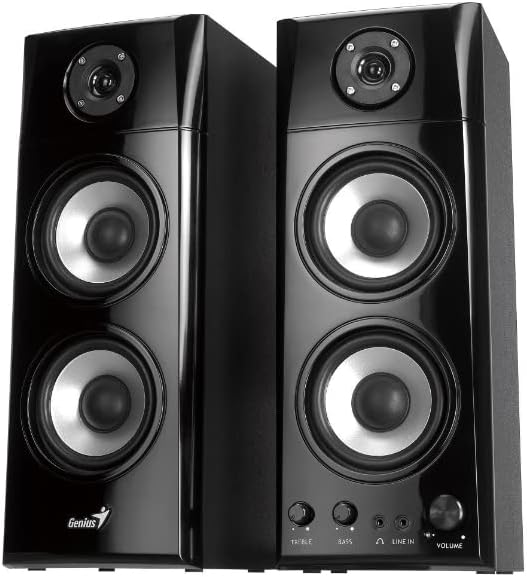
Figur 1.1: Forside view of the Genius SP-HF 1800A V2 Speaker System, showcasing both speakers.
2. Pakkens indhold
Kontroller venligst pakken omhyggeligt for at sikre, at alle varer er til stede og i god stand:
- One pair of SP-HF 1800A V2 speakers
- RCA to 3.5mm stereo cable
- Brugervejledning (dette dokument)
3. Opsætningsvejledning
Follow these steps to set up your Genius SP-HF 1800A V2 speaker system:
- Højttalerplacering: Place the speakers on a stable, flat surface. For optimal stereo imaging, position them equidistant from your listening position and spaced appropriately apart. Ensure adequate ventilation around the speakers.
- Tilslut højttalere: Connect the passive speaker to the active (main) speaker using the integrated speaker cable. This cable typically connects the left speaker to the right speaker. Ensure the connection is secure.
- Tilslut til lydkilde: Use the provided RCA to 3.5mm stereo cable. Connect the 3.5mm jack end to the audio output port of your PC, television, game console, or other audio device. Connect the RCA ends to the 'LINE IN' ports on the active speaker. The speakers feature two 3.5mm jack inputs for versatile connectivity.
- Strømtilslutning: Plug the power cord of the active speaker into a standard electrical outlet.
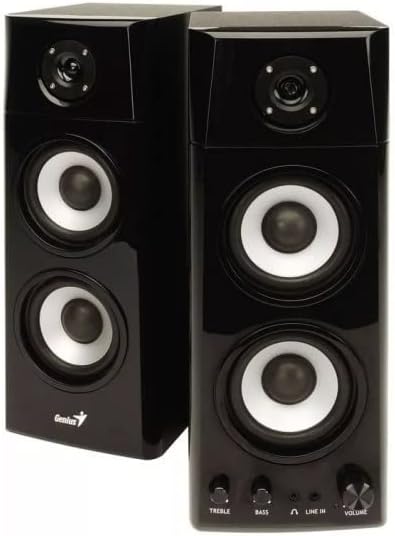
Figur 3.1: Nærbillede view of the active speaker's front panel, displaying the Treble, Bass, Headphone, Line In, and Volume controls.
4. Betjeningsvejledning
Once set up, operate your speakers using the controls on the active speaker:
- Tænd/sluk: The main power switch is usually located on the back or side of the active speaker. Turn it on to power the system.
- Lydstyrkekontrol: Rotate the 'VOLUME' knob clockwise to increase the volume and counter-clockwise to decrease it.
- Baskontrol: Use the 'BASS' knob to adjust the level of low-frequency sounds. Rotate clockwise for more bass, counter-clockwise for less.
- Diskantkontrol: Use the 'TREBLE' knob to adjust the level of high-frequency sounds. Rotate clockwise for more treble, counter-clockwise for less.
- Hovedtelefonudgang: A 3.5mm headphone jack is available on the front panel. Plug in your headphones for private listening. When headphones are connected, the speaker output will typically mute automatically.
- Linie ind: The 'LINE IN' ports allow connection to your audio source. Ensure your source device's volume is also adjusted appropriately.
5. Vedligeholdelse
Korrekt vedligeholdelse sikrer dine højttaleres levetid og ydeevne:
- Rensning: Use a soft, dry cloth to clean the speaker cabinets. Do not use liquid cleaners or aerosol sprays, as they may damage the finish or internal components.
- Støvning: Støv regelmæssigt højttalergitre og -overflader for at forhindre støvophobning, hvilket kan påvirke lydkvaliteten og komponenternes levetid.
- Placering: Avoid placing speakers in direct sunlight, near heat sources, or in areas with high humidity. Ensure they are on a stable surface to prevent accidental falls.
- Ventilation: Do not block the ventilation openings on the speakers. Proper airflow is crucial to prevent overheating.
- Kabelstyring: Ensure all cables are neatly arranged and not tangled or pinched, which can lead to damage or signal loss.
6. Fejlfinding
Hvis du støder på problemer med dine højttalere, kan du se følgende almindelige problemer og løsninger:
| Problem | Mulig årsag | Løsning |
|---|---|---|
| Ingen lyd |
|
|
| Forvrænget lyd |
|
|
| En højttaler virker ikke |
|
|
7. Specifikationer
Detailed technical specifications for the Genius SP-HF 1800A V2 Speaker System:
- Modelnavn: SP-HF1800A V2
- Modelnummer: 31730031400
- Lydudgangstilstand: Stereoanlæg
- Højttalertype: Koaksial
- Højttalerkonfiguration: 2.0 Channel System (3-way design)
- Samlet RMS-effekt: 60 watt
- Driver woofer: 4 inches, 4Ω x 2
- Diskanthøjttaler: 1 inch, 4Ω
- Forbindelse teknologi: Hjælpestik (3.5 mm jack)
- Forbindelser: 2 x 3.5mm jack inputs
- Farve: Sort
- Produktmål (L x B x H): 14.5 x 16.74 x 38.4 cm (5.7 x 6.6 x 15.1 tommer)
- Produktvægt: 14.05 kg (30.97 lbs)
- Særlige funktioner: Portable (referring to ease of movement, not battery-powered)
- Anbefalede anvendelser: For computer, gaming console, television
8. Sikkerhedsoplysninger
Læs og følg disse sikkerhedsretningslinjer for at forhindre skade på produktet eller personskade:
- Do not expose the speakers to water, moisture, or extreme temperatures.
- Do not open the speaker cabinets. There are no user-serviceable parts inside. Refer all servicing to qualified personnel.
- Undgå at placere tunge genstande på højttalerne.
- Unplug the power cord from the electrical outlet during lightning storms or when unused for long periods.
- Opbevares utilgængeligt for børn og kæledyr.
9. Garanti og support
Warranty information for this product is not available in the provided data. For support, please contact your retailer or visit the official Genius website for the latest information and contact details.


