1. Produktet er slutview
The SIMOLIO JH-214A is a long-range Bluetooth audio adapter designed to wirelessly stream high-fidelity audio from Bluetooth-enabled devices to your home stereo system, wired speakers, or amplifier. Featuring Bluetooth 5.0 technology, it offers an extended wireless range and convenient volume and track controls.
This device acts as a Bluetooth receiver, enabling older audio systems to connect wirelessly with modern smartphones, tablets, and computers for music streaming.

Image: The SIMOLIO JH-214A Bluetooth Audio Adapter, shown with its external antenna and included RCA and 3.5mm AUX cables, along with the power adapter.
2. Hvad er der i æsken
Bekræft at alle komponenter er til stede i pakken:
- Bluetooth receiver (SIMOLIO JH-214A)
- US Power adapter
- RCA-lydkabel
- 3.5 mm AUX lydkabel
- Instruction user manual
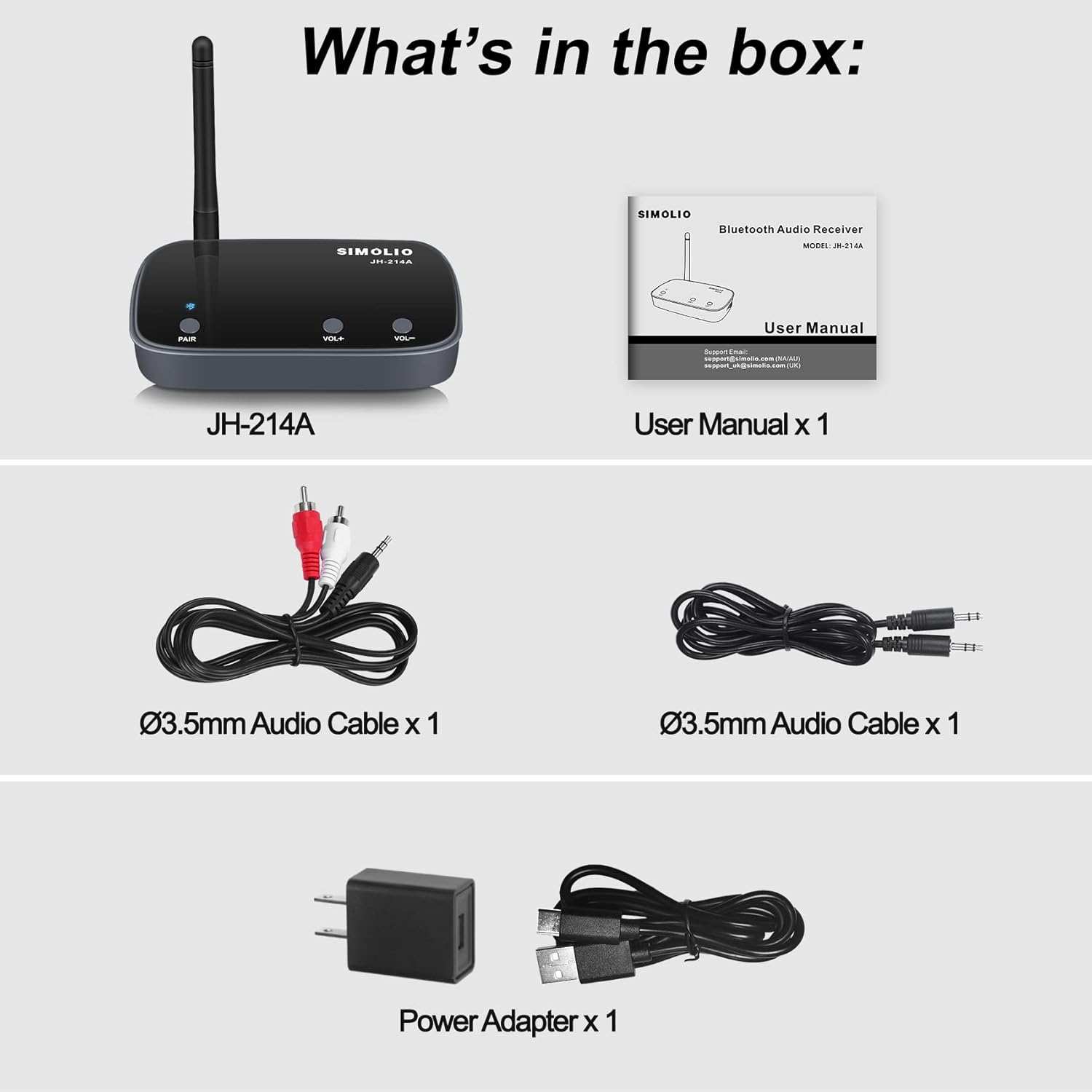
Image: All items included in the product packaging: the SIMOLIO JH-214A receiver, a power adapter, RCA audio cable, 3.5mm AUX audio cable, and the user manual.
3. Opsætningsvejledning
Follow these steps to set up your SIMOLIO JH-214A Bluetooth Audio Adapter:
3.1. Power and Audio Connection
- Tilslut strøm: Connect the provided power adapter to the "USB POWER IN" port on the Bluetooth receiver and plug it into a power outlet.
- Tilslut til lydsystem: Use either the RCA audio cable or the 3.5mm AUX audio cable to connect the "AUX (OUT)" port on the receiver to the corresponding input on your home stereo system, powered speakers, or amplivligere.
- Tænd: Locate the ON/OFF switch on the side of the receiver. Turn the switch to the "ON" position. You will hear an audible "Power on" prompt.

Image: Connection diagram illustrating how to plug the receiver into a power source and connect it to speakers or an AV receiver using either a 3.5mm AUX cable or an RCA cable.
3.2. Bluetooth-parring
- Gå ind i parringstilstand: Long press the "PAIR" button on the receiver for 3 seconds. The Bluetooth indicator light will flash red and blue alternately, indicating it is in pairing mode.
- Aktivér Bluetooth på din enhed: Gå til Bluetooth-indstillingerne på din smartphone, tablet eller anden Bluetooth-aktiveret enhed, og sørg for, at Bluetooth er tændt.
- Vælg enhed: From the list of available Bluetooth devices, select "SIMOLIO 214A". Once connected, you will hear a "Connected" prompt, and the Bluetooth indicator will turn solid blue.

Image: A visual guide demonstrating the three main steps: Plug the receiver into power and audio, Pair it with your Bluetooth device, and Play audio content.
3.3. Opsætningsvideoguide
For a visual walkthrough of the setup process, please watch the official operation guide video:
Video: Official Operation Guide for SIMOLIO Bluetooth Receiver JH-214A, demonstrating the setup and basic usage.
4. Betjeningsvejledning
4.1. Lydstyrke- og sporkontrol
The SIMOLIO JH-214A allows for convenient control directly from the unit:
- Lydstyrkekontrol: Short press the "VOL+" button to increase volume or "VOL-" to decrease volume.
- Sporkontrol: Press and hold the "VOL+" button for 2 seconds to skip to the next track. Press and hold the "VOL-" button for 2 seconds to go to the previous track.

Image: Demonstrates how to use the VOL+/- buttons on the receiver for volume adjustment and track skipping.
4.2. Auto Power Off Feature
The Bluetooth receiver is designed to automatically shut off if there is no audio signal input for approximately 10 minutes. This feature prevents unexpected music playback from your stereo system due to automatic re-connection at night.
To resume use after auto power off, you must manually turn the adapter OFF and then back ON using the power switch.
5. Fejlfinding
Here are answers to some frequently asked questions and common troubleshooting tips:
Q1: What range can I expect?
A: The SIMOLIO JH-214A can achieve up to 164ft (50m) in open-air line-of-sight conditions. For indoor use, the range is up to 50-70ft (15-20m) without obstacles. If used with a Class 1 SIMOLIO transmitter, the 164ft (50m) open-air range can be achieved.
Please note: Operation range can be affected by physical obstructions (walls, people, etc.) and wireless interference (Wi-Fi routers, wireless TV adapters, cordless phones, etc.). Relocate your SIMOLIO JH-214A away from such obstructions if you experience range issues.

Image: The receiver positioned in a home environment, illustrating its long-range capability for wireless audio streaming.
Q2: Will the JH-214A work with my Bluetooth headphone or speaker?
A: No. This device is a Bluetooth receiver only, not a Bluetooth transmitter. It is designed to receive Bluetooth audio from your PC, phone, or tablet and output it to your wired AV receiver or home stereo system. It will not work with Bluetooth headphones or speakers.
Q3: Can it automatically re-pair?
A: Normally, the Bluetooth adapter will re-pair to a previously paired device when it is turned on. Automatic re-pairing may fail if the pairing history is cleared or with certain iOS systems.
Q4: Does the Bluetooth receiver power off automatically when there is no audio input?
A: Yes, the Bluetooth receiver will automatically shut off when there is no audio signal for about 10 minutes. To use the adapter again, you must first manually turn it OFF, and then switch it back ON. This feature is designed to prevent sudden or accidental music playback from the speaker/stereo at late night when the adapter auto-reconnects to your phone.
6. Specifikationer
| Feature | Detalje |
|---|---|
| Produktdimensioner | 3.15 x 4.33 x 0.8 tommer |
| Varens vægt | 9.1 ounce |
| Modelnummer | JH-214A |
| Mærke | SIMOLIO |
| Forbindelsesteknologi | RCA, 3.5 mm AUX |
| Farve | Grå |
| Standard for trådløs kommunikation | Bluetooth 5.0 |
| Fabrikant | Simolio |
| Oprindelsesland | Kina |
| Første ledige dato | 28. november 2022 |
7. Garanti og support
SIMOLIO is committed to providing high-quality audio products. For warranty information and technical support, please refer to the contact details provided in the included user manual or visit the official SIMOLIO website. You can also reach out to Simolio Direct, the seller, for assistance.
For yderligere support og produktinformation kan du besøge SIMOLIO-butik på Amazon.


