1. Introduktion
This manual provides detailed instructions for the SANWA Bluetooth Finger Ring Mouse & Presentation Clicker, Model GMABT156BK. Please read this manual thoroughly before using the product to ensure proper operation and to maximize its features. Keep this manual for future reference.
2. Pakkens indhold
- SANWA Bluetooth Finger Ring Mouse (GMABT156BK)
- Ladekabel
- Brugervejledning (dette dokument)
3. Produktet er slutview
The SANWA Bluetooth Finger Ring Mouse is a versatile, wearable device designed for both mouse functionality and presentation control. It features a compact, ergonomic design for comfortable use and is rechargeable for convenience.

Image: The SANWA Bluetooth Finger Ring Mouse, a compact device designed to be worn on the finger, shown held in a user's hand.
Nøglefunktioner:
- Finger-Wearing Design: Allows for off-table use and reduces wrist strain.
- 5 Buttons & Touchpad: Functions as a mini mouse and a wireless presentation clicker.
- Bluetooth 5.0-forbindelse: Ensures a stable and reliable connection up to 10 meters (32 feet).
- 1200 DPI: Provides precise cursor control.
- Genopladeligt batteri: Offers up to 15 hours of constant working time or 25 days standby on a single charge.
- Bred kompatibilitet: Supports macOS, Windows, iOS, and Android operating systems.
4. Opsætning
4.1 Opladning af enheden
- Locate the Micro USB charging port on the device.
- Connect the provided charging cable to the device and a USB power source (e.g., computer USB port, USB wall adapter).
- LED-indikatoren lyser under opladning og slukker, når den er fuldt opladet.
- A full charge typically provides 15 hours of constant use or 25 days of standby time.

Image: The SANWA Bluetooth Finger Ring Mouse being charged via its USB cable, with an LED indicator visible.
4.2 Bluetooth -parring
The SANWA Finger Ring Mouse uses Bluetooth 5.0 for wireless connection. Follow these steps to pair it with your device:
- Turn on the Mouse: Locate the ON/OFF switch on the bottom of the ring mouse and slide it to the "ON" position.
- Aktivér Bluetooth på din enhed:
- For PC/Laptop (Windows/macOS): Go to your computer's Bluetooth settings and ensure Bluetooth is enabled.
- For Mobile Devices (iOS/Android): Go to your phone or tablet's settings, then navigate to the Bluetooth menu and ensure Bluetooth is enabled.
- Søg efter Enheder: Your device will begin searching for available Bluetooth devices.
- Vælg musen: Look for "400-MABT156" (or similar, e.g., "GMABT156BK") in the list of available devices and select it to initiate pairing.
- Bekræft parring: If prompted for a passcode, try "0000" or "1234", or leave it blank if not specified. Confirm the pairing request on your device.
- Tilslutningsbekræftelse: Once successfully paired, the device will show "Connected" next to the mouse's name.
Video: A demonstration of how to connect the SANWA GMABT156BK Bluetooth Finger Ring Mouse to a device, showing the pairing process on both an iPad and an iPhone.
Important Notes for iOS Devices:
For full mouse functionality on iOS devices (iPhone/iPad), you may need to enable AssistiveTouch:
- Gå til Indstillinger > Tilgængelighed > Røre > AssistiveTouch.
- Skift AssistiveTouch til ON.
5. Betjeningsvejledning
The SANWA Finger Ring Mouse features a touchpad for cursor movement and dedicated buttons for various functions.
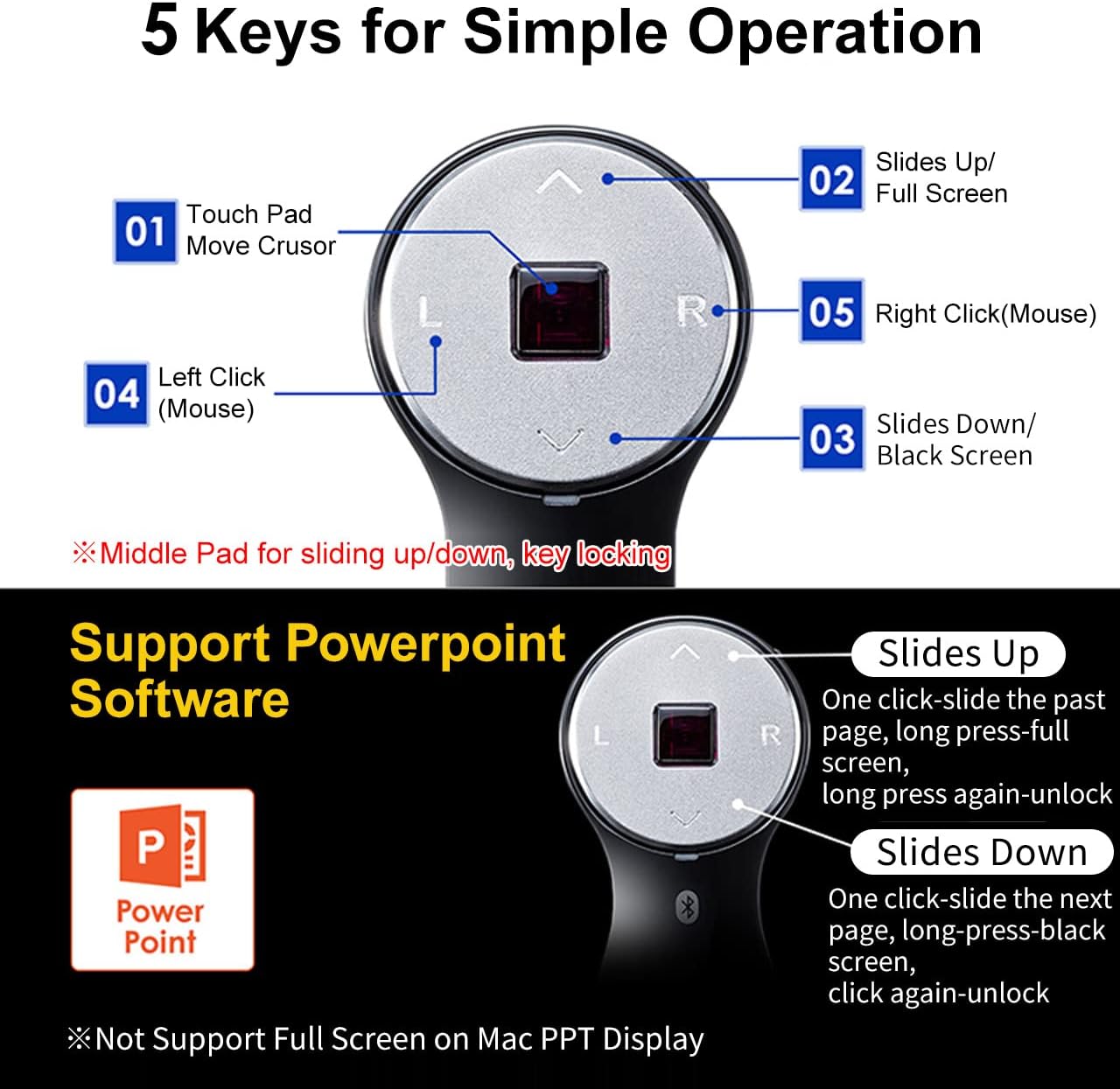
Image: A detailed diagram illustrating the 5 keys of the SANWA Finger Ring Mouse and their corresponding functions, including touchpad for cursor movement, left click, right click, slides up/full screen, and slides down/black screen.
5.1 Grundlæggende musefunktioner
- Flyt markøren: Use the central touchpad to move the cursor on your screen.
- Venstre klik: Press the "L" button for a left click.
- Højreklik: Press the "R" button for a right click.
- Scroll Function (Page Up/Down): The central touchpad also functions as a scroll wheel. Swipe up or down on the touchpad to scroll pages.
- Drag & Drop: Long press the "L" button, move the cursor to drag an item, then press "L" again to drop it.
Video: A demonstration of how to operate the SANWA GMABT156BK mouse, showing cursor movement, left/right clicks, and drag-and-drop functionality on a laptop.
5.2 Presentation Clicker Functions (PowerPoint/Keynote)
- Slides Up (Previous Page): Press the "Up Arrow" button. Long press for Full Screen (On/Off).
- Slides Down (Next Page): Press the "Down Arrow" button. Long press for Black Screen (On/Off).
Note: Full Screen functionality may not be supported on Mac PPT Display.
Video: A demonstration of the SANWA Finger Ring Mouse functioning as a 2-in-1 Bluetooth Finger Ring Mouse and PPT Clicker, showcasing its use for presentations and general navigation.
5.3 Kompatibilitetsnoter
- Compatible with Windows 11/10/8.1/8/7, Android 3.0+, macOS 10.12-10.15, Mac OS X 10.6-10.11, Chrome OS, iOS 13, iPadOS 13.4, Android 7-10.
- Fit for Notebook, PC, Laptop, Computer, and other devices.
- Not fully compatible with Apple products, and the recently launched Mac SONOMA system is not supported.
- Does not support TikTok, YouTube, Instagram, and Twitter for certain functions.
6. Vedligeholdelse
- Rensning: Brug en blød, tør klud til at rengøre enheden. Undgå at bruge skrappe kemikalier eller slibende materialer.
- Opbevaring: Opbevar enheden et køligt, tørt sted væk fra direkte sollys og ekstreme temperaturer.
- Batteripleje: For at forlænge batteriets levetid bør du undgå at aflade batteriet helt ofte. Oplad enheden regelmæssigt, selvom den ikke er i brug i længere perioder.
7. Fejlfinding
7.1 Device Not Recognized or Bluetooth Cannot Be Searched
- Ensure the device is turned on and the ring mouse's power switch is in the "ON" position.
- Verify that your PC or device supports Bluetooth and has a functional Bluetooth module.
- Confirm that Bluetooth is enabled on your PC or device. If the Bluetooth icon is missing or shows as off, restart your computer and re-enable Bluetooth.
- Check the ring mouse's battery level. Recharge if necessary.
- Turn the ring mouse off, wait a few seconds, then turn it back on and attempt Bluetooth pairing again.
- If your PC connects to other Bluetooth devices but not the SANWA ring mouse, unpair those devices and then try reconnecting the SANWA device.
7.2 Cursor Movement Speed is Too Slow
You can adjust the DPI (Dots Per Inch) setting through your operating system:
- Til Windows 11:
- Open Windows Settings (Windows Key + I).
- Navigate to "Bluetooth & devices" > "Mouse".
- Adjust the "Mouse pointer speed" slider. Moving it to the right increases speed.
- For other OS: Refer to your operating system's mouse or pointer settings to adjust sensitivity.
7.3 Prompted for a Passcode During Pairing
If a passcode is requested and not provided in the manual, try entering "0000" or "1234". Alternatively, leave the field blank if possible.
7.4 Scroll Wheel (Touchpad) Not Working
The product uses high-precision sensors on the middle touchpad for scrolling. Ensure the touchpad is clean and free from sweat stains or dirt, which can interfere with its operation.
8. Specifikationer
| Feature | Detalje |
|---|---|
| Modelnummer | GMABT156BK |
| Mærke | SANWA |
| Forbindelsesteknologi | Bluetooth 5.0 |
| Bevægelsesdetektion | Optisk |
| DPI | 1200 |
| Driftsafstand | Op til 10 meter (32 fod) |
| Battery Life (Constant Use) | Ca. 15 timer |
| Batterilevetid (Standby) | Ca.. 25 dage |
| Produktdimensioner | 2.36 x 1.3 x 1.42 tommer |
| Varens vægt | 2.39 ounce |
| Understøttet OS | Windows 11/10/8.1/8/7, Android 3.0+, macOS 10.12-10.15, Mac OS X 10.6-10.11, Chrome OS, iOS 13, iPadOS 13.4, Android 7-10 |
9. Garanti og support
For warranty information and technical support, please refer to the official SANWA webwebstedet eller kontakt deres kundeservice direkte. Gem din købskvittering som købsbevis i tilfælde af garantikrav.
SANWA Official Webwebsted: www.sanwa.co.jp


