1. Introduktion
Welcome to the user manual for your Tunturi Centuri S100 Sprinter Exercise Bike. This manual provides essential information for the safe assembly, operation, maintenance, and troubleshooting of your new fitness equipment. Please read this manual thoroughly before using the exercise bike to ensure proper usage and to maximize your training experience.

Image 1.1: The Tunturi Centuri S100 Sprinter Exercise Bike, a robust indoor cycling solution.
2. Vigtige sikkerhedsinstruktioner
Before beginning any exercise program, consult with your physician. It is essential to follow these safety guidelines to prevent injury and ensure the longevity of your equipment.
- Always place the exercise bike on a flat, stable surface.
- Ensure adequate clear space around the bike (at least 0.6 meters or 2 feet).
- Hold børn og kæledyr væk fra udstyret under brug.
- Brug passende sportsfodtøj og -sko.
- Inspect the bike for loose or damaged parts before each use. Do not use if damaged.
- Justér sæde og styr til en behagelig og sikker position, inden du starter din træning.
- Use the emergency stop switch immediately if you feel unwell or experience any discomfort.
- Maximum user weight for this device is 150 kg (330 lbs).
3. Opsætning og montering
The Tunturi Centuri S100 Sprinter Exercise Bike requires some assembly. Please follow the detailed assembly instructions provided in the separate assembly guide included with your product. Once assembled, ensure all bolts and nuts are securely tightened.
3.1 Adjusting the Bike
Proper adjustment of the seat and handlebars is crucial for comfort and effective training.
- Sædejustering: The seat can be adjusted both vertically and horizontally. Loosen the adjustment knob located beneath the seat post, slide the seat to your desired position, and then securely tighten the knob.
- Justering af styr: The handlebars can be moved forward, backward, up, and down. Loosen the adjustment knob on the handlebar post, position the handlebars for optimal comfort and reach, and then firmly tighten the knob.
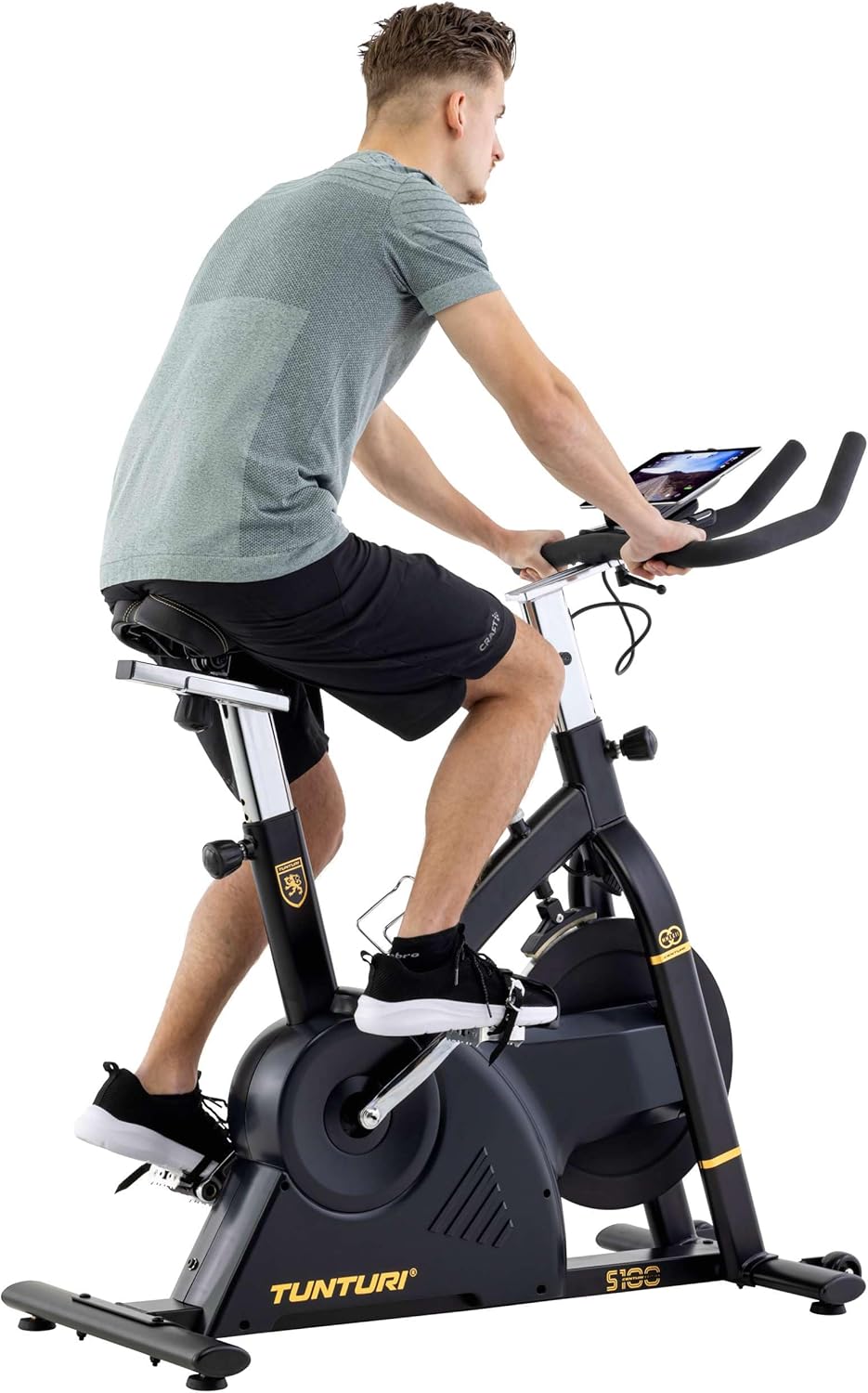
Image 3.1: A user adjusting the handlebars for a personalized fit.

Image 3.2: Proper riding posture on the Tunturi S100, demonstrating adjusted seat and handlebars.
4. Betjeningsvejledning
4.1 Konsol Overview
The S100 features a 5.5-inch backlit LCD display that shows important training parameters.

Image 4.1: Close-up of the S100's 5.5-inch backlit LCD display, showing time, pulse, speed, distance, watts, and calories.
The display provides real-time feedback on:
- Tid: Varigheden af din træning.
- Puls: Heart rate (measured via handlebar sensors or compatible chest strap).
- Hastighed: Aktuel cykelhastighed.
- Afstand: Samlet tilbagelagt distance under træningen.
- Kalorier: Anslået forbrændte kalorier.
- Watt: Power output in watts.
Use the buttons below the display (RESET, START/STOP, RECOVERY, UP, MODE, DOWN) to navigate menus, select programs, and adjust settings.
4.2 Resistance and Programs
The S100 offers a varied and intense training experience with:
- 32 Resistance Levels: Adjust the intensity of your workout using the console controls.
- 21 programmer: Choose from a variety of pre-set programs designed for different fitness goals. Refer to the console manual for detailed program descriptions.
4.3 Bluetooth Connectivity and Apps
The Tunturi S100 connects via Bluetooth to popular fitness applications, enhancing your training options.
- Kompatible apps: Zwift, iConsole+ Training, and Kinomap.
- Tunturi Routes: Experience virtual routes around the globe through compatible applications.
Sådan forbinder du:
- Sørg for, at Bluetooth er aktiveret på din smartphone eller tablet.
- Download and open your preferred fitness app (e.g., Zwift, iConsole+ Training, Kinomap).
- Follow the app's instructions to pair with your Tunturi S100 exercise bike.
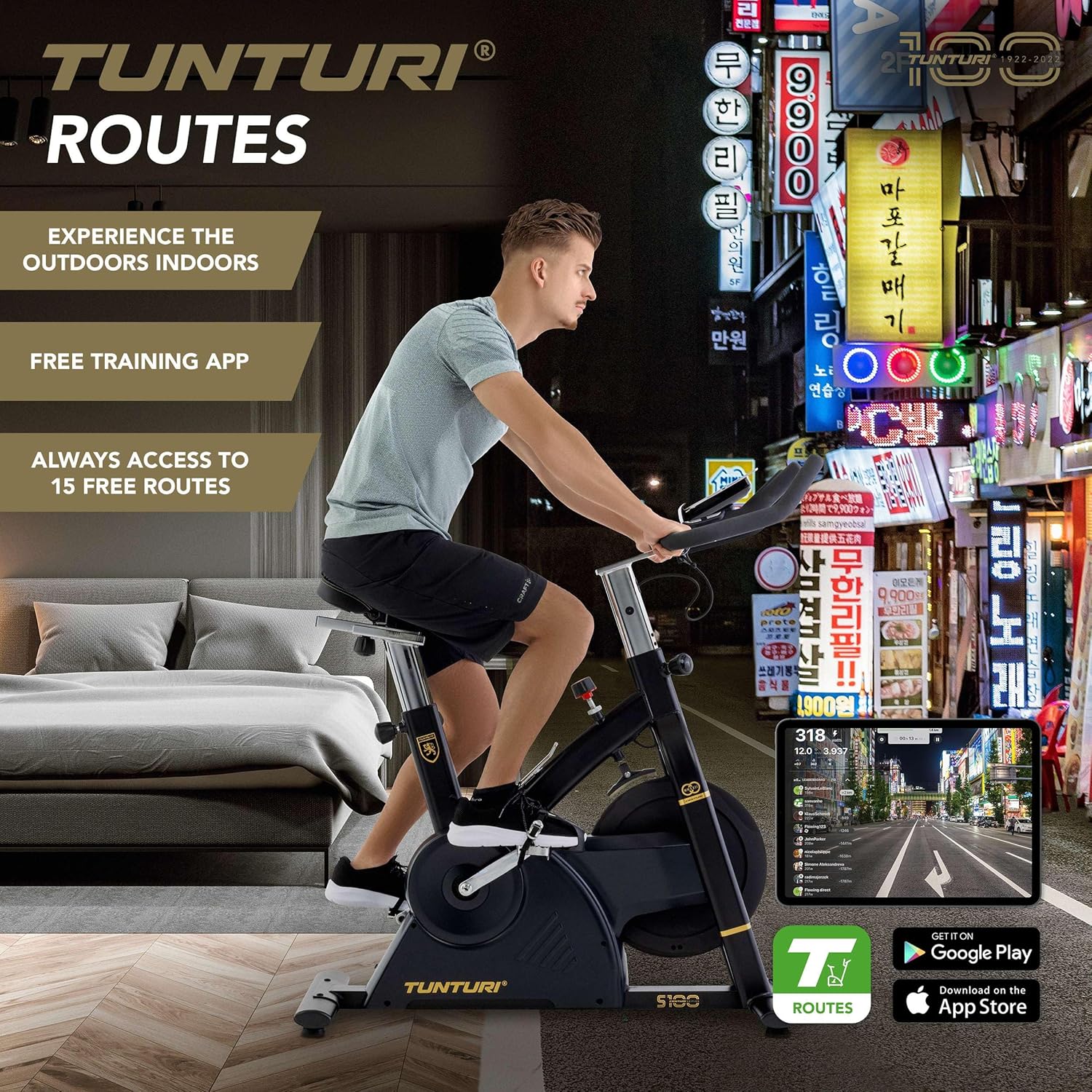
Image 4.2: A user engaging in a virtual cycling experience using the Tunturi Routes app on a tablet, connected via Bluetooth.

Image 4.3: The Tunturi Routes application interface displayed on a tablet, showcasing various training options and real-life video routes.
4.4 Yderligere funktioner
- Nødstopkontakt: Located on the frame, this switch allows for immediate cessation of the flywheel rotation for safety.
- Tabletholder: A convenient holder is integrated into the console for your tablet or smartphone.
- Flaskeholder: Keep hydrated during your workout with the easily accessible bottle holder.
- Transporthjul: For easy relocation, the bike is equipped with transport wheels at the front stabilizer.
5. Vedligeholdelse
Regular maintenance ensures the longevity and optimal performance of your Tunturi Centuri S100.
- Rensning: Tør cyklen af med annonceamp en klud efter hver brug for at fjerne sved og støv. Undgå slibende rengøringsmidler.
- Inspektion: Kontrollér regelmæssigt alle bolte, møtrikker og bevægelige dele for fastspænding og slid. Spænd eventuelle løse fastgørelseselementer.
- Smøring: Consult the separate assembly guide for any specific lubrication requirements for moving parts.
- Opbevaring: Opbevar cyklen et tørt, køligt sted væk fra direkte sollys og ekstreme temperaturer.
6. Fejlfinding
If you encounter any issues with your Tunturi Centuri S100, refer to the following common problems and solutions.
| Problem | Mulig årsag | Løsning |
|---|---|---|
| Konsollen viser ikke data. | Loose cable connection, dead batteries (if applicable). | Check all cable connections to the console. Replace batteries if the console is battery-powered. |
| Usædvanlig støj under drift. | Loose parts, friction, or internal component issue. | Inspect all visible bolts and nuts for tightness. Ensure the bike is on a level surface. If noise persists, contact customer support. |
| Modstanden ændrer sig ikke. | Issue with the resistance mechanism or console connection. | Ensure the console is properly connected. If the problem continues, contact customer support. |
| Problemer med Bluetooth-forbindelse. | Bluetooth not enabled, app issues, or interference. | Ensure Bluetooth is on for both devices. Restart the app and the bike. Move closer to the bike to reduce interference. |
Ved problemer, der ikke er nævnt her, eller hvis løsningerne ikke løser problemet, bedes du kontakte Tunturi kundesupport.
7. Specifikationer
| Feature | Detalje |
|---|---|
| Model | Tunturi Centuri S100 Sprinter Exercise Bike |
| Dimensioner (L x B x H) | 110 x 52 x 120 cm (43.3 x 20.5 x 47.2 tommer) |
| Produktets vægt | 45.25 kg (99.7 lbs) |
| Maksimal brugervægt | 150 kg (330 lbs) |
| Vise | 5.5-tommer baggrundsbelyst LCD-skærm |
| Modstandsniveauer | 32 |
| Programmer | 21 |
| Bremsesystem | PMS, Servomotor |
| Svinghjulets vægt | 17 kg (37.5 lbs) |
| Forbindelse | Bluetooth (Zwift, iConsole+ Training, Kinomap compatible) |
| Materiale | Cast iron, plastic, metal, foam |
| Særlige funktioner | Adjustable seat (vertical & horizontal), adjustable handlebars (forward/backward, up/down), tablet holder, bottle holder, transport wheels, emergency stop switch. |
8. Garanti og support
For detaljerede garantioplysninger henvises til garantikortet, der følger med dit produkt, eller besøg den officielle Tunturi-side. webwebsted.
If you require technical assistance, spare parts, or have any questions regarding your Tunturi Centuri S100, please contact Tunturi customer support. Contact details can typically be found on the Tunturi webwebstedet eller i din produktemballage.


