1. Introduktion
Tak for købetasing the AKAI Audio TS-90 2.0 Wireless Bluetooth Tower Speaker. This manual provides essential information for the safe and efficient operation of your new audio system. Please read it thoroughly before use and retain it for future reference.
The AKAI TS-90 is a powerful 90W tower speaker system designed to deliver high-quality audio with versatile connectivity options, including Bluetooth, USB, and Aux. It also features an FM radio, equalizer modes, and a wireless microphone for karaoke.
2. Sikkerhedsoplysninger
For at sikre sikker drift og forhindre skader, bedes du overholde følgende forholdsregler:
- Udsæt ikke enheden for regn, fugt eller ekstreme temperaturer.
- Sørg for ordentlig ventilation; bloker ikke ventilationsåbninger.
- Brug kun den strømadapter, der følger med enheden.
- Do not open the speaker cabinet; refer all servicing to qualified personnel.
- Hold enheden væk fra direkte sollys, varmekilder og stærke magnetfelter.
- Rengør kun enheden med en tør klud.
3. Pakkens indhold
Kontroller venligst, at alle varer er til stede i pakken:
- AKAI Audio TS-90 Tower Speaker (2 units)
- Trådløs mikrofon
- Fjernbetjening
- Audio kabel
- Brugervejledning (dette dokument)

This image displays the two tower speakers and the remote control, which are standard components of the AKAI TS-90 package.
4. Produktet er slutview
The AKAI TS-90 features a robust design with multiple input options and controls for an enhanced audio experience.
4.1 Frontpanel og display
The front panel of the main speaker unit includes the display and primary controls. The display shows the current mode (e.g., "BLUE" for Bluetooth), volume level, and track information.

This image highlights the sleek finish and the digital display on the top part of the speaker, which indicates the active input mode.
4.2 Bagpaneltilslutninger
The rear panel of the main speaker unit houses all input and output ports.

This image details the rear connections, including the SPK OUT for connecting the secondary speaker, MIC INPUT for the wireless microphone, and the main POWER ON/OFF switch.
- SPK OUT: Connects to the secondary speaker unit.
- MIC -INDGANG: For connecting the wireless microphone receiver.
- STRØM TIL/FRA: Main power switch for the system.
- AUX IN: For connecting external audio devices via a 3.5mm or RCA cable.
- USB-port: Til afspilning af lyd files fra et USB-drev.
4.3 Højttalerkomponenter
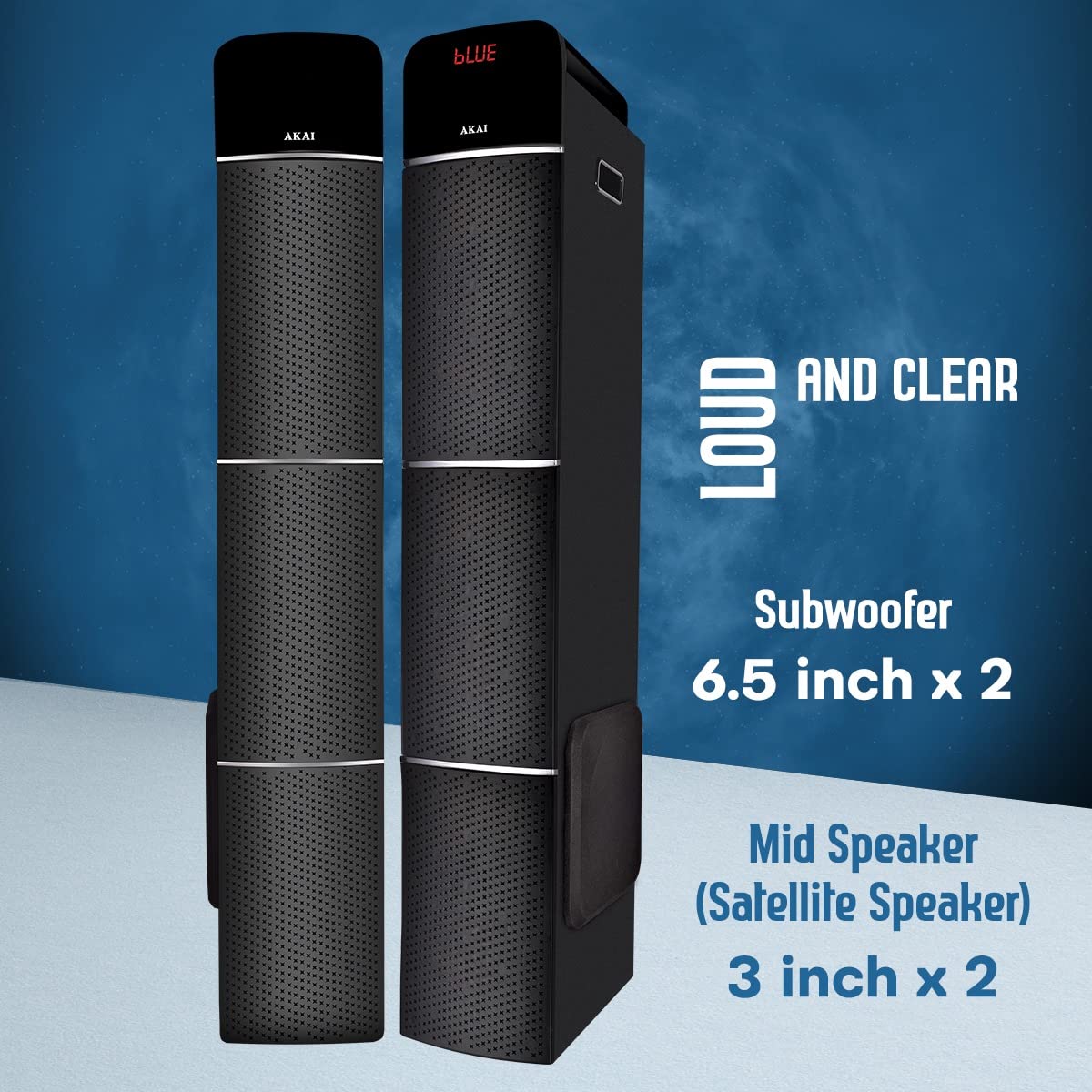
This image illustrates the speaker configuration, featuring two 6.5-inch subwoofers and two 3-inch mid-range (satellite) speakers for balanced audio output.
5. Opsætning
Follow these steps for the initial setup of your AKAI TS-90 Tower Speaker system.
- Placering: Position the two tower speakers on a flat, stable surface. Ensure adequate space around them for optimal sound dispersion and ventilation.
- Connect Secondary Speaker: Using the provided speaker cable, connect the "SPK OUT" port on the main speaker unit to the input port on the secondary speaker unit.
- Strømtilslutning: Connect the power cord to the main speaker unit and then plug it into a standard AC power outlet.
- Tænd: Flip the "POWER ON/OFF" switch on the rear panel to the "ON" position. The display on the front panel should light up.
- Indledende volumen: Before playing audio, set the volume to a low level using the remote control or the control knob on the speaker.
6. Betjeningsvejledning
The AKAI TS-90 offers various modes for audio playback.
6.1 Valg af tilstand
Press the "MODE" button on the remote control or the main unit to cycle through available input sources: Bluetooth, USB, AUX, and FM Radio.

This image visually represents the primary connectivity methods: Bluetooth for wireless streaming, USB for media playback from flash drives, and Aux for wired connections.
6.2 Bluetooth-tilstand
- Select "Bluetooth" mode using the MODE button. The display will show "BLUE" and a pairing indicator.
- Aktiver Bluetooth på din mobilenhed, og søg efter tilgængelige enheder.
- Select "AKAI TS-90" from the list. Once paired, the speaker will emit a confirmation sound.
- You can now play audio from your device wirelessly through the speakers.
6.3 USB-afspilning
- Indsæt et USB-flashdrev med MP3-lyd files i USB-porten på hovedenheden.
- Select "USB" mode. The speaker will automatically detect and begin playing audio files.
- Use the remote control to navigate tracks (Previous/Next), play/pause, and adjust volume.
6.4 AUX-indgang
- Connect your external audio device (e.g., smartphone, tablet, TV) to the "AUX IN" port using an appropriate audio cable.
- Select "AUX" mode. Audio from your connected device will now play through the speakers.
6.5 FM radio
- Select "FM" mode.
- Press the "SCAN" button on the remote control to automatically scan and save available FM stations.
- Use the Previous/Next buttons to cycle through saved stations.
6.6 Wireless Microphone and Karaoke
The AKAI TS-90 includes a wireless microphone for karaoke functionality.

This image demonstrates the use of the included wireless microphone, enabling users to engage in karaoke activities with the speaker system.
- Ensure the wireless microphone is powered on and its receiver is connected to the "MIC INPUT" port on the speaker's rear panel.
- Adjust the microphone volume using the dedicated control on the speaker or remote, if available.
- Play your desired karaoke track from any input source (Bluetooth, USB, AUX).
6.7 Equalizer-tilstande (EQ)
The speaker features various equalizer modes to optimize sound for different music genres.

This image shows the speakers alongside a television, emphasizing their role in a home audio system and the availability of EQ modes for sound customization.
Press the "EQ" button on the remote control to cycle through preset equalizer settings (e.g., Pop, Rock, Jazz, Classic, Flat).
7. Vedligeholdelse
Proper care will ensure the longevity and performance of your AKAI TS-90 speakers.
- Rensning: Use a soft, dry cloth to clean the exterior surfaces of the speakers. Do not use liquid cleaners or abrasive materials.
- Ventilation: Ensure that the ventilation openings are not blocked by dust or debris.
- Opbevaring: Hvis højttalerne opbevares i en længere periode, skal de afbrydes fra strømmen og opbevares et køligt og tørt sted.
8. Fejlfinding
If you encounter issues with your AKAI TS-90, refer to the following common problems and solutions.
| Problem | Mulig årsag | Løsning |
|---|---|---|
| Ingen strøm | Power cord not connected; Power switch off; Power outlet faulty. | Check power cord connection; Ensure power switch is ON; Try a different power outlet. |
| Ingen lyd | Volume too low; Incorrect input mode selected; Audio cable loose/faulty; Bluetooth not paired. | Increase volume; Select correct input mode; Reconnect audio cable; Re-pair Bluetooth device. |
| Bluetooth-parringsfejl | Device too far; Bluetooth not enabled on source device; Speaker already paired to another device. | Move device closer; Enable Bluetooth on source device; Disconnect from other devices and try again. |
| Trådløs mikrofon virker ikke | Microphone batteries low/dead; Microphone not powered on; Receiver not connected to MIC INPUT. | Replace microphone batteries; Ensure microphone is ON; Connect receiver to MIC INPUT. |
| Fjernbetjening virker ikke | Batteries low/dead; Obstruction between remote and speaker; Remote not pointed at sensor. | Replace remote batteries; Remove obstructions; Point remote directly at the speaker's IR sensor. |
9. Specifikationer
Detailed technical specifications for the AKAI Audio TS-90 Tower Speaker.
| Feature | Detalje |
|---|---|
| Modelnavn | TS-90 |
| Mærke | AKAI |
| Højttaler type | Tower, Floor Standing |
| Forbindelsesteknologi | Bluetooth, Trådløs |
| Trådløs kommunikationsteknologi | Bluetooth |
| Højttaler Maksimal udgangseffekt | 90 watt (RMS) |
| Lydudgangstilstand | Stereoanlæg |
| Surround Sound Kanalkonfiguration | 2.1 |
| Særlige funktioner | Display, Equalizer, Remote Control, USB Port, Wireless Microphone |
| Kompatible enheder | Smartphone, tablet |
| Kontrolmetode | Berøring, fjernbetjening |
| Strømkilde | AC |
| Materiale | Træ |
| Varens vægt | 19.9 kg (ca.) |
| Pakkedimensioner | 103.8 x 47.2 x 32.6 cm |
| Subwoofer størrelse | 6.5 tommer x 2 |
| Mid Speaker (Satellite Speaker) Size | 3 tommer x 2 |
10. Garanti og support
For warranty information and customer support, please refer to the warranty card included with your product or visit the official AKAI webwebsted. Gem din købskvittering som købsbevis i tilfælde af garantikrav.
For technical assistance or service inquiries, please contact AKAI customer support through their official channels. Contact details are typically provided in the product packaging or on the brand's webwebsted.
Note: Customer reviews indicate varying experiences with customer service. It is recommended to register your product upon purchase and retain all documentation.


