Indledning
The Ansmann Energy Check LCD is a professional battery tester designed to quickly and accurately determine the energy content and voltage of various primary and rechargeable batteries. This compact and user-friendly device provides results within 2-3 seconds, displaying the actual energy content in 10% steps and the cell voltage i volt (V).

Figure 1: Ansmann Energy Check LCD Battery Tester. This image shows the overall design of the battery tester, including the LCD display and the various slots for different battery types.
Opsætning
Pakkens indhold
Before using your Ansmann Energy Check LCD, ensure all components are present:
- Ansmann Energy Check LCD Battery Tester
- 1 x 9V Battery (for powering the tester)
Inserting the 9V Battery
The Ansmann Energy Check LCD is powered by a 9V battery. To install or replace the battery:
- Locate the battery compartment on the back or side of the tester.
- Åbn batterirummets dæksel.
- Isæt 9V-batteriet, og sørg for korrekt polaritet (+ og - terminaler).
- Luk batterirummets dæksel forsvarligt.
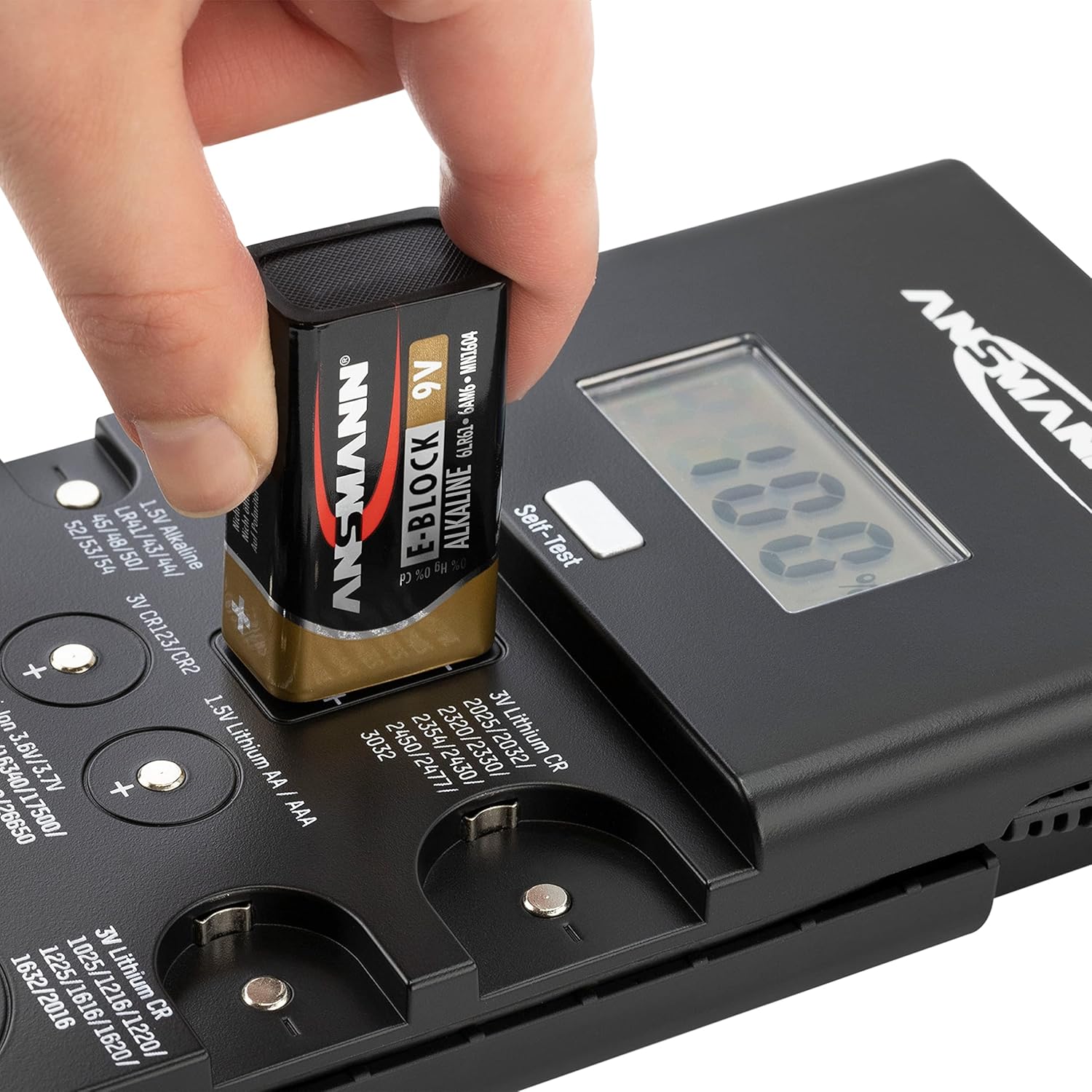
Figure 2: Inserting the 9V battery into the tester. This image demonstrates the correct way to insert the 9V battery that powers the Ansmann Energy Check LCD.
Betjeningsvejledning
Generel drift
The Ansmann Energy Check LCD provides quick and easy battery testing. The device automatically detects the battery type and displays the energy content in 10% steps and the voltage in volts (V) within 2-3 seconds.

Figure 3: Fast Testing and Percentage Display. This image highlights the quick testing capability and the 10% step display of the battery's energy content.
Battery Type Identification and Testing Slots
The tester features multiple dedicated slots and a test probe for various battery types. Refer to the diagram below to identify the correct testing location for your battery.

Figure 4: Battery Type Testing Slots. This detailed diagram illustrates where each specific battery type should be placed or connected for accurate testing.
Testprocedure
Sådan tester du et batteri:
- Identify the correct slot or contact points for your battery type using Figure 4.
- Sørg for, at batteripolerne er rene og fri for snavs.
- Place the battery firmly into the designated slot or press it against the contact points, observing correct polarity (+ and -). For batteries requiring the test probe, connect the probe to the battery's positive terminal and the negative terminal to the corresponding contact on the tester.
- The LCD display will show the battery's energy content in percentage and its voltage.

Figure 5: Testing a Button Cell Battery. This image shows a user testing a small button cell battery by pressing it onto the designated contact points.

Figure 6: Testing an AA Battery with Probe. This image illustrates the use of the test probe for larger cylindrical batteries like AA or AAA.
Opretholdelse
Rensning
To ensure accurate readings and prolong the life of your tester, keep it clean. Wipe the exterior with a soft, dry cloth. Periodically clean the metal contact surfaces with a cotton swab lightly dampened with rubbing alcohol to remove any residue that might affect conductivity.
Opbevaring
Store the Ansmann Energy Check LCD in a cool, dry place away from direct sunlight and extreme temperatures. If the tester will not be used for an extended period, it is recommended to remove the 9V battery to prevent leakage.
Fejlfinding
- Testeren tænder ikke:
Check if the 9V battery is correctly inserted with the proper polarity. Ensure the 9V battery itself has sufficient charge. Replace if necessary.
- Unøjagtige eller inkonsistente aflæsninger:
Ensure the battery being tested is making firm and clean contact with the tester's terminals. Clean the battery terminals and the tester's contact points if there is any visible dirt or corrosion. Ensure the battery is placed in the correct slot for its type.
- Display shows 'LO' or 'ERR':
This may indicate a very low battery charge or an incompatible battery type. Verify the battery type is supported by the tester.
Specifikationer
| Feature | Specifikation |
|---|---|
| Modelnummer | 1900-0100 |
| Produktdimensioner | 3.94 x 1.26 x 7.68 tommer |
| Varens vægt | 9.63 ounces (273 gram) |
| Strømkilde | 1 x 9V batteri (inkluderet) |
| Farve | Sort |
| Måledisplay | Energy content in 10% steps, Voltage in Volts (V) |
Understøttede batterityper
- 3V Lithium Button Cells: CR1025, CR1216, CR1220, CR1616, CR1620, CR1632, CR2016, CR2025, CR2032, CR2320, CR2330, CR2354, CR2430, CR2450, CR2477, CR3032
- 3V Lithium Photo Batteries: CR2, CR123(A)
- 1.5V Alkaline Button Cells: LR41, LR43, LR44, LR45, LR48, LR50, LR52, LR53, LR54, LR55, LR57, LR58, LR59, LR60, LR63, LR66, LR69
- 1.44V Zinc-Air Button Batteries: 10, 13, 675, 312
- 12V Alkaline Batteries: A23, A27
- 1.5V Alkaline Batteries: AAA, AA, C, D, 9V alkaline battery
- 1.2V NiMH/NiCd Batteries: AAA, AA, C, D
- 1.5V Lithium Batteries: AAA, AA
- 3.6V/3.7V Li-ion Batteries: 14500, 14650, 16340, 17500, 18500, 18650, 22650, 26650
Sikkerhedsoplysninger
Please observe the following safety guidelines when handling batteries and using the Ansmann Energy Check LCD:

Figure 7: Battery Safety Icons. This image displays universal symbols for safe battery handling, including warnings against improper disposal, short-circuiting, heating, and disassembling batteries.
- Do not attempt to test damaged or leaking batteries.
- Kortslut ikke batteripolerne.
- Smid ikke batterier i ild.
- Skil ikke batterier ad.
- Opbevar batterier utilgængeligt for børn.
- Bortskaf batterier i henhold til lokale regler.
Garanti og support
For detailed warranty information, technical support, or service inquiries regarding your Ansmann Energy Check LCD, please visit the official Ansmann webwebstedet eller kontakt deres kundeserviceafdeling. Gem din købskvittering som købsbevis i tilfælde af garantikrav.
Du kan finde mere information på Ansmann-butikken på Amazon.


