Indledning
Welcome to the user manual for your CANYON Sandy KW-44 Smartwatch. This guide provides essential information on setting up, operating, maintaining, and troubleshooting your device. Please read this manual carefully to ensure optimal performance and longevity of your smartwatch.
Opsætning
1. Pakkens indhold
Før du begynder, skal du sørge for, at alle varer er til stede i pakken:
- CANYON Sandy KW-44 Smartwatch
- Ladekabel
- Brugervejledning (dette dokument)

Figure 1: Product packaging showing the smartwatch and brand details.
2. Opladning af smartwatchet
Oplad dit smartwatch helt før første brug.
- Tilslut opladningskablet til opladningsporten på smartwatchet.
- Tilslut den anden ende af kablet til en USB-strømadapter (medfølger ikke) eller en computers USB-port.
- Opladningsindikatoren på skærmen viser opladningsstatus.
- En fuld opladning tager typisk cirka 2 timer.
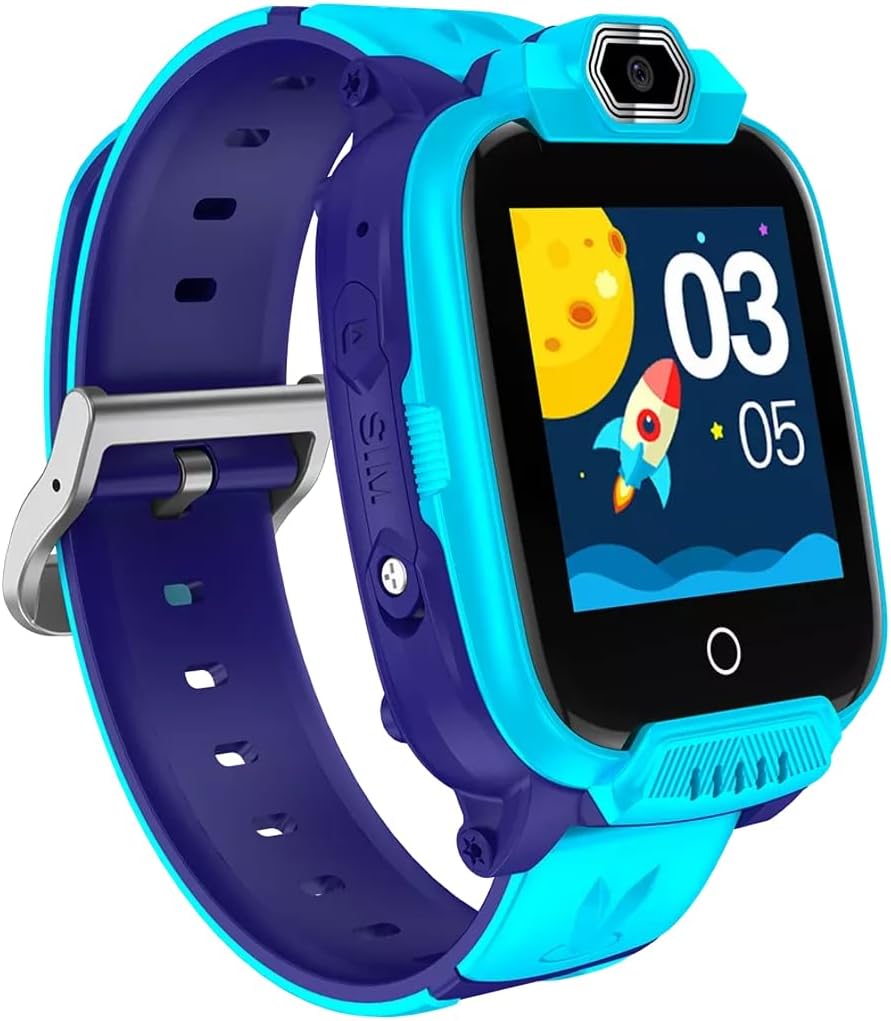
Figur 2: Vinklet view of the CANYON Sandy KW-44 Smartwatch, showing the side buttons and SIM card slot area.
3. Installation af SIM-kort (valgfrit)
The smartwatch supports a SIM card for call functions.
- Sluk smartwatchet.
- Locate the SIM card slot on the side of the device (refer to Figure 2).
- Carefully insert a nano-SIM card into the slot with the gold contacts facing up, ensuring it clicks into place.
- Luk dækslet til SIM-kortstikket ordentligt.
- Power on the smartwatch.
4. Appinstallation og parring
To unlock full features and manage your smartwatch, download the companion app on your smartphone.
- Søg efter the "CANYON Life" app (or similar, check product documentation for exact app name) in your smartphone's app store (Google Play Store or Apple App Store).
- Download og installer appen.
- Åbn appen og følg instruktionerne på skærmen for at oprette en konto eller logge ind.
- Aktiver Bluetooth på din smartphone.
- In the app, select "Add Device" and choose your CANYON Sandy KW-44 from the list of available devices.
- Confirm the pairing request on both your smartphone and smartwatch.
Betjeningsvejledning
1. Grundlæggende navigation

Figur 3: Forside view of the CANYON Sandy KW-44 Smartwatch, showing the main display with time and a rocket graphic.
- Tænd/sluk: Press and hold the power button (usually on the side) to turn the device on or off.
- Berøringsskærm: Swipe left/right or up/down to navigate through menus and features. Tap to select an option.
- Tilbage knap: A dedicated button or a swipe gesture may be used to go back to the previous screen.
2. Foretage og modtage opkald
With a properly installed and activated SIM card, you can make and receive calls directly from your smartwatch.
- Foretag et opkald: Access the "Dialer" or "Contacts" app on the smartwatch, select a contact or dial a number, and tap the call icon.
- Modtagelse af et opkald: When a call comes in, the smartwatch will ring and display the caller ID. Tap the green answer icon to accept or the red icon to decline.
3. Brug af kameraet
The smartwatch is equipped with a built-in camera.
- Navigate to the "Camera" application on your smartwatch.
- Komponer dit billede ved hjælp af skærmen som en viewfinderen.
- Tap the capture button on the screen to take a photo.
- Photos are saved to the smartwatch's internal memory.

Figur 4: Vinklet view of the CANYON Sandy KW-44 Smartwatch, highlighting the camera lens above the display.
4. Andre funktioner
Explore other functionalities available on your smartwatch, which may include:
- Tidsvisning: Brugerdefinerbare urskiver.
- Meddelelser: Modtag advarsler om opkald, beskeder og app-notifikationer fra din parrede smartphone.
- Aktivitetssporing: Monitor steps, distance, and calories (if supported by the model).
- Musik afspiller: Play music stored on the device or control music on your paired phone.
Opretholdelse
1. Rensning
- Wipe the smartwatch and strap with a soft, damp klæde.
- Brug ikke hårde kemikalier eller slibende rengøringsmidler.
- Sørg for, at enheden er tør, før den oplades.
2. Batteripleje
- Undgå ekstreme temperaturer, da disse kan påvirke batteriets levetid.
- Lad ikke batteriet være helt afladet i længere perioder.
- Brug kun det medfølgende ladekabel.
3. Vandtæthed (IP67)
The CANYON Sandy KW-44 Smartwatch is rated IP67, meaning it is protected from dust and can withstand immersion in water up to 1 meter for 30 minutes.
- Do not use the smartwatch for swimming or diving.
- Undgå udsættelse for varmt vand, damp eller højtryksvandstråler.
- Ensure all ports and covers are securely closed to maintain water resistance.
Fejlfinding
| Problem | Mulig løsning |
|---|---|
| Smartwatchet tænder ikke. | Sørg for, at batteriet er opladet. Tilslut det til opladeren i mindst 30 minutter. |
| Kan ikke parres med smartphone. |
|
| SIM-kort blev ikke fundet. |
|
| Skærmen reagerer ikke. | Restart the smartwatch by pressing and holding the power button. If unresponsive, allow the battery to drain completely and then recharge. |
Specifikationer
| Feature | Detalje |
|---|---|
| Mærke | CANYON |
| Modelnavn | Sandy KW-44 |
| Modelnummer | CNE-KW44BL |
| Skærmstørrelse | 1.44 tommer |
| Forbindelsesteknologi | Bluetooth |
| Standard for trådløs kommunikation | Bluetooth |
| Hukommelseslagringskapacitet | 512 MB |
| Batteritype | 1 Lithium-polymer (Rechargeable) |
| Inkluderede komponenter | Ladekabel |
| Stroppebredde | 20 millimeter |
| Vandmodstandsvurdering | IP67 (støvbeskyttet, nedsænkning ned til 1 m i 30 min) |
Garanti og support
For warranty information and technical support, please refer to the official CANYON website or contact their customer service. Details are typically provided on the product packaging or the manufacturer's official support page.
Fabrikant: CANYON


